

Production-Grade React Project Structure: From Setup to Scale
Learn the best React folder structures — from simple to feature-based — to boost scalability, teamwork, and maintainable code organization.
 ·
·
Join the DZone community and get the full member experience.
Join For FreeDo you struggle to organize your React project folder structures? The right folder organization does more than just keep things tidy. The development efficiency and team collaboration of your project depend on it. A solid folder structure makes the project look clean and speeds up scalability, collaboration, and debugging.
The way developers organize files and components is vital to the long-term success of any React project. React applications are easier to scale, debug, and onboard new team members through a clean folder structure and clear system design. The best folder structure practices help developers find files and components quickly, which reduces the time spent searching through the code. The consistent folder structure of your application prevents chaos and confusion as it grows. Team members work together more smoothly, with fewer merge conflicts and improved productivity.
This section explores the best practices for different React project folder structures. We start with simple setups for small projects and move to advanced, feature-based organizations for large-scale applications later. You will discover practical guidance to create a maintainable and scalable React project structure, whether you are launching something new or reorganizing an existing project.
Simple React Folder Structure for Small Projects
Simple organization beats complexity in early-stage projects. A flat folder structure offers clear visibility without extra layers, particularly when fewer than 15 components are present.
The simple structure is as follows:
- src/ – Main source directory
- components/ – Houses all UI components
- hooks/ – Contains custom hooks
- assets/ – Stores images, icons, and static files
- App.js – Main application component
- index.js – Entry point
This streamlined approach eliminates decision fatigue during development. Developers can focus on building features rather than debating file locations. New team members can quickly find files without diving through nested directories.
The hooks/folder serves as a central place for reusable logic that multiple components require. Expert React developers suggest setting up this pattern early, as it works well regardless of the project size.
Test organizations can follow two paths: keep tests with components (Button.js and Button.test.js together) or create a separate tests/ directory. Each approach offers benefits: co-located files close, whereas separate test folders maintain clear boundaries.
This structure shows its limitations as projects expand. The components/folder becomes difficult to manage once you cross 15–20 components. Notwithstanding this, this straightforward setup allows easy reorganization as the architecture of the application evolves.
Intermediate Structure With Page-Based Organization
Simple projects can use a technical-type organization, but larger applications require a better approach. Page-based organization works really well here; you group files by feature or route instead of type.
Colocation is the key principle that keeps related files together, regardless of their technical category. We organized the React project folder structure around pages and routes.
src/
├── pages/
│   ├── Login/
│   │   ├── index.js         # Main page component
│   │   ├── LoginForm.js     # Page-specific component
│   │   └── useLogin.js      # Page-specific hook
│   └── Dashboard/
│       └── ...
├── components/              # Shared components
├── hooks/                   # Shared hooks
├── context/                 # React Context files
├── services/                # API calls, utilities
└── assets/                  # Images, fonts, etc.
The basic rule is Colocate first, extract later. Your page folder should contain every component, hook, or utility at the beginning. When you find something that multiple pages use, move it to a shared folder.
Mid-sized applications benefit from this structure in several ways, including: The code's responsibilities become clearer when the related pieces stay together. Developers can quickly locate the page-specific code. Debugging becomes easier with all relevant files in one place. The structure scaled well without complex abstractions.
This approach naturally guides the evolution of an application from simple to advanced structures.
Advanced Feature-Based React Project Structure
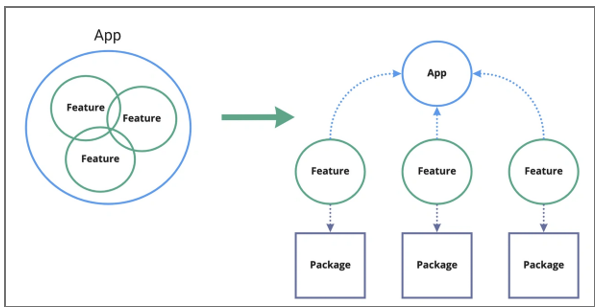
Feature-based architecture is at the forefront of React project organization, particularly in enterprise-scale applications with complex domains. The code is grouped by business features or domains and creates self-contained modules that package all related functionalities.
The basic structure includes the following components:
src/
├── features/           # Self-contained business domains
│   ├── authentication/
│   ├── users/
│   ├── posts/
├── core/               # Global, app-wide concerns
│   ├── api/
│   ├── config/
├── layouts/            # Page structure components
└── shared/             # Common utilities and components
Each feature folder functions as a mini-application with its components, hooks, services, and state management. Clear boundaries between different application parts make the codebase easier to understand and maintain as it expands.
Barrel files (index.js) can enhance this structure by serving as public APIs for features. These files export only externally needed items and hide the implementation details.
// features/users/index.js
export { UserList } from '. /components/UserList'.
export { useUsers } from. js '; /hooks/useUsers';
// Internal components/utilities remain private
Your structure becomes more robust with absolute imports configured in jsconfig.json or tsconfig.json.
{
  "compilerOptions": {
    "baseUrl": "src"
  }
}
Clean imports, such as import { Button } from 'shared/ui, become possible without relative path complexity.
The Facade pattern helps manage third-party libraries using wrapper services that abstract external dependencies. Library updates or replacements are simplified with centralized integration points.
This feature-based approach created a scalable foundation. Teams collaborate better through clear ownership boundaries, and new developers can onboard easily.
Conclusion
The structure of your React project depends on the size, complexity, and future growth plans of your project. This study shows how folder organization affects development optimization, team collaboration, and code maintainability.
Small projects perform well with simple structures. The components, hooks, and assets live in clearly defined top-level folders. This approach works well until you reach about 15–20 components. Page-based organization becomes a natural progression after that point, and groups related files by feature or route rather than technical type.
Feature-based architecture is the gold standard for enterprise applications. It creates self-contained modules that encapsulate the business domain. This structure is especially beneficial when multiple teams work on different application areas simultaneously.
Your project structure should progress in parallel with your application. You do not need to stick to one approach forever. Many successful React applications begin with minimal organization and gradually shift toward more sophisticated patterns as they scale up.
Start with the simplest structure that meets your current needs, and then refactor as patterns emerge. Techniques such as barrel files, absolute imports, and API facades will also strengthen whatever structure you choose. This makes the codebase more maintainable over time.
The best React project structure is not the most complex or trendy. It helps your team build features quickly while reducing cognitive load. This principle will guide you in building applications that remain maintainable from setup to scale.
Opinions expressed by DZone contributors are their own.
Comments