

Build Production-Ready AI Phone Agents: Infrastructure, Models, and Telephony
Take a voice AI agent from a laptop demo to a phone agent that answers real calls: LiveKit, STT, LLM and TTS, SIP trunks, human transfers, deploys, and tests.
 CORE
·
Introduction: From Voice AI Prototype to Production Phone Agent
A voice AI demo is a model, a microphone, and a speaker. A phone agent is a distributed system. Audio arrives from a carrier over a SIP trunk, callers interrupt on bad lines, backends time out, model providers have bad minutes, and callers want a person the moment something goes wrong.
This article shows you how to build an AI receptionist for a dental clinic. It answers calls to the clinic’s number, looks up patients by caller ID, looks up and books appointments through a backend API, and transfers calls to the front desk when a person is needed. It runs on LiveKit Agents, the open-source framework for Python and Node.js. The logs highlight which features require LiveKit Cloud. Every snippet comes from one working project, and every output shows what that project printed.
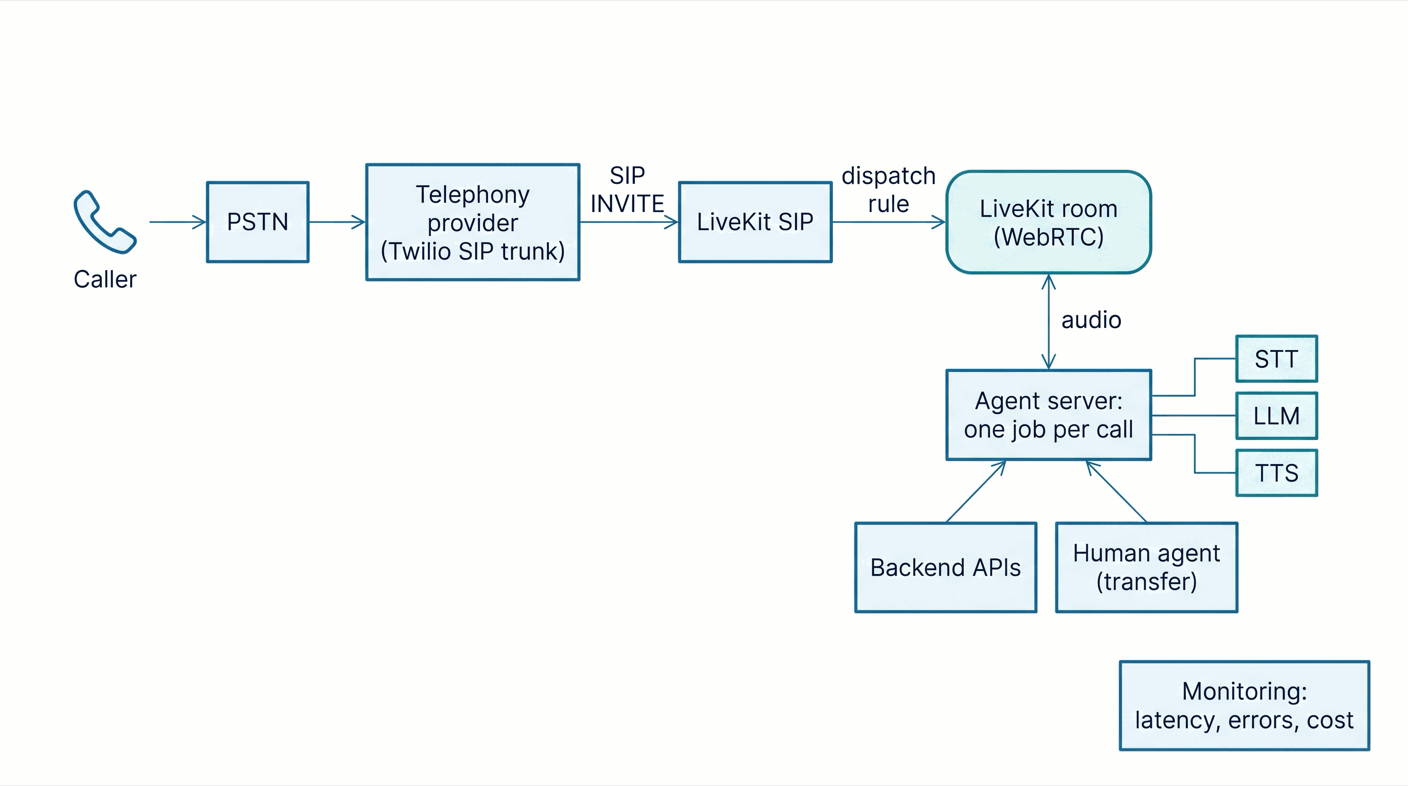
The architecture has six parts:
- A telephony provider that owns the number.
- SIP connectivity that turns a call into a session participant.
- Real-time audio infrastructure between the caller and the agent.
- The AI models: speech-to-text, a language model and text-to-speech.
- Application logic: conversation state, tools, and escalation.
- Monitoring: latency, errors, and cost for every call.
Step 1: Choose Your Real-Time Voice Infrastructure
A phone call is not a request. Audio flows both ways at once, callers talk over the agent, and a pause more than a second feels broken. You need a transport that moves audio frames in real time and an agent that reacts as they arrive:
- SIP is the phone network's signaling protocol. It sets up, transfers, and ends calls, while the audio travels over RTP.
- WebRTC carries low-latency audio between participants and absorbs packet loss and jitter.
- A media server bridges the two and turns the call into a participant in a WebRTC room.
In LiveKit, the telephony media layer consists of the LiveKit server plus the LiveKit SIP service, both open source. A call becomes a SIP participant in a room, and LiveKit dispatches a job to an agent server. Each job runs in its own process — in this setup, one per call. The agent server connects out over a WebSocket for job dispatch and uses WebRTC for media, so it needs no public inbound ports. Run it all yourself or on LiveKit Cloud, or connect self-hosted agents to Cloud. LiveKit Inference, Agent insights, LiveKit Phone Numbers, and the participant move behind this warm-transfer workflow are Cloud-only. Cloud also provides enhanced noise cancellation, while basic WebRTC cancellation and separately licensed alternatives are available outside Cloud.
There are other routes. Twilio (the carrier) can also stream audio calls over WebSockets (Media Streams), which LiveKit Cloud accepts through its Twilio Connector. At the fully managed end, Voiceflow runs the whole stack: you design the agent, import a Twilio or Vonage number, and assign it. Calls, recordings, and transcripts just work. The SDK route trades that convenience for control over every model, timeout, and transfer rule.
Step 2: Select and Configure Your AI Models
You need a cascaded pipeline that chains speech-to-text (STT), a large language model (LLM) that decides what to say and which tools to call, and text-to-speech (TTS). A real-time speech-to-speech model — such as OpenAI Realtime or Gemini Live — does all three in one.
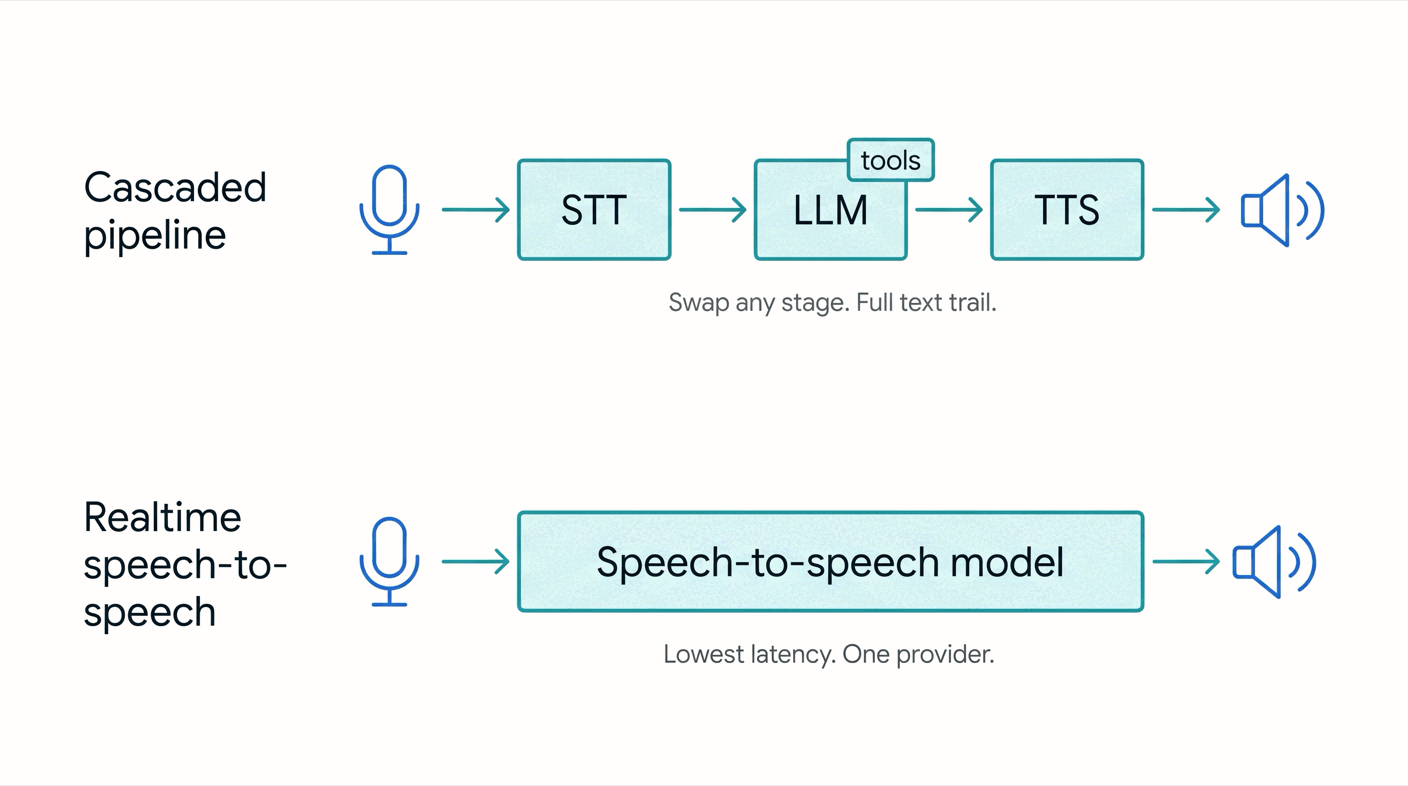
| Cascaded STT, LLM, TTS | Realtime speech-to-speech | |
|---|---|---|
| Latency | Moderate; streaming overlaps the stages | Lowest; one model, no hand-offs |
| Changing models | Any stage, independently | One provider for the whole path |
| Tool calling | Mature, text-based | Less mature |
| Debugging and audit | Text at every stage | Transcripts arrive late |
Exact phrasing with say() |
Yes | Not the same way |
| Cost | Three meters, each tunable | One meter |
A receptionist must read appointment data exactly and keep an auditable transcript, so the agent uses the cascaded pipeline — LiveKit's recommended production default. Keep the models in configuration, since prices, voices, and availability change. In LiveKit Agents, the pipeline is an AgentSession with one parameter per stage. In LiveKit Cloud, the inference module provides hosted models with server-side fallbacks and no provider keys:
from livekit.agents import AgentSession, TurnHandlingOptions, inference

session = AgentSession(
    stt=inference.STT(model="deepgram/nova-3", language="en",
                      fallback=[{"model": "assemblyai/universal-3-6-pro"}]),
    llm=inference.LLM(model="google/gemma-4-31b-it"),
    tts=inference.TTS(model="cartesia/sonic-3", voice="9626c31c-bec5-4cca-baa8-f8ba9e84c8bc",
                      fallback=[{"model": "fishaudio/s2.1-pro", "voice": "fa4c9eb3dccc4806b382b40d61c6b10a"}]),
    turn_handling=TurnHandlingOptions(
        turn_detection=inference.TurnDetector(),
        endpointing={"min_delay": 0.5, "max_delay": 3.0},
        interruption={"min_duration": 0.5},
    ),
)
When self-hosted, the same session takes provider plugins and your own keys. Nothing else changes. The receptionist picks one session with a MODEL_PROVIDER variable, and the calls in this guide run on the plugin version:
from livekit.plugins import openai, silero

session = AgentSession(
    stt=openai.STT(model="gpt-4o-mini-transcribe", use_realtime=True),  # streaming transcripts
    llm=openai.LLM(model="gpt-4.1-mini"),
    tts=openai.TTS(model="gpt-4o-mini-tts", voice="coral"),
    vad=silero.VAD.load(),
    turn_handling=TurnHandlingOptions(turn_detection="vad", endpointing={"min_delay": 0.5, "max_delay": 3.0}),
)
Step 3: Connect Your AI Agent to the Telephone Network
The PSTN is the public phone network. The SIP trunk connects this to your system: the provider owns the number and forwards each call as a SIP INVITE. LiveKit mirrors the trunk with an inbound trunk (which claims the number) and a dispatch rule (which picks the room and the agent).
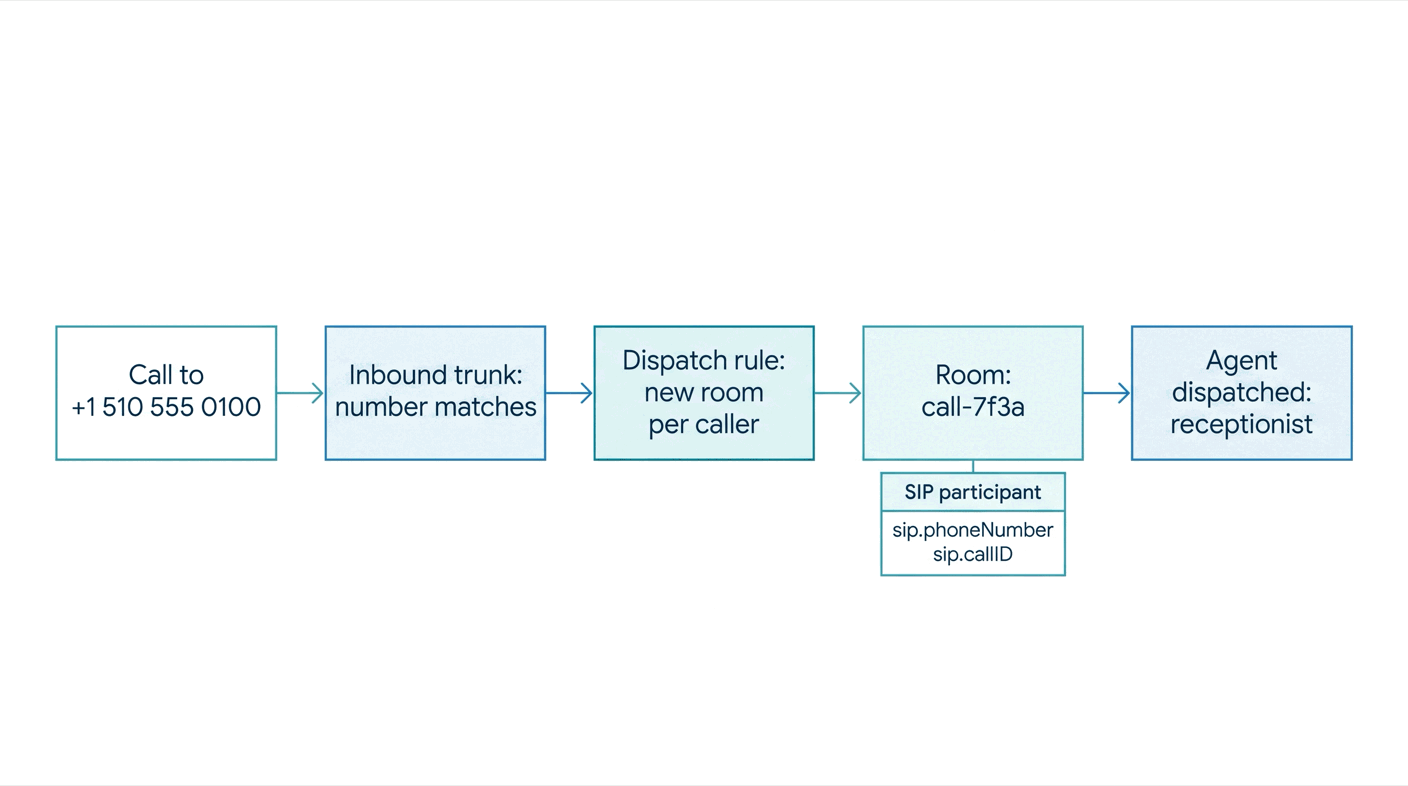
Get a number. LiveKit Cloud sells US numbers through LiveKit Phone Numbers, which need only a dispatch rule. With Twilio, create an Elastic SIP trunk, point its origination URI at your LiveKit SIP endpoint (your project ID without p_, followed by .sip.livekit.cloud), and attach the number:
twilio api trunking v1 trunks create --friendly-name "Harbor Dental" --domain-name "harbor-dental.pstn.twilio.com"
twilio api trunking v1 trunks origination-urls create --trunk-sid <TRUNK_SID> --friendly-name "LiveKit SIP" \
  --sip-url "sip:<subdomain>.sip.livekit.cloud;transport=tcp" --weight 1 --priority 1 --enabled
twilio api trunking v1 trunks phone-numbers create --trunk-sid <TRUNK_SID> --phone-number-sid <NUMBER_SID>
Create the inbound trunk and the dispatch rule. The rule puts each caller in a fresh room and dispatches the agent named receptionist:
{ "trunk": { "name": "Harbor Dental inbound", "numbers": ["+15105550100"] } }{
"dispatch_rule": {
"name": "Harbor Dental receptionist",
"trunk_ids": ["ST_TgirZ2Wz75YG"],
"rule": { "dispatch_rule_individual": { "room_prefix": "call-" } },
"room_config": { "agents": [{ "agent_name": "receptionist", "metadata": "{\"clinic\": \"harbor-dental\"}" }] }
}
}lk sip inbound create inbound-trunk.json
lk sip dispatch create dispatch-rule.json
lk sip dispatch list┌───────────────────┬────────────────────────────┬─────────────────┬─────────────────────┬─────────────────────────┬──────────────┐
│ SipDispatchRuleID │ Name │ SipTrunks │ Type │ RoomName │ Agents │
├───────────────────┼────────────────────────────┼─────────────────┼─────────────────────┼─────────────────────────┼──────────────┤
│ SDR_w4oMyPKcc2qT │ Harbor Dental receptionist │ ST_TgirZ2Wz75YG │ Individual (Caller) │ call-_<caller>_<random> │ receptionist │
└───────────────────┴────────────────────────────┴─────────────────┴─────────────────────┴─────────────────────────┴──────────────┘Create both once and reuse them for every call. Pin the rule to your trunk with trunk_ids, since a rule without it matches every trunk. The metadata reaches the agent as ctx.job.metadata, so one agent can serve several clinics.
Answer the call. LiveKit SIP matches the trunk and the rule, creates the room with the caller in it, and dispatches a job to an agent server registered under the same agent_name. The caller's number arrives as a participant attribute, so the receptionist agent finds the patient before saying a word:
server = AgentServer()

@server.rtc_session(agent_name="receptionist", on_session_end=on_session_end)
async def receptionist(ctx: JobContext) -> None:
    await ctx.connect()
    participant = await ctx.wait_for_participant()

    customer = None
    if participant.kind == rtc.ParticipantKind.PARTICIPANT_KIND_SIP:
        phone = participant.attributes.get("sip.phoneNumber", "")
        logger.info("inbound call from %s to %s (call %s)", phone,
                    participant.attributes.get("sip.trunkPhoneNumber"), participant.attributes.get("sip.callID"))
        try:
            customer = await clinic_api("GET", "/customers", params={"phone": phone})
        except ToolError:
            customer = None  # greet anonymously; the agent can identify the caller later

    session = build_session()
    observe(session)
    await session.start(room=ctx.room, agent=Receptionist(customer), room_options=room_options())

    # A scripted greeting goes straight to TTS: no LLM round trip before the caller hears a voice.
    who = f"Hello {customer['name'].split()[0]}, " if customer else "Hello, "
    await session.say(f"{who}this is Ava from Harbor Dental Clinic, how can I help you today?")
Check it with a call. A number that rings without an answer may indicate that no agent is registered under the configured name. A call that connects to silence may indicate the agent is not publishing audio. A healthy call looks like this in the agent log:
INFO livekit.agents - registered worker {"agent_name": "receptionist", "id": "AW_MMW9r2DMkYYP", "url": "ws://localhost:7880"}
INFO livekit.agents - received job request {"job_id": "AJ_8pRxKpmvNjmf", "room": "call-_+15550002_BFK5wQ3zB25J", "agent_name": "receptionist"}
INFO receptionist - inbound call from +15550002 to +15105550100 (call SCL_LeFbnPRqGmDK)
lk room list shows the call- room while the call is up, and lk room participants get prints the SIP attributes, including sip.twilio.callSid, for finding the call in the Twilio console.
Outbound calls and existing phone systems. Outbound calls and the warm transfer in Step 5 need an outbound trunk configured with the provider’s termination address, credentials if required, and the caller ID to present. Your code dials with CreateSIPParticipant. A SIP-capable PBX or contact center connects the same way, using an inbound trunk, an outbound trunk, or both, depending on the call direction.
{ "trunk": { "name": "Harbor Dental outbound", "address": "harbor-dental.pstn.twilio.com",
             "numbers": ["+15105550100"], "auth_username": "<user>", "auth_password": "<password>" } }
Step 4: Implement Conversations, Interruptions, and Backend Integrations
Conversation state. AgentSession keeps the conversation history, including turns, tool calls, and results. The active agent’s chat context is sent to the LLM each turn. The receptionist stores the identified patient on the agent and includes that information in its instructions. Without that explicit context, the model may ask known callers for their number again:
class Receptionist(Agent):
    def __init__(self, customer: dict | None = None) -> None:
        end_call = EndCallTool(
            extra_description="Only end the call after the caller confirms they need nothing else.",
            end_instructions="Thank the caller for calling Harbor Dental Clinic and say goodbye.",
        )
        instructions = INSTRUCTIONS
        if customer:  # matched by caller ID before the session started
            instructions += (f"\nThe caller ID matches the patient {customer['name']} (id {customer['id']}), "
                             "so they are already identified: do not ask for their phone number.")
        super().__init__(instructions=instructions, tools=end_call.tools)
        self.customer = customer
Turns and interruptions. Voice activity detection (VAD) finds speech, while turn detection estimates when the caller has finished talking. LiveKit’s default audio turn detector weighs both what the caller says and how they say it. With interruptions enabled, LiveKit stops the agent’s speech and trims the conversation history to reflect what was played before the interruption. This supports corrections such as “actually, make it Thursday” without custom interruption-handling code, though updating the appointment still requires application logic.
The sessions wait 0.5 to 3 seconds before closing a turn, and LiveKit Cloud ignores interruptions under half a second, which filters coughs. LiveKit Cloud's adaptive interruption model also tells "mm-hm" from a real interruption; without Cloud credentials, the agent falls back to VAD:
INFO livekit.agents - adaptive interruption disabled due to unrecoverable error, falling back to VAD-based interruptionTools. A method decorated with @function_tool becomes a tool, and its docstring and type hints define the tool description and parameter schema the LLM sees. The receptionist calls a clinic API through the job’s shared HTTP session with a four-second timeout and turns handled failures into messages the model can act on:
async def clinic_api(method: str, path: str, **kwargs: Any) -> Any:
    http = utils.http_context.http_session()
    try:
        async with http.request(method, f"{BACKEND_URL}{path}", timeout=aiohttp.ClientTimeout(total=4), **kwargs) as resp:
            if resp.status == 404:
                return None
            data = await resp.json()
            if resp.status >= 400:
                raise ToolError(data.get("error", f"clinic system error {resp.status}"))
            return data
    except (aiohttp.ClientError, asyncio.TimeoutError) as exc:
        raise ToolError("The clinic system is not responding. Apologize, and offer a transfer or a callback.") from exc


class Receptionist(Agent):
    @function_tool()
    async def get_appointments(self, ctx: RunContext) -> list[dict]:
        """List the identified caller's upcoming appointments."""
        if self.customer is None:
            raise ToolError("The caller is not identified yet. Ask for the phone number on file.")
        return await clinic_api("GET", f"/customers/{self.customer['id']}/appointments")

    @function_tool()
    async def book_appointment(self, ctx: RunContext, day: str, time: str, service: str) -> dict:
        """Book an appointment for the identified caller. Call it only after they said yes.

        Args:
            day: The date in YYYY-MM-DD format.
            time: The start time in 24 hour HH:MM format.
            service: The service, for example "dental cleaning".
        """
        ctx.disallow_interruptions()  # a write must finish even if the caller keeps talking
        if self.customer is None:
            raise ToolError("Identify the caller before booking.")
        return await clinic_api("POST", "/appointments",
                                json={"customer_id": self.customer["id"], "service": service, "start": f"{day}T{time}"})
Three rules help keep tools safe on a phone line. Lookups may be interrupted, but completed lookup results stay in history. Writes call ctx.disallow_interruptions() first, because interrupting a booking does not automatically roll it back. A ToolError returns an actionable error to the LLM so the agent can explain the failure to the caller. The agent should confirm an appointment only after the backend reports success. The receptionist can book but not cancel, and booking requires spoken confirmation from the caller.
Step 5: Add Human Call Transfers and Failure Handling
An agent with no way out of the conversation is a dead end. The receptionist hands the call over when the caller asks for a person—for billing, insurance, complaints, or medical questions—or after two failed attempts to complete the caller’s request.
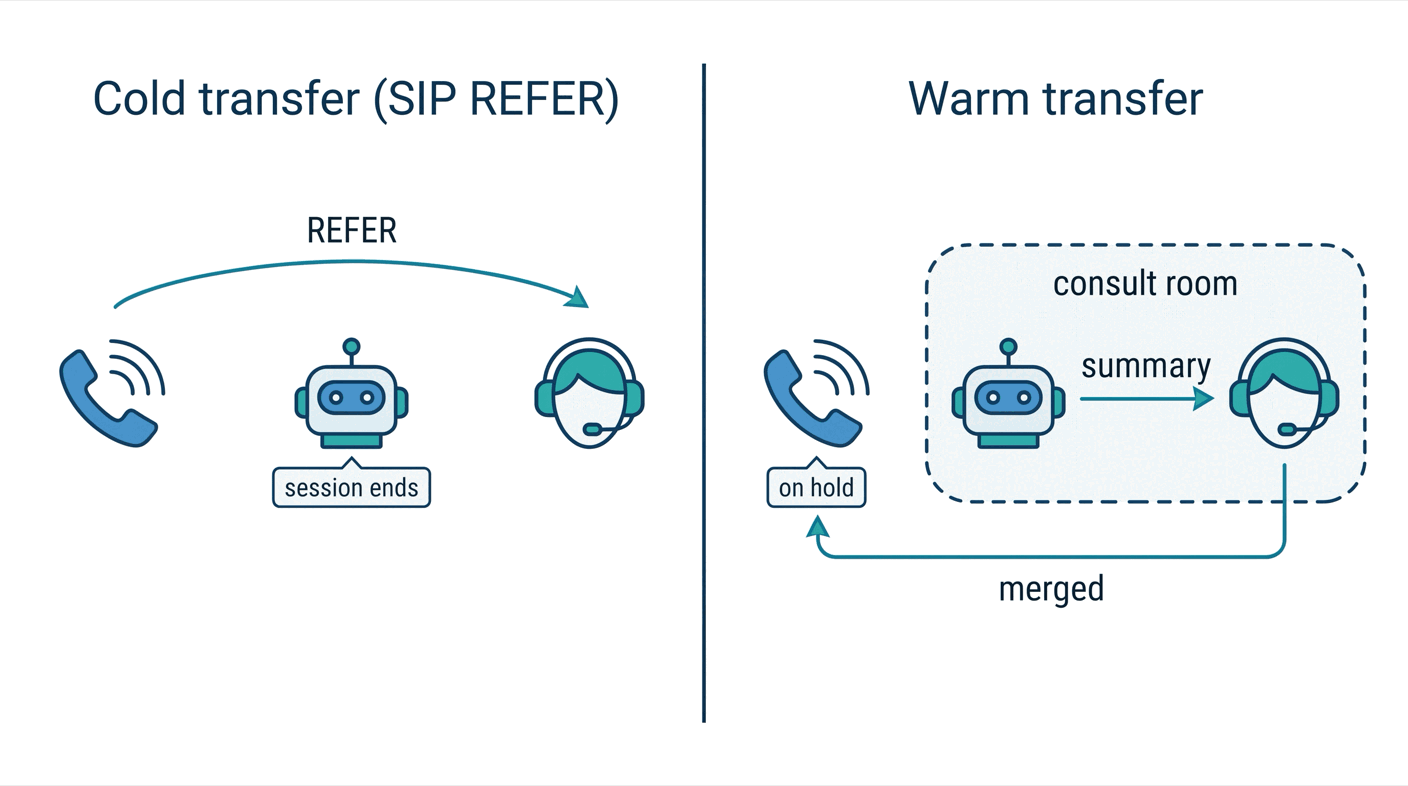
A cold transfer forwards the call using SIP REFER: the carrier connects the caller to the new number, and the agent drops out once the transfer succeeds. A warm transfer puts the caller on hold, calls the human into a private room, briefs them, and merges the calls, reducing the need for the caller to explain the problem twice. The receptionist uses warm transfer for billing, insurance, and complaints. It uses cold transfer for other requests to speak with a person.
Cold transfer. TransferSIPParticipant sends the REFER. The caller's participant identity is not the phone number, so sip_caller() finds the caller by participant type:
@function_tool()
async def transfer_to_human(self, ctx: RunContext, reason: str) -> str | None:
    """Cold transfer to the front desk. Call it only after the caller agreed to it."""
    ctx.disallow_interruptions()
    line = sip_caller()  # (job, SIP participant), or None outside a phone call
    if line is None:
        return "There is no phone line to transfer. Offer a callback instead."
    job, caller = line
    await ctx.session.say("Transferring you to the front desk now.", allow_interruptions=False)
    try:
        await job.api.sip.transfer_sip_participant(api.TransferSIPParticipantRequest(
            room_name=job.room.name,
            participant_identity=caller.identity,
            transfer_to=FRONT_DESK_URI,  # "tel:+1..." on Twilio, "sip:+1...@host" on most PBXs
            play_dialtone=True,
        ))
    except api.SipCallError as exc:  # the front desk rejected the call or did not answer
        logger.warning("transfer failed: SIP %s %s", exc.sip_status_code, exc.sip_status)
        return "The front desk did not answer. Apologize and offer to take a message or arrange a callback."
    except api.ServerError:
        return "The transfer could not be started. Apologize and offer a callback."
    return None  # the caller has left the room
The trunk must allow transfers. On Twilio, run twilio api trunking v1 trunks update --sid <SID> --transfer-mode enable-all. The target format depends on the carrier. Twilio takes tel:+15105550199, while a PBX such as Asterisk answers a tel: target with 400 Bad Request and needs sip:+15105550199@host. A front desk that rejects the call or doesn't answer within ringing_timeout (30 seconds by default) raises a SipCallError, and the caller is still on the line to be offered a callback.
Warm transfer. The prebuilt WarmTransferTask (Python’s beta.workflows module) plays hold music, dials the front desk through the outbound trunk, and uses a second agent to brief the front desk based on the chat history. Once the front desk accepts the transfer, the task moves their SIP participant into the caller’s room:
@function_tool()
async def transfer_with_handoff(self, ctx: RunContext, summary: str) -> str | None:
    """Warm transfer: put the caller on hold, brief the front desk, then connect them."""
    ctx.disallow_interruptions()
    if sip_caller() is None:
        return "There is no phone line to transfer. Offer a callback instead."
    if not ON_LIVEKIT_CLOUD:  # the merge uses MoveParticipant, a LiveKit Cloud API
        return "Warm transfers are not available here. Use transfer_to_human; the caller already agreed."
    await ctx.session.say("Please hold while I brief the front desk.", allow_interruptions=False)
    try:
        result = await WarmTransferTask(
            sip_call_to=FRONT_DESK_NUMBER,
            sip_trunk_id=os.environ["LIVEKIT_SIP_OUTBOUND_TRUNK"],
            chat_ctx=self.chat_ctx,
            extra_instructions=f"Context for the front desk: {summary}",
            ringing_timeout=30.0,
        )
    except ToolError:  # no answer, voicemail, or the front desk declined
        return "The front desk could not take the call. Apologize, then offer a cold transfer or a callback."
    await ctx.session.say("You're now connected with the front desk. Goodbye!", allow_interruptions=False)
    ctx.session.shutdown()  # the agent leaves; the caller and the front desk stay in the room
    return None
Three details matter. First, merging the calls requires MoveParticipant, which is available only in LiveKit Cloud. On a self-hosted deployment, the transfer workflow can dial and brief the front desk, but the merge request returns not implemented.
Second, the caller’s room must remain open after the agent session ends. Setting delete_room_on_close=False prevents session shutdown from deleting it.
Third, a ringing timeout, detected voicemail, or an explicit decline ends the transfer task with a ToolError, allowing the agent to resume the caller conversation. Any fallback to a cold transfer must be handled separately by the application.
The following log from the agent and LiveKit SIP service shows a billing-call transfer on a self-hosted deployment:
# agent (local time)
13:17:50 DEBUG livekit.agents - executing tool {"function": "transfer_with_handoff", ...}
13:17:51 DEBUG livekit.agents - executing tool {"function": "transfer_to_human", ...}
13:17:51 INFO  receptionist - transferring sip_+15550002 to sip:+15105550199@asterisk (The patient Maria Lopez called reporting being charged twice on their last bill and needs assistance with billing.)
# LiveKit SIP service (UTC)
12:17:55.918Z INFO sip transferring SIP call {"callID": "SCL_Gfe6warmSi7b", "transferTo": "<sip:+15105550199@asterisk>"}
12:17:56.938Z INFO sip inbound call transferred {"callID": "SCL_Gfe6warmSi7b"}
Other failures. Catch backend timeouts and raise a ToolError with a useful recovery message, then instruct the agent to explain the problem to the caller. Model outages switch providers through fallbacklists on LiveKit Cloud. You can also configure stt.FallbackAdapter, llm.FallbackAdapter, and tts.FallbackAdapter in the agent process, whether Cloud-hosted or self-hosted. The session’s error event exposes ev.error.recoverable to guide error handling. A caller hang-up closes the session with the reason participant_disconnected. Adding the prebuilt EndCallTool lets the agent end the call cleanly when the conversation is over.
Step 6: Deploy, Monitor, and Scale Your AI Phone Agent
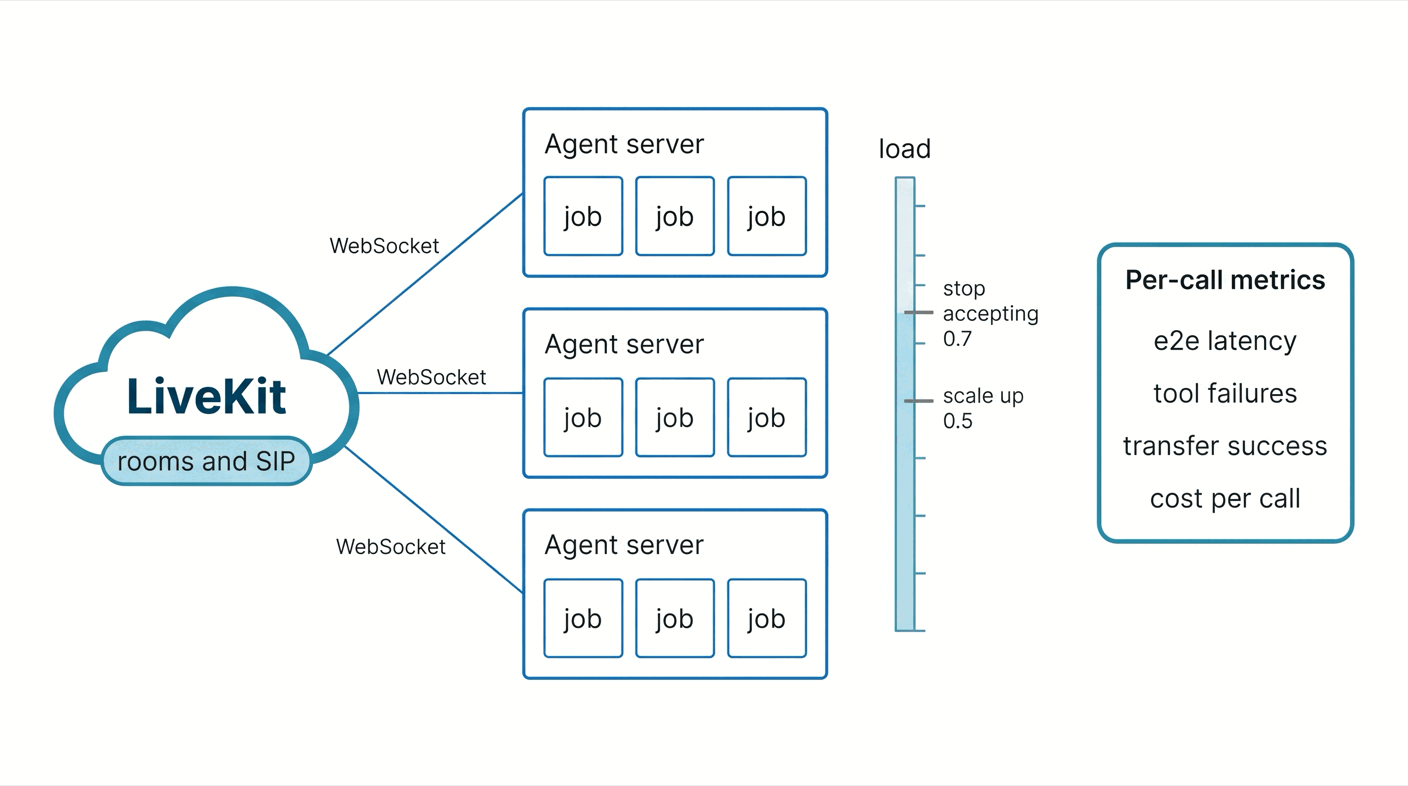
In production, the agent is a container running python agent.py start, which registers with LiveKit and waits for jobs. LiveKit's Dockerfile template builds in two stages and runs as a non-root user:
ARG PYTHON_VERSION=3.12
FROM python:${PYTHON_VERSION}-slim AS base
ENV PYTHONUNBUFFERED=1
ENV PIP_DISABLE_PIP_VERSION_CHECK=1

FROM base AS build
RUN apt-get update && apt-get install -y gcc g++ python3-dev && rm -rf /var/lib/apt/lists/*
WORKDIR /app
COPY requirements.txt ./
RUN python -m venv .venv
ENV PATH="/app/.venv/bin:$PATH"
RUN pip install --no-cache-dir -r requirements.txt
COPY . .

FROM base
ARG UID=10001
RUN adduser --disabled-password --gecos "" --home "/app" --shell "/sbin/nologin" --uid "${UID}" appuser
WORKDIR /app
COPY --from=build --chown=appuser:appuser /app /app
ENV PATH="/app/.venv/bin:$PATH"
USER appuser
CMD ["python", "agent.py", "start"]
The image is 1.01 GB. In start mode, the agent answers a health check on port 8081 and writes JSON logs, ready for a log drain. On LiveKit Cloud, lk agent create builds and deploys it, lk agent deploy ships new versions, lk agent logs tails them, and --region keeps the agent in the same area as your callers.
Capacity. Each call is a job in its own process. LiveKit recommends using 4 cores and 8 GB per agent server to start, for 10 to 25 concurrent calls — depending on the models you run locally. A server stops taking jobs above load_threshold (CPU, 0.7 by default), so scale out earlier, around 0.5. Give servers a grace period of ten minutes or more, so calls finish before shutdown.
Latency. Every message in the history logs carries a metrics report. Log it to take note of the time spent for every turn:
@session.on("conversation_item_added")
def _on_item(ev: ConversationItemAddedEvent) -> None:
    if not isinstance(ev.item, ChatMessage):
        return
    m = ev.item.metrics
    if ev.item.role == "user" and m.get("end_of_turn_delay") is not None:
        logger.info("user turn: end_of_turn=%.2fs transcription=%.2fs",
                    m["end_of_turn_delay"], m.get("transcription_delay") or 0.0)
    elif ev.item.role == "assistant" and m.get("e2e_latency") is not None:
        logger.info("agent turn: e2e=%.2fs llm_ttft=%.2fs tts_ttfb=%.2fs",
m["e2e_latency"], m.get("llm_node_ttft") or 0.0, m.get("tts_node_ttfb") or 0.0)13:18:26,334 INFO receptionist - user turn: end_of_turn=1.21s transcription=1.21s
13:18:26,877 DEBUG livekit.agents - executing tool {"function": "get_appointments", "lk.pii.arguments": "{}"}
13:18:38,520 INFO receptionist - agent turn: e2e=3.45s llm_ttft=0.50s tts_ttfb=1.00sMaria's appointment question took 3.45 seconds from her last word to the agent's first, and tamesu (an open-source testing framework) measured 3.2 seconds at the end of the line (Step 7) — over three times the one-second allotment. The log shows where it went: 1.21 seconds to close the turn while the final transcript arrived, half a second for the LLM to call get_appointments, another half second to start the answer, and a full second to the first TTS audio. Each number points to a fix: an STT with faster finals or its own endpointing, the turn detector model instead of plain VAD, a short filler before slow tools, and models served near your agent servers.
What to watch. The following metrics will tell you whether the agent is healthy. The SDK has the data for all of them:
| Metric | Where it comes from |
|---|---|
| Call connection and completion | SIP participant attributes and the session close_reason |
| Response latency | e2e_latency per turn, as p50 and p95 |
| STT, LLM and TTS errors | the error event and the report's errors counters |
| Tool failures | ToolError raises in your logs |
| Transfer success | the outcome each transfer tool logs |
| Cost per call | session.usage per model, plus the carrier's per-minute rate |
After a test call, the session report from ctx.make_session_report() answers most questions in one file. The following is an excerpt from an appointment call:
{
  "room": "call-_+15550002_BFK5wQ3zB25J",
  "duration_ms": 47621,
  "user_turns": 2,
  "close_reason": "CR_USER_INITIATED",
  "errors": { "llm": 0, "stt": 0, "tts": 0, "realtime": 0, "interruption": 0 },
  "usage": [
    { "model": "gpt-4.1-mini", "input_tokens": 3193, "output_tokens": 73 },
    { "model": "gpt-4o-mini-tts", "input_tokens": 69, "output_tokens": 561, "audio_duration": 21.77 },
    { "model": "gpt-4o-mini-transcribe", "input_tokens": 90, "output_tokens": 30, "audio_duration": 8.94 }
  ]
}
On LiveKit Cloud, session data appears in Agent Insights, with recordings and traces when agent observability is enabled. For Cloud-deployed agents, log drains forward runtime logs to Datadog, CloudWatch, Sentry, or New Relic. For fully self-hosted deployments, store the session report yourself, and export traces with OpenTelemetry.
Step 7: Test the Complete Calling Workflow Before Launch
Local audio tests confirm that the pipeline works under local test conditions. They don’t confirm that calls to the number reach the agent, that caller ID arrives, that telephone audio is clear enough for STT, or that a transfer reaches the front desk. Test in three layers.
Unit tests on every commit. session.run() runs one conversation turn using text input and returns the results. You get assertions for messages and tool calls, an LLM judge to check whether a response matches the expected intent, and mock_tools to simulate tool failures:
def called(result, name: str) -> bool:
    try:
        result.expect.contains_function_call(name=name)
        return True
    except AssertionError:
        return False

@pytest.mark.asyncio
async def test_billing_gets_a_warm_transfer(clinic_backend):  # fixture: the mock clinic API
    async with openai.LLM(model="gpt-4.1-mini") as judge, AgentSession(llm=judge) as session:
        await session.start(Receptionist(customer=MARIA))
        first = await session.run(user_input="I was charged twice on my last bill. Can I talk to someone?")
        second = await session.run(user_input="Yes please, transfer me.")
        assert any(called(r, "transfer_with_handoff") for r in (first, second)), "no warm transfer"
        await second.expect[-1].is_message(role="assistant").judge(
judge, intent="Explains the transfer is not possible right now and offers a callback or to take a message.")$ pytest -q
7 passed in 22.13sThe seven tests cover the greeting, the lookup, confirmation before booking, both transfers, and a backend outage. Write judge intents without ambiguity: “offers a transfer or a callback” may be interpreted as requiring both options. If either is acceptable, write “offers at least one of these options: a transfer or a callback; either option alone is sufficient.”
Simulated callers on every pull request. Agent Simulations, a LiveKit Cloud feature, runs an LLM-driven caller with a goal against your real agent and grades the whole conversation. Run each scenario several times, since the caller and the judge are both models.
Real phone calls before launch. tamesu is an open-source testing framework whose siptarget calls your agent through a LiveKit SIP service and a trunk you provide, like a customer would. A simulated caller with a persona and a goal speaks through TTS and listens through VAD and STT. It can interrupt or add background noise, while deterministic checks and LLM judges evaluate the call, regardless of the framework used to build the agent. SIP testing requires the full build from the releases page; the lite build does not include SIP support.
suite: receptionist-phone
targets:
  clinic:
    type: sip
    direction: outbound
    to: "+15105550100"   # the clinic
    from: "+15550002"    # Maria's number, so the agent should recognize her
    ring_timeout: 30s
    max_call_duration: 3m
tests:
  - name: a patient asks for her next appointment
    target: clinic
    persona: { name: Maria, style: "polite", language: en, voice: en-US-female }
    scenario:
      script:
        - wait_for: "Harbor Dental Clinic"   # a real caller waits for the greeting
      goal: "You are Maria Lopez. Find out when your next appointment is, then say goodbye."
      max_turns: 4
      stop_when: "the agent has said the date and time of the next appointment"
    assert:
      - judge: "The agent greets Maria by name and says her next appointment is a dental cleaning on November 12 at 10 in the morning"
      - metric: { name: greeting_ms, lt: 3000 }   # call answered to the agent's first word
  - name: a billing question reaches the front desk
    target: clinic
    persona: { name: Maria, style: "firm", language: en, voice: en-US-female }
    scenario:
      script:
        - wait_for: "Harbor Dental Clinic"
      goal: "You were charged twice on your last bill and want to talk to a person. Say yes to a transfer. When someone from the front desk answers, say thanks and goodbye."
      max_turns: 5
      stop_when: "someone from the front desk has answered the call"
    assert:
      - judge: "The agent offers to transfer the billing question, and then a person from the front desk answers the call"
      - call_ended_by: [agent, caller]
Without the wait_for step, the simulated caller starts talking the moment the call connects, right over the greeting. tamesu sip setup creates the outbound trunk on your LiveKit SIP service, then tamesu doctor checks the secrets, the models, and the SIP service. Meanwhile, tamesu run places the calls and keeps a transcript, a stereo recording, and the call timeline of each run:
$ tamesu run
tamesu run: 2 tests, output in .tamesu/runs/2026-11-09T14-16-40
PASS   receptionist-phone / a billing question reaches the front desk  47.6s
PASS   receptionist-phone / a patient asks for her next appointment  48.2s
2 passed, 0 failed, 0 errors in 1m36s · 14 model calls, 3892 tokens, $0.0087 · llm cache: 0 hits, 6 misses
Pre-Launch Checklist
- The number rings the agent from mobiles, landlines, and withheld caller IDs.
- Known patients are identified by caller ID, and unknown callers still get help.
- Every tool has a timeout and a
ToolErrorpath, and the agent never logs data it did not receive. - Writes need a spoken "Yes" and cannot be interrupted, and the agent has no tool it should not have.
- Transfers work on a real call, and a failed transfer brings the caller back to the agent.
- Hang-ups, silence, and network drops leave no rooms open or jobs left behind.
- Latency, errors, transfer outcomes, and usage are logged and charted per call.
- Simulated callers at peak load plus a margin stay under
load_threshold. - The hard cases pass: speakerphone in a car, accents, interruptions, long silences, requests the agent has no tool for, a backend or model provider down, and a front desk that doesn't answer.
- Caller ID alone never unlocks sensitive actions. Callers hear a recording notice where consent is required, recordings and transcripts expire, and keys live in a secret store.
- Every model or prompt change reruns all of the above.
Conclusion: Building Reliable AI Phone Agents
An AI phone agent is a complete application, not a language model wired to a microphone. What makes it production-ready is invisible in a demo: a trunk and a dispatch rule that reliably reach the agent, swappable models, turn handling tuned for phone lines, tools with timeouts and limits, an escalation path that works when nobody picks up, and metrics for every call.
Keep those parts modular, with narrow interfaces between them. Then you can test each one alone, replace a model when a better one ships, and scale agent servers without touching the trunk.
Resources and Documentation
- LiveKit Agents, the voice AI quickstart and pipeline types
- Turns and interruptions and function tools
- Telephony: inbound trunks, dispatch rules, Twilio and testing your setup
- Call transfers, WarmTransferTask, and the warm transfer example
- Deployment, self-hosted deployments, and metrics and data hooks
- Testing: unit tests and Agent Simulations
- tamesu: the SIP target and SIP setup
- Voiceflow phone numbers and the LiveKit Twilio Connector
Versions used: LiveKit Agents 1.8.10 on Python 3.12, LiveKit CLI 2.19.3, a self-hosted livekit-server 1.13.11, and LiveKit SIP service 1.10 with Asterisk as the carrier, tamesu 1.20.1, and GPT-4.1 mini for the agent and the judges.
Published at DZone with permission of Xavier Portilla Edo. See the original article here.
Opinions expressed by DZone contributors are their own.