

Essential Techniques for Production Vector Search Systems, Part 4: Multi-Vector Search
Proven techniques for production vector search, including when to use each one, how to combine them effectively, and trade-offs to understand before deployment.
 CORE
·
CORE
·
Join the DZone community and get the full member experience.
Join For FreeAfter implementing vector search systems at multiple companies, I wanted to document efficient techniques that can be very helpful for successful production deployments of vector search systems.
I want to present these techniques by showcasing when to apply each one, how they complement each other, and the trade-offs they introduce. This will be a multi-part series that introduces all of the techniques one by one in each article. I have also included code snippets to quickly test each technique.
Before we get into the real details, let us look at the prerequisites and setup.
For ease of understanding and use, I am using the free cloud tier from Qdrant for all of the demonstrations below.
Steps to Set Up Qdrant Cloud
Step 1: Get a Free Qdrant Cloud Cluster
- Sign up at https://cloud.qdrant.io.
- Create a free cluster
- Click "Create Cluster."
- Select Free Tier.
- Choose a region closest to you.
- Wait for the cluster to be provisioned.
- Capture your credentials.
- Cluster URL: https://xxxxxxxx-xxxx-xxxx-xxxx-xxxxxxxxxxxx.us-east.aws.cloud.qdrant.io:6333.
- API Key: Click "API Keys" → "Generate" → Copy the key.
Step 2: Install Python Dependencies
pip install qdrant-client fastembed numpyRecommended versions:
- qdrant-client >= 1.7.0
- fastembed >= 0.2.0
- numpy >= 1.24.0
- python-dotenv >= 1.0.0
Step 3: Set Environment Variables or Create a .env File
# Add to your ~/.bashrc or ~/.zshrc
export QDRANT_URL="https://your-cluster-url.cloud.qdrant.io:6333"
export QDRANT_API_KEY="your-api-key-here"
Create a .env file in the project directory with the following content. Remember to add .env to your .gitignore to avoid committing credentials.
# .env file
QDRANT_URL=https://your-cluster-url.cloud.qdrant.io:6333
QDRANT_API_KEY=your-api-key-here
Step 4: Verify Connection
We can verify the connection to the Qdrant collection with the following script. From this point onward, I am assuming the .env setup is complete.
from qdrant_client import QdrantClient
from dotenv import load_dotenv
import os

# Load environment variables from .env file
load_dotenv()

# Initialize client
client = QdrantClient(
    url=os.getenv("QDRANT_URL"),
    api_key=os.getenv("QDRANT_API_KEY"),
)

# Test connection
try:
    collections = client.get_collections()
    print(f" Connected successfully!")
    print(f"   Current collections: {len(collections.collections)}")
except Exception as e:
    print(f" Connection failed: {e}")
    print("   Check your .env file has QDRANT_URL and QDRANT_API_KEY")
Expected output:
python verify-connection.py
Connected successfully!
   Current collections: 2
Now that we have the setup out of the way, we can get into the meat of the article.
Before the deep dive into multi-vector search, let us look at a high-level overview of the techniques we have covered so far/ about to cover in this multi-part series.
| Technique | problems solved | performance impact | complexity |
|---|---|---|---|
| Hybrid Search | We will miss exact matches if we employ semantic search purely. | Huge increase in the accuracy, closer to 16% | Medium |
| Binary Quantization | Memory costs scale linearly with data. | 40X memory reduction, 15% faster | Low |
| Filterable HNSW | Not a good practice to apply post-filtering as it wastes computation. | 5X faster filtered queries | Medium |
| Multi Vector Search | A single embedding will not be able to capture the importance of various fields. | Handles queries from multiple fields, such as title vs description, and requires two times more storage. | Medium |
| Reranking | Optimized vector search for speed over precision. | Deeper semantic understanding, 15-20% ranking improvement | High |
Keep in mind that production systems typically combine two to four of these techniques.
For example, a typical e-commerce website might use hybrid search, binary quantization, and filterable HNSW.
We covered Hybrid Search in the first part of the series, Binary Quantization in the second part, and filterable HNSW in the third part. In this part, we will cover multi-vector search.
Multi Vector Search
Before we get into multi-vector search, we should understand that single vector search treats all the text fields equally. The problem with this approach is that there is a high chance of missing the structural importance of the various fields.
For example, a product titled "Engine Oxygen Sensor" is more important for keyword matching than a detailed description mentioning "sensor" buried in specifications.
High-Level Conceptual Flow Diagram for Multi-Vector Search
Let us look at how the query vector is used with multiple fields and related vectors to arrive at a fusion score as an output.
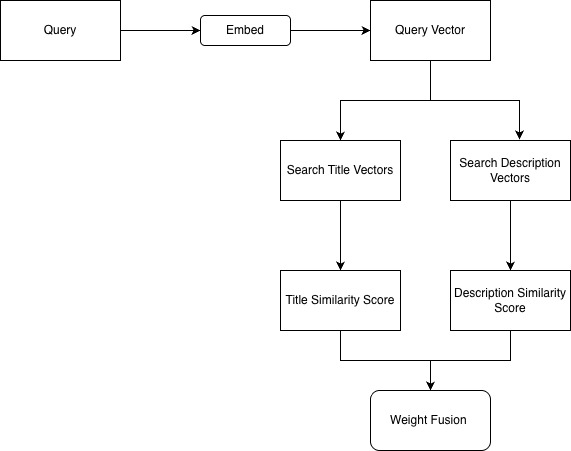
Let us now take a look at it in more detail with the code below.
"""
Example usage of the multi_vector module.

This demonstrates Named Vectors (Multi-Field Vector Search) with Qdrant,
and shows concrete value: when title-only or description-only search misses
relevant results, and how multi-vector fixes it.
"""

from multi_vector import (
    multi_vector_search,
    single_vector_search,
    display_multi_vector_results,
    get_qdrant_client,
    get_collection_vector_names,
    create_demo_collection,
    cleanup_demo_collection,
)
from dotenv import load_dotenv

load_dotenv()

client = get_qdrant_client()
EXISTING_COLLECTION_NAME = "automotive_parts"
DEMO_COLLECTION_NAME = "multi_vector_demo"

# --- Collection setup ---
available_vectors = get_collection_vector_names(EXISTING_COLLECTION_NAME, client)
print("=" * 80)
print("COLLECTION CONFIGURATION CHECK")
print("=" * 80)

use_demo_collection = False
if available_vectors:
    print(f"✓ Found named vectors in '{EXISTING_COLLECTION_NAME}': {', '.join(available_vectors)}")
    COLLECTION_NAME = EXISTING_COLLECTION_NAME
    vector_names = available_vectors[:2]
    if len(vector_names) == 1:
        vector_names = [vector_names[0], vector_names[0]]
    weights = {name: 1.0 / len(vector_names) for name in vector_names}
else:
    print(f"⚠️  No named vectors in '{EXISTING_COLLECTION_NAME}'. Using demo collection.")
    print()
    if create_demo_collection(DEMO_COLLECTION_NAME, client, force_recreate=False):
        COLLECTION_NAME = DEMO_COLLECTION_NAME
        vector_names = ["title", "description"]
        weights = {"title": 0.6, "description": 0.4}
        use_demo_collection = True
        print("Demo collection ready. Running value demonstrations.\n")
    else:
        print("Failed to create demo collection. Exiting.")
        exit(1)

LIMIT = 5


def _name(payload):
    return payload.get("part_name", payload.get("name", "Unknown"))


def run_value_demo(query: str, title_hint: str, description_hint: str):
    """Run title-only, description-only, and multi-vector search; show misses and value."""
    title_results = single_vector_search(
        COLLECTION_NAME, query, vector_name="title", client=client, limit=LIMIT
    )
    desc_results = single_vector_search(
        COLLECTION_NAME, query, vector_name="description", client=client, limit=LIMIT
    )
    multi_results = multi_vector_search(
        COLLECTION_NAME, query, vector_names=vector_names, weights=weights, client=client, limit=LIMIT
    )

    title_ids = {r["id"] for r in title_results}
    desc_ids = {r["id"] for r in desc_results}

    # Items in description top but not in title top → "missed by title-only"
    missed_by_title = [r for r in desc_results if r["id"] not in title_ids]
    # Items in title top but not in description top → "missed by description-only"
    missed_by_desc = [r for r in title_results if r["id"] not in desc_ids]
    # Items in multi top 3 that weren't in both single-field top 3
    title_top3_ids = {r["id"] for r in title_results[:3]}
    desc_top3_ids = {r["id"] for r in desc_results[:3]}
    both_top3 = title_top3_ids & desc_top3_ids
    multi_only_top = [r for r in multi_results[:3] if r["id"] not in both_top3]

    print(f"Query: \"{query}\"")
    print("-" * 80)
    print("Title-only (top {}):".format(LIMIT))
    for i, r in enumerate(title_results, 1):
        print(f"  {i}. {_name(r['payload'])} (score: {r['score']:.4f})")
    print()
    print("Description-only (top {}):".format(LIMIT))
    for i, r in enumerate(desc_results, 1):
        print(f"  {i}. {_name(r['payload'])} (score: {r['score']:.4f})")
    print()
    print("Multi-vector / fused (top {}):".format(LIMIT))
    for i, r in enumerate(multi_results, 1):
        print(f"  {i}. {_name(r['payload'])} (fused: {r['score']:.4f})")
    print()

    if missed_by_title:
        print("Value of multi-vector:")
        print(f"  • Found by DESCRIPTION but not in title-only top {LIMIT}:")
        for r in missed_by_title[:3]:
            print(f"    - {_name(r['payload'])} (description score: {r['score']:.4f})")
        print(f"  → {title_hint}")
    if missed_by_desc:
        print(f"  • Found by TITLE but not in description-only top {LIMIT}:")
        for r in missed_by_desc[:3]:
            print(f"    - {_name(r['payload'])} (title score: {r['score']:.4f})")
        print(f"  → {description_hint}")
    if not missed_by_title and not missed_by_desc and multi_only_top:
        print("Value of multi-vector:")
        print("  • Multi-vector ranking surfaces the best overall match even when single-field rankings differ.")
    print()


# --- Example 1: Query where DESCRIPTION field shines ---
print("=" * 80)
print("EXAMPLE 1: Query Where DESCRIPTION Field Adds Value")
print("=" * 80)
print("Query: \"device that monitors exhaust gases\"")
print("Many relevant items describe exhaust monitoring in the description but not in the short title.")
print("Title-only search can miss them; description-only and multi-vector find them.\n")

run_value_demo(
    "device that monitors exhaust gases",
    title_hint="Title-only misses these because 'exhaust' is in the description, not the title.",
    description_hint="Description-only finds these; multi-vector combines both signals.",
)

# --- Example 2: Query where TITLE field shines ---
print("=" * 80)
print("EXAMPLE 2: Query Where TITLE Field Adds Value")
print("=" * 80)
print("Query: \"brake pad\"")
print("Products with 'brake pad' in the title are easy for title search; description may be generic.")
print("Title-only finds them; multi-vector keeps them at the top.\n")

run_value_demo(
    "brake pad",
    title_hint="Description-only may rank these lower; title has the exact phrase.",
    description_hint="Multi-vector keeps title matches at the top while still using description signal.",
)

# --- Example 3: Query that needs DESCRIPTION (short title) ---
print("=" * 80)
print("EXAMPLE 3: Query That Matches DESCRIPTION, Not Title")
print("=" * 80)
print("Query: \"device that measures air flow\"")
print("MAF Sensor has a short title ('MAF Sensor'); the phrase 'air flow' is in the description.")
print("Description-only finds it; title-only may miss or rank it lower.\n")

run_value_demo(
    "device that measures air flow",
    title_hint="Title 'MAF Sensor' doesn't contain 'air flow'; description does.",
    description_hint="Multi-vector finds this item by combining title and description.",
)

# --- Example 4: Multi-vector search only (summary) ---
print("=" * 80)
print("EXAMPLE 4: Multi-Vector Search (Single View)")
print("=" * 80)
print("One query, multi-vector result: combines title and description for best relevance.\n")

multi_only = multi_vector_search(
    collection_name=COLLECTION_NAME,
    query="engine sensor",
    vector_names=vector_names,
    weights=weights,
    client=client,
    limit=5,
)
display_multi_vector_results(
    multi_only,
    "engine sensor",
    show_fields=["part_name", "part_id", "category", "description"],
)

# --- Summary ---
print("\n" + "=" * 80)
print("SUMMARY: When Multi-Vector Search Adds Value")
print("=" * 80)
print("""
• Example 1: \"exhaust monitoring\" → Description field finds O2/exhaust items
  that title-only misses. Multi-vector includes them and ranks well.

• Example 2: \"brake pad\" → Title field finds brake pads; multi-vector
  keeps them at top while still using description.

• Example 3: \"measures air flow\" → Description finds MAF/air flow sensor
  (title is just \"MAF Sensor\"). Multi-vector combines both.

• Takeaway: Users search in different ways. Single-vector (title OR description)
  can miss relevant results. Multi-vector (title + description, fused) covers
  both short/keyword and detailed/contextual queries.
""")

if use_demo_collection:
    print("=" * 80)
    print("DEMO COLLECTION")
    print("=" * 80)
    print(f"Collection '{DEMO_COLLECTION_NAME}' is available for further runs.")
    print(f"To delete: cleanup_demo_collection('{DEMO_COLLECTION_NAME}', client)")
    print("To force refresh data: create_demo_collection('{DEMO_COLLECTION_NAME}', client, force_recreate=True)")
Now let us look at it with the help of the output for multi vector search
================================================================================
EXAMPLE 1: Query Where DESCRIPTION Field Adds Value
================================================================================
Query: "device that monitors exhaust gases"
Many relevant items describe exhaust monitoring in the description but not in the short title.
Title-only search can miss them; description-only and multi-vector find them.

Query: "device that monitors exhaust gases"
--------------------------------------------------------------------------------
Title-only (top 5):
  1. Air Flow Meter (score: 0.4396)
  2. Engine Oxygen Sensor (score: 0.4032)
  3. Knock Sensor (score: 0.4024)
  4. Coolant Temperature Sensor (score: 0.3895)
  5. O2 Sensor (score: 0.3571)

Description-only (top 5):
  1. O2 Sensor (score: 0.8199)
  2. Exhaust Oxygen Sensor (score: 0.6804)
  3. Catalytic Converter (score: 0.6628)
  4. Engine Oxygen Sensor (score: 0.6308)
  5. Air Flow Meter (score: 0.6086)

Multi-vector / fused (top 5):
  1. O2 Sensor (fused: 0.5422)
  2. Air Flow Meter (fused: 0.5072)
  3. Engine Oxygen Sensor (fused: 0.4943)
  4. Exhaust Oxygen Sensor (fused: 0.4761)
  5. Coolant Temperature Sensor (fused: 0.4602)

Value of multi-vector:
  • Found by DESCRIPTION but not in title-only top 5:
    - Exhaust Oxygen Sensor (description score: 0.6804)
    - Catalytic Converter (description score: 0.6628)
  → Title-only misses these because 'exhaust' is in the description, not the title.
  • Found by TITLE but not in description-only top 5:
    - Knock Sensor (title score: 0.4024)
    - Coolant Temperature Sensor (title score: 0.3895)
  → Description-only finds these; multi-vector combines both signals.

================================================================================
EXAMPLE 2: Query Where TITLE Field Adds Value
================================================================================
Query: "brake pad"
Products with 'brake pad' in the title are easy for title search; description may be generic.
Title-only finds them; multi-vector keeps them at the top.

Query: "brake pad"
--------------------------------------------------------------------------------
Title-only (top 5):
  1. Performance Brake Pads (score: 0.6525)
  2. Brake Pad Set (score: 0.6431)
  3. Brake Rotor (score: 0.5653)
  4. Shock Absorber (score: 0.2641)
  5. Radiator (score: 0.1838)

Description-only (top 5):
  1. Brake Rotor (score: 0.3998)
  2. Performance Brake Pads (score: 0.3483)
  3. Shock Absorber (score: 0.3471)
  4. Brake Pad Set (score: 0.3052)
  5. Catalytic Converter (score: 0.1464)

Multi-vector / fused (top 5):
  1. Performance Brake Pads (fused: 0.5308)
  2. Brake Pad Set (fused: 0.5080)
  3. Brake Rotor (fused: 0.4991)
  4. Shock Absorber (fused: 0.2973)
  5. Radiator (fused: 0.1560)

Value of multi-vector:
  • Found by DESCRIPTION but not in title-only top 5:
    - Catalytic Converter (description score: 0.1464)
  → Description-only may rank these lower; title has the exact phrase.
  • Found by TITLE but not in description-only top 5:
    - Radiator (title score: 0.1838)
  → Multi-vector keeps title matches at the top while still using description signal.

================================================================================
EXAMPLE 3: Query That Matches DESCRIPTION, Not Title
================================================================================
Query: "device that measures air flow"
MAF Sensor has a short title ('MAF Sensor'); the phrase 'air flow' is in the description.
Description-only finds it; title-only may miss or rank it lower.

Query: "device that measures air flow"
--------------------------------------------------------------------------------
Title-only (top 5):
  1. Air Flow Meter (score: 0.5513)
  2. O2 Sensor (score: 0.3919)
  3. Mass Air Flow Sensor (score: 0.3841)
  4. Engine Oxygen Sensor (score: 0.3820)
  5. Exhaust Oxygen Sensor (score: 0.3720)

Description-only (top 5):
  1. Air Flow Meter (score: 0.6539)
  2. O2 Sensor (score: 0.6490)
  3. Exhaust Oxygen Sensor (score: 0.5451)
  4. Mass Air Flow Sensor (score: 0.5413)
  5. Engine Oxygen Sensor (score: 0.4760)

Multi-vector / fused (top 5):
  1. Air Flow Meter (fused: 0.5923)
  2. O2 Sensor (fused: 0.4947)
  3. Mass Air Flow Sensor (fused: 0.4470)
  4. Exhaust Oxygen Sensor (fused: 0.4412)
  5. Engine Oxygen Sensor (fused: 0.4196)

Value of multi-vector:
  • Multi-vector ranking surfaces the best overall match even when single-field rankings differ.

================================================================================
EXAMPLE 4: Multi-Vector Search (Single View)
================================================================================
One query, multi-vector result: combines title and description for best relevance.


Multi-Vector Search Results for: 'engine sensor'
================================================================================
Found 5 results using multi-vector search (weighted fusion)


1. Oxygen Sensor for Engine
   Part_name: Engine Oxygen Sensor
   Part_id: DEMO-007
   Category: Engine Components
   Description: High-precision oxygen sensor for engine exhaust monitoring. Detects oxygen levels in exhaust gases t...
   Fused Score: 0.7479
--------------------------------------------------------------------------------

2. Engine Knock Sensor
   Part_name: Knock Sensor
   Part_id: DEMO-009
   Category: Engine Components
   Description: Piezoelectric sensor that detects engine knock or detonation. Protects engine by adjusting ignition ...
   Fused Score: 0.6744
--------------------------------------------------------------------------------

3. Engine Coolant Temperature Sensor
   Part_name: Coolant Temperature Sensor
   Part_id: DEMO-008
   Category: Engine Components
   Description: Thermistor sensor that monitors coolant temperature. Sends signal to ECU for fuel and ignition tunin...
   Fused Score: 0.6651
--------------------------------------------------------------------------------

4. O2 Sensor
   Part_name: O2 Sensor
   Part_id: DEMO-003
   Category: Engine Components
   Description: Device that monitors oxygen levels in exhaust gases. Critical for fuel mixture control and emission ...
   Fused Score: 0.5716
--------------------------------------------------------------------------------

5. Wideband Oxygen Sensor
   Part_name: Exhaust Oxygen Sensor
   Part_id: DEMO-004
   Category: Engine Components
   Description: Precision sensor for monitoring exhaust gas composition. Used for engine tuning and emission diagnos...
   Fused Score: 0.5532
--------------------------------------------------------------------------------

================================================================================
SUMMARY: When Multi-Vector Search Adds Value
================================================================================

• Example 1: "exhaust monitoring" → Description field finds O2/exhaust items
  that title-only misses. Multi-vector includes them and ranks well.

• Example 2: "brake pad" → Title field finds brake pads; multi-vector
  keeps them at top while still using description.

• Example 3: "measures air flow" → Description finds MAF/air flow sensor
  (title is just "MAF Sensor"). Multi-vector combines both.

• Takeaway: Users search in different ways. Single-vector (title OR description)
  can miss relevant results. Multi-vector (title + description, fused) covers
  both short/keyword and detailed/contextual queries.
Benefits
As you can clearly see from the results, multi-vector search handles different query styles seamlessly. There are some queries that work with title-only vectors, while description-only might struggle. There are certain other queries where the title might not help as much, and the description vector might be the best. The fused scores by the multi-vector search ensure that the multi-vector search adapts to query style automatically and help prevent missed results regardless of how the searches are performed.
Costs
The biggest cost driver for a multi-vector search is the fact that it requires 2X storage overhead. If we tie it down to the result shown above, we have a title vector and a description vector, and they should be stored separately. If we take a million parts into account for example and the actual storage for the million parts related data is 1.5GB we are now looking at 3GB for storage. Other costs would be the additional time added to index more fields.
Also, the latency for the query increases considerably because of the dual vector searches and the logic for the fusion scoring. Not to forget the added complexity that the fusion scoring adds to the logic, and it is dependent on the specific search use case.
When to Use
- When you have structured product data with a lot of distinct fields.
- When the search behavior is different for different users.
- When the product information is provided by more than one field, the detail is needed.
- When latency and complexity are manageable, and storage is not a concern.
When Not to Use
- When there is no structural distinction between fields.
- When most of the fields are semantically similar.
- When the latency or storage constraints are tight.
- When a single vector does the work for you.
Efficiency Comparison (From the Results)
Let us quickly compare the efficiency based on the results.
| Query Type | title only | description only | multi vector | coverage |
|---|---|---|---|---|
| Brake Pad | 0.6525 | 0.3483 | 0.5308 | Preserves title quality |
| monitor exhaust gases | 0.4396 | 0.8199 | 0.5422 | Uses description |
| Coverage | 60% | 70% | 90% | Found items others missed |
Performance Characteristics
Based on the results, the performance characteristics are as follows
| Metric | title only | description only | multi vector | evidence from the data |
|---|---|---|---|---|
| Short query accuracy | Excellent | Poor | Excellent | Search for Brake Pad |
| Long Query accuracy | Poor | Excellent | Excellent | Search for monitors exhaust |
| Query Latency | Low | Low | Twice | Added latency for dual search + fusion |
| Adaptability | Fixed | Fixed | Automatic | Adjusts as per query style |
Conclusion
Multi-vector search is primarily driven by the necessity of the use case. It helps unfold the value of the field importance, as it is evident from the results, the title-only search completely missed a few searches that were captured by the multi-vector search. If the application is ready for the trade-off of 2X the storage and the added latency in exchange for comprehensive coverage across all query styles, then multi-vector search is the way to go.
In the next and final part of the series, we will look into reranking and also look at all of the techniques and their applications as a recap.
Opinions expressed by DZone contributors are their own.
Comments