

Building a Retrieval-Augmented Generation (RAG) System in Java With Spring AI, Vertex AI, and BigQuery
Build a Java RAG application using Spring Boot, Vertex AI embeddings, BigQuery vector search, and a web UI for interactive PDF-based question answering.
Join the DZone community and get the full member experience.
Join For FreeRetrieval-augmented generation (RAG) is quickly becoming one of the most powerful design patterns for AI applications. It bridges the gap between general-purpose large language models (LLMs) and your specific enterprise data. In this article, we’ll walk through how to build a complete RAG pipeline in Java using Spring Boot, Vertex AI’s Gemini embeddings, Apache PDFBox, and BigQuery Vector Search.
You will see how to do the following, wrapped in a Spring Boot app with a simple web UI:
- Upload a PDF
- Generate embeddings using Vertex AI
- Store them in BigQuery
- Ask natural-language questions against your document
What Is RAG?
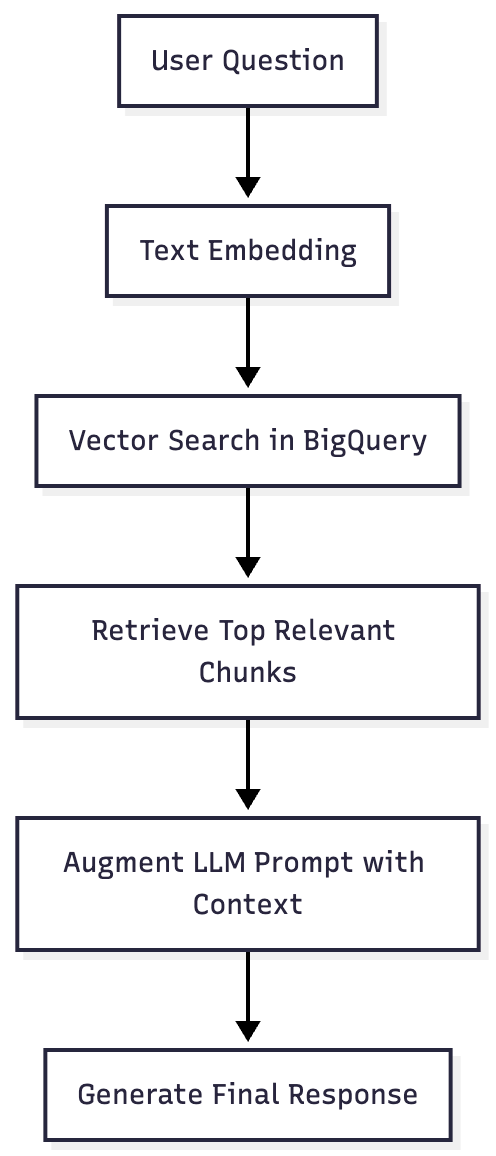
A retrieval-augmented generation (RAG) system enhances an LLM’s output by combining retrieval (search) and generation (LLM response). It works by fetching the most relevant document chunks before generating an answer, ensuring contextually accurate, up-to-date, and source-grounded responses.
Here’s the conceptual flow:
Introducing Spring AI
While frameworks like LangChain dominate Python-based GenAI development, Java developers now have a native, production-ready alternative: Spring AI. Built and maintained by the Spring team, Spring AI extends the familiar Spring Boot ecosystem to the world of large-language-model applications.
What Spring AI Does
Spring AI provides a simple, consistent abstraction layer for calling AI models - text generation, embeddings, or chat - without dealing with raw REST endpoints or authentication boilerplate. It automatically manages:
- Model configuration through
application.properties - Prompt orchestration and message handling
- Credential resolution using Google Cloud, OpenAI, or other providers
- Seamless integration with the rest of your Spring Boot application stack
In this project, Spring AI handles communication with Vertex AI’s gemini-embedding-001 model, simplifying API calls for embedding generation while remaining fully compatible with Spring WebFlux and dependency injection.
Why It’s Useful Here
Integrating Spring AI lets us:
- Use the same Spring idioms (Beans, Controllers, Configuration) to build GenAI apps
- Easily switch between embedding and chat models from different providers
- Keep the application lightweight and cloud-ready for deployment on Cloud Run
- Maintain testability and observability consistent with enterprise Spring Boot services
How It Works
1. PDF Upload and Parsing
When a user uploads a PDF through the web interface, it’s processed by Apache PDFBox — a reliable library for extracting text from PDF documents.
PDFTextStripper stripper = new PDFTextStripper();
String text = stripper.getText(document);
The text is then split into manageable chunks (e.g., 500 characters with 100-character overlap) to make retrieval more precise.
private List<String> chunkText(String text, int chunkSize, int overlap) {
    List<String> chunks = new ArrayList<>();
    for (int i = 0; i < text.length(); i += (chunkSize - overlap)) {
        chunks.add(text.substring(i, Math.min(text.length(), i + chunkSize)));
    }
    return chunks;
}
2. Generating Embeddings With Vertex AI
Each chunk is sent to Vertex AI’s gemini-embedding-001 model to get a 3072-dimensional embedding vector representing its semantic meaning.
String url = String.format(
  "/v1/projects/%s/locations/%s/publishers/google/models/gemini-embedding-001:predict",
  projectId, location
);
String body = "{ \"instances\": [{\"content\": \"" + text + "\"}] }";
String response = webClient.post()
    .uri(url)
    .bodyValue(body)
    .retrieve()
    .bodyToMono(String.class)
    .block();
The resulting embedding vectors are stored in BigQuery as an ARRAY<FLOAT64> column.
3. Storing and Searching in BigQuery
Each embedding, along with its text chunk and metadata, is inserted into a BigQuery table:
CREATE TABLE rag_dataset.doc_embeddings (
  doc_id STRING,
  chunk_id STRING,
  content STRING,
  embedding ARRAY<FLOAT64>
);
The app uses the BigQuery Java SDK to insert rows:
TableId tableId = TableId.of("rag_dataset", "doc_embeddings");
InsertAllRequest insertRequest = InsertAllRequest.newBuilder(tableId)
    .addRow(Map.of(
        "doc_id", docId,
        "chunk_id", chunkId,
        "content", content,
        "embedding", embedding
    ))
    .build();
bigQuery.insertAll(insertRequest);
When a user asks a question, the app embeds it the same way, and runs a vector similarity search in BigQuery using the VECTOR_SEARCH function:
SELECT content
FROM VECTOR_SEARCH(
  TABLE rag_dataset.doc_embeddings,
  'embedding',
  (SELECT [0.12, 0.45, -0.23, ...] AS embedding),
  top_k => 3,
  distance_type => 'COSINE'
);
4. Presenting Answers via the Web UI
The application returns the most semantically relevant chunks to the web interface, giving users an immediate, context-rich response.
The simple Thymeleaf-based frontend lets you:
- Upload PDFs
- Ask questions
- View results in real time
<form action="/api/upload" method="post" enctype="multipart/form-data">
  <input type="file" name="file" />
  <button type="submit">Upload</button>
</form>

<form id="askForm">
  <input type="text" id="question" name="question" placeholder="Ask your question" />
  <button type="submit">Ask</button>
</form>
Building and Running the Application
Prerequisites
- Java 17+
- Maven 3.8+
- Google Cloud SDK with Vertex AI and BigQuery APIs enabled
- Application Default Credentials (
gcloud auth application-default login)
Build and Run
mvn clean install
mvn spring-boot:run
Then open http://localhost:8080 to access the UI.
Dataset and Table Setup
Use the BigQuery console or CLI to create your dataset and table:
bq mk rag_dataset
bq query --use_legacy_sql=false \
'CREATE TABLE rag_dataset.doc_embeddings (
  doc_id STRING,
  chunk_id STRING,
  content STRING,
  embedding ARRAY<FLOAT64>
);'
Conclusion
With just a few hundred lines of Java and Spring Boot code, you can stand up a production-ready RAG pipeline powered by Google Cloud. This architecture cleanly separates ingestion, embedding, and retrieval, making it a robust kickstart for enterprise AI applications.
View the full application on GitHub here.
Opinions expressed by DZone contributors are their own.
Comments