

Removing the Bastion Host and Improving the Security in AWS
This article covers the security in AWS and overcoming the classic SSH/RDP jump with a better alternative for all OS.
Join the DZone community and get the full member experience.
Join For FreeFrequently, jump servers or bastion hosts are used as a practice to access resources without Internet access (Private Subnets) within AWS, or even with access to the outside but restricted by IP (Security Group). Jump servers are often used to connect to a database, perform tests, check application logs, apply updates.
How Does This Jump Work?
- This access is done by SSH connection (Port 22) or RDP (3389) establishing the public source IPs that will access the Bastion Security Group.
- In addition, the accessing person must have the key pair associated with the instance.
- Once the connection to Bastion has been established, another SSH/RDP connection is made to the private service (EC2 instance, for example).
The following diagram describes the connectivity flow from the user to the private EC2 instance which host the application: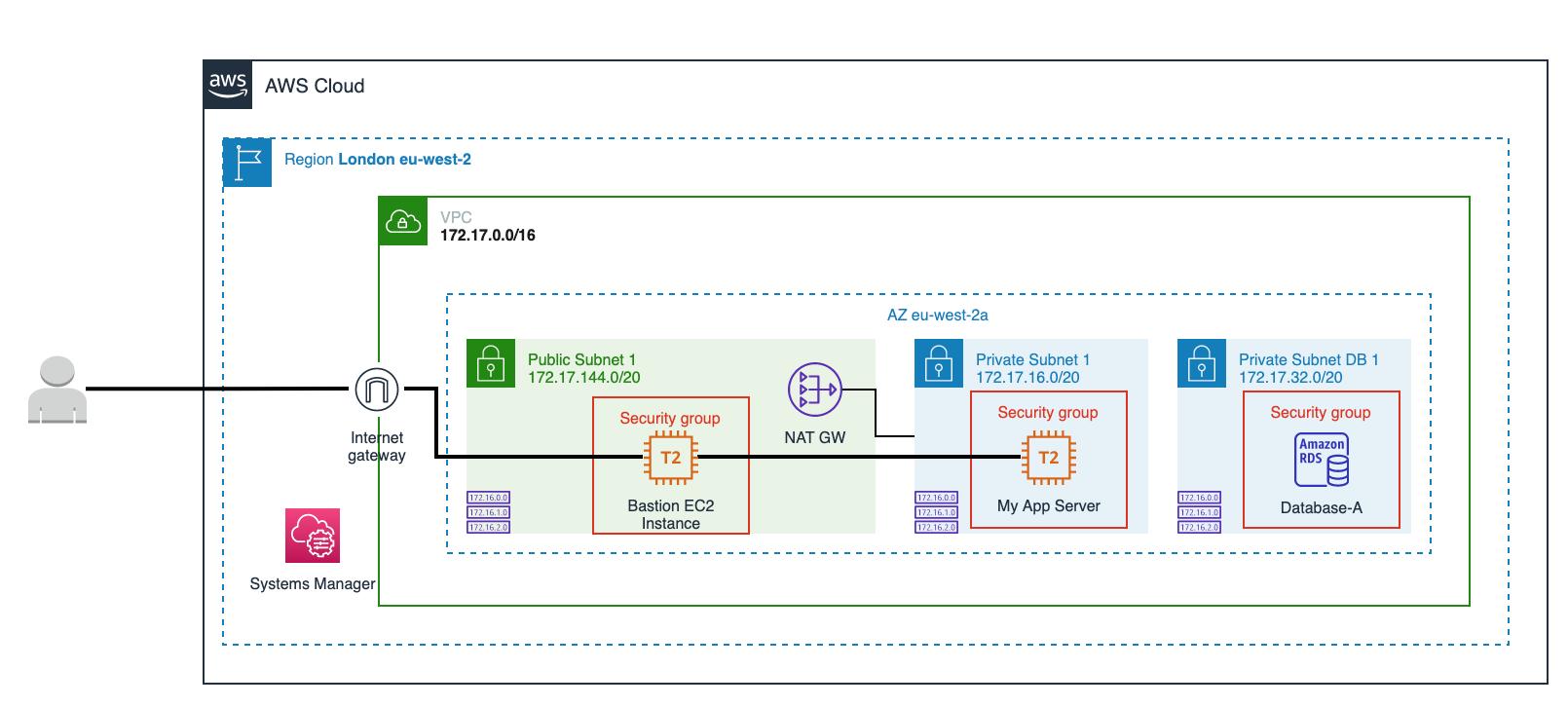
What Is the Alternative?
AWS Systems Manager Session Manager.
What Are Its Advantages Over the Classic SSH/RDP Jump?
- Cross-platform: You do not need to use different SSH/RDP connection tools depending on the operating system (Linux, Windows, macOS).
- Quick but secure access: Simply access the AWS Management Console from your browser and log in to the desired host with a couple of clicks or using AWS CLI.
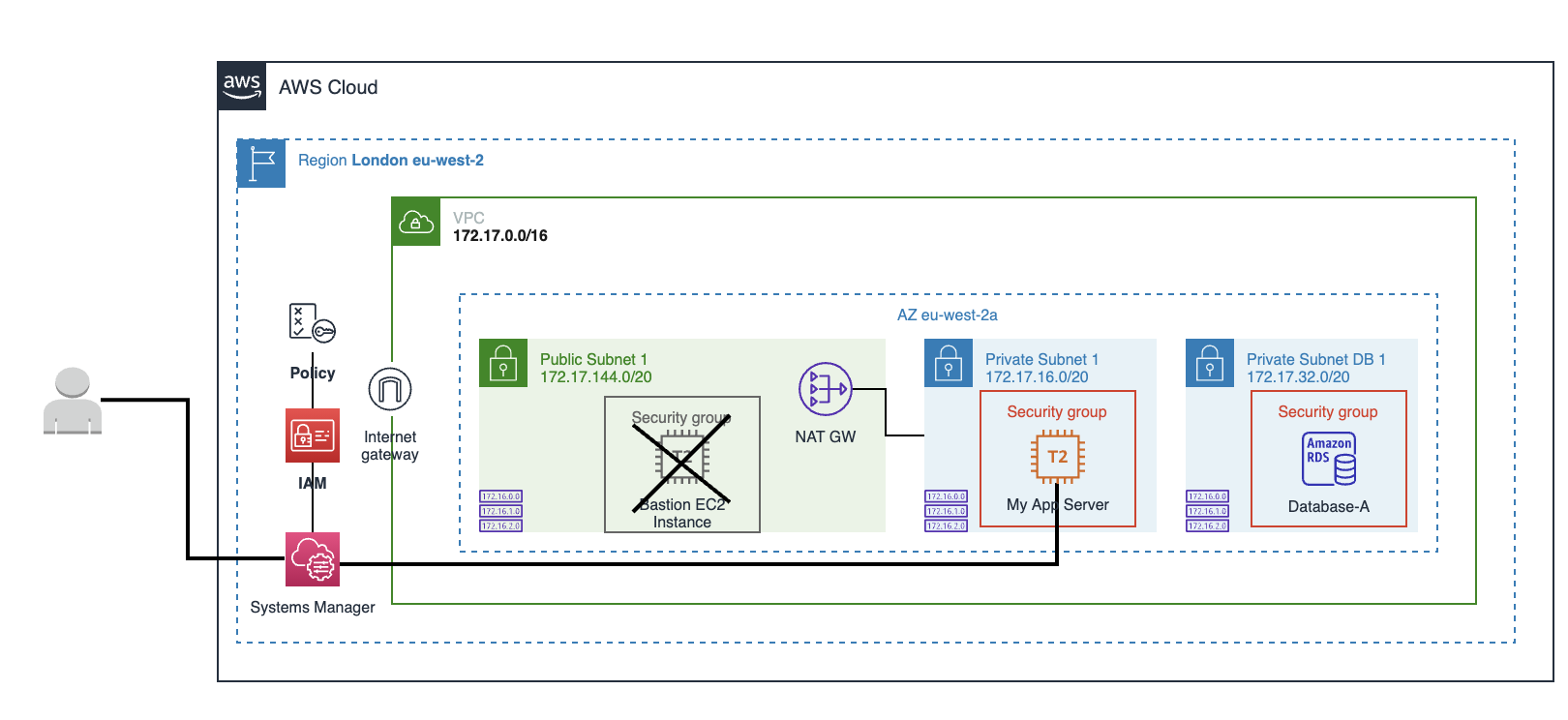
- Forget about SSH access and open ports in the security group: With Session Manager, you don't need to add SSH or RDP access rules or maintain a security group with different public IPs that can change over time.
- Security managed by IAM: In this way, security is centralized, allowing permissions to be given and denied from a single place depending on the user, group, and instance by through of IAM policies.
- Integration with audit and log services: With Session Manager you can further trace and record user session activity by integrating with AWS CloudTrail, Amazon S3, Amazon CloudWatch, Amazon EventBridge, and Amazon SNS services, allowing you, for example, to receive alerts when a user starts or stops a session.
The following diagram describes connectivity to the private EC2 instance using Systems Manager Session Manager:
How Do I Enable Sessions Manager on My EC2 Instance?
Please check the prerequisites based on your OS here.
Linux
SSM Agent is installed, by default, on the following EC2 instances and Amazon Machine Images (AMIs):
- Amazon Linux
- Amazon Linux 2
- Amazon Linux 2 ECS-Optimized Base AMIs
- Ubuntu Server 16.04, 18.04, and 20.04
For other Linux distributions, see the following link.
Windows
AWS Systems Manager Agent (SSM Agent) is preinstalled, by default, on the following Amazon Machine Images (AMIs):
- Windows Server 2008-2012 R2 AMIs published in November 2016 or later
- Windows Server 2016 and 2019
For other Windows versions, see the following link.
macOS
SSM Agent is installed by default on the following EC2 instances and Amazon Machine Images:
- macOS 10.14.x (Mojave)
- macOS 10.15.x (Catalina)
- macOS 11.x (BigSur)
SSM Agent doesn't need to be manually installed on macOS EC2 instances unless it has been uninstalled. In that case, follow this article.
Once you have installed the SSM Agent, the EC2 instance must have attached an IAM Role Profile. Follow these steps to create the policy.
Now the IAM Role Profile has been created it must be attached from EC2. Select the EC2 instance > Actions > Security > Modify the IAM role and select the IAM Role you have created before.
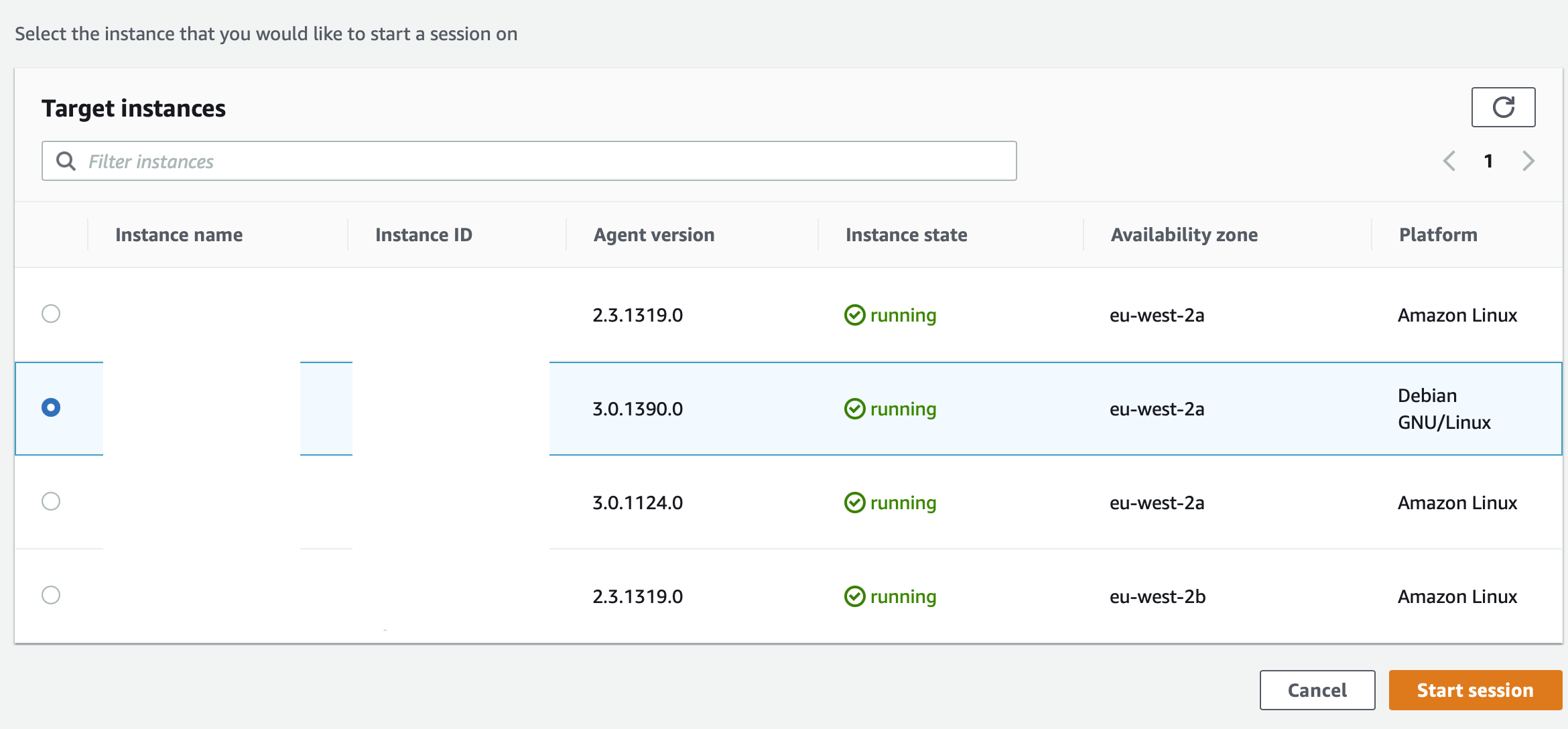
From AWS Systems Manager, select Session Manager from the Node Management list. If the instance has been configured correctly, it should appear in the list of "Target Instances".
Tip: Type bash to keep track of the commands executed in the session.
Opinions expressed by DZone contributors are their own.
Comments