

AWS vs GCP Security: Best Practices for Protecting Infrastructure, Data, and Networks
A practical guide to securing AWS and GCP using IAM, encryption, network controls, and continuous monitoring to help improve resilience on the cloud.
Join the DZone community and get the full member experience.
Join For FreeHow would you comprehensively analyze and propose solutions for system, network, and infrastructure security issues on GCP and AWS, considering native and third-party cloud security services, focusing on preventing unauthorized access, securing data transmission, and enhancing overall resilience?
Analyzing system, network, and infrastructure security problems and offering solutions in cloud service providers such as GCP (Google Cloud Platform) or AWS (Amazon Web Services) requires a comprehensive approach. First of all, all employees need to understand the shared responsibility model.

AWS Responsibility — “Security of the Cloud”
AWS is responsible for protecting the infrastructure on which all services offered in the AWS Cloud run. This infrastructure consists of the hardware, software, network, and facilities on which AWS Cloud services run.
Customer Responsibility — “Security in the Cloud”
Customer responsibility will be determined by the AWS Cloud services it selects. This determines the amount of configuration work the customer must perform within the scope of their security responsibilities. For example, a service such as Amazon Elastic Compute Cloud (Amazon EC2) is in the Infrastructure as a Service (IaaS) category and therefore requires all necessary security configuration and management tasks to be performed by the customer.
After a deep understanding of this shared responsibility model, a detailed guide to help address security concerns, access different layers (unauthorized access, securing data transmission, and enhancing overall security) of the cloud environment is summarized below.
1. Risk Assessment
Identify Assets
Enumerate all assets, including data, applications, and infrastructure components, like S3 Buckets, EC2 Instances.
Threat Modeling
Understand potential threats and vulnerabilities relevant to your environment. To do this, there are a bunch of methods that you can use, like STRIDE and PASTA. But for the cloud and modern architectures, these techniques are a bit outdated. Instead of a traditional approach, we need to take a special approach to meet the requirements and developers' expectations. Also, awslabs has a great thread model tool named threat-composer. Here is the live demo.
Compliance Requirements
Compliance requirements depend on the industry or country regulations. But it’s great to follow best practices for data collection and storage, as well as for application security.
2. Identity and Access Management (IAM)
Implement Least Privilege
Assign the minimum necessary permissions to users and services. Unauthorized access is a major concern with cloud security. Organizations should consider building comprehensive identity and access management (IAM) systems based on the following principles to minimize risk.
The company should be able to design and enforce access controls based on the concepts of least privilege and zero trust. This entails restricting user access to only what is required for their tasks and approaching all access requests with caution. Privileged access management (PAM) can help secure access for the most sensitive accounts. Implement IAM policies that offer permissions based on role-based access control (RBAC). This guarantees that users’ access is provided based on their unique positions within the company, decreasing the possibility of unwanted access.
Multi-Factor Authentication (MFA)
Enforce MFA for user accounts and privileged actions. Implement multi-factor authentication (MFA) to increase security. Even if thread actors get credentials like usernames and passwords, MFA provides an additional layer of security by demanding additional verification, such as SMS.
3. Data Encryption
In-Transit Encryption
Ensure SSL/TLS for data in transit.
At-Rest Encryption
Use native encryption services like AWS Key Management Service (KMS) or Google Cloud Key Management Service (KMS).
4. Network Security
Virtual Private Cloud (VPC) Configuration
Implement private subnets for sensitive components. Use security groups or network ACLs to control traffic.
DDoS Protection
Enable AWS Shield or Google Cloud Armor for DDoS mitigation. AWS Shield standard is default enabled for AWS services. But the premium version has various helpful features.
5. Logging and Monitoring
Cloud Monitoring
Utilize AWS CloudWatch or Google Cloud Monitoring for real-time monitoring. Set up alerts for suspicious activities. For example, you can detect possible application security-related attacks by checking nginx logs using CloudWatch.
Logging
Enable centralized logging using services like AWS CloudTrail or Google Cloud Audit Logs. These services provide visibility of user activities.
6. Incident Response
Create an Incident Response Plan
You should define roles and responsibilities, and prepare communication channels. For example, Bob from the Development team is the first contact for a public S3 bucket that contains company confidential data.
7. Patch Management
Automate Patching
Use AWS Systems Manager or Google OS Config for automated patch management.
These steps will help improve overall resilience. Apart from these steps, to continuously monitor and assess overall resilience, we can use the Cloud Security Posture Management methodology. To do this, use the AWS Security Hub service. It helps automate security best-practice checks, aggregate security alerts into a single place and format (Amazon Finding Format), and understand your overall security posture across all your AWS accounts.
Also, there are third-party products, like Prowler, that you can use with AWS, GCP, or Azure.
For better data security, you can implement DLP (data loss prevention) to protect sensitive data. Amazon has the Macie service to check S3 buckets. It automatically discovers and reports sensitive data on S3 buckets. Also, you need to do;
- Data discovery
- Data classification
- Risk assessment and prioritization
- Remediation and prevention
To do this, you can utilize the DSPM (Data Security Posture Management) methodology to automate this process.
How Web Application Firewall (WAF), Virtual Private Cloud (VPC) Flow Logs, Identity and Access Management (IAM), Key Management Services (KMS), Cloud Audit Logs, and Load Balancers play crucial roles in keeping a cloud infrastructure secure.
Web Application Firewall (WAF)
WAF protects web applications from various application security attacks, such as SQL injection, cross-site scripting (XSS), and other OWASP top 10 vulnerabilities. By inspecting and filtering HTTP traffic between a web application and the internet, WAF helps prevent malicious attacks, ensuring the integrity and availability of the web application.
WAF Implementation for AWS to Prevent SQL Injection (Extra)
1. Access AWS WAF Console
Login to your AWS Management Console and navigate to the AWS WAF service.
2. Create a Web ACL
In the AWS WAF console, click on “Web ACLs” in the left navigation pane. Next, click “Create Web ACL” and provide a name for your WebACL. Then select the AWS resources (like CloudFront distributions or Application Load Balancers) to which you want to attach the WebACL.
3. Create a Rule
Inside the WebACL, click “Add rules” to create a new rule. Choose “Create a rule” and select “Contains SQL Injection Attack” on Match Type.
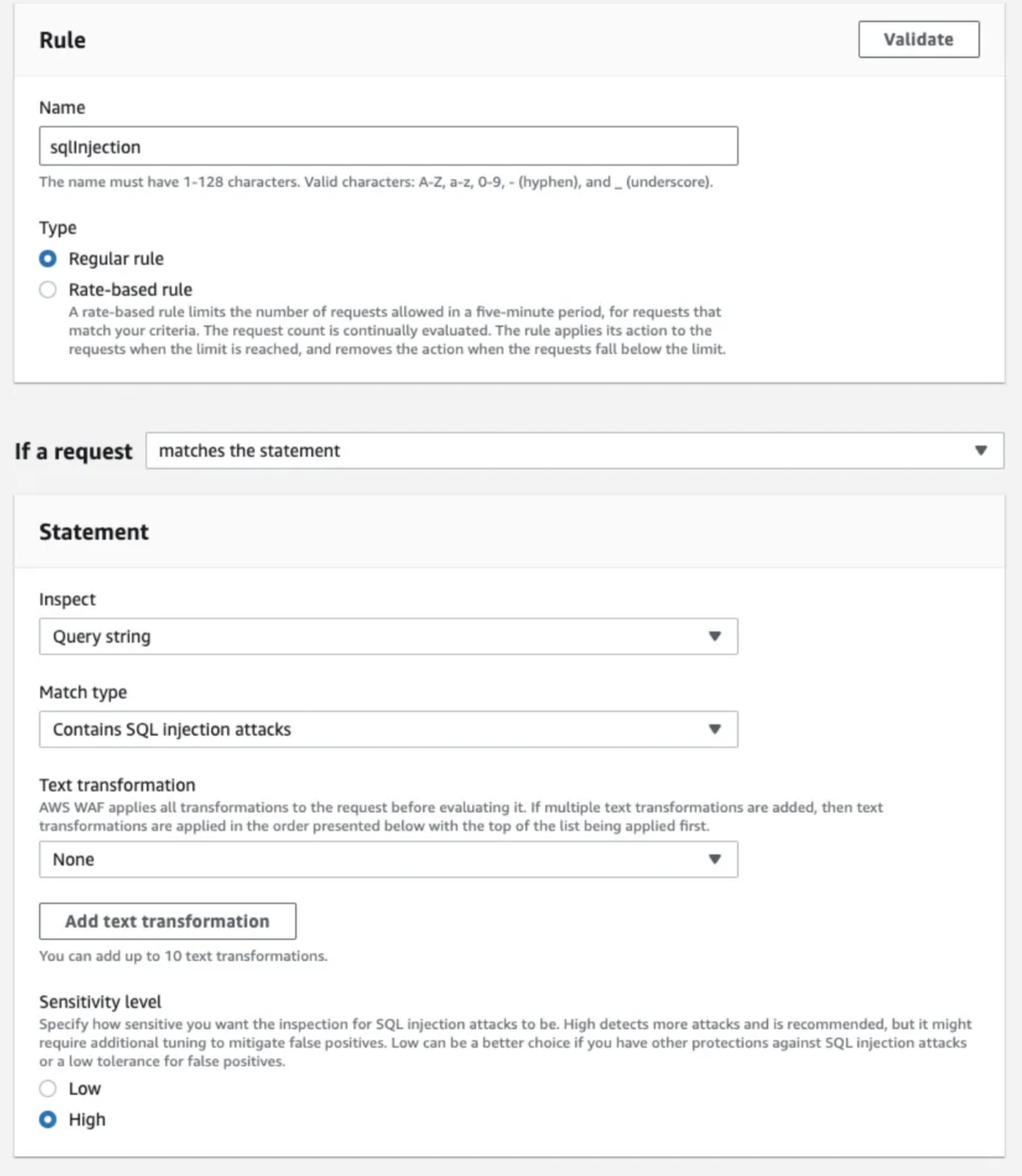
4. Configure Rule Actions
After defining the conditions, specify the actions to be taken when a SQL injection attempt is detected. Common actions include blocking the request, counting the request, or allowing the request but logging it for further analysis. Configure the rate-based settings if you want to limit the number of requests from a client IP address within a specific time frame to prevent brute-force attacks.
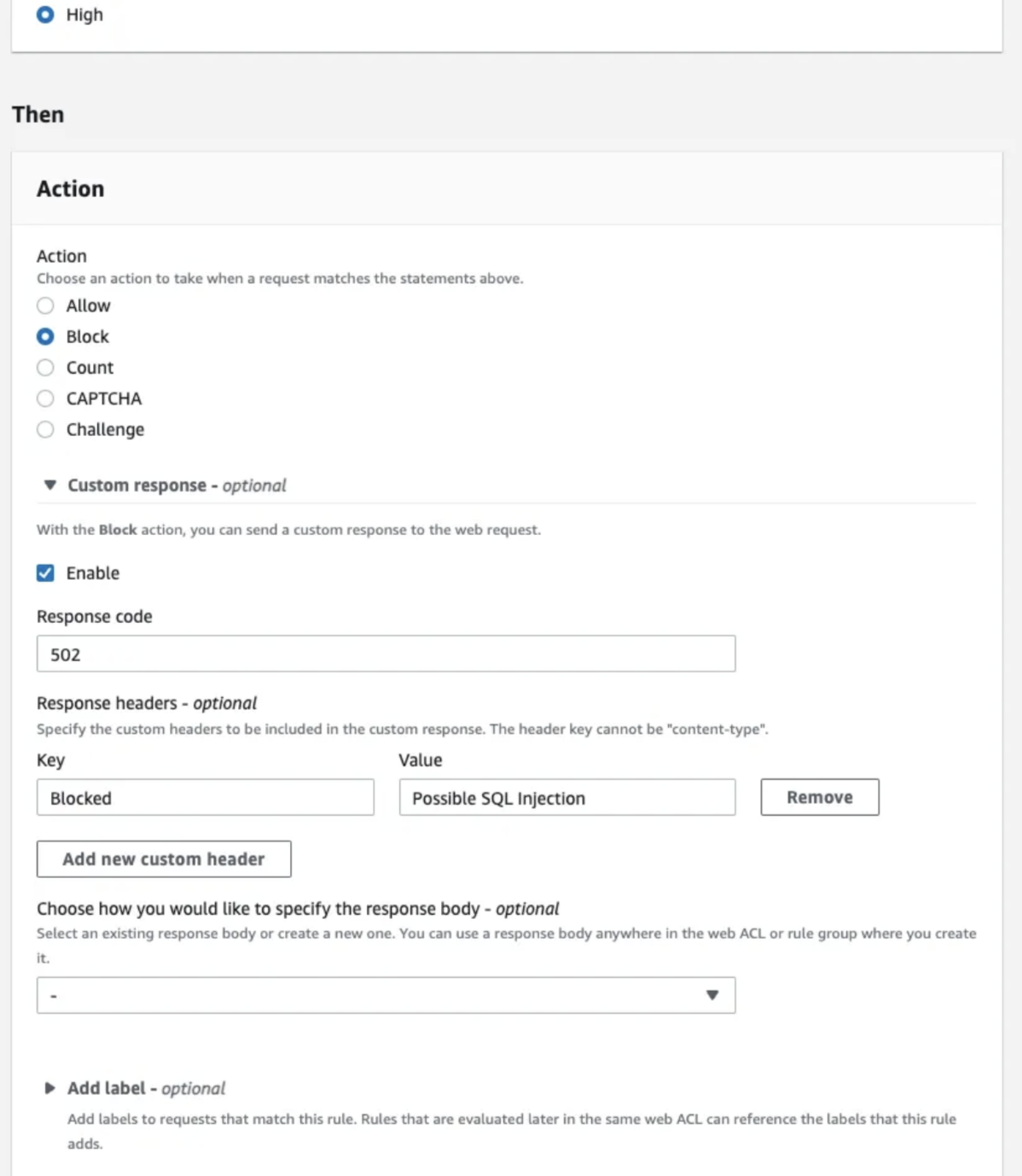
For this example, the rule action is returning a 502 response code and adding a header like: “Blocked: Possible SQL Injection.”
5. Review and Activate
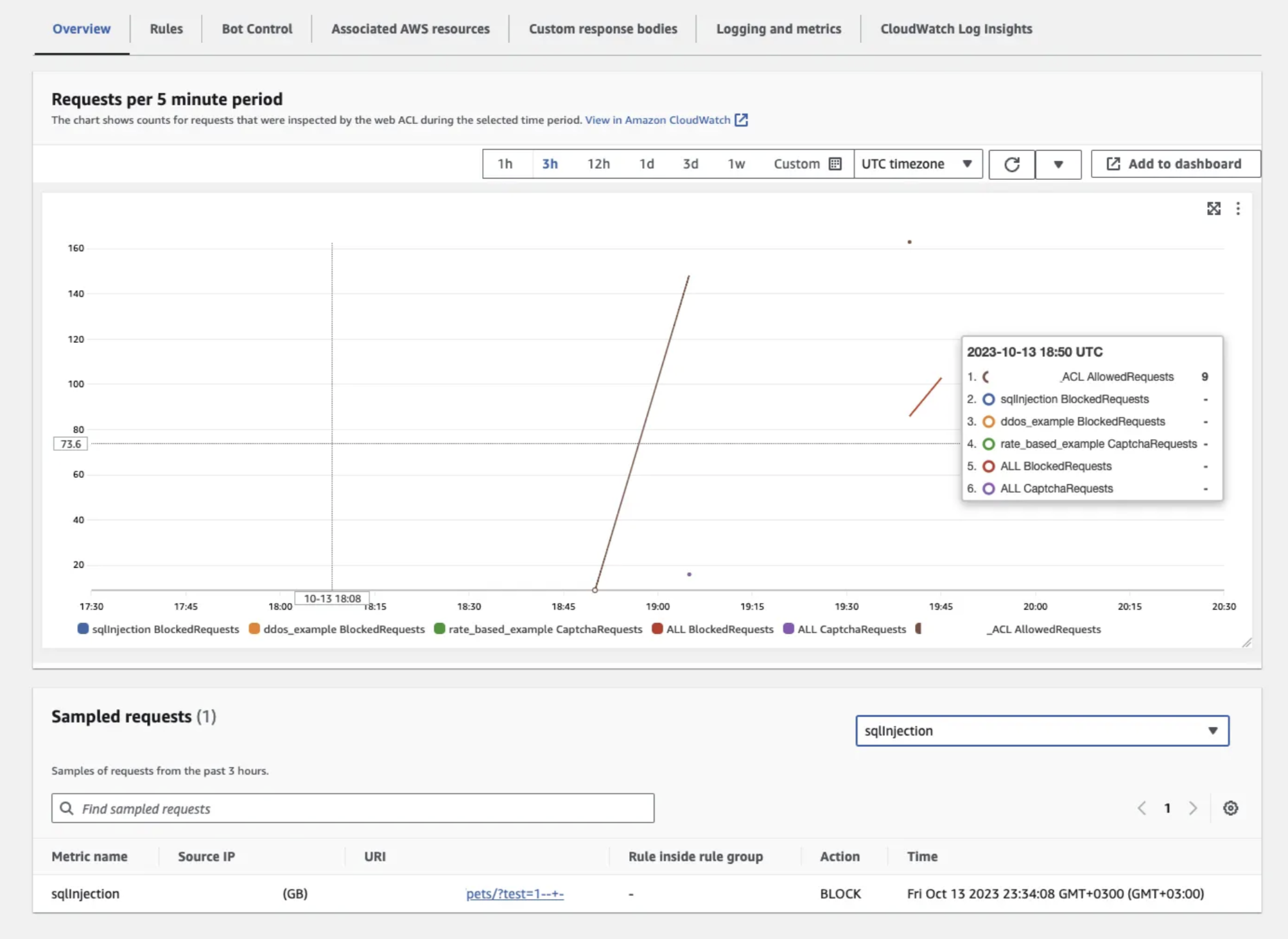
After activating and doing an example SQL injection attack, we can see logs like the following screenshot:
Virtual Private Cloud (VPC) Flow Logs
VPC Flow Logs is a useful feature that allows you to gather details on IP traffic moving between network interfaces within your VPC. Data from flow logs can be sent to various destinations, including Amazon CloudWatch Logs, Amazon S3, or Amazon Kinesis Data Firehose. Once a flow log is established, you can access and review the log records in the group, bucket, or stream you’ve set up.
Flow logs serve several purposes, including:
- Identifying issues with overly restrictive security group rules
- Monitoring the traffic reaching your instance
- Understanding the direction of traffic to and from network interfaces
You can create a flow log for a VPC, a subnet, or a network interface. If you create flow logging for a subnet or VPC, every network interface in that subnet or VPC is monitored.
To generate a flow log, you need to provide:
- Source from which to create the flow log
- Type of traffic to capture (accepted traffic, rejected traffic, or all traffic)
- Destinations to which you want to publish flow log data
It plays a crucial role in network traffic visibility, forensic analysis in the cloud, and the detection of Security Incidents. For example, you can detect anomalies on the cloud infrastructure and/or analyze post-incident.
Identity and Access Management (IAM)
Identity and access management (IAM) manages the end-to-end lifecycle of user identities and authorizations across all enterprise resources, both in data storage centers and in the cloud. It is one of the core controls of cloud security because it authenticates and regulates users’ access to systems, networks, and data. So, naturally, it’s the most crucial service in cloud security. You can do:
- User provisioning and de-provisioning
- Authentication/MFA
- Authorization
For access to the cloud environment, it’s crucial. Apart from that, it’s also the place where you need to manage your users, permission policies, and check access.
Key Management Services
Key management services (KMS) refer to a set of tools, processes, and infrastructure designed to securely manage cryptographic keys. Services are available from cloud providers for this. Encryption keys are important components in ensuring the confidentiality, integrity, and authenticity of data in various systems, including cloud environments. Databases and buckets can be encrypted using KMS.
KMS helps organizations create, store, distribute, and rotate these encryption keys in a secure and controlled manner.
Cloud Audit Logs
Cloud audit logs are records of activities and events that occur within a cloud environment. It allows you to track changes made to resources. For instance, you can see who created, modified, or deleted an Amazon EC2 instance, providing a resource change history. Apart from that, cloud audit logs may help to pinpoint the root cause of operational issues.
It allows real-time monitoring and alerting, and it’ll help to respond quickly to suspicious activities or potential security incidents. It can help with various security checks on the cloud environment. For example:
- Unauthorized access: You can see if there is a newly created user.
- WAF implementation: You can see if the rule set is deleted.
Load Balancers
Load balancers are a crucial component for distributed architectures. It helps to distribute application (L7) or network (L4) traffic across multiple servers to ensure efficiency and overall reliability.
Load balancers play an important role in defending against DDoS attacks. Apart from that, to improve infrastructure security, you can use built-in features in load balancers, such as TLS offloading. Network load balancer supports client TLS session termination. This preserves the source IP address for your backend applications.
Since you can also use load balancers for traffic management, you can manage and prioritize traffic, directing it away from potentially compromised servers. Some load balancers come with integrated WAF capabilities. This is also a crucial thing for preventing L7 attacks.
Conclusion
Cloud security in AWS and GCP is not only about using tools but also about building a strong security mindset. Companies should focus on identity control, encryption, network protection, and continuous monitoring. Using native cloud services together with third-party security tools helps reduce risks and improve visibility.
With proper planning, regular monitoring, and incident readiness, organizations can better protect their data, prevent unauthorized access, and create more resilient cloud environments.
Opinions expressed by DZone contributors are their own.
Comments