

Replacing commons-lang ToStringBuilder With Eclipse
Want to get the benefit of Apache's commons-lang ToStringBuilder class, but don't want to add the dependency? Here's how to do it with Eclipse.
 ·
·
Join the DZone community and get the full member experience.
Join For FreeRecently, I was modifying a common library and I wanted to create a toString method with some (but not all) of the fields of the object.
This can be easily done using the Apache commons-lang ToStringBuilder class. A quick way to generate a toString() method is using the reflectionToString method (though it will include all the object's fields in the result):
@Override
public String toString() {
  return ToStringBuilder.reflectionToString(this);
}
You can customize the fields to include by using something like this:
@Override
public String toString() {
    return new ToStringBuilder(this)
        .append("field1", field1)
        .append("field2", field2)
        .append("field3", field3)
            .toString();
}
This is straightforward. However, as simple a solution as it is, it requires us to include Apache commons-lang as a dependency for your library, a price that you may not want to pay for some util components.
Luckily, Eclipse has a useful functionality to generate a toString() method for your class. The default key binding is Alt-Shift-S + S, which will open a dialog box:
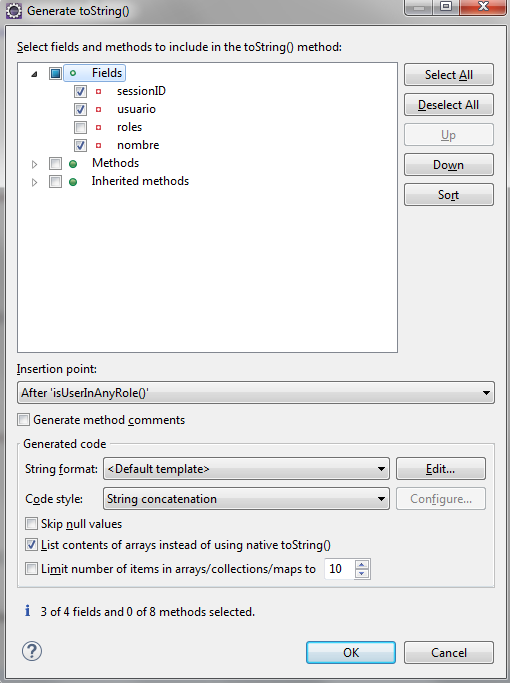
This will generate a toString() method according to the <Default template>:
@Override
public String toString() {
    return "MyClass [sessionID=" + sessionID + ", usuario=" + usuario + ", nombre=" + nombre + "]";
}
This is good, but not enough for my particular requirements, as I had unit tests that check that the "roles" field is not included in the toString() method, which matched the toString() method produced by commons-lang ToStringBuilder:
@Test
public void testToStringWithoutRoles() {
  MyClass object = new MyClass();
  object.setNombre("Gabriel Belingueres");
  object.setSessionID("abcdefg");
  object.setUsuario("gbe");

  HashSet<String> roles = new HashSet<String>();
  roles.add("rol1");
  roles.add("rol2");
  roles.add("rol3");
  object.setRoles(roles);

  String expected = "com.hexaid.myapp.MyClass@" + Integer.toHexString(object.hashCode())
        + "[sessionID=abcdefg,usuario=gbe,nombre=Gabriel Belingueres]";

  assertEquals(expected, object.toString());
}
Lickily, Eclipse allowed me to easily change the String format template to create one that matched that of ToStringBuilder, pressing the "New..." button and entering:
${object.superToString}[${member.name()}=${member.value},${otherMembers}]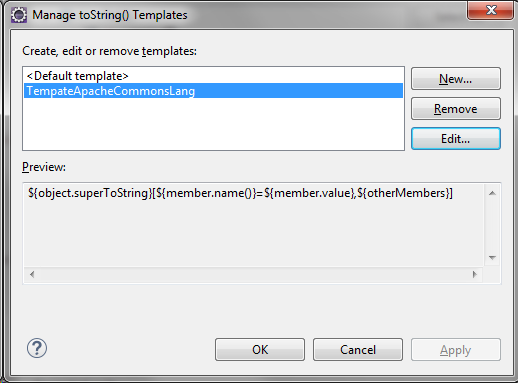
When regenerating the toString() method, tests turned green again and allowed me to remove the commons-lang dependency from the project.
Opinions expressed by DZone contributors are their own.
Comments