

Resolving Permission Issue in Multi-node Hadoop Cluster
It has been observed when we configure and deploy a multi-node Hadoop cluster or add new DataNodes, there is an SSH permission issue in communication with Hadoop daemons.
 CORE
·
CORE
·
Join the DZone community and get the full member experience.
Join For FreeSometimes it has been observed that when we configure and deploy multi-node Hadoop cluster or add new DataNodes, there is an SSH permission issue in communication with Hadoop daemons.
This short article aims to explain how we can resolve the permission issue among DataNodes with NameNode while trying to establish the Secure Shell/SSH without a passphrase. By using DataNode Protocol, all DataNodes talk to the NameNode. By design, the NameNode never initiates any RPCs (Remote Procedure Call). Instead, it only responds to RPC requests issued by DataNodes or clients.
In a fully distributed environment when the cluster is alive and running, the NameNode (Hadoop core services like NodeManager, YARN, etc) uses SSH for communication with DataNodes very frequently. Simply, in other words, we can say monitoring the heartbeats of every configured DataNode. The error in the terminal console appears as 'Permission Denied (public key, password)' once we start the Hadoop daemons at NameNode ($ sbin /.start-dfs.sh) in that cluster.

Most of the time we suspect that there was an issue in public-private RSA key pair generation followed by granting accurate permissions. And we keep repeating those steps to resolve the issue.
Even though key-pair generation and permission grant were correct to connect via SSH:
$ ssh-keygen -t rsa -P ” -f ~/.ssh/id_rsa
$ cat ~/.ssh/id_rsa.pub >> ~/.ssh/authorized_keys$ chmod 0600 ~/.ssh/authorized_keys
and able to ssh to all the systems (designated for DataNodes) without a passphrase from the NameNode terminal (without starting Hadoop daemons), there could be an issue of permission denied as mentioned above. This issue ideally might come upon unknowing modification/changes in the sshd_config file in any DataNode or Secondary NameNode (if configured in a separate system ) in the cluster. This file is available in /etc/ssh/ in Ubuntu 14.04. Here are the following parameters in the sshd_config that we need to be careful.
1. 'PubKeyAuthentication' key should be uncommented with value 'yes.'

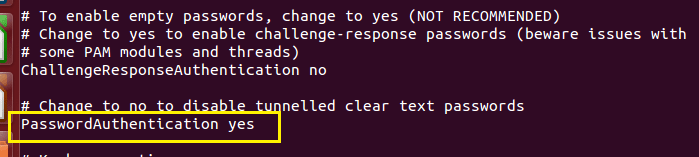
2. 'PasswordAuthentication' key should be uncommented with value 'yes.'
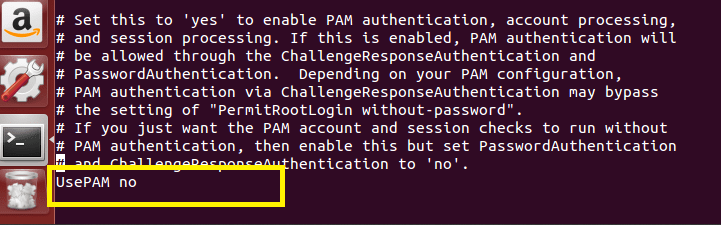
3. The key 'UsePAM' should be uncommented with value 'no.'
After verification with necessary corrections, restart the ssh service or reboot the systems.
sudo service network-manager restartsudo service ssh restart
And finally, restart the cluster after the successful format of NameNode. The error will disappear and successfully starts all the DataNode in the cluster. We used Ubuntu 14.04 as OS in the multi-node cluster.
Published at DZone with permission of Gautam Goswami. See the original article here.
Opinions expressed by DZone contributors are their own.
Comments