

Retrieving Table Metadata from SQL Server Catalog Views
SQL Server Catalog Views can be queried easily, and being able to retrieve this metadata can be very useful in various situations.
all database systems that i’ve worked with have some sort of system tables that provide information about the tables, columns, indexes, constraints, etc in a database. sql server is no exception; in fact there are different ways of querying its system catalog . we’re going to look at one of these: catalog views, which can be queried easily.
being able to retrieve this metadata can be very useful in various situations, such as developing tools to work with and visualize data (like sql server management studio), or automating rote tasks (such as creating entity classes for each table).
list of table names
querying catalog views is as easy as querying any table. the easiest thing you can do is get a list of table names. use this query:
select *
from sys.tables;
here’s the result:

so if all you want is the name of the table, just refine the query to select only that:
select name
from sys.tables;
retrieving data using ado .net
it is easy to run simple queries using the good old ado .net technology. below is a sample you could use to retrieve the table names from a c# application.
        static void main(string[] args)
        {
            const string connstr = @"server=.\sqlexpress;database=bookstore;trusted_connection=true;";

            using (var conn = new sqlconnection(connstr))
            {
                conn.open();

                using (var command = new sqlcommand())
                {
                    command.connection = conn;

                    command.commandtext = "select name from sys.tables;";

                    using (var reader = command.executereader())
                    {
                        while (reader.read())
                        {
                            string name = reader["name"].tostring();
                            console.writeline(name);
                        }
                    }
                }
            }

            console.readline();
        }
this code can be similarly adapted to fetch additional data from the queries we will see next.
more advanced queries
retrieving other table metadata such as indexes, foreign keys, etc is not as straightforward as retrieving table names. however, you can get queries for just about any metadata you need from the querying the sql server system catalog faq .
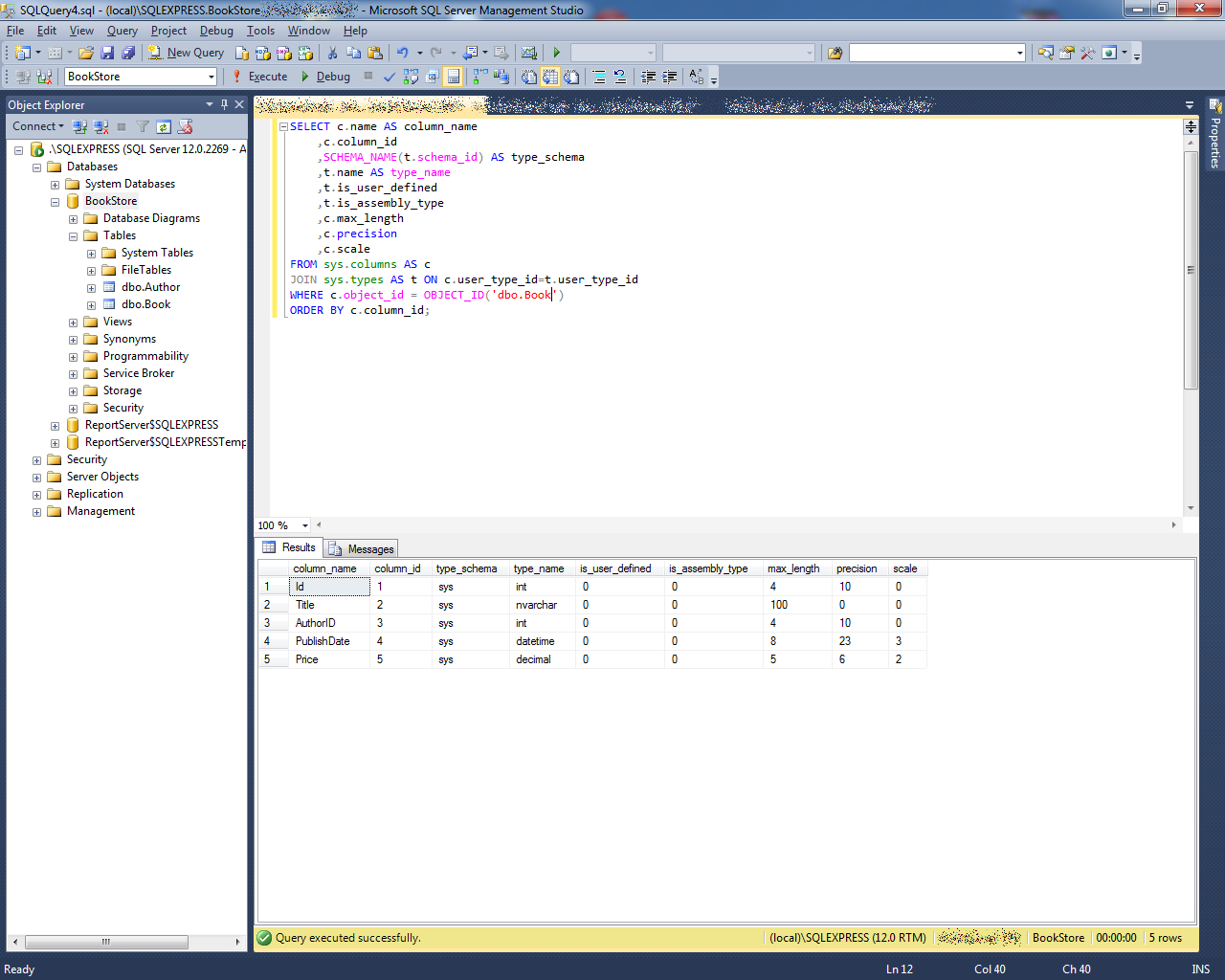
here’s the query to get column data types :
select c.name as column_name
    ,c.column_id
    ,schema_name(t.schema_id) as type_schema
    ,t.name as type_name
    ,t.is_user_defined
    ,t.is_assembly_type
    ,c.max_length
    ,c.precision
    ,c.scale
from sys.columns as c
join sys.types as t on c.user_type_id=t.user_type_id
where c.object_id = object_id('<schema_name.table_name>')
order by c.column_id;
here’s the result:
this is how you get the indexes for a table (which may include primary keys):
select i.name as index_name
    ,i.type_desc
    ,is_unique
    ,ds.type_desc as filegroup_or_partition_scheme
    ,ds.name as filegroup_or_partition_scheme_name
    ,ignore_dup_key
    ,is_primary_key
    ,is_unique_constraint
    ,fill_factor
    ,is_padded
    ,is_disabled
    ,allow_row_locks
    ,allow_page_locks
from sys.indexes as i
inner join sys.data_spaces as ds on i.data_space_id = ds.data_space_id
where is_hypothetical = 0 and i.index_id <> 0
and i.object_id = object_id('<schema_name.table_name>');
here’s an example result:

and finally, here’s how you get info on the foreign keys :
select
    f.name as foreign_key_name
   ,object_name(f.parent_object_id) as table_name
   ,col_name(fc.parent_object_id, fc.parent_column_id) as constraint_column_name
   ,object_name (f.referenced_object_id) as referenced_object
   ,col_name(fc.referenced_object_id, fc.referenced_column_id) as referenced_column_name
   ,is_disabled
   ,delete_referential_action_desc
   ,update_referential_action_desc
from sys.foreign_keys as f
inner join sys.foreign_key_columns as fc
   on f.object_id = fc.constraint_object_id
where f.parent_object_id = object_id('<schema_name.table_name>');
here’s the result of that:

so even though these queries aren’t trivial to cook up, you can find just about anything you need from the querying the sql server system catalog faq , and just adapt it from there.
one query to rule them
if you’re going to do something like code generation, you probably want to build one query that retrieves all the above metadata in one go. you can do that by combining the above queries. fortunately, i’ve done that for you. here you go:
select
-- columns / data types
c.name as column_name
    ,c.column_id
    ,schema_name(t.schema_id) as type_schema
    ,t.name as type_name
    ,c.max_length
    ,c.precision
    ,c.scale
-- primary key / indexes
,i.name as index_name
    ,is_identity
,i.is_primary_key
-- foreign key
    ,f.name as foreign_key_name
   ,object_name (f.referenced_object_id) as referenced_object
   ,col_name(fc.referenced_object_id, fc.referenced_column_id) as referenced_column_name
from sys.columns as c
inner join sys.types as t
on c.user_type_id=t.user_type_id
left outer join sys.index_columns as ic
on ic.object_id = c.object_id
and c.column_id = ic.column_id
left outer join sys.indexes as i
on i.object_id = ic.object_id
and i.index_id = ic.index_id
left outer join sys.foreign_key_columns as fc
on fc.parent_object_id = c.object_id
and col_name(fc.parent_object_id, fc.parent_column_id) = c.name
left outer join sys.foreign_keys as f
on f.parent_object_id = c.object_id
and fc.constraint_object_id = f.object_id
where c.object_id = object_id('dbo.book')
order by c.column_id;
here’s what you’ll get:

that includes column names, column types (along with stuff like decimal precision), indexes, primary keys, auto-increment (that’s
is_identity
), and foreign key info (constraint name, referenced table, and referenced column).
i’ve only tested this on a very simple scenario, so i’m pretty sure there are improvements to be made. while this can be considered a starting point, feedback is more than welcome.
Published at DZone with permission of Daniel D'agostino. See the original article here.
Opinions expressed by DZone contributors are their own.