

Rewrite Rules in Nginx
Return directive and Rewrite directive are two widely used methods for rewriting URLs. Discover why and how to rewrite URLs with Nginx.
Join the DZone community and get the full member experience.
Join For FreeRewrite rules modify a part or whole of a URL. This is done for two reasons. First, to inform clients about the relocation of resources, and second, to control the flow to Nginx. The two general-purpose methods used widely for rewriting URLs are the return directive and the rewrite directive. Of these, the rewrite directive is more powerful. Let's discuss why it is so, as well as how to rewrite the URLs.
Having a better understanding of NGINX will make it easier to follow this blog.
Return Directive
Return is the easiest way to rewrite a URL declared in the server or local machine.
Return in Server
Suppose your site is migrated to a new domain and all existing URLs are to be redirected here; run the below code to direct any new request to your site.

This directs all requests that hit www.previousdomain.com to www.currentdomain.com. The www.previousomain.com will send out a '301' error as soon as the above code is run, and a new access request is generated. The two variables, $scheme, and $request_uri, get data from the input URL. 'Listen 80' indicates that the block applies to both HTTP and HTTPS requests.
Return in Local
If you want to redirect pages in place of a complete domain, you can use the return directive under the location block.
Knowing how to create the Nginx rewrite rules can save a lot of your effort and time.
Rewrite Directive
Just like the return directive, the rewrite directive can also act in both server and local. Compared to the return directive, the rewrite directive can handle complex replacements of URLs. The following is the syntax of the rewrite:

The regex is a regular expression that matches against incoming URI.
The replacement_url is the string used to change the requested URI.
The value of the flag decides if any more redirection or processing is necessary.
Static Page Rewrite
Suppose you want to redirect the page https://example.com/tutorial to https://example.com/new_page. The directive will be:
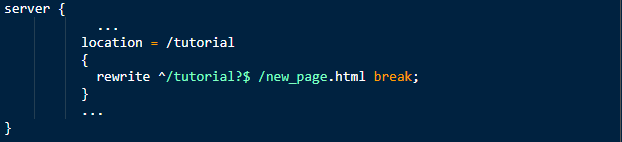
The line location = /tutorial defines that any identification of the tutorial is to be replaced. The rewrite command says to replace the phrase within notations ^ and $ with new_page.html and then break the command. The notation '?' is termed as a non-greedy modifier, after which the pattern search is stopped.
Dynamic Page Rewrite
Consider rewriting the URL https://www.sample.com/user.phpid=11 to https://www.sample.com/user/11. Here, the user=11 is to be replaced. By using the static rewrite method, it would require writing the rewrite command 10 times. Instead, let's do it in a single go.
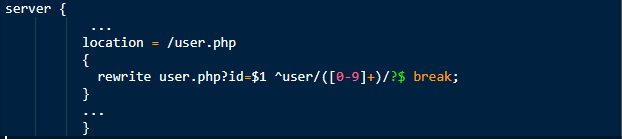
The line location = /user.php asks Nginx to check for the prefix'/user'. As said earlier, the Nginx will search for phrases between the start and end notations as ^ and $ along with the non-greedy '?' modifier. The phrase in our example is a range of users. It is mentioned inside the square brackets as [0-9]+. The back-reference in this expression is noted within the parenthesis and is referred to by the $1 symbol. So, for our example, the rewrite will happen for all users automatically.
One special case under the dynamic reference is the multiple back-references.
Now, we have discussed how to write the rewrite rules for simple and complex URLs.
Understand the detailed working of rewrite rules through some examples handling various scenarios.
Directive Comparison
Let's analyze both directives by comparing them and find out why the rewrite derivative is more powerful.
Return Directive
- It is simple to use and understand.
It can be used in both server and location contexts.
It explicitly mentions the corrected or updated URL so that the client can use them in the future.
Return directives can include multiple error codes as well.
For codes 301, 302, 303, and 307, the URL parameters define the redirect URL.
return (301 | 302 | 303 | 307) url;
For other codes, the text is to be explicitly mentioned by the user.
return (1xx | 2xx | 4xx | 5xx) ["text"];
For example, return 401 "Access denied because the token is expired or invalid";
This directive can be used in scenarios where the return URL is correct for both server and location block, and rewritten URL is built with Nginx variables.
Rewrite Directive
It can accommodate more complex URL modifications where capturing elements without Nginx variables or an update in the elements in the path is required.
It can be used in both server and location contexts.
The rewrite directive can return only code 301 or 302. To accommodate other codes, explicitly add the return directive after the rewrite directive.
It may not send the redirect details to the client.
The Nginx request processing is not halted.
Conclusion
The return and rewrite directives can be used to redirect URLs in both server and location contexts. Though the return directive is much simpler, the rewrite directive is widely used as it can also handle complex modifications/updates to the URLs.
Published at DZone with permission of Ritu Chaturvedi. See the original article here.
Opinions expressed by DZone contributors are their own.
Comments