
DZone
Thanks for visiting DZone today,
Edit Profile
  • Manage Email Subscriptions
  • How to Post to DZone
  • Article Submission Guidelines
Sign Out View Profile
  • Post an Article
  • Manage My Drafts
Newsletter
Log In / Join
Refcards Trend Reports
Events Video Library
Refcards
Trend Reports

Events

View Events Video Library

Related

  • 7 Techniques That Supercharged My Claude-Assisted Development
  • Beyond Request-Response: Architecting Stateful Agentic Chatbots with the Command and State Patterns
  • A Beginner's Guide to Docker Compose
  • A Beginner's Guide to Essential Commands to Fix Container Setup Issues

Trending

  • How to Build Your Own AI SRE From Scratch
  • Running a Self-Hosted WAF in Production: Practical Lessons From SafeLine
  • How to Migrate From C/C++ to Rust: A Practical Guide for Embedded IoT Systems
  • Architecture Review Boards for Generative AI: A Framework for Governance, Risk Management, and Responsible Adoption

Draft This article hasn't been published, so readers can't see it.

In moderation This article is waiting for review, so readers can't see it yet.

Deleted This article has been deleted, so readers can't see it.

  1. DZone
  2. Data Engineering
  3. Databases
  4. Run Oracle SQL Script From Command Line in Windows

Run Oracle SQL Script From Command Line in Windows

Sometimes we have to run a particular SQL script from the Windows command line “CMD” with or without parameters. Here are the steps required to perform this task.

By 
Hassan Abd Elrahman
·
Sep. 16, 21 · Tutorial
Post on X (opens in a new tab) Share on LinkedIn (opens in a new tab)
12.1K Views

Join the DZone community Save articles, join the discussion, and download Refcards and Trend Reports with a free account.

Join for free Already a member? Log in

Sometimes we need to run a particular SQL script from the Windows command line “CMD” with or without parameters.

This article will guide you through the steps required to perform this task to get an employee’s information — both with and without parameters.

To Run SQL Scripts from Windows Command Line CMD 

  1. Press Windows + R from your keyboard, then type cmd and press enter.
Run SQL Script From Windows Command Line CMD Step 1
  1. Change the current directory to the directory where your script is available.
Run SQL Script From Windows Command Line CMD Step 2


  1. To run SQL Script without parameters, we need to type this command.
sqlplus hr/hr @ScriptWithoutParameter.sql
  1. To run SQL Script with parameters, we need to type this command.
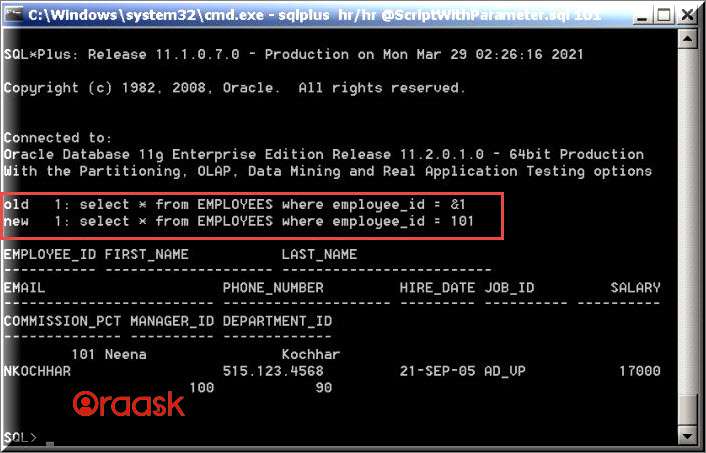
sqlplus hr/hr @ScriptWithoutParameter.sql 101

It is important that when running SQL script with parameters from CMD:

  • In our script, the WHERE condition should be typed in the substitution variable as follows
select * from EMPLOYEES where employee_id = &1;
  • For the script above, we passed &1 to be replaced with 101 to bring employee number 101's data.
To Run SQL Script from SQL PLUS

  1. Open SQL PLUS and then connect to the database.
  2. In SQL Command, type the following command and press enter
oracle user:\MyScript\ScriptWithoutParameter.sql


SQL Plus Command (computing)

Published at DZone with permission of Hassan Abd Elrahman. See the original article here.

Opinions expressed by DZone contributors are their own.

Related

  • 7 Techniques That Supercharged My Claude-Assisted Development
  • Beyond Request-Response: Architecting Stateful Agentic Chatbots with the Command and State Patterns
  • A Beginner's Guide to Docker Compose
  • A Beginner's Guide to Essential Commands to Fix Container Setup Issues

Partner Resources

×

Comments

Loading comments

The comments didn't load

Please try again in a moment.

Likes

Loading

The next likes didn't load. Please try again.

The likes didn't load

Please try again in a moment.

See who liked this

Log in or join DZone for free to see who liked this article.

Log in Join for free
  • RSS
  • X
  • Facebook

ABOUT US

  • About DZone
  • Support and feedback
  • Community research

ADVERTISE

  • Advertise with DZone

CONTRIBUTE ON DZONE

  • Article Submission Guidelines
  • Become a Contributor
  • Core Program
  • Visit the Writers' Zone

LEGAL

  • Terms of Service
  • Privacy Policy

CONTACT US

  • 3343 Perimeter Hill Drive
  • Suite 215
  • Nashville, TN 37211
  • [email protected]

Let's be friends:

  • RSS
  • X
  • Facebook