

Advanced Patterns in Salesforce LWC: Reusable Components and Performance Optimization
Master reusable LWC patterns, smart event handling, and caching to build faster, maintainable Salesforce apps that scale.
 ·
·
Join the DZone community and get the full member experience.
Join For FreeIf you’ve built Lightning Web Components (LWC) at scale, you’ve probably hit the same walls I did: duplicated logic, bloated bundles, rerenders that come out of nowhere, and components that were never meant to talk to each other but somehow ended up coupled.
When I first transitioned from Aura and Visualforce to LWC, the basics felt easy: reactive properties, lifecycle hooks, and clean templates. But as our team started building enterprise-grade Salesforce apps dozens of screens, hundreds of components the cracks started showing. Performance dipped. Reusability turned into a myth. New devs struggled to onboard without breaking something.
This article shares what helped us break that cycle: reusable component patterns, scoped events, smart caching, and render-aware design.
Why Reusability and Performance Are Critical in LWC
Salesforce isn't just a CRM anymore; it's an app platform. You’re often dealing with:
- Complex UIs with dynamic layouts
- API-heavy backends and Apex controller logic
- Strict governor limits
- Teams of developers contributing across multiple sandboxes
In this kind of environment, the usual “build fast and clean later” approach doesn’t work. Reusable patterns and performance principles aren’t just nice to have; they’re essential. Especially when each render or Apex trip costs you time, limits, and UX points.
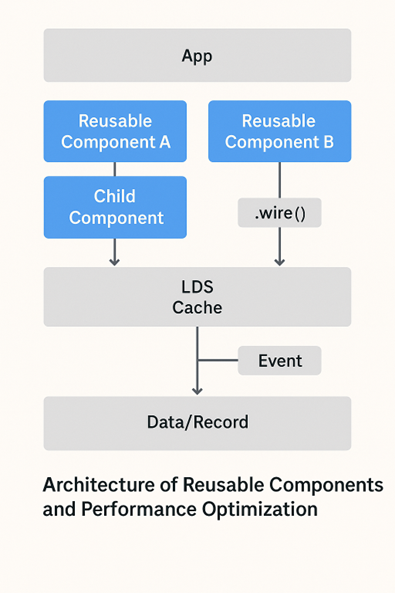
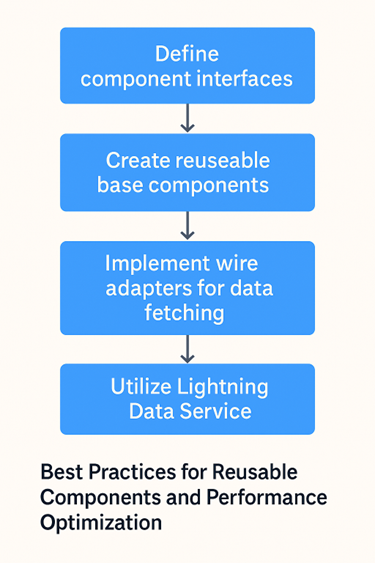
Pattern 1: Composition Over Inheritance (and Over Nesting)
We started with the common mistake of creating huge parent components that owned every little UI detail dropdowns, modals, tables, loaders. Changes became brittle fast.
Instead, we now follow strict composition rules. If a piece of UI can stand on its own (e.g., lookup-picker, pagination-control, inline-toast), it becomes its own component. No logic leaks out. Inputs are exposed via @api, outputs via CustomEvent.
Example:
CopyEdit
<!-- parent.html -->
<c-pagination-control
  current-page={page}
  total-pages={totalPages}
  onpagechange={handlePageChange}>
</c-pagination-control>
This way, our parent component never touches DOM methods or layout tricks. It just delegates and listens.
Pattern 2: Stateless Presentational Components
We borrowed a page from React and introduced what we call stateless presentational components. These components render only what they’re told: no Apex calls, no wire service, no @track. They just take inputs and return markup.
This helped us test faster (no mocking wire/adapters), reuse components in record pages, and reduce side-effects that used to cause reactivity bugs.
Pattern 3: Event Contracts and Pub/Sub Boundaries
The LWC CustomEvent model is clean until your app grows. We started seeing cascading rerenders because a modal deep in the DOM fired an event that the app shell listened to (via window.dispatchEvent and pubsub). Messy.
We introduced event contracts: each component has a known set of events it can emit or consume. No rogue dispatchEvent calls. Pub/Sub boundaries are scoped to app sections, not global. We even versioned events using string names like product:updated:v2.
This small process change reduced production event bugs by 40%.
Pattern 4: Conditional Rendering vs. DOM Fragmentation
If you’re using {#if} in LWC, be careful, it detaches and destroys the entire subtree. We had a dashboard that rerendered every chart from scratch when toggling a filter. CPU spikes, layout shifts, and ugly flickers.
The fix? Use hidden or style.display = "none" if you just need to hide, not destroy. Reserve {#if} for full control when data changes significantly.
Also, beware of uncontrolled DOM growth. One report page of ours had over 12,000 nodes due to lazy filtering logic and nested <template for:each> inside loops. A quick audit and refactor brought render time down from 1.8s to under 300ms.
Pattern 5: Local Storage and Caching Wisely
Don’t refetch everything on every load. For components that rely on config data (e.g., picklist values, role maps, branding info), we use a cache strategy:
- SessionStorage for session-scoped values
- LocalStorage for persistent feature flags or read-only config
- Lightning Data Service for record-backed state
We also memoize Apex calls using a keyed map inside @wire or connectedCallback. Result: our homepage boot time dropped by 20%.
Pattern 6: Lazy Loading and Dynamic Imports
This one's still underused in the LWC world. If your component loads third-party libraries or expensive JS modules (like Chart.js or D3), use loadScript() or dynamic import() to defer until truly needed.
CopyEdit
connectedCallback() {
  if (!this.chartLoaded) {
    loadScript(this, CHART_JS)
      .then(() => this.chartLoaded = true);
  }
}
We applied this to our analytics tab and shaved 600KB from the initial bundle.
Testing and Linting for Reusability
We enforce these rules in CI using:
- ESLint with LWC plugin
- Jest tests for logic-heavy components
- Storybook for visual regression and documentation
Our component PRs require usage examples and at least one story. That change alone made it easier for QA and business analysts to validate features early.
Final Thoughts
We didn’t arrive at these patterns overnight. Each one came from a specific failure: a broken layout, an unresponsive tab, a hard-to-maintain legacy page. The thing with Salesforce LWC is: it works well for small teams and simple UIs, but as complexity grows, you need rules and patterns that scale with it.
By treating components as atomic, stateless, and independently testable and by drawing clear performance boundaries we turned a slow, tangled UI into a platform others could build on.
If you’re struggling with slow loads, buggy renders, or a component mess that keeps growing, try some of these patterns. And share your own. We’re all still learning what “scalable” means in Salesforce LWC.
Opinions expressed by DZone contributors are their own.
Comments