

Scoped Filtering: A Practical Bridge to RBAC
Need RBAC but can’t afford an architecture overhaul? Scoped filtering lets you enforce access control at the API level, making it easy to layer onto your existing system.
 ·
·
Join the DZone community and get the full member experience.
Join For FreeYou’re a startup fresh out of your development-focused cycle, starting to gain traction and demo your product to potential clients. As someone working at a freshly minted Series A company, I understand the priority: get the product working. In our case, that meant demonstrating our data insights solution worked — before implementing sophisticated (but necessary) controls like role-based access control (RBAC).
But now, it’s time. Clients are onboarding, and you need to ensure that only the right people can access the right customer data.
There’s no shortage of RBAC solutions out there — that’s not the problem. The problem is that most of them require massive changes to your existing codebase, especially when it comes to APIs. If your APIs are powered by Snowflake, for instance, Snowflake’s Row Access Policies (RAPs) offer an excellent native RBAC mechanism — but adopting them often means breaking queries, rewriting views, and re-architecting access logic.
If your team isn’t ready for that level of change yet, there’s a middle ground. You can implement scope-based filtering with a mapping table to simulate RBAC entirely in SQL — without modifying your underlying data model. This approach enforces RBAC at the API level, wrapping around your existing endpoints with minimal disruption, and giving your team breathing room before committing to a full RAP rollout.
This article walks through how to adopt and implement this bridge solution, so your product can support RBAC without requiring a massive overhaul — at least until you're ready for one.
A Quick Introduction to Role-Based Access Control
Data security isn’t just about who gets in — it’s about what they can see once they’re inside. As systems grow more sophisticated, it’s no longer enough to ask “Who has access?” The real question becomes: “Who has access to which slice of the data?”
This is where role-based access control (RBAC) comes in. Instead of assigning permissions to users directly, RBAC assigns them to roles, and users inherit access based on their assigned roles. It’s a widely adopted model that simplifies access control at scale. Update a role’s permissions once, and every user in that role is automatically updated.
In a fully mature data stack, this kind of access control is typically implemented within the data platform itself. But if you're not there yet, you can still enforce it effectively at the API level — using scoped filtering as a lightweight alternative.
When Native Row-Level Security Becomes a Bottleneck
Native row-level security is often sophisticated, flexible, and designed to support a variety of use cases. When implemented correctly, it removes the need for downstream access control — the database itself returns the rows a user is authorized to see.
Take Snowflake’s Row Access Policies (RAPs) as an example.
RAPs offer platform-level RBAC by allowing you to define access rules directly on tables and views. Once applied, Snowflake automatically enforces these policies based on the conditions you specify. This means queries only return rows the user is allowed to see, without requiring additional filtering or logic in the API or application layer.
It’s a powerful system — but it comes with tradeoffs that were slightly hard to justify for our team early on:
- High operational overhead: You need custom code to apply RAPs to all relevant tables and views, and to automatically apply them to any new objects added later. If a RAP changes, you must remove it from every table it's attached to before it can be deleted and recreated — Snowflake doesn’t allow you to drop a RAP that’s in use.
- Risky global side effects: RAPs are schema-level changes. If applied incorrectly — say, with the wrong role mapping or logic — developers and analysts can silently lose access to rows. This can break dashboards, analytics pipelines, and internal queries in ways that are difficult to debug.
In practice, we found that while RAPs are an excellent long-term solution, adopting them too early would have introduced fragility and overhead into our data workflows.
Scoped Filtering: A Lightweight Bridge to Role-Based Access Control
So what do you do when you need RBAC but can’t afford a full platform-level overhaul?
You use scoped filtering.
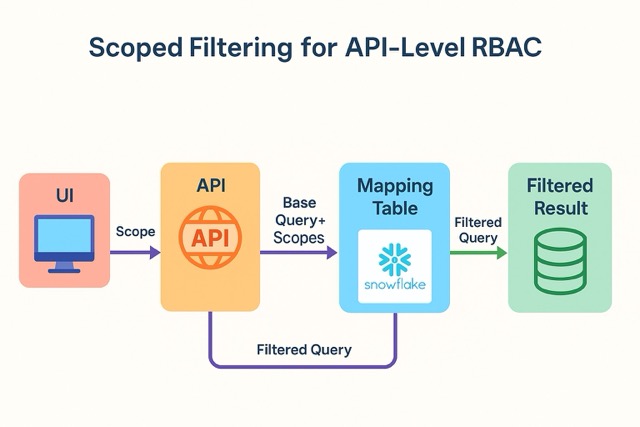
The core idea is simple: your application UI sends a scope along with every request — a clear definition of the data the user is allowed to access. This scope is then used by your backend to filter the data returned by your APIs.
On the backend, you maintain a mapping table that defines which scopes can access which data. The data source doesn’t matter — it could be Snowflake accounts, AWS regions, or Databricks workspaces. In our case, we store data in accounts uniquely identified by a combination of account_id and region. So our mapping table linked scopes to (account_id, region) pairs.
Once this mapping is in place, implementing RBAC becomes as simple as wrapping your existing APIs with a filtering layer. This wrapper looks up the user’s scope, fetches the allowed (account_id, region) combinations, and applies those as filters to the query, all without modifying your underlying data model or views.
A High-Level Flowchart of Scope Filtering
How to Implement Scoped Filtering (Step-by-Step)
Define and Pass the Scope
The UI must send a “scope” representing the user’s level of access. A scope may be a team, a role, or even just a string identifier for access control, which can be mapped to the various data accounts.
This scope is sent alongside the API request, either as the HTTPS header or within the query parameters of the request.
For additional security, the scope should be made into a permanent component of the API contract such that when no scope is sent, no data is made visible.
Create a Mapping Table
The mapping table defines the bridge between scopes and the data partitions they’re allowed to access. You can store it anywhere the backend can easily query — in our case, we used a Snowflake table.
The columns of the table may include Scope, Account_ID, and Region. Scope can be a list of strings.
The mapping should be such that it supports:
- Multiple scopes per account
- Multiple accounts per scope
- [Optional] Fast querying by scope
Create an RBAC wrapper
What does the API wrapper look like?
WITH BASE_QUERY AS (
    -- Your original query goes here
    %[1]s
),

ACCOUNTS_RBAC AS (
    -- Select allowed accounts for the user’s scope
    %[2]s
)

SELECT
    BASE_QUERY.*
    EXCLUDE RBAC_IDENTIFIER
FROM
    BASE_QUERY
INNER JOIN ACCOUNTS_RBAC
    ON
        BASE_QUERY.RBAC_IDENTIFIER:ACCOUNTID = ACCOUNTS_RBAC.ACCOUNTID
        AND
        BASE_QUERY.RBAC_IDENTIFIER:REGION = ACCOUNTS_RBAC.REGION
- The
BASE_QUERY CTEholds your original query logic — this is your unfiltered API-level data request. The only edit to this is sending back anRBAC_IDENTIFIER, which indicates the account, region, or any other identifier of the data rows. - The
ACCOUNTS_RBAC CTEpulls a list of authorized (account_id, region) pairs based on the user's scope, looked up from your mapping table. - The final
SELECTjoins the two on these identifiers, returning only rows the user is allowed to see. - We exclude
RBAC_IDENTIFIERto prevent leaking internal RBAC metadata.
The ACCOUNTS_RBAC CTE may look like this:
SELECT DISTINCT
    ACCOUNTID,
    REGION
FROM ACCOUNTS
WHERE
    'ROOT' IN (%[1]s)
    OR ARRAYS_OVERLAP(ACCOUNTS.SCOPES, [%[1]s])
UNION DISTINCT
SELECT DISTINCT
    ACCOUNTS.ACCOUNTID,
    'aws-region-agnostic' AS REGION
FROM ACCOUNTS
WHERE
    'ROOT' IN (%[1]s)
    OR ARRAYS_OVERLAP(ACCOUNTS.SCOPES, [%[1]s])
Here, two things to consider are:
- Having a ROOT scope that has access to everything
- Handling edge cases where the region is agnostic
And that’s it!
By wrapping your APIs with this scoped filtering layer:
- You avoid re-architecting your data platform.
- You gain clear, auditable RBAC enforcement.
- You retain flexibility for future migration to native solutions like Snowflake RAPs.
Real-World Considerations
Scoped filtering is simple, flexible, and easy to retrofit into existing systems — but like any access control model, its real-world application comes with trade-offs and operational nuances.
1. It’s Still Centralized Logic — So Treat It Carefully
While it is not a global policy like Snowflake’s RAP, it still is a central gatekeeper. Any bugs in the logic with respect to joins, bad scopes, etc., could still lead to unauthorized access or unexpected missing rows!
Edge case testing and unit tests can help with these.
2. Scope Lifecycle Can Be Tricky to Manage
Over time, the scopes can get tricky to manage — teams might split and require sub-scopes, there might be an ask for dynamic scopes, etc, and since our mapping table is manually mapped, that can be hard to manage.
3. Performance Considerations
At the end of the day, we are running a SQL query, which will have a cost associated with it based on how large your mapping table gets. Joins can be expensive, and data can be multi-regional.
Caching can be a possible solution for this. Indexing might also help.
Conclusion
RBAC is an essential part of any modern data platform. But introducing it into an existing codebase doesn't always require a full-blown architectural overhaul.
Scoped filtering offers a practical bridge — a lightweight, API-level enforcement mechanism that’s straightforward to implement, easy to debug, and flexible enough to support your product until native RBAC solutions like Snowflake’s Row Access Policies can be adopted. It allows teams to move fast while staying secure.
Start small. Build over time. Tighten when you can.
Scoped filtering is a great place to begin.
Opinions expressed by DZone contributors are their own.
Comments