

SELECT AI Query Integration Using Oracle Autonomous Database 26AI and OpenAI
A custom framework testing Oracle 26ai’s ability to convert natural language into SQL using the 22 TPC-H benchmark. With no prompt engineering, it achieves high accuracy.
Join the DZone community and get the full member experience.
Join For FreeThis is one of the first studies on Oracle 26 AI, which was launched in January 2026. Instead of writing complex SQL queries, Oracle Autonomous Database introduced Oracle 26ai, which uses natural-language programming techniques to write SQL queries. As part of this research paper, I am examining the capabilities of the SELECT AI. I will be examining the accuracy and latency of LLMs.
Setup
I used approximately 10 GB of data generated by my Python script (the underlying tables are not different from what is available in TPC-H and Kaggle). I inserted my own data to enable this in a faster way. Please refer to https://github.com/sanmish4ds/oracle26ai-eval/blob/main/data_setup.py.
I have also created an Oracle Autonomous Database environment, which is free, and I found it online easy enough for a 5–10 minute setup:
- Sign up for Oracle Cloud.
- Go to Autonomous Database in the OCI console.
- Click "Create Autonomous Database."
- Select the "Always Free" tier.
- Choose "Data Warehouse" workload.
- Version: 26ai.
- Download wallet (credentials).
- You'll get a wallet.zip file with connection info.
- Once you follow the above and log in, create an OpenAI or any LLM key. I used OpenAI.
SQL
BEGIN DBMS_CLOUD.CREATE_CREDENTIAL( credential_name => 'OPENAI_CRED', username => 'openai', password => 'sk-your-openai-api-key-here' -- Get from openai.com ); END; / - Configure Select AI to use OpenAI.
SQL
BEGIN DBMS_CLOUD_AI.CREATE_PROFILE( profile_name => 'EVAL_PROFILE', attributes => '{"provider": "openai", "credential_name": "OPENAI_CRED", "model": "gpt-4", "temperature": 0.1, "max_tokens": 1000}' ); END; / - Set as the default profile.
SQL
BEGIN DBMS_CLOUD_AI.SET_PROFILE(profile_name => 'EVAL_PROFILE'); END; / - Test it works!
SQL
SELECT DBMS_CLOUD_AI.GENERATE(
         prompt       => 'show me all customer ',
         profile_name => 'OPENAI_GPT4',
         action       => 'runsql'
       ) FROM DUAL;
Refer to the following GitHub file to further see the file https://github.com/sanmish4ds/oracle26ai-eval/blob/main/Data-Setup-Help-Sqls-26ai.sql.
I have created the NL_SQL_TEST_QUERIES table with 22 TPC-H benchmark queries (simple/medium/complex) and stored the ground truth SQL results as a comparison baseline. We are all set to test how SELECT AI works and the accuracy with which it creates SQL queries.
Here is the ground truth Queries link on GitHub: https://github.com/sanmish4ds/oracle26ai-eval/blob/main/TPCH_22_QUERIES.txt.
Execution
Here is the Python project structure:
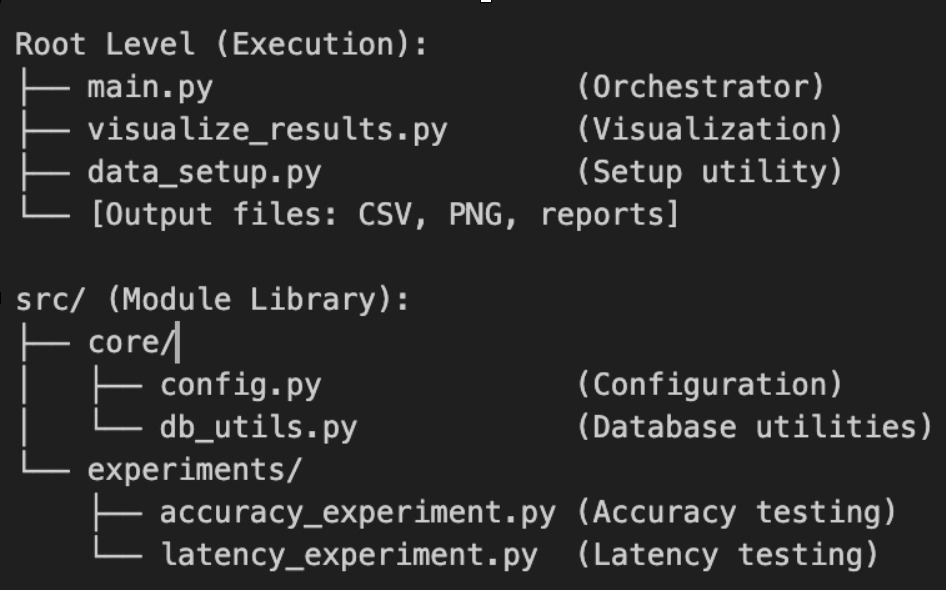
I created a Python orchestrator (main.py) that runs two experiments:
- Accuract test
- Latency test
Accuracy Test
The accuracy test compares AI-generated SQL result counts with ground truth.
Step-by-Step
- Load ground truth questions: Gets 22 test questions ordered Q1-Q22
- For each question:
- Generate SQL: Asks Oracle AI to write SQL from the English question (using
DBMS_CLOUD_AI) - Run AI SQL: Run the AI-generated SQL and counts results using
COUNT(*) - Run ground truth SQL: Run the ground truth SQL and counts results
- Compare: Checks if both returned the same number of rows
- Generate SQL: Asks Oracle AI to write SQL from the English question (using
- Smart pattern detection:
- If row counts of both AI and Ground Truth match → marks as successful.
- Also recognize equivalent SQL patterns (e.g.,
ROWNUMvs.FETCH FIRST). Sometimes the LLM chooses a different—and even better—approach for generating queries; for example, it may avoid usingCOUNT(*)when counting rows.
- Save results: Saves to a CSV file with columns:
query_id, question, AI SQL, row counts, success status, and visualizes the comparison.
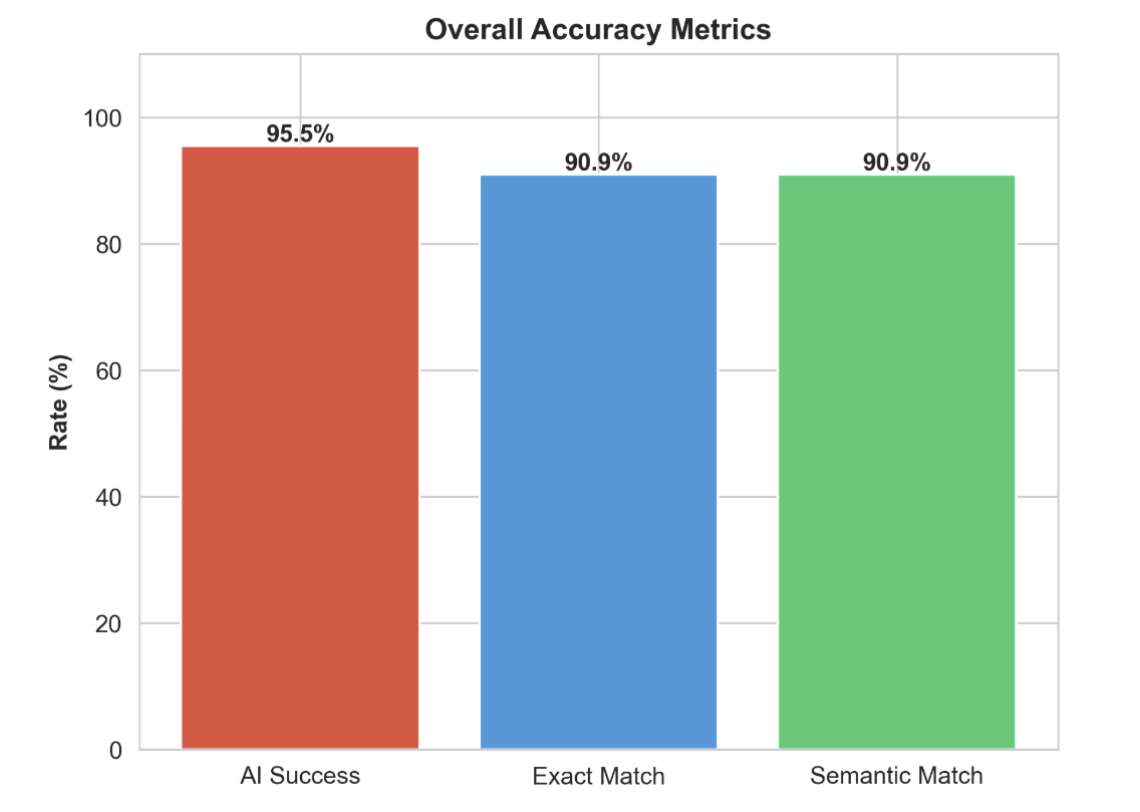
Accuracy Test Summary and Result Visualization
Total queries tested: 22
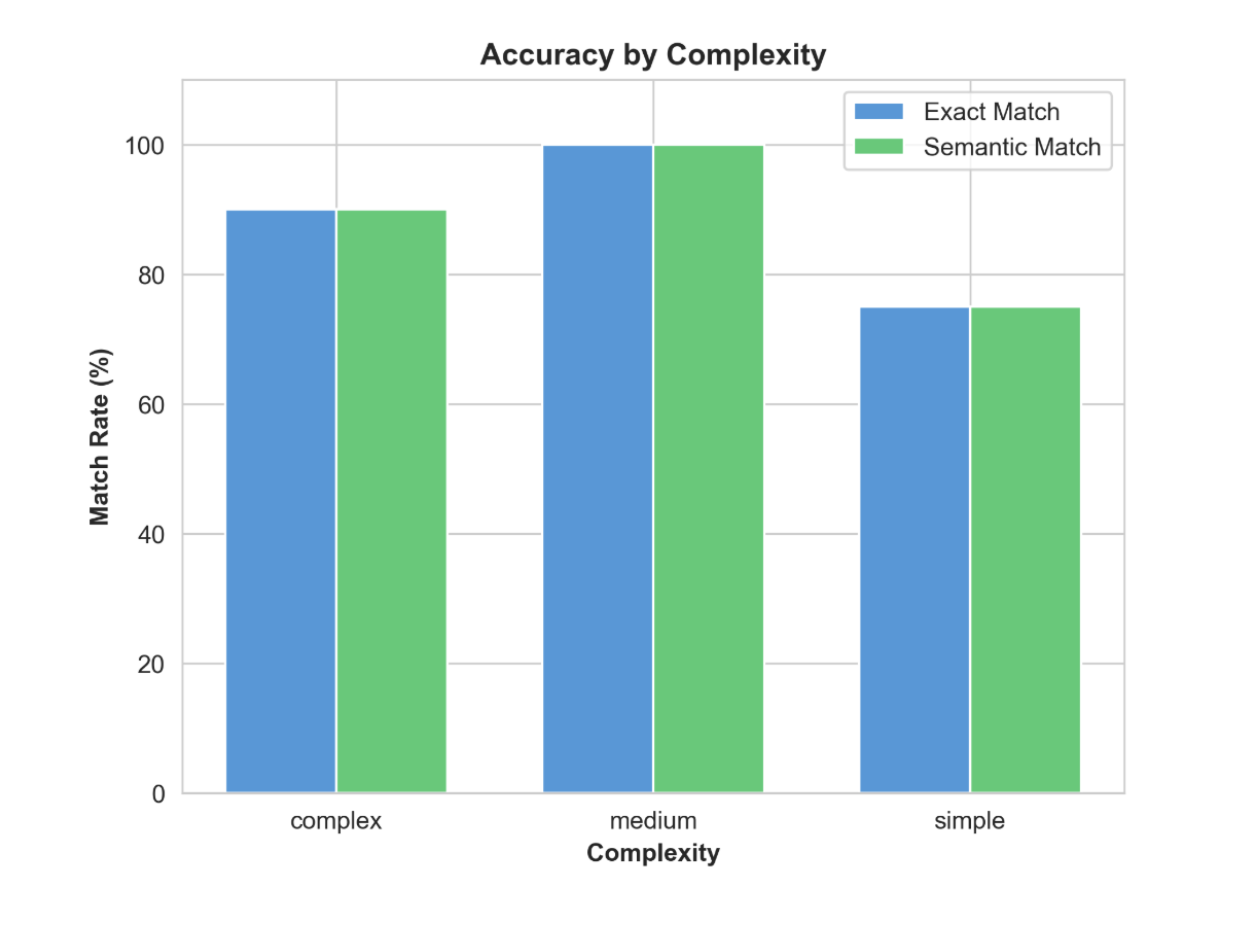
By SQL complexity: The table below shows that, even though queries are simpler, the LLM is not giving an exact match, so we probably need a better prompt.
| Category | Success Rate | Exact Match | Semantic Match | Total Queries |
| Complex | 90.0% | 90.0% | 90.0% | 10 |
| Medium | 100.0% | 100.0% | 100.0% | 8 |
| Simple | 100.0% | 75.0% | 75.0% | 4 |
| Overall Total | 95.5% | 90.9% | 90.9% | 22 |
Accuracy Metrics Visually Presented by Graphs
Latency Test
The latency test measures LLM generation time and Oracle execution time.
Step-by-Step
- Load questions: Gets 22 ground truth test questions
- For each question (3-stage timing):
- Stage 1: LLM generation time (thinking)
- Asks Oracle AI to generate SQL from English
- Stops before running the SQL
- Records how long AI took to think and write the SQL
- Result:
llm_latency_ms(e.g., 2500ms = 2.5 seconds)
- Stage 2: Oracle execution time (doing)
- Runs the ground truth SQL
- Records database query execution time
- Result:
oracle_exe_ms(e.g., 500ms = 0.5 seconds)
- Stage 3: Ground truth execution
- Runs the correct SQL to compare timing
- Records for comparison
- Stage 1: LLM generation time (thinking)
- Calculate metrics:
- Total time = LLM time + Oracle execution time
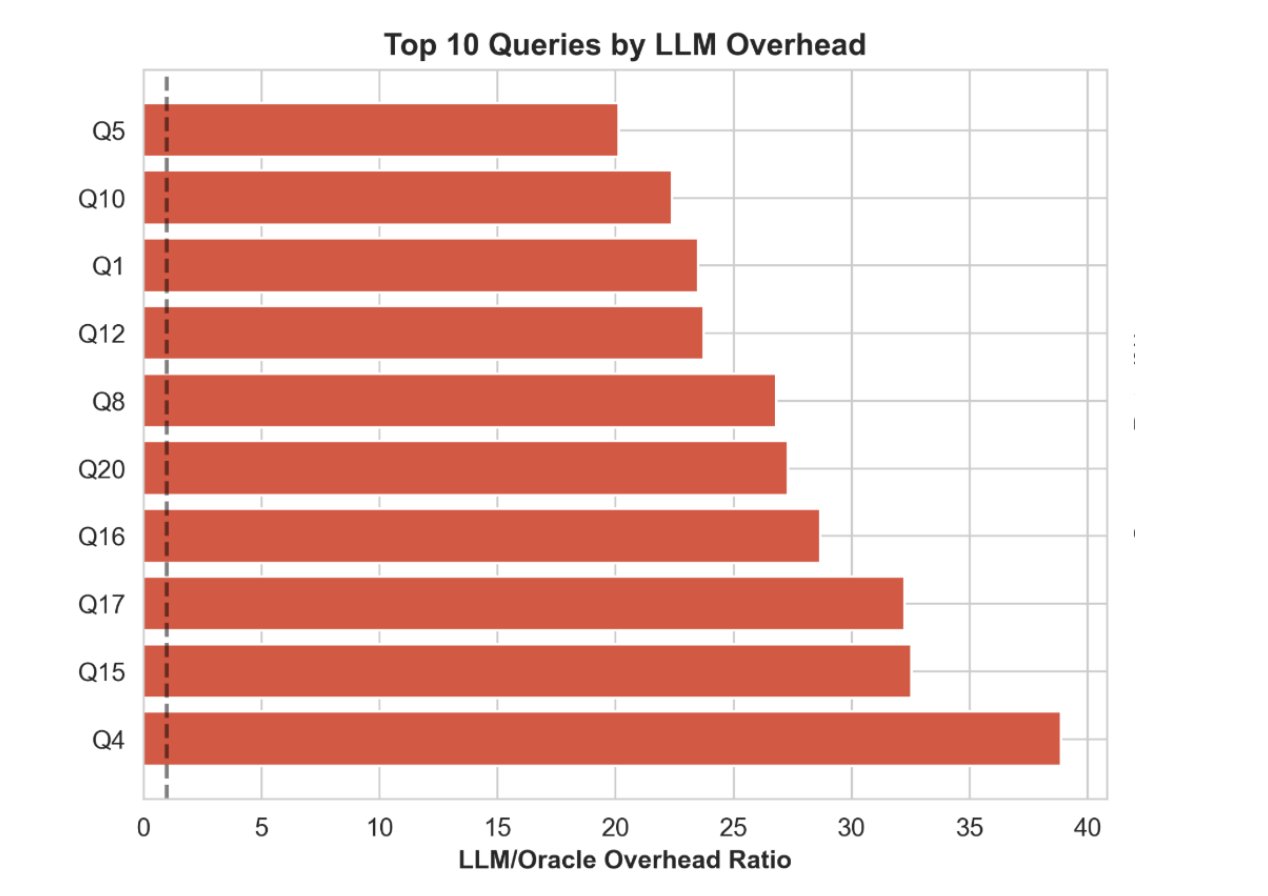
- Overhead ratio = LLM time ÷ Oracle time (how much slower is LLM vs. SQL?)
- Example: If AI takes 3000ms and database takes 1000ms → Ratio = 3x (AI is 3x slower than database)
- Save and report:
- Saves to CSV with columns: query_id, llm_latency_ms, oracle_exe_ms, total_latency_ms, overhead_ratio
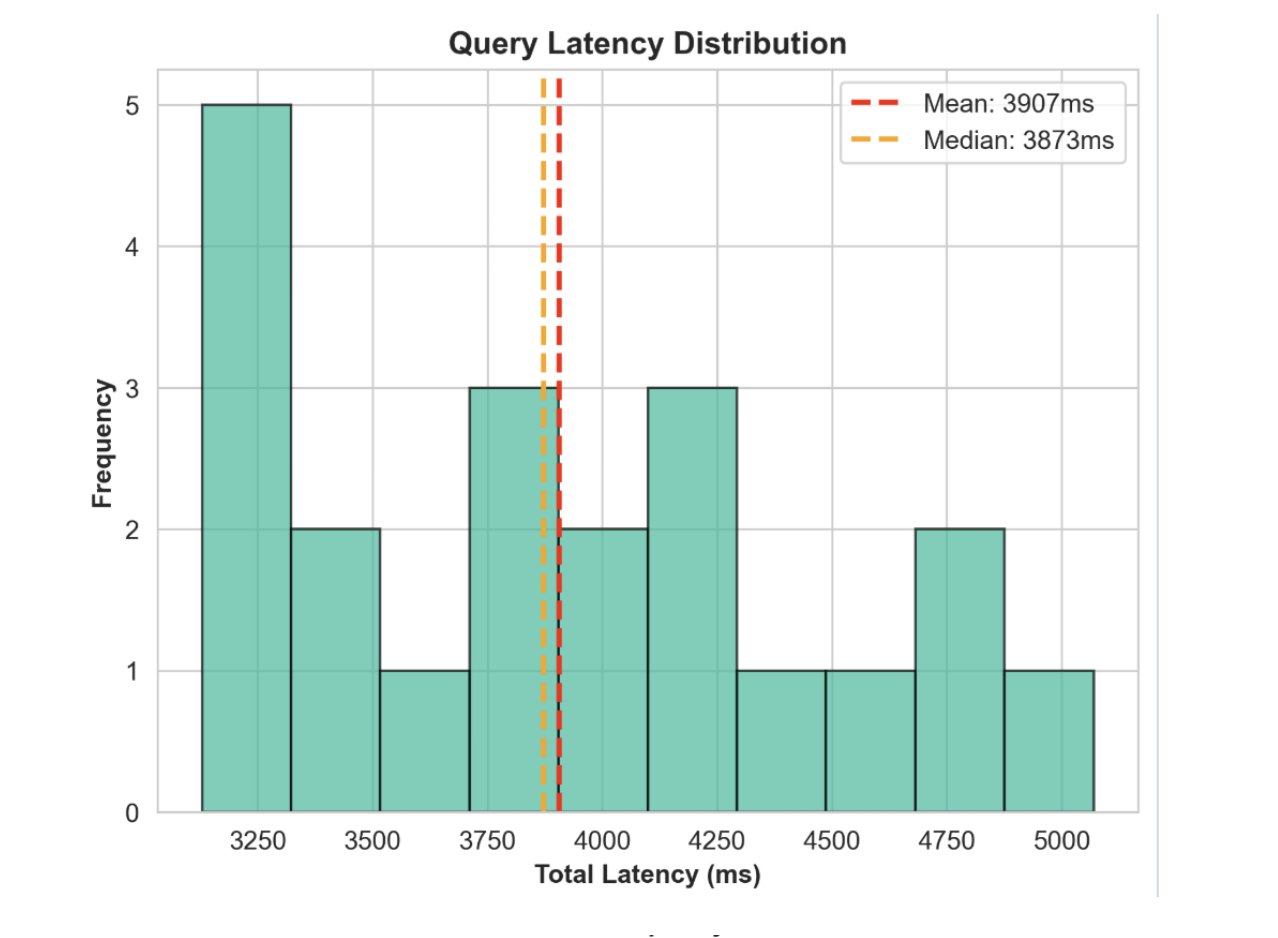
- Prints statistics: Mean, median, P95, P99 latencies
- Shows breakdown: "Average LLM: 3500ms, Average Oracle: 500ms, Ratio: 7x"
Latency Test Summary and Result Visualization
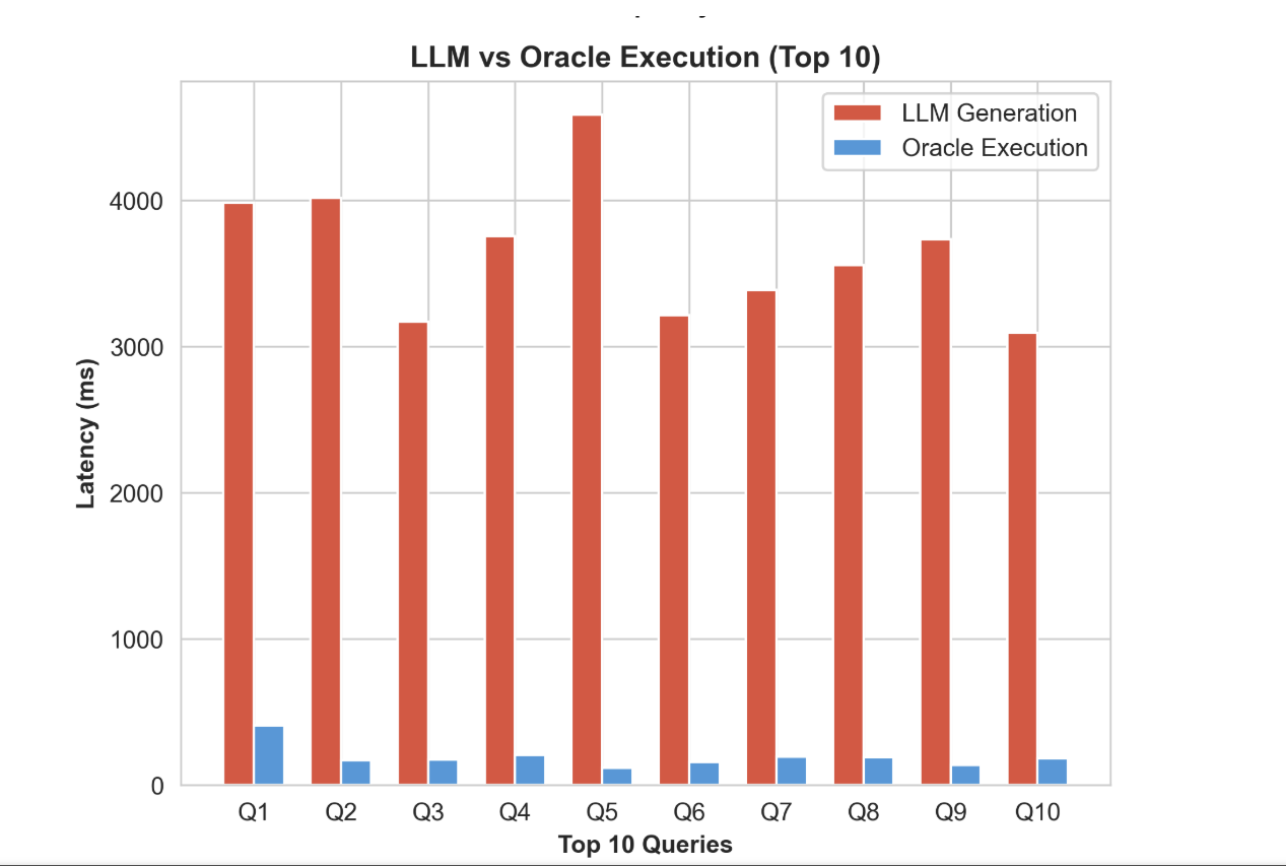
Latency analysis: LLM is doing the heavy lifting, as shown in the table below.
| Metric | Latency (ms) |
| Mean (Average) | 3,906.64 ms |
| Median | 3,872.82 ms |
| P95 (95th Percentile) | 4,812.40 ms |
| P99 (99th Percentile) | 5,018.30 ms |
Latency breakdown: The table below explains that the time spent during SQL by the LLM generative phase is significantly more time-intensive than the execution phase.
| Component | Avg. Time (ms) | % of Total Latency |
| LLM Generation | 3,691.35 ms | 94.5% |
| Oracle Execution | 215.29 ms | 5.5% |
| Total | 3,906.64 ms | 100% |
Visualization Using a Graph
Conclusion
I built a comprehensive framework to measure Oracle Database 26ai's capability to generate SQL from natural language, utilizing 22 TPC-H benchmark queries. While this technology is highly promising and can save developers, engineers, and data scientists significant time, thorough validation remains essential.
One of the most critical observations in my research is the model's ability to generate efficient queries; for instance, where the ground truth was a broad COUNT(*), the AI intelligently selected only the specific columns required.
Do note that even the latency metrics indicate the LLM takes time to generate SQL, it is important to understand that a developer would likely take longer to manually draft a complete, complex query.
I kept prompt engineering outside the current scope of my research, as it has the potential to drive even higher accuracy, making SELECT AI of Oracle 26ai an invaluable tool for software engineers.
Refer to the GitHub code repo for full functional code: https://github.com/sanmish4ds/oracle26ai-eval/tree/main.
Opinions expressed by DZone contributors are their own.
Comments