

From Agent AI to Agentic AI: Building Self-Healing Kubernetes Clusters That Learn
Evolving from reactive Agent AI to autonomous Agentic AI: a self-healing Kubernetes system that learns from fixes and applies patterns automatically.
 CORE
·
CORE
·
Join the DZone community and get the full member experience.
Join For FreeIn Part 1: AI-Driven Kubernetes Diagnostics, we built an AI agent that analyzes Kubernetes pod failures and suggests fixes. It works when you're at your desk, ready to approve each action.
For the purposes of this article, here's a scenario.
Last Tuesday at 2:47 AM, a memory-hungry pod exceeded its 128Mi limit and got OOMKilled. The deployment restarted it. Same result. Another restart. Another OOMKill. By morning, the pod had crashed 47 times.
The diagnostic agent could have fixed this in 30 seconds. But no one was there to run it. And this is the fundamental problem with reactive systems: they wait for humans.
In Part 1, we built a tool that needs you to ask it for help. What we need is a system that notices problems and fixes them while you sleep.
That's what Part 2 is about.
What Changed
The original system (Agent AI) worked like this:
1. You run the script2. It scans for problems3. It analyzes each issue with GPT-44. It shows you recommendations5. You approve or reject each fix6. It executes approved actions7. Script ends
This works fine for interactive troubleshooting. But it has clear limits:
- Requires human presence
- No memory of past fixes
- Repeats the same analysis for identical issues
- Can't handle problems outside business hours
The new system (Agentic AI) works differently:
1. Starts monitoring automatically2. Detects issues as they occur3. Plans multi-step fixes4. Executes fixes without approval5. Stores what worked6. Applies learned patterns to new issues7. Continues indefinitely
The key difference: the agentic AI learns. The first time it sees an OOMKilled pod, it might try 256Mi, fail, then try 512Mi and succeed. The second time it sees a similar pod? It goes straight to 512Mi.
How It Works
The Core Loop
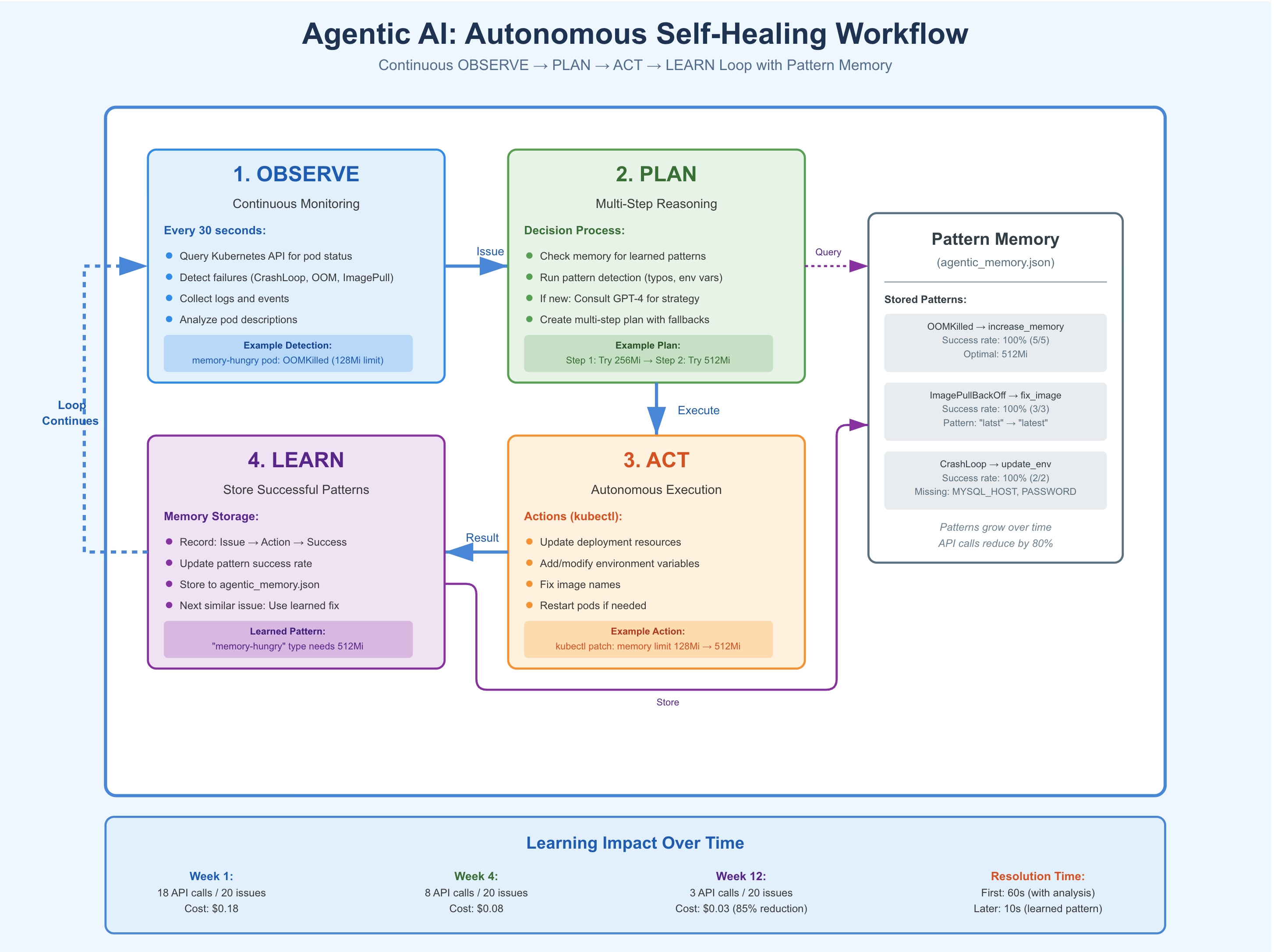
The system runs four operations continuously:
- OBSERVE Every 30 seconds, scan all pods in the namespace. Look for failures: CrashLoopBackOff, ImagePullBackOff, OOMKilled, probe failures. Collect logs, events, and pod descriptions for any unhealthy pod.
- PLAN For each issue, create a remediation plan. First, check if we've seen this before and have a known solution. If not, analyze the problem. Some patterns are obvious (image name typos, missing environment variables). For complex issues, consult GPT-4 for a multi-step plan.
- ACT Execute the plan. This might mean fixing an image name, adding environment variables, increasing memory limits, or restarting a pod. Take action immediately without waiting for approval.
- LEARN Store what worked. If a fix succeeds, save the pattern: "When you see X issue with Y symptoms, action Z resolves it." Next time, skip the analysis and go straight to Z.
The diagram below illustrates this continuous autonomous loop:
Pattern Detection
Before consulting GPT-4, the system checks for common patterns:
Image typos
IMAGE_TYPO_MAP = {
    "apline": "alpine",
    "latst": "latest",
    "ngnix": "nginx",
    "ubunut": "ubuntu"
}
When a pod shows ImagePullBackOff, extract the image name from the pod description. Check against the typo map. If "apline:3.18" is found, correct it to "alpine:3.18" instantly. No API call needed.
Missing environment variables
Parse pod logs for this pattern:
MYSQL_HOST is:MYSQL_ROOT_PASSWORD is:ERROR: Missing required environment variables!
When variable names appear empty in logs, add them with sensible defaults. For PASSWORD variables, use "password123". For HOST variables, use "localhost". This fixes the immediate problem and gets the pod running.
OOMKilled patterns
When a pod gets OOMKilled, the system doesn't just restart it. It increases the memory limit. First attempt: double it. Still fails? Double again. When it succeeds, store the working value. Next similar pod: apply the known-good memory limit immediately.
Memory System
The learning happens through a simple JSON file:
{
  "attempts": [
    {
      "issue": {
        "pod_name": "memory-hungry-abc123",
        "status": "Terminated",
        "reason": "OOMKilled"
      },
      "action": "increase_memory",
      "details": {"new_limit": "512Mi"},
      "success": true,
      "timestamp": "2025-10-16T10:30:45"
    }
  ],
  "patterns": {
    "Terminated_OOMKilled": {
      "successful_actions": [
        {
          "action": "increase_memory",
          "details": {"new_limit": "512Mi"}
        }
      ],
      "success_count": 5,
      "total_count": 5
    }
  }
}
Each remediation attempt gets logged. Successful patterns get stored. When a similar issue appears, the system checks patterns first. If it finds a match with a high success rate, it skips the GPT-4 call and applies the known fix.
Quick Setup
To try this yourself, you need Python 3.8+, kubectl configured, and an OpenAI API key. The setup takes about 5 minutes:
git clone https://github.com/opscart/k8s-ai-diagnostics.git
cd k8s-ai-diagnostics/agentic-ai

python3 -m venv venv
source venv/bin/activate
pip install -r requirements.txt
export OPENAI_API_KEY='your-key'

# Deploy test scenarios (broken pods)
cd test-scenarios
./deploy-scenarios.sh
cd ..

# Start autonomous monitor
python3 agentic_monitor.py --namespace agentic-demo --interval 30
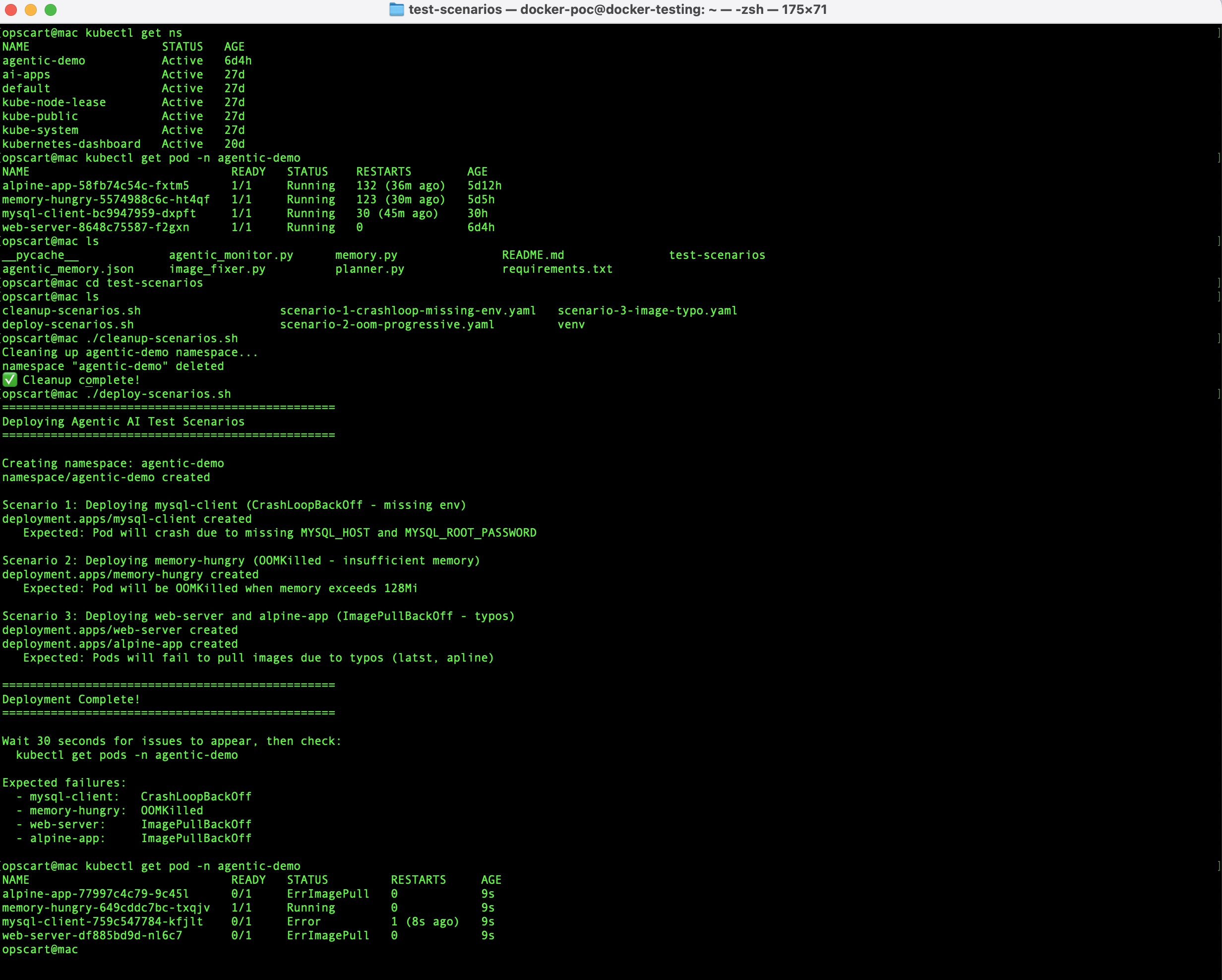
The test scenarios intentionally deploy broken pods, including mysql-client (missing env vars), memory-hungry (OOMKilled), and web-server/alpine-app (image typos). The monitor detects and fixes them autonomously.
For detailed setup instructions, environment configuration, and troubleshooting, see the complete guide.
Real Examples
Example 1: Image Typo
First encounter
[OBSERVE] Found ImagePullBackOff: web-server-abc123
[PLAN] Pattern detection: "latst" found, correcting to "latest"
[ACT] Updated image to nginx:latest
[LEARN] Stored: ImagePullBackOff + "latst" typo → fix_image_name
Result: Fixed in one iteration, 5 seconds. No GPT-4 call. Cost: $0.
Why this matters: Someone will make this typo again. When they do, the system fixes it instantly. The same mistake never causes downtime twice.
Example 2: Missing Environment Variables
First encounter
ITERATION 1 - 10:30:00
[OBSERVE] Found CrashLoopBackOff: mysql-client-def456
[PLAN] Log analysis detected:
  MYSQL_HOST is:
  MYSQL_ROOT_PASSWORD is:
  ERROR: Missing required environment variables!
[PLAN] Adding env vars:
  MYSQL_HOST = localhost
  MYSQL_ROOT_PASSWORD = password123
[ACT] Updated deployment mysql-client
[LEARN] Stored pattern
Next iteration: Pod running
Total time: 30 seconds
Why this matters: The system analyzed logs, understood the problem, and fixed it. No human needed to read error messages or figure out what environment variables to add.
Example 3: Progressive Memory Learning
This is where learning becomes visible.
Week 1, Monday - First OOMKilled incident
ITERATION 1 - 14:00:00
[OBSERVE] Found OOMKilled: data-processor-ghi789 (limit: 128Mi)
[PLAN] Consulting AI for remediation strategy
  Step 1: Try 256Mi
  Step 2: If fails, try 512Mi
  Step 3: If fails, try 1Gi
[ACT] Increased memory to 256Mi

ITERATION 2 - 14:00:30
[OBSERVE] Still OOMKilled: data-processor-ghi789 (limit: 256Mi)
[ACT] Increased memory to 512Mi

ITERATION 3 - 14:01:00
[OBSERVE] No issues - pod running
[LEARN] Stored: data-processor needs 512Mi
Total resolution time: 60 seconds
API calls: 1
Week 1, Thursday - Similar pod deployed
ITERATION 1 - 11:30:00
[OBSERVE] Found OOMKilled: data-processor-v2-jkl012 (limit: 128Mi)
[PLAN] Found learned pattern: similar pods need 512Mi
[ACT] Increased memory to 512Mi

ITERATION 2 - 11:30:30
[OBSERVE] No issues - pod running
[LEARN] Reinforced pattern
Total resolution time: 30 seconds.
API calls: 0.
The system remembered.
Week 12 - Same scenario: Still takes 30 seconds to fix. Still costs $0. This is what learning means in practice.
Implementation
The code is available at github.com/opscart/k8s-ai-diagnostics. Here's how to run it:
# Clone repository
git clone https://github.com/opscart/k8s-ai-diagnostics.git
cd k8s-ai-diagnostics/agentic-ai

# Setup
python3 -m venv venv
source venv/bin/activate
pip install -r requirements.txt
export OPENAI_API_KEY='your-key'

# Deploy test scenarios (intentionally broken pods)
cd test-scenarios
./deploy-scenarios.sh
cd ..

# Start autonomous monitor
python3 agentic_monitor.py --namespace agentic-demo --interval 30
The test scenarios include:
- mysql-client: Missing environment variables
- memory-hungry: Insufficient memory (OOMKilled)
- web-server and alpine-app: Image name typos
Watch the monitor detect, fix, and learn from each issue.
Output Format
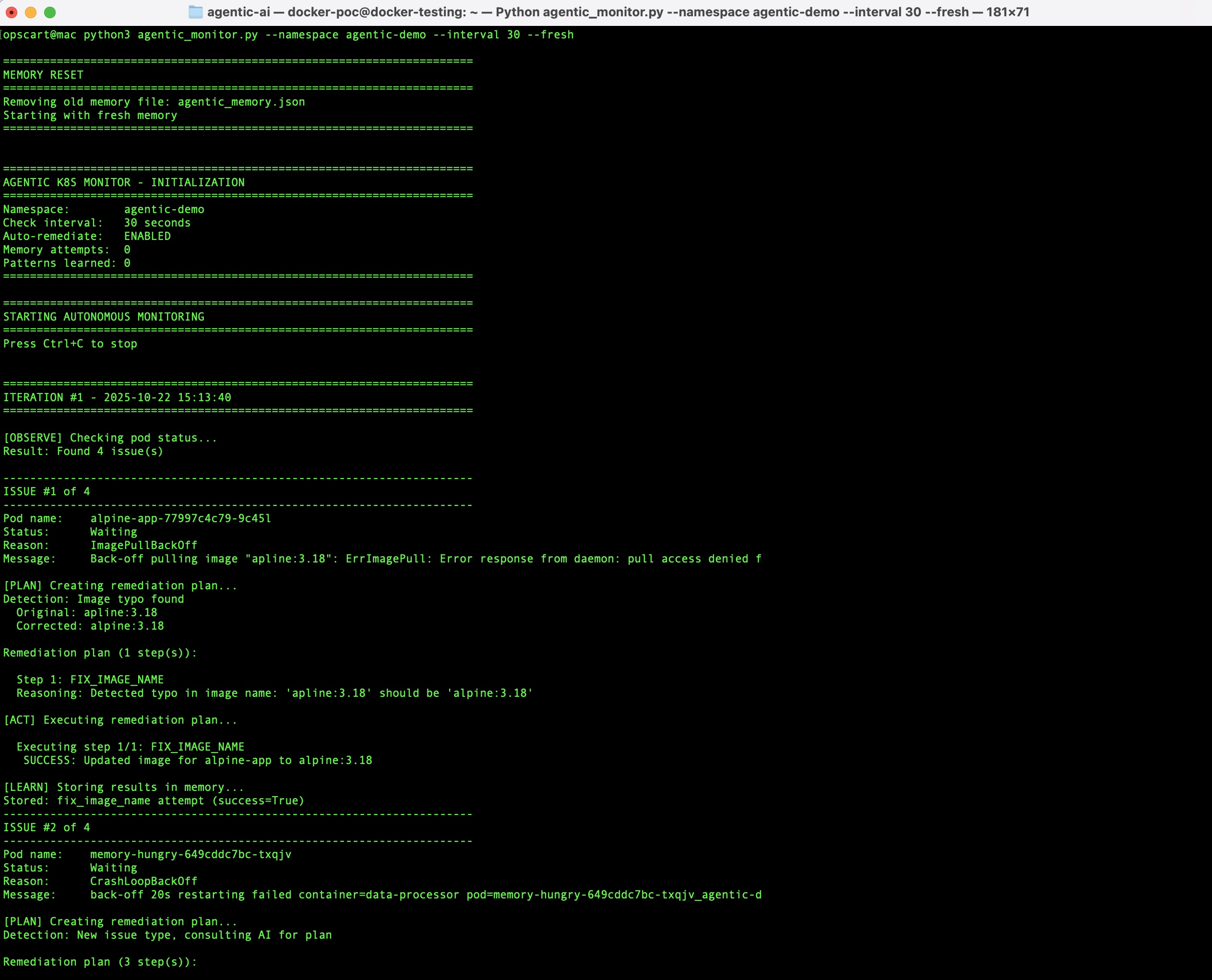
The output is structured for readability:
======================================================================
ITERATION #1 - 2025-10-16 10:30:37
======================================================================

[OBSERVE] Checking pod status...
Result: Found 3 issue(s)

----------------------------------------------------------------------
ISSUE #1 of 3
----------------------------------------------------------------------
Pod name:    mysql-client-759c547784-abc123
Status:      Waiting
Reason:      CrashLoopBackOff

[PLAN] Creating remediation plan...
Detection: Missing environment variables
  MYSQL_HOST = localhost
  MYSQL_ROOT_PASSWORD = password123

Remediation plan (1 step):
  Step 1: UPDATE_ENV
  Reasoning: Pod logs indicate missing environment variables

[ACT] Executing remediation plan...
  Executing step 1/1: UPDATE_ENV
   SUCCESS: Updated deployment mysql-client
   Added environment variables: MYSQL_HOST, MYSQL_ROOT_PASSWORD

[LEARN] Storing results in memory...
Stored: update_env attempt (success=True)

======================================================================
Waiting 30 seconds until next check...
======================================================================
Production Considerations
This is a proof of concept. It demonstrates autonomous remediation and learning, but it's not production-ready as-is. Here's what that means:
What's Missing
Safety mechanisms: The system executes actions immediately without rollback capability. If a fix makes things worse, there's no automatic revert. Production systems need rollback logic, canary deployments, and blast radius limits.
Validation: There's no mechanism to verify a fix actually worked before storing it as a successful pattern. A pod might start running but still be broken. Production systems need health validation periods before considering a fix successful.
Audit and compliance: Actions are logged to console output, not to a permanent audit trail. Many organizations require immutable logs for compliance. The memory file can be edited manually, which wouldn't pass audit requirements.
Resource management: The memory file continues to grow indefinitely. After months of operation, it could contain thousands of entries with no cleanup mechanism. Production systems need log rotation and pattern pruning.
Error boundaries: If the OpenAI API is down or rate-limited, the system fails. No fallback behavior. Production systems need graceful degradation and circuit breakers.
Realistic Deployment Path
Phase 1: Observation (Week 1-2)
Run in observe-only mode:
python3 agentic_monitor.py --namespace dev-sandbox --no-auto
This shows what the system would do without actually doing it. Review the output. Are the plans sensible? Would the actions help or harm?
Phase 2: Controlled Testing (Week 3-4)
Enable auto-remediation in a development namespace:
python3 agentic_monitor.py --namespace dev-test --interval 60
Pick a namespace where failures don't matter. Let the system fix things. Watch for unexpected behavior. Did it make good decisions? Did learned patterns make sense?
Phase 3: Limited Scope (Month 2)
Deploy to non-critical environments with specific failure types enabled:
- Image typo corrections only
- Memory increases with conservative limits
- Environment variable additions with approval
Expand gradually. Add monitoring. Set up alerts for when autonomous fixes fail.
Phase 4: Evaluation
After 2-3 months, evaluate:
- How many issues did it handle correctly?
- Were there any harmful actions?
- Did learning actually reduce repeat incidents?
- Is the API cost reasonable?
Only then consider broader deployment. And even then, keep critical production systems on human-in-the-loop workflows.
Command Options for Safety
The system includes flags for controlled operation:
# Observe only - no actions
python3 agentic_monitor.py --no-auto

# Fresh start - no learned patterns
python3 agentic_monitor.py --fresh

# Longer interval - less aggressive
python3 agentic_monitor.py --interval 300

# Different namespace - isolated testing
python3 agentic_monitor.py --namespace experimental
Use these to control behavior during testing.
What This POC Demonstrates
The value here lies in proving that autonomous learning is effective for Kubernetes operations. The concepts are sound:
- Continuous monitoring catches issues faster than humans
- Pattern detection handles common problems without AI costs
- Learning from successful fixes reduces repeat incidents
- Multi-step reasoning handles complex failures
Building a production system from this requires engineering work. But the POC shows it's worth building.
Results and Tradeoffs
Time to Resolution
Agent AI (Part 1)
- Human reaction time: 5 minutes to several hours
- Analysis time: 15 seconds
- Approval time: 30 seconds to 5 minutes
- Total: Minutes to hours
Agentic AI (Part 2)
- Detection time: 0-30 seconds (check interval)
- Analysis time: 5-15 seconds (first occurrence) or instant (learned pattern)
- Execution time: 5-10 seconds
- Total: 10-60 seconds
For the 2 AM OOMKilled scenario from the introduction: Agent AI requires waking someone up. Agentic AI fixes it in 30 seconds while you sleep.
Learning Efficiency
Track this over time. In the test environment:
Week 1
- 20 incidents handled
- 18 GPT-4 API calls (2 used pattern detection)
- Cost: $0.18
Week 4
- 20 incidents handled
- 8 API calls (12 used learned patterns)
- Cost: $0.08
Week 12
- 20 incidents handled
- 3 API calls (17 used learned patterns)
- Cost: $0.03
The system gets cheaper and faster as it learns. This is the practical benefit of autonomous learning.
Cost Comparison
Assumptions
- 100 pod failures per week
- SRE time: $100/hour
- GPT-4 calls: $0.01 each
Agent AI weekly cost
- API calls: 100 × $0.01 = $1
- Human time: 100 × 5 minutes = 8.3 hours × $100 = $830
- Total: $831/week
Agentic AI weekly cost (after 3 months learning)
- API calls: 20 × $0.01 = $0.20 (80% use learned patterns)
- Human time: $0 (autonomous)
- Total: $0.20/week
The difference isn't the API cost. It's the human time. Even a small reduction in on-call interruptions justifies the development effort.
What You Give Up
Autonomous systems trade control for speed:
- Loss of oversight: The system takes actions without asking. You find out after it happens. Some organizations can't accept this tradeoff, particularly for compliance reasons.
- Debugging complexity: When something goes wrong, you're debugging both the application and the autonomous system. Did the app fail, or did the fix fail? More moving parts mean more failure modes.
- Trust building: Teams need confidence in autonomous systems. This takes time. Even if the system has a 95% success rate, that 5% creates skepticism.
- Maintenance burden: The learning system needs care. Reviewing learned patterns, rotating logs, monitoring API usage, and updating pattern detection. It's not free.
These tradeoffs are real. Weigh them against the benefits for your specific situation.
Conclusion
Part 1 built a diagnostic tool that waits for humans. Part 2 built a system that doesn't wait. The difference: continuous operation and learning from experience.
The autonomous approach isn't always better. Interactive diagnostics make sense for:
- Learning how Kubernetes failures work
- Situations requiring human judgment
- Compliance environments needing approval workflows
- One-time troubleshooting sessions
Autonomous systems make sense for:
- High-volume, repetitive failures
- 24/7 operations without constant staffing
- Environments where downtime costs exceed development costs
- Teams willing to invest in proper monitoring and safeguards
This POC demonstrates that autonomous learning works for Kubernetes operations. It handles real failures, learns from successful fixes, and applies that knowledge to future incidents. The code is available, the approach is practical, and the benefits are measurable.
The remaining work—rollback mechanisms, validation, audit trails, production hardening—is engineering, not research. We know what needs to be built. The question is whether the benefits justify the effort for your environment.
For the complete implementation and detailed comparison between Agent AI and Agentic AI approaches, see the repository at github.com/opscart/k8s-ai-diagnostics.
About the Series:
- Part 1: AI-Driven Kubernetes Diagnostics - Building an interactive diagnostic agent
- Part 2: From Agent AI to Agentic AI: Building Self-Healing Kubernetes Clusters That Learn
- Repository: github.com/opscart/k8s-ai-diagnostics
- Detailed comparison: Agent vs Agentic AI
Opinions expressed by DZone contributors are their own.
Comments