

Running a Self-Hosted WAF in Production: Practical Lessons From SafeLine
Learn how to deploy and configure SafeLine as a self-hosted web application firewall and reverse proxy, with guidance on tuning rules and monitoring threats.
 ·
·
Why Put a WAF in Front of the Application?
Web application firewalls are often introduced as a list of security features: SQL injection protection, cross-site scripting detection, bot mitigation, rate limiting, and access control.
Those capabilities matter, but they are only part of the operational problem. The more difficult questions usually appear after deployment:
- Where should the WAF sit in the traffic path?
- How do we avoid exposing the origin server?
- How do we tune blocking rules without interrupting legitimate users?
- How should security events be investigated?
- What happens when the application has unusual request formats?
- How much control do we retain when using a self-hosted solution?
This article describes how SafeLine can be used as a self-hosted Web Application Firewall and reverse proxy. It focuses on the deployment model, request-processing flow, practical configuration, and operational lessons that matter when protecting real web applications.
The WAF's Position in the Architecture
A WAF operates at the HTTP layer. It can inspect requests before they reach the application and evaluate information such as:
- HTTP methods
- URLs and query parameters
- Request bodies
- Headers and cookies
- Source IP addresses
- Request frequency and behavioral patterns
This position gives the WAF visibility that a network firewall does not have. A network firewall can allow or deny traffic based on addresses and ports, but it usually cannot determine whether a request contains an SQL injection payload or whether a client is repeatedly probing an administrative endpoint.
The WAF also provides a safety boundary around applications that may contain unknown vulnerabilities. It does not replace secure coding, dependency updates, authentication, or database protections. It adds another enforcement point between an untrusted client and the application.
The origin application should accept traffic only from the SafeLine host or from a trusted upstream load balancer. If users can bypass the WAF and connect directly to the origin, an attacker can simply avoid the protection layer.
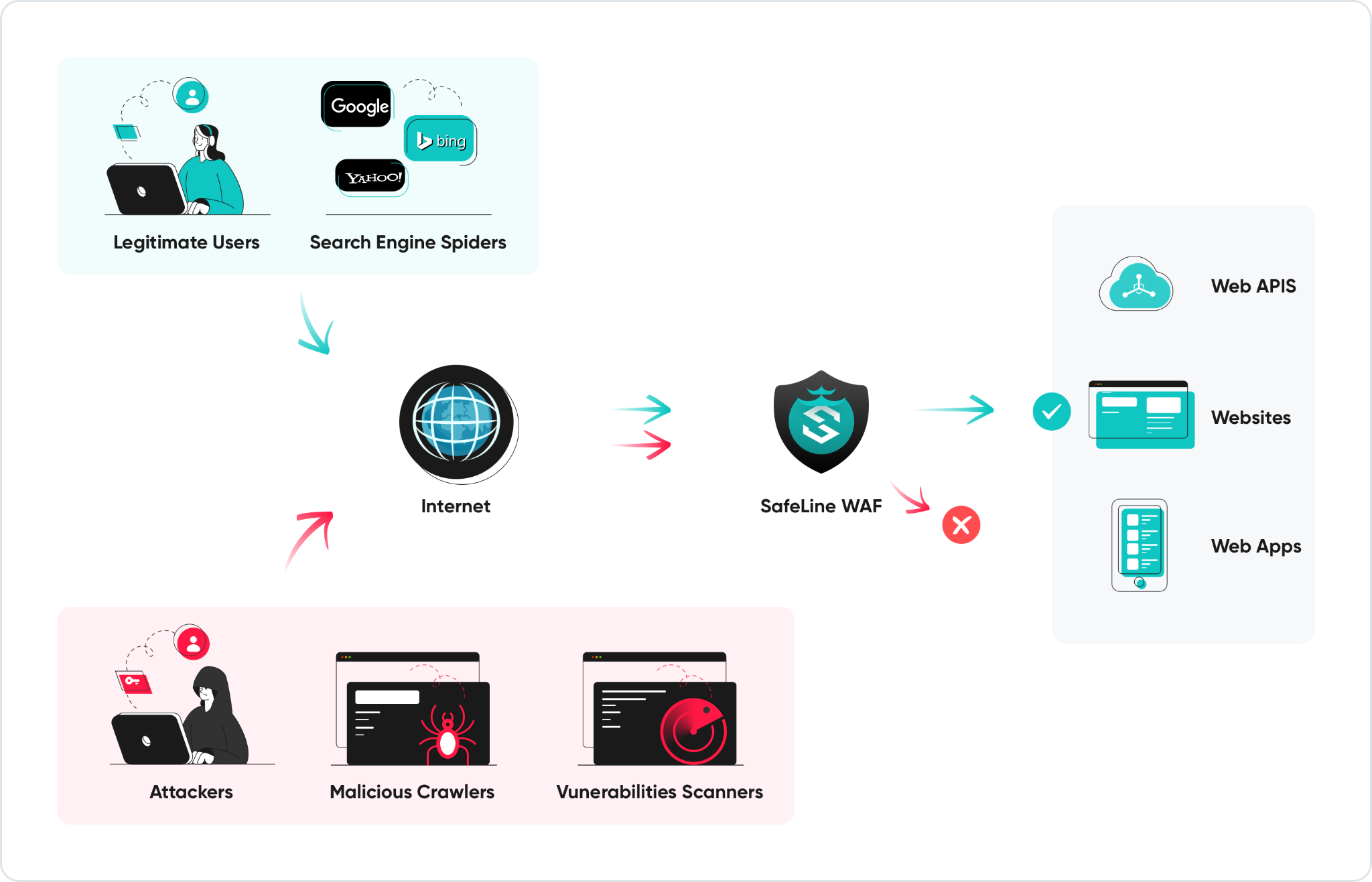
SafeLine's Deployment Model
SafeLine is designed to run in a self-hosted environment. It acts as a reverse proxy, receives traffic for configured applications, analyzes the requests, and forwards acceptable requests to the configured upstream service.
This deployment model is useful for teams that need:
- Control over where traffic and logs are processed
- A WAF that can run on their own infrastructure
- A relatively simple installation process
- Protection for applications deployed on virtual machines, bare-metal servers, or private infrastructure
- A management interface for applications, policies, and security events
SafeLine can be installed on a Linux server using Docker-based deployment. Installation can be completed with a single command:
bash -c "$(curl -fsSLk
https://waf.chaitin.com/release/latest/manager.sh)" -- --en
Full guide to install SafeLine: https://ly.cyberserval.tech/b3QLLSJ.
After installation, the administrator opens the management console, completes the initial setup, and adds the application that needs protection.
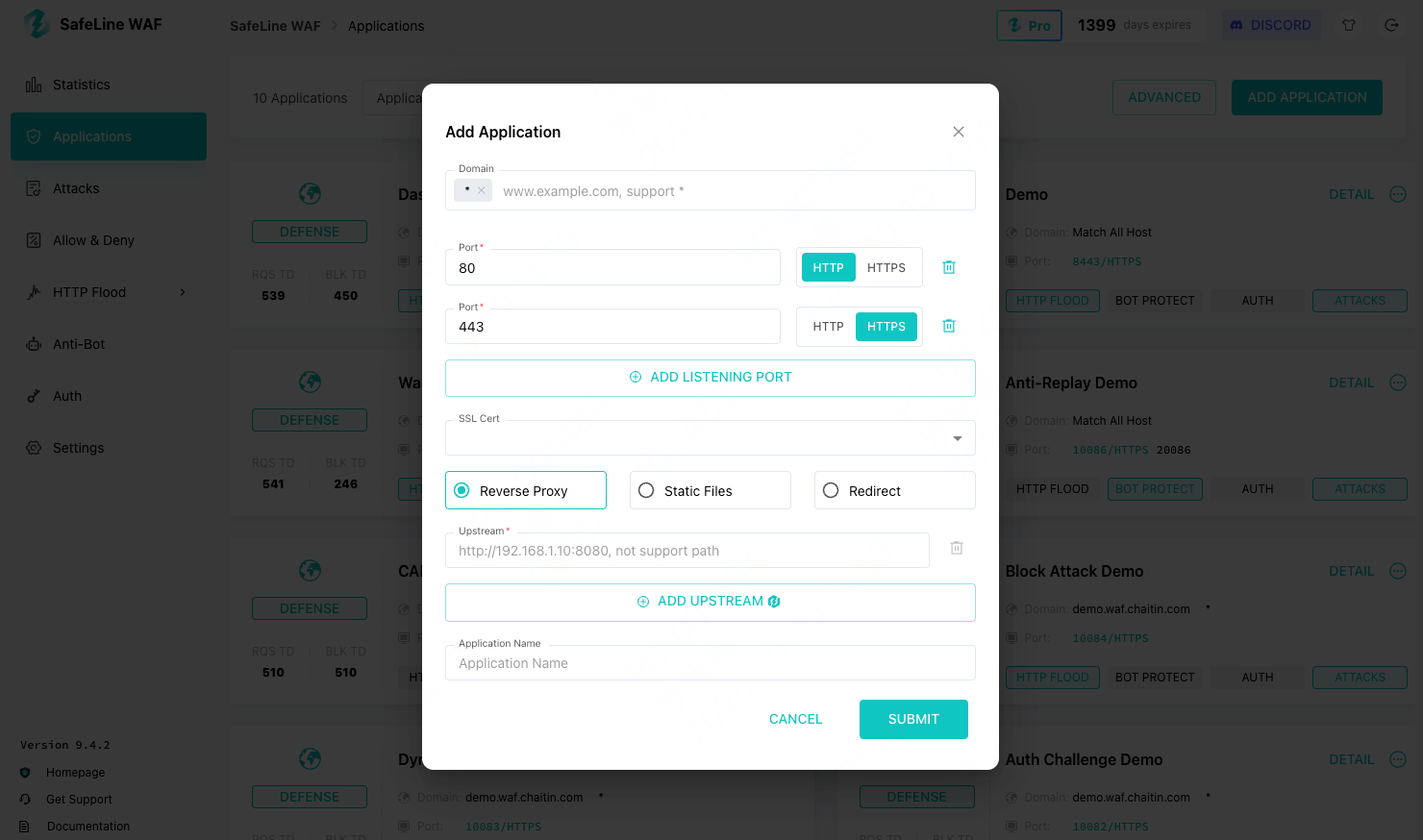
Figure 2. Add the application you want to protect in the SafeLine management console.
For a production deployment, treat the installation host as a security-sensitive system. At minimum, the host should have:
- A supported Linux distribution
- Docker installed and maintained
- Persistent storage for configuration and logs
- Restricted access to the management interface
- A backup strategy for configuration
- Monitoring for CPU, memory, disk, and network usage
The management interface should not be exposed broadly to the public internet. Restricting it by firewall policy, VPN, or an administrative allowlist reduces the attack surface.
How a Request Is Processed
When a request reaches SafeLine, it passes through several conceptual stages.
First, SafeLine identifies the application and routing configuration. It determines which upstream service should receive the request.
Next, it inspects the request structure. Depending on the request, this may include the URL, parameters, headers, cookies, and body content.
The detection engine then evaluates whether the request resembles an attack. Common categories include:
- SQL injection
- Cross-site scripting
- Command injection
- Path traversal
- File inclusion
- Malicious scanners
- Automated abuse
- Excessive request rates
Finally, SafeLine applies the configured action. The request may be allowed and forwarded, logged for observation, challenged, rate limited, or blocked.
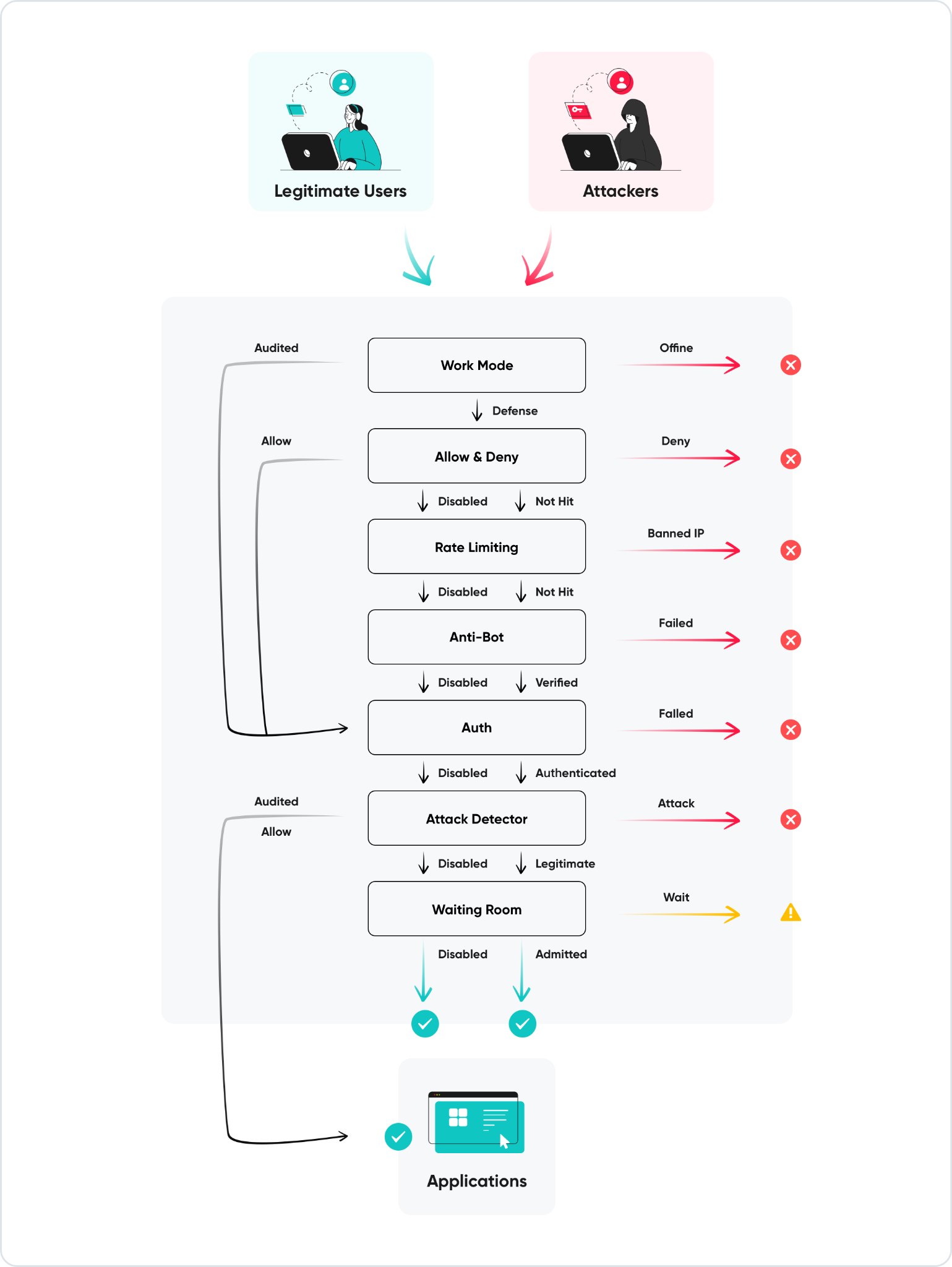
Figure 3. HTTP Request Processing Flow in SafeLine
A request can be observed before enforcement is enabled, allowing the team to identify legitimate traffic that needs a narrow exception. A team should not begin by blocking every suspicious request in a production environment without understanding the application's normal traffic.
A safer rollout sequence is:
- Put the application behind the WAF.
- Observe requests and security events.
- Identify legitimate traffic that may look unusual.
- Adjust application-specific rules.
- Enable blocking for high-confidence attack categories.
- Continue reviewing events after enforcement begins.
Deployment Example
Assume the application listens on port 8080 and the public domain is app.example.com.
The basic workflow is:
- Install SafeLine on a Linux host.
- Point the DNS record for app.example.com to the SafeLine host.
- Add the domain as a protected application.
- Configure HTTPS and certificates.
- Configure the upstream as http://application-host:8080.
- Restrict direct access to the application host.
- Verify that normal requests reach the application.
- Send controlled test requests and confirm that events appear in the dashboard.
The most important network change is often the origin restriction. The application server should no longer accept arbitrary internet traffic. For example, its firewall can permit the application port only from the SafeLine server's private IP address.
This is easy to overlook because the WAF may appear to be working even while the origin remains publicly reachable.
Tuning Without Creating an Availability Problem
A WAF cannot understand every business rule automatically. Some applications intentionally accept content that resembles an attack payload.
Examples include:
- Security testing platforms
- Developer tools that accept code as input
- Search features that process special characters
- APIs that receive structured expressions
- CMS systems with complex administrative requests
The correct response to a false positive is usually a narrow exception. Avoid disabling protection for the entire application when only one endpoint or parameter requires special handling.
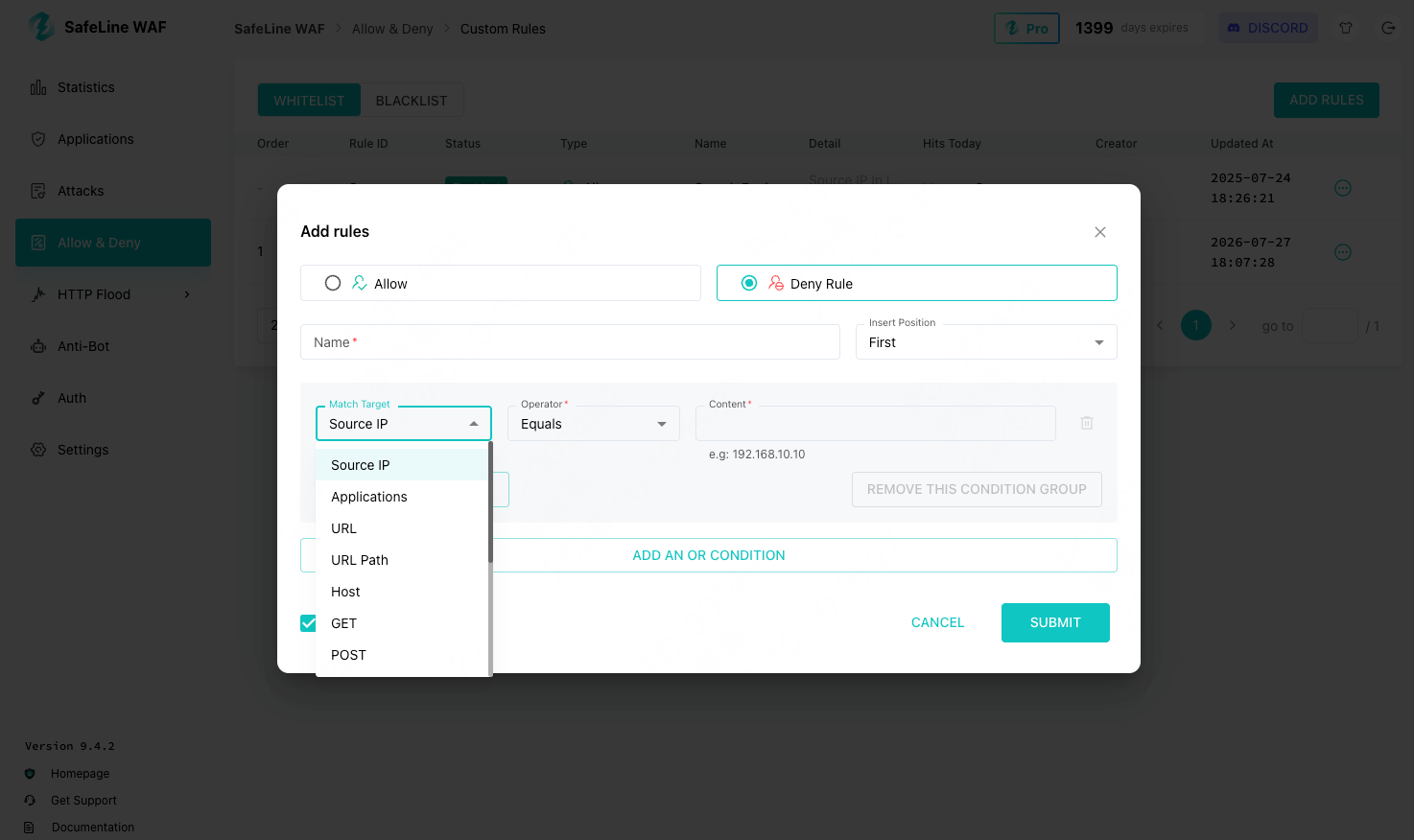
Figure 4. SafeLine’s Custom Allow Rule and Deny Rule Configuration Interface
False-positive handling should move from an observed event to the narrowest possible exception. For example, an exception for /api/search and one request parameter is easier to review than a global allowlist for the source IP. Narrow rules also reduce the chance that an attacker can reuse the exception against other endpoints.
The application team should be involved in this process. Security events are often difficult to interpret without knowing what the endpoint is supposed to accept.
Rate Limiting and Anti-Bot Challenge
Application-layer attacks are not limited to SQL injection or cross-site scripting. Automated traffic can also consume resources, abuse login forms, scrape content, and repeatedly call expensive API endpoints.
SafeLine provides two complementary controls for this type of traffic: Rate Limiting and Anti-bot Challenge.
Rate limiting restricts how frequently a client can access an endpoint. It is useful for protecting login pages, password reset flows, search APIs, file upload endpoints, report-generation APIs, public APIs, and administrative paths.
Anti-bot challenges address a different problem. Instead of relying only on request frequency, they challenge clients that exhibit suspicious automated behavior. Legitimate users can usually complete the challenge, while basic scripts, crawlers, and other automated tools may be unable to proceed.
These controls are most effective when applied according to the behavior and sensitivity of each endpoint. A global request limit may block legitimate users, especially when many users share the same corporate or mobile network address. A challenge may also be inappropriate for machine-to-machine APIs that cannot interact with a browser-based verification flow.
When configuring rate limits and anti-bot protection, consider:
- Requests per IP address
- Requests per account or session
- Requests per endpoint
- Burst behavior
- Response codes
- Legitimate client retry behavior
- Whether the endpoint is accessed by browsers, mobile clients, or APIs
- Geographic and network distribution
- Whether the client can complete an interactive challenge
A useful operational metric is not simply the number of blocked requests or triggered challenges. It is the relationship between automated traffic and application health. If an increase in blocked requests and challenged sessions coincides with lower application latency, fewer authentication failures, and reduced load on expensive endpoints, the controls may be addressing a real operational problem.
The recommended approach is to begin in observation mode, identify the endpoints receiving suspicious automated traffic, and then apply the narrowest suitable control. Rate limiting is usually appropriate for high-frequency access, while anti-bot challenges are more suitable when the goal is to distinguish normal users from automated clients.
Investigating Security Events
A WAF is most useful when its events can support an investigation.
For each event, the operations team should be able to answer:
- Which application was targeted?
- Which endpoint received the request?
- What type of attack was detected?
- When did the activity begin?
- Was the request blocked, challenged, or only logged?
- Did the source continue after the first response?
- Did the application generate errors?
- Are other endpoints or applications seeing the same pattern?
SafeLine's management interface provides a central place to review protection events and traffic activity. It can help teams distinguish isolated scans from persistent automated activity.
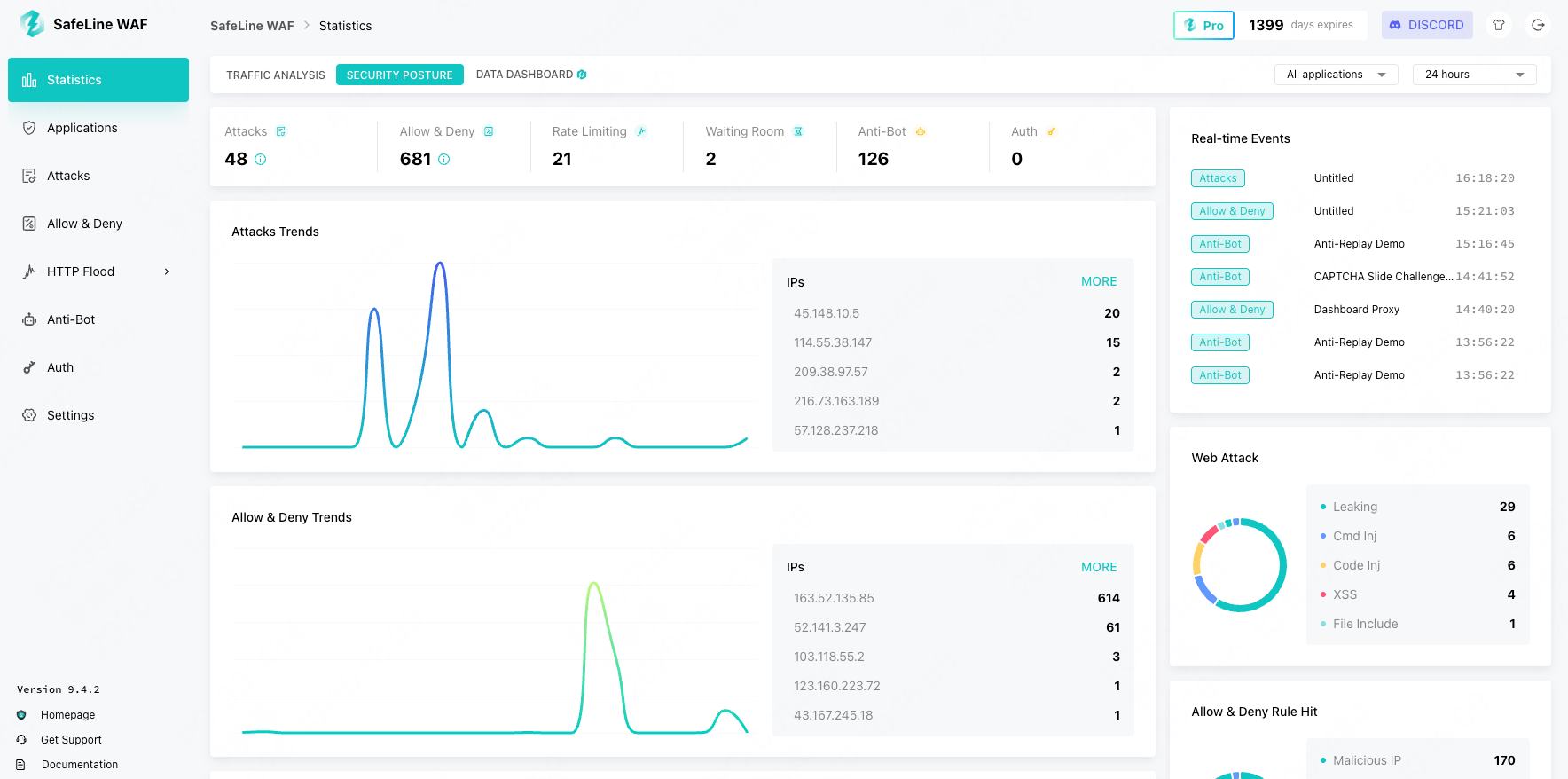
Figure 5. SafeLine’s Security Posture Dashboard
However, WAF logs should be correlated with application and infrastructure logs. A blocked request may be useful evidence, but it does not prove that the application was compromised. Likewise, an allowed request does not prove that the application is safe.
For a complete incident review, correlate WAF events with web server logs, application logs, authentication logs, and host and network telemetry.
SafeLine live demo: https://ly.cyberserval.tech/i61INy7.
SafeLine Pro Annual License Promotion
SafeLine has reached more than 700,000 installations. That number is useful because it reflects broad adoption across different environments, application types, and operational constraints.
To mark this milestone, the SafeLine team is offering a customer feedback discount for a Pro annual license.

Figure 6. SafeLine 700K Installs Promotion Campaign
The promotion details, eligibility requirements, validity period, and redemption process should be confirmed on the campaign page: https://ly.cyberserval.tech/DZAGbHo.
Final Takeaways
A WAF is not valuable simply because it has a long feature list. It is valuable when it can be placed correctly in the request path, tuned for the application, monitored by the operations team, and maintained as part of the broader security architecture.
SafeLine's self-hosted reverse-proxy model makes it practical to introduce application-layer protection without redesigning the application itself. The most important implementation lessons are:
- Ensure all public traffic passes through the WAF.
- Restrict direct access to the origin server.
- Start with observation before enabling aggressive blocking.
- Handle false positives with narrow, reviewable exceptions.
- Apply rate limits to specific high-risk endpoints.
- Correlate WAF events with application and infrastructure logs.
- Continue using secure development practices alongside the WAF.
- Evaluate commercial licensing based on operational requirements rather than feature count alone.
Comments