

Mastering Serverless Architecture: Event-Driven Design with Azure Functions and Cosmos DB
A comprehensive guide to building serverless event-driven systems using Azure Functions and Cosmos DB, featuring real-world patterns.
 CORE
·
CORE
·
Join the DZone community and get the full member experience.
Join For FreeThe landscape of modern software engineering has shifted dramatically from monolithic, stateful applications toward decoupled, event-driven architectures. At the forefront of this evolution is the combination of Azure Functions and Azure Cosmos DB. This powerful duo enables developers to build systems that are massively scalable, cost-effective, and resilient.
In this article, we take a deep dive into the technical intricacies of building end-to-end event-driven systems. We explore the mechanics of the Cosmos DB Change Feed, architectural design patterns such as CQRS and Materialized Views, and practical implementation strategies for production-grade serverless applications.
1. The Serverless Paradigm Shift
Traditional application design often relies on polling or synchronous request-response cycles. While intuitive, these patterns struggle with elasticity and resource utilization. Serverless architecture abstracts the underlying infrastructure, allowing the compute layer (Azure Functions) to react dynamically to changes in the data layer (Cosmos DB).
Why Azure Functions + Cosmos DB?
Seamless Integration: Azure Functions includes a native Cosmos DB trigger that leverages the Change Feed Processor library under the hood.
Global Scale: Cosmos DB provides multi-region distribution with single-digit millisecond latency, while Azure Functions can scale out to handle thousands of concurrent executions.
Cost Efficiency: In a consumption-based model, you pay only for the Request Units (RUs) consumed and the execution time of your functions.
2. Core Architectural Components
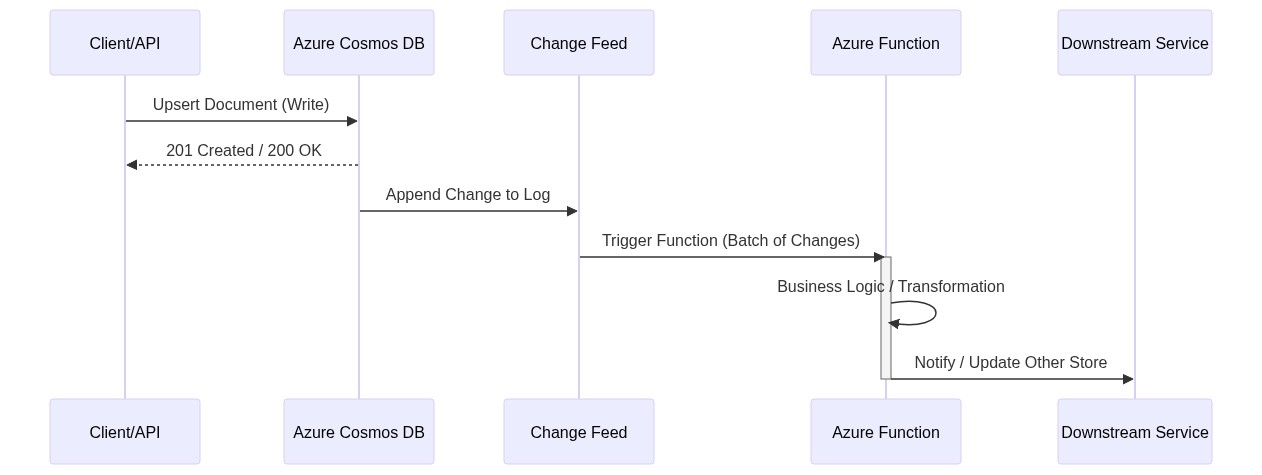
To build a robust system, you must understand the communication flow between the compute and data layers. The sequence diagram illustrates the lifecycle of an event-driven request—from the initial data write to downstream processing.
The Change Feed: The Heart of the System
The Change Feed is a persistent record of changes to a container in the order they occur. It does not capture deletes (unless using soft-delete patterns), but it provides an immutable log of inserts and updates. This log forms the foundation of all event-driven patterns discussed in this article.
3. Comparing Compute Strategies
When deploying Azure Functions for event-driven workloads, choosing the right hosting plan is critical for both performance and cost.
| Feature | Consumption Plan | Premium Plan | Dedicated (App Service) |
|---|---|---|---|
| Scaling | Automatic (Scales to zero) | Rapid Elastic Scale | Manual/Autoscale |
| Max Execution Time | 5-10 minutes | Guaranteed 30 mins (Unlimited possible) | Unlimited |
| Cold Start | Yes (Can be significant) | No (Pre-warmed instances) | No |
| VNET Integration | Limited | Full | Full |
| Cost Model | Pay-per-execution | Monthly per-instance | Monthly per-instance |
For high-throughput Cosmos DB processing, the Premium Plan is often preferred to avoid cold starts and to support the sustained compute requirements of the Change Feed Processor.
4. Deep Dive: The Change Feed Pattern
The Change Feed enables you to decouple your primary write store from downstream consumers. This is essential for maintaining O(1) or O(log n) write performance on your main database while offloading heavy processing to asynchronous background tasks.
Implementing a Cosmos DB Trigger
In C#, a Function reacting to Cosmos DB changes looks like this:
using System.Collections.Generic;
using Microsoft.Azure.WebJobs;
using Microsoft.Extensions.Logging;
using Microsoft.Azure.Cosmos;

public static class OrderProcessor
{
    [FunctionName("ProcessOrderChanges")]
    public static void Run(
        [CosmosDBTrigger(
            databaseName: "StoreDatabase",
            containerName: "Orders",
            Connection = "CosmosDBConnectionString",
            LeaseContainerName = "leases",
            CreateLeaseContainerIfNotExists = true)] IReadOnlyList<Order> input,
        ILogger log)
    {
        if (input != null && input.Count > 0)
        {
            log.LogInformation($"Documents modified: {input.Count}");
            foreach (var order in input)
            {
                // Logic: Send to Event Hub, update cache, or trigger email
                log.LogInformation($"Processing Order ID: {order.Id}");
            }
        }
    }
}
Technical Nuance: The Lease Container
The LeaseContainerName is critical. The Change Feed Processor uses this container to maintain checkpoints, tracking which documents have been processed by specific instances of the Azure Function. This allows the system to load-balance changes across multiple function instances and resume processing if a function fails.
5. Design Pattern: Materialized Views (CQRS)
In many NoSQL scenarios, the way data is written is rarely the most efficient way to read it. Command Query Responsibility Segregation (CQRS) addresses this by separating the write model from the read model.
The Scenario
Imagine an e-commerce system where orders are stored by OrderId. However, the customer service dashboard needs to query orders by CustomerId and Status. Instead of running high-RU cross-partition queries, you can use a materialized view.
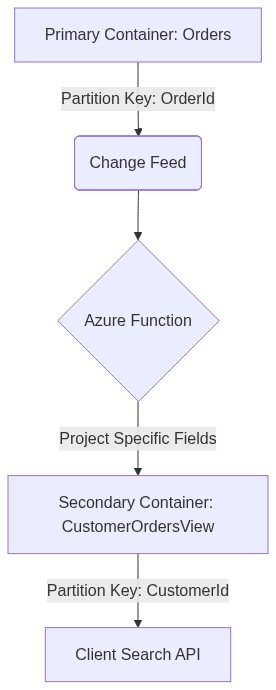
By using the Change Feed to populate a second container partitioned by CustomerId, dashboard queries become single-partition lookups. This significantly reduces latency and RU consumption.
6. Advanced Pattern: The Saga Pattern for Distributed Transactions
Because Azure Functions and Cosmos DB operate in distributed environments, you cannot rely on traditional ACID transactions across services. The Saga pattern manages data consistency across microservices through a sequence of local transactions.
Implementation Logic
- Service A writes to Cosmos DB (e.g., “Order Created”).
- The Change Feed triggers a Function.
- The Function calls Service B (e.g., “Inventory Reservation”).
- If Service B fails, the Function writes a compensating transaction to Cosmos DB to cancel the order.
State Machine Workflow
7. Data Modeling and Partitioning Strategy
Technical accuracy in Cosmos DB begins with selecting the correct Partition Key (PK). In an event-driven system, a poor PK choice can create hot partitions, where a single physical partition handles most of the traffic, leading to 429 (Too Many Requests) errors — even if thousands of RUs are provisioned.
Partitioning Best Practices
High Cardinality: Choose a PK with thousands of unique values (e.g., userId, deviceId, or transactionId).
Even Distribution: Ensure both data volume and request traffic are evenly distributed across partitions.
Synthetic Keys: If a single property is insufficient, concatenate multiple properties (e.g., userId_date) to create a more balanced key.
Comparison: Throughput Models
| Model | Best For | Pros | Cons |
|---|---|---|---|
| Provisioned Throughput | Steady workloads | Guaranteed performance | Pay for idle time |
| Autoscale Throughput | Unpredictable spikes | Scales RUs automatically | Higher base cost per 100 RUs |
| Serverless (Cosmos DB) | Low traffic, dev/test | No cost when idle | Not suitable for sustained high loads |
8. Reliability and Error Handling
In an event-driven system, failures are inevitable. A downstream API may be unavailable, or transient network errors may occur. Azure Functions with Cosmos DB triggers offer several resiliency mechanisms.
Dead Lettering
If a function fails to process a batch, implement a try-catch block that sends failed documents to a poison queue (Azure Storage Queue or Service Bus) for manual inspection.
Retry Policies
Azure Functions supports fixed-delay and exponential backoff retry policies defined in host.json.
Idempotency
Idempotency is critical. Because the Change Feed guarantees “at least once” delivery, your function must safely handle duplicate events without causing side effects. Always verify whether an operation has already been performed (e.g., by checking for an existing transactionId).
Idempotent Code Example
module.exports = async function (context, documents) {
    const cosmos = require("@azure/cosmos");
    // Initialization logic...

    for (const doc of documents) {
        // Check if we've already processed this event
        const alreadyProcessed = await checkAuditLog(doc.id);

        if (!alreadyProcessed) {
            await processEvent(doc);
            await markAsProcessed(doc.id);
        } else {
            context.log(`Event ${doc.id} already processed. Skipping.`);
        }
    }
}
9. Performance Optimization Techniques
Batching
Avoid processing documents one by one when possible. The MaxItemsPerInvocation setting allows you to control how many documents are processed per function execution. Increasing this value can improve throughput but may increase timeout risk.
RU Optimization
When writing back to Cosmos DB, enable Bulk Mode in the .NET SDK. Bulk Mode groups concurrent operations efficiently to maximize provisioned throughput.
Indexing Policy
By default, Cosmos DB indexes every property. In high-write, event-driven systems, this increases RU costs unnecessarily. Exclude properties that are never used in filters or ORDER BY clauses to reduce write overhead.
10. Monitoring and Observability
You cannot manage what you do not measure. For an Azure Functions + Cosmos DB architecture, Azure Monitor and Application Insights are essential.
Dependency Tracking: Monitor latency for Cosmos DB calls.
Custom Metrics: Track Change Feed lag (the time difference between document creation and processing). Increasing lag indicates that your functions cannot keep up with write volume.
Log Analytics: Use Kusto Query Language (KQL) to trace events across multiple services and analyze performance trends.
Example KQL:
// KQL to find function execution duration percentiles
requests
| where cloud_RoleName == "MyOrderProcessor"
| summarize percentiles(duration, 50, 95, 99) by bin(timestamp, 1h)
11. Conclusion
Building event-driven systems with Azure Functions and Cosmos DB requires a mindset shift—from traditional CRUD operations to a stream-based philosophy.
By mastering the Change Feed, implementing patterns such as Materialized Views and Sagas, and ensuring idempotency, you can build systems that scale to meet global demand.
The serverless model reduces operational overhead, enabling teams to focus on business logic instead of infrastructure management. As cloud ecosystems mature, tight integration between compute and data will remain a cornerstone of high-performance architecture.
Further Reading & Resources
Published at DZone with permission of Jubin Soni, FBCS. See the original article here.
Opinions expressed by DZone contributors are their own.
Comments