

DZone
Thanks for visiting DZone today,
Edit Profile
  • Manage Email Subscriptions
  • How to Post to DZone
  • Article Submission Guidelines
Sign Out View Profile
  • Post an Article
  • Manage My Drafts
Newsletter
Log In / Join
Refcards Trend Reports
Events Video Library
Refcards
Trend Reports

Events

View Events Video Library

Related

  • Debug Like a Pro in 2025: 10 New Eclipse Java Debugger Features to Enhance Your Productivity (With Spring Boot Examples)
  • Introducing Graph Concepts in Java With Eclipse JNoSQL, Part 3: Understanding Janus
  • Introducing Graph Concepts in Java With Eclipse JNoSQL, Part 2: Understanding Neo4j
  • Introducing Graph Concepts in Java With Eclipse JNoSQL

Trending

  • Build a Voice Assistant With Gemini Live API
  • Testing Java and Spring Applications With Kotlin: Low-Risk to Adoption
  • Avoiding AI Debt as a Team
  • The Three Tiers of Agentic Incident Response: When to Trust AI Autonomy

Draft This article hasn't been published, so readers can't see it.

In moderation This article is waiting for review, so readers can't see it yet.

Deleted This article has been deleted, so readers can't see it.

  1. DZone
  2. Coding
  3. Frameworks
  4. Show Heap Status in Eclipse

Show Heap Status in Eclipse

A quick overview on how to see your heaps in Eclipse.

By 
Erich Styger
·
Nov. 05, 13 · Tutorial
Post on X (opens in a new tab) Share on LinkedIn (opens in a new tab)
72.3K Views

Join the DZone community Save articles, join the discussion, and download Refcards and Trend Reports with a free account.

Join for free Already a member? Log in

wondering how much heap is used by eclipse? using the menu window > preferences there is a setting i can enable: “ show heap status “:
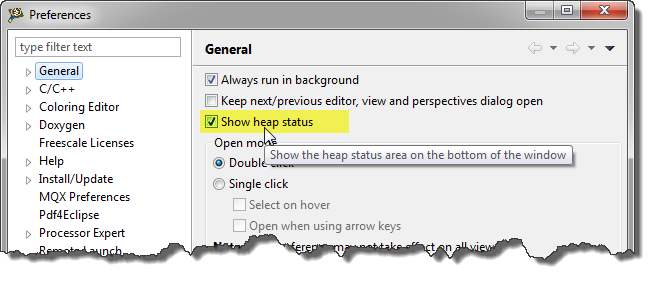
show heap status in eclipse

show heap status in eclipse

with this, i see the current status of the heap in the lower right corner of eclipse: the currently used amount of heap and the maximum of heap allocated:
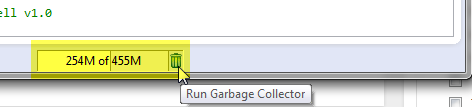
heap status

heap status

there is as wall an icon to run the garbage collector manually.

with the status i can watch the memory consumption over time which gives me an indication if i feel that eclipse is using too much memory.

happy heaping :-)


Eclipse

Published at DZone with permission of Erich Styger. See the original article here.

Opinions expressed by DZone contributors are their own.

Related

  • Debug Like a Pro in 2025: 10 New Eclipse Java Debugger Features to Enhance Your Productivity (With Spring Boot Examples)
  • Introducing Graph Concepts in Java With Eclipse JNoSQL, Part 3: Understanding Janus
  • Introducing Graph Concepts in Java With Eclipse JNoSQL, Part 2: Understanding Neo4j
  • Introducing Graph Concepts in Java With Eclipse JNoSQL

Partner Resources

×

Comments

Loading comments

The comments didn't load

Please try again in a moment.

Likes

Loading

The next likes didn't load. Please try again.

The likes didn't load

Please try again in a moment.

See who liked this

Log in or join DZone for free to see who liked this article.

Log in Join for free
  • RSS
  • X
  • Facebook

ABOUT US

  • About DZone
  • Support and feedback
  • Community research

ADVERTISE

  • Advertise with DZone

CONTRIBUTE ON DZONE

  • Article Submission Guidelines
  • Become a Contributor
  • Core Program
  • Visit the Writers' Zone

LEGAL

  • Terms of Service
  • Privacy Policy

CONTACT US

  • 3343 Perimeter Hill Drive
  • Suite 215
  • Nashville, TN 37211
  • [email protected]

Let's be friends:

  • RSS
  • X
  • Facebook