

Simplicity and Value of HotSpot's -XshowSettings Flag
The HotSpot JVM flat is a Java launcher option, and has a neat feature, XshowSettings. Here's an overview of this flag, and how to use it.
Join the DZone community and get the full member experience.
Join For FreeA handy HotSpot JVM flag (option for the Java launcher java) is the -XshowSettings option. This option is described in the Oracle Java launcher description page as follows:
-XshowSettings:categoryShows settings and continues. Possible category arguments for this option include the following:
allShows all categories of settings. This is the default value.
localeShows settings related to locale.
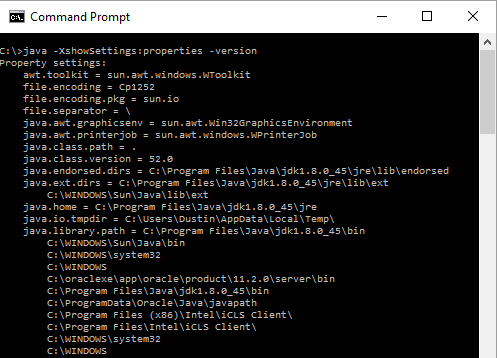
propertiesShows settings related to system properties.
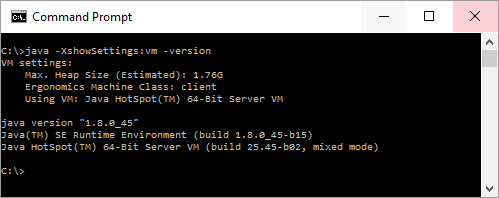
vmShows the settings of the JVM.
This flag can be easily used with the Java launcher using syntax such as java -XshowSettings. In this case, it's as if the all category was provided and locale information, system properties information, and virtual machine settings will be displayed. However, when executed list that, the help/usage information for running the Java launcher will also be displayed and, because that usage information is displayed after the locale, properties, and VM information, it can make it a bit less convenient to see those details. A common approach used to avoid the displaying of the verbose usage information for java when using flags such as -XshowSettings, -XX:+PrintFlagsInitial, and -XX:+PrintFlagsFinal is to also supply the -version argument. This allows the results of the other flag to be seen more clearly with only the JVM version details added (which are more succinct than the usage information).
The next several screen snapshots demonstrate using this option to get useful details regarding one's HotSpot JVM.
java -XshowSettings:locales -version

java -XshowSettings:properties -version (not all shown)
java -XshowSettings:vm -version
Running java -XshowSettings:all (or simply its default equivalent java -XshowSettings) will show locales, properties, and virtual machine details. Note that although the -X in the flag tells us this is a non-standard flag, OpenJDK has had support for this flag since late 2010.
The -XshowSettings Java launcher option is another example of the growing number of simple tools and options added in later versions of Java that make things that seem like they should be simple even simpler to accomplish. Besides displaying locales details, system properties, and virtual machine information, I'd love to see a future version of this option include a category for time zones available on a given JVM. There are ways to get timezones now that aren't too complicated, but the approach -XshowSettings provides for listing locales seems like a natural fit for listing supported timezones.
Published at DZone with permission of Dustin Marx. See the original article here.
Opinions expressed by DZone contributors are their own.
Comments