

Should Developers Switch From SQLite to DuckDB?
SQLite shines for lightweight OLTP and embedded apps, while DuckDB dominates large-scale analytics and OLAP pipelines. Use the right tool for your workload.
If you are a data scientist, data analyst, or anyone who works with big data, you have likely used SQLite, or even use it daily.
Introduced in 2000, SQLite quickly became a popular choice for database-related tasks. Whether you used it in an introductory database module, built a local data pipeline, or managed local metadata in production, SQLite has long been the gold standard for a zero-configuration database, with more than 25 years of widespread use.
But in recent years, DuckDB has emerged as a more powerful alternative, designed specifically for analytical workloads. For tasks involving Data analysis, analytics, and ETL (Extract, Transform, and Load), DuckDB is quietly gaining traction.
The developer community today is increasingly migrating to DuckDB, especially when running analytical aggregations across gigabytes of local Parquet or CSV files, where it shows its speed advantage. So the question that arises is:
Should DuckDB Replace SQLite?
The Evolution of SQLite and DuckDB
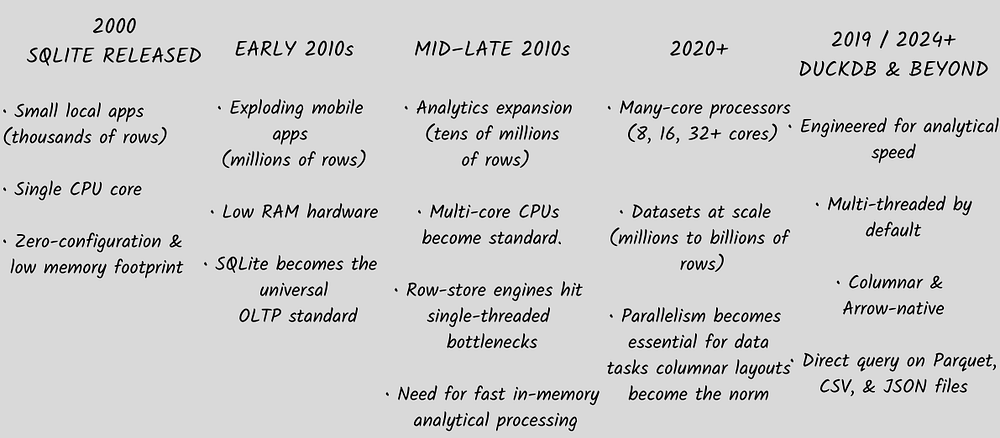
Evolutionary timeline comparing the hardware eras, workload requirements, and engine architectures of SQLite and DuckDB from 2000 to the present. (Image by the Author)
SQLite was created by American software engineer D. Richard Hipp, whose original motivation for developing the library stemmed from his work with U.S. Navy destroyers. While working on Navy software, he wanted a database that could work reliably without a complex client-server system.
As a result, SQLite was designed with the Navy’s specific requirements in mind. It was easy to use, with zero administrative overhead, and had excellent fault tolerance by eliminating the client-server architecture, providing continuous uptime. However, as datasets scaled to millions of records and multicore CPUs became the norm, some of SQLite’s original design choices became its core bottlenecks.
Modern CPUs have multiple cores for better speed, but SQLite processes data row by row on a single thread. Moreover, it requires users to manually import files before querying them, which can result in slow import and export processes.
Then came DuckDB in 2019, designed for fast analytical processing on local data. Although it was not intended to be a competitor or direct replacement for SQLite, it effectively solved the problem of single-core processing, prompting developers to use it more frequently for building data pipelines.
The Developer Interface: Similar Syntax, Different Engines
When it comes to the interface, there is no noticeable difference between the two libraries. If you are already familiar with SQL, then querying data with DuckDB requires virtually no learning curve compared to SQLite.
SQLite
import sqlite3

conn = sqlite3.connect("sales.db")
cursor = conn.cursor()
cursor.execute(
    "SELECT region, SUM(sales) FROM transactions WHERE sales > 1000 GROUP BY"
    " region"
)
results = cursor.fetchall()
DuckDB
import duckdb

# Querying local disk files directly with standard SQL
results = duckdb.sql(
    "SELECT region, SUM(sales) FROM 'sales.csv' WHERE sales > 1000 GROUP BY"
    " region"
).fetchall()
They may look similar at first glance, but the differences become clear when you look deeper into their architectures.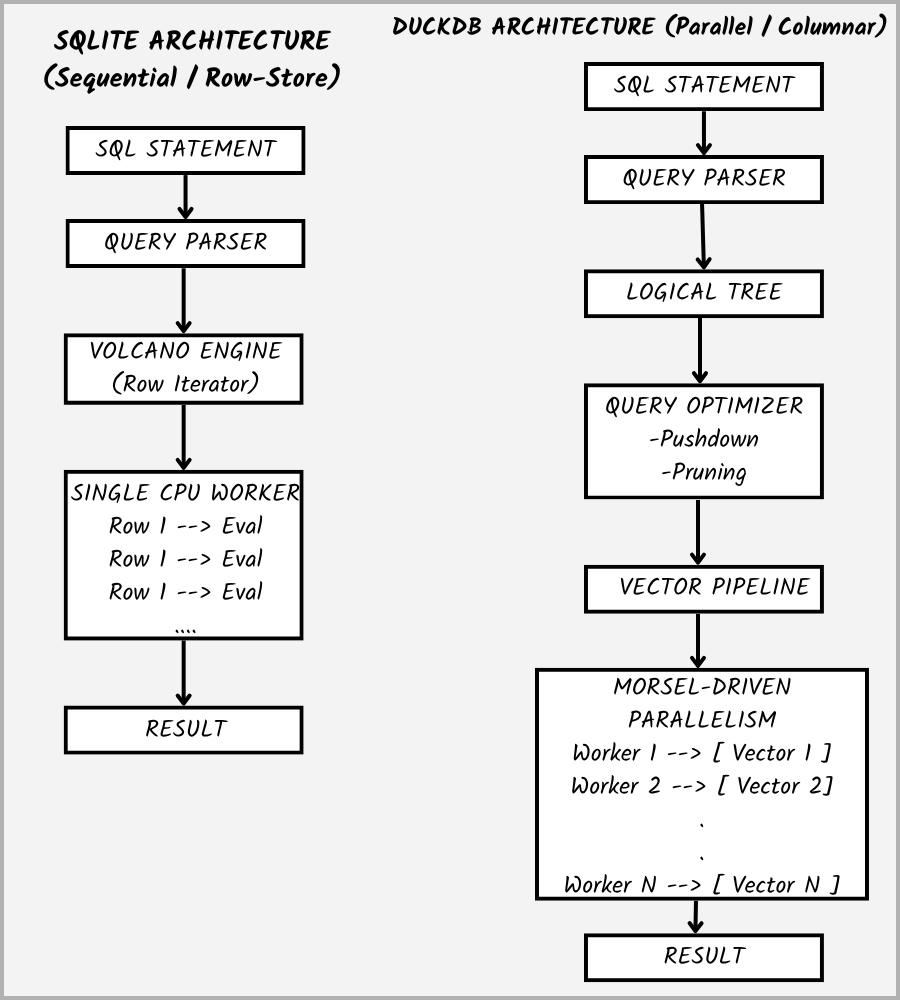
Architectural comparison between SQLite’s sequential row-store processing and DuckDB’s optimized columnar vector execution pipeline. (Image by Author)
Query Engines Processing Across CPU Cores
SQLite uses the Volcano Iterator Model, where a single core processes queries sequentially on a single CPU thread. If you sort 10 million rows, a single CPU thread handles the entire task while the rest of the CPU sits idle, increasing processing time.
On the other hand, DuckDB uses morsel-driven parallelism, partitioning the dataset into smaller chunks and processing them across available CPU threads through independent task queues. A large operation is split into uniform data chunks called morsels. Idle worker threads grab any available morsels from the queue, keeping the CPU cores fully utilized until execution finishes.
Deferred Execution and Logical Plan Optimization
SQLite executes queries in an eager streaming fashion where the rows are read immediately from disk or B-Trees and pushed through the expression evaluator step without global transformations.
DuckDB enforces a deferred pipeline with an explicit optimization pass before the data is even touched.
[ Raw SQL Query ] →[ Unoptimized Logical Plan ] → [Optimizer Pass ] → [ Physical Execution Plan ]
DuckDB optimizes the query to eliminate non-essential work.
During optimization, unused columns are dropped entirely, and conditions like WHERE sales > 1000 are pushed to the file reader level, skipping non-matching data blocks. Additionally, various query operations are arranged dynamically based on cardinalities to reduce intermediate memory allocation.
Memory Efficiency and Data Storage Structures
At last, we will look at the memory architecture, as the data transfer between RAM and CPU cache lines is frequently the primary bottleneck in data applications.
Both libraries use fundamentally different data storage structures. SQLite uses a row-oriented storage layout, where it stores every feature of a record in a single row. Combined with an extremely minimal baseline footprint of just 2–5 MB, this design is optimal for retrieving an individual row (eg: loading a single user’s profile), but not for running an aggregation like AVG(sales), as it forces SQLite to load every unused attribute into cache along with the target values.
DuckDB, on the other hand, uses a columnar format. Each feature is stored in a separate column, with the column data stored as a contiguous block in memory. This approach is preferred for analytical queries because DuckDB reads only the specific columns, maximizing CPU cache efficiency. The columnar structure also enables zero-copy data sharing with tools such as Apache Arrow, PyTorch, and Polars without expensive memory serialization steps. To maintain its multi-threaded vector channels, DuckDB operates with a higher baseline memory footprint of 20–30 MB.
Final Thoughts: Should DuckDB Replace SQLite?
After comparing the architectures of the two libraries, DuckDB may appear to be the better alternative. So, coming to our final question: Should DuckDB replace SQLite?
The answer is: No, not quite.
After looking at the architecture of the two database engines, the core trade-offs become clear:
SQLite uses a row-oriented layout and a single-threaded engine to maintain a minimal memory footprint of just 2–5 MB. It is optimized for transactional (OLTP) operations, securing its position as a universal component across mobile and desktop devices. Conversely, DuckDB’s columnar architecture with multi-core parallel processing makes it a great choice for analytical (OLAP) queries and scanning external .csv, .parquet, or .json files directly without any manual imports. It turns out to be a better option for modern data science and AI pipelines.
SQLite was engineered at a time when embedded storage was expected to handle lightweight applications and reliable local commits. In contrast, DuckDB was built to function as an analytics engine for large datasets. So which library you use for what task depends entirely on your use case.
Choose SQLite if you need a zero-maintenance, embedded database to store app configuration or handle fast single-row lookups with minimal RAM overhead.
Choose DuckDB if you are building a professional data or AI pipeline, running aggregations (GROUP BY, SUM, AVG) across millions of records, extracting features from .csv files, or processing local data in Python notebooks without a complex setup.
Overall, it is better to see both as libraries designed for different purposes rather than as competitors.
Opinions expressed by DZone contributors are their own.