

A Unified Framework for SRE to Troubleshoot Database Connectivity in Kubernetes Cloud Applications
Troubleshoot Kubernetes database connectivity using a layered diagnostic framework and achieve rapid root-cause identification and production stability.
Join the DZone community and get the full member experience.
Join For FreeThe ability to have an application or business connect with the right information at the right time is key to making informed decisions in today’s digital and AI world. Having an efficient, reliable connection between an application and its database enables businesses to best serve their customers. Traditional troubleshooting methods used on many enterprise systems are no longer sufficient to troubleshoot these complex, multi-layered Kubernetes systems. The layered troubleshooting framework described in this article can be used by developers, cloud architects, and site reliability engineers (SREs) as a structured approach to quickly determine the root cause of failures and achieve stability in production environments.
A layered approach to troubleshooting is necessary to provide an understanding of how all the different components of a system relate to one another, which is critical to being able to resolve problems quickly and efficiently. Troubleshooting the communication layer between an application and its database is one of the most complex tasks for developers, cloud architects, and SREs working with Kubernetes-based cloud-native applications.
The Landscape of Kubernetes Connectivity
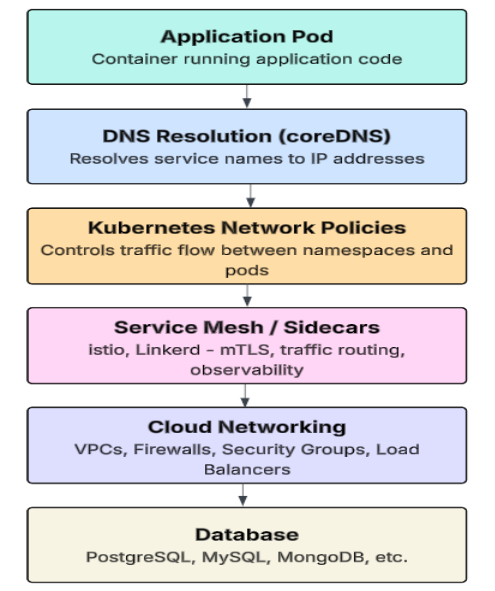
Multiple layers of abstraction exist in Kubernetes between an application and its database. The design of this architecture lends itself well to scalability; however, it has introduced additional levels of complexity, which may produce incorrect assumptions about the original source of problems in a production environment. The main layers that can have an impact on connectivity are:
| S.No | Component | Description |
|---|---|---|
|
1 |
Pod networking |
It is a component of Kubernetes that manages communication between pods in a pod cluster. |
|
2 |
DNS resolution |
Internal DNS is a layer that allows applications to resolve a service name (db-service) to an IP address. |
|
3 |
Secrets and configMaps |
Two dedicated layers of storage that allow secrets and configuration information to be passed to containers. |
|
4 |
Resource limits |
Kubernetes resource constraints (CPU and Memory), which will cause pods to be delayed or fail if they are set too low. |
|
5 |
Sidecars/Service mesh |
Proxy layers (e.g., sidecar, Istio, Linkerd) that can intercept, secure, and route traffic between services. |
|
6 |
Cloud networking |
External infrastructure layers, including VPCs, firewalls, and cloud-provider security groups. |
Any failure in one of the above layers will be reflected as a database error. SREs use a layered approach to eliminate each layer until they find the problem area.
The Framework Components
1. Identifying the Symptom
The first phase is a symptom collection phase, in which SREs collect information on system performance from application logs and various monitoring systems. In contrast to the assumption that the database has simply "gone down," the framework requires collecting and normalizing all of the symptoms. SREs will then identify patterns in the log files that may provide insight into where in the system the problem is occurring.
| S.No | Log Details | Primary Root Cause |
|---|---|---|
|
1 |
dial tcp: lookup db-service failed |
DNS Resolution issues within the cluster. |
|
2 |
connection timed out |
The network path is blocked by a firewall or policy. |
|
3 |
pq: too many connections |
The database has reached its maximum connection limit. |
|
4 |
ECONNREFUSED |
The service is reachable, but the port is not accepting connections. |
2. Checking Pod Health and Placement
This phase is used to verify that the Kubernetes pod is healthy. Pods that are repeatedly restarted (due to CrashLoopBackOff), or terminated due to high memory usage (OOMKilled), cannot reliably connect to a database. Before we proceed further with identifying whether the problem lies within the network, SREs can verify that the pod was not recently rescheduled to a new node pool, potentially with different network permissions. This allows us to determine whether it is possible for compute to be a contributing factor to the failure prior to looking at the network.
# Diagnostic commands to evaluate pod health
kubectl get pods -n prod
kubectl describe pod <app-pod-name> -n prod
3. DNS Resolution Analysis
DNS failures in Kubernetes can be a silent "killer" for many applications. If the application can't find the fully qualified domain name for the database service, it won't even attempt a network connection. SREs need to verify from within the pod if the resolv.conf and CoreDNS configurations are correct.
Many mistakes occur when using a short name such as db-service rather than the fully qualified domain name of the service; for example:
db-service.database.svc.cluster.local 4. Network Path Diagnostics
The process of establishing a network connection can be viewed as an effective exchange of a TCP handshake. We use diagnostic tools to verify whether there is successful connectivity from the source pod. The diagnostic tool converts a complex network path into a simple success or failure status for the SRE. SREs always test connectivity from within the pod that has failed to provide the gap between the real-world network and the application's view.
| S.No | Google Cloud | Azure | AWS | Open source |
|---|---|---|---|---|
|
1 |
Connectivity Tests |
Network Watcher |
Reachability Analyzer |
nc -vz (Netcat) |
Bash
# Using Netcat to verify if the database port is open
kubectl exec -it <app-pod-name> -n prod -- nc -vz db-service 5432
5. Kubernetes Network Policies
Network policies are essential components that can block traffic using labels and namespaces. These policies are commonly configured for security purposes and may unknowingly create an issue where an application will just timeout because it cannot communicate with the database namespace. The framework checks the egress rules to make sure the application is permitted to communicate with the database namespace.
Example: A policy that causes failures (deny all)
apiVersion: networking.k8s.io/v1
kind: NetworkPolicy
metadata:
  name: deny-all-egress
spec:
  podSelector: {}
  policyTypes:
    - Egress #This blocks all outbound traffic by default
Example: A unified framework fix (allow egress)
spec:
  podSelector:
    matchLabels:
      app: my-app
  egress:
    - to:
        - namespaceSelector:
            matchLabels:
              name: database
      ports:
        - protocol: TCP
          port: 5432
6. Secrets and Configuration Changes
Credentials for databases provide the ability to connect to databases. If “secrets” (passwords) are changed without restarting pods, the application will continue to use the old “secrets,” causing it to fail at authenticating with the database. Here, SREs check whether the variables stored in each pod have the correct secret value.
# Verify actual environment variables in the running container
kubectl exec <app-pod-name> -- printenv | grep DB_
7. Connection Pool Evaluation
This is probably the most frequent production issue encountered when scaling applications. Each pod maintains a group of connections to the database to optimize performance. However, if the total number of pods times the pool size exceeds the database's maximum connection limit, new connections will be denied.
The framework uses a simple formula to determine the "safe" limits of connections for a cluster:
(Total Pods X Pool Size Per Pod) < Database Max Connections The database will refuse connections (with a "connection refused" error) even when the network is working properly if applications violate this constraint.
8. Resource Limits and CPU Throttling
When the CPU of pods is being throttled because of hitting the Kubernetes CPU limits, it may create high levels of latency within the TCP handshake process for the database connection. When a pod has reached the point where the CPU usage is at its maximum capacity, the amount of time to perform the TLS handshake to establish a database connection may be longer than the timeout set for an application. To determine whether there is sufficient buffer room for network operations within the pod manifest, SREs compare the CPU limits to the CPU requests for the pod.
9. Sidecars and Service Mesh Impact
If a sidecar proxy is installed as part of an Istio or Linkerd configuration, the proxy is injected into each pod, which routes all traffic from the pod to the database. In Strict mTLS configuration mode, if the database is unable to support mTLS encryption, the proxy will drop the connection. Therefore, SREs monitor the proxy logs to confirm that they are properly handling the database connection traffic through the mesh.
Final Thoughts
This framework enables developers and architects to follow a unified, scalable approach for identifying failures.
| S.no | Layer | Root Cause | Symptom | detection tool | fix |
|---|---|---|---|---|---|
|
1 |
Pod |
CrashLoop/OOM |
Intermittent Errors |
kubectl describe |
Increase Resources |
|
2 |
DNS |
CoreDNS failure |
Host not found |
nslookup |
Fix CoreDNS config |
|
3 |
Network |
Network Policy |
Timeout |
nc -vz |
Allow Egress traffic |
|
4 |
Secrets |
Wrong Credentials |
Auth Failure |
printenv |
Restart Pods |
|
5 |
Scaling |
Pool Exhaustion |
Connection Refused |
DB Metrics |
Tune Pool Size |
|
6 |
Resources |
CPU Throttling |
Latency/Timeout |
Metrics Server |
Adjust CPU Limits |
|
7 |
Mesh |
mTLS Misconfig |
Silent Drops |
Proxy Logs |
Fix Mesh Policy |
Conclusion
Systematic troubleshooting combined with a multi-layered approach to the Kubernetes framework provides an effective way to maintain high-availability applications. SREs can use this structure to obtain the correct information at the appropriate time to solve database connection problems on Kubernetes. The approach will speed up the recovery process, ensure application to database connectivity is always available, and ultimately improve customer satisfaction.
Opinions expressed by DZone contributors are their own.
Comments