

Streaming Radio Player Tutorial with Live Demo and Source Code
here's the final result of our player:
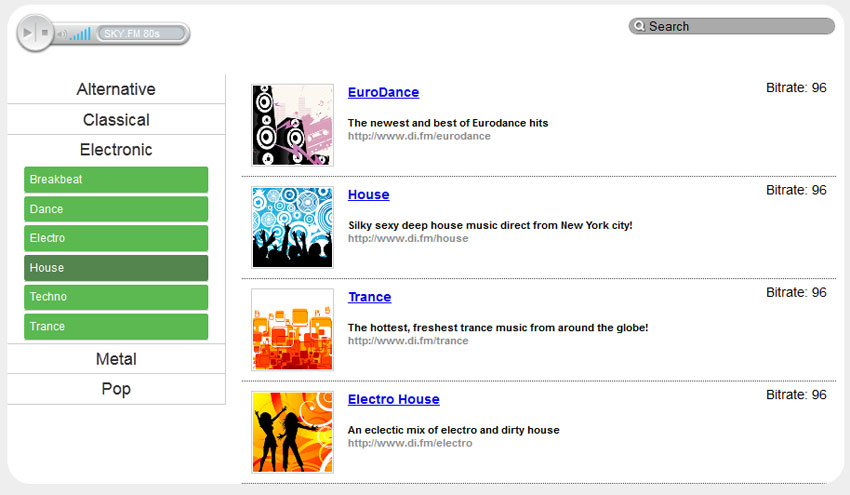
here's our live demo and downloadable package:


ok, download our source files and lets start coding!
step 1. html markup
this is the markup of one of the template files. this is a template of our main (index) page:
templates/main_page.html
<!doctype html>
<html lang="en" >
    <head>
        <meta charset="utf-8" />
        <title>stream radio script | script tutorials</title>
        <link href="css/main.css" rel="stylesheet" type="text/css" />
        <link href="css/radio.css" rel="stylesheet" type="text/css" />
        <script type="text/javascript" src="https://www.google.com/jsapi"></script>
        <script>
            google.load("jquery", "1.7.1");
        </script>
        <script src="js/script.js"></script>
    </head>
    <body>
        <header>
            <h2>stream radio script</h2>
            <a href="http://www.script-tutorials.com/stream-radio-script/" class="stuts">back to original tutorial on <span>script tutorials</span></a>
        </header>
        <div class="container">

            <form method="get" class="header" action="javascript:void(0)" onsubmit="get_stations_by_keyword(); return false;">
                <input type="text" id="search" value="search" name="s">
                <span>
                    <div id="rplayer">
                        <object classid="clsid:d27cdb6e-ae6d-11cf-96b8-444553540000" width="191" height="46" bgcolor="#ffffff">
                        <param name="movie" value="player/ffmp3-config.swf" />
                        <param name="flashvars" value="url=http://scfire-dtc-aa04.stream.aol.com:80/stream/1013/&lang=en&codec=mp3&volume=100&introurl=media/welcome.mp3&autoplay=true&traking=false&jsevents=false&buffering=5&skin=player/def/skin.xml&title=sky.fm 80s" />
                        <param name="wmode" value="opaque" />
                        <param name="allowscriptaccess" value="always" />
                        <param name="scale" value="noscale" />
                        <embed src="player/ffmp3-config.swf" flashvars="url=http://scfire-dtc-aa04.stream.aol.com:80/stream/1013/&lang=en&codec=mp3&volume=100&introurl=media/welcome.mp3&autoplay=true&traking=false&jsevents=false&buffering=5&skin=player/def/skin.xml&title=sky.fm 80s" width="191" scale="noscale" height="46" wmode="opaque" bgcolor="#ffffff" allowscriptaccess="always" type="application/x-shockwave-flash" />
                        </object>
                    </div>
                </span>
            </form>
            <div class="clear"></div>
            <div class="genres_par">
                <ul class="genres">
                    <li id="1" val="alternative"><a href="javascript:void(0)">alternative</a>
                        <ul>
                            <li id="11" val="classic+alternative"><a href="javascript:void(0)">classic alternative</a></li>
                            <li id="12" val="industrial"><a href="javascript:void(0)">industrial</a></li>
                            <li id="13" val="new+wave"><a href="javascript:void(0)">new wave</a></li>
                            <li id="14" val="punk"><a href="javascript:void(0)">punk</a></li>
                        </ul>
                    </li>
                    <li id="2" val="classical"><a href="javascript:void(0)">classical</a>
                        <ul>
                            <li id="21" val="modern"><a href="javascript:void(0)">modern</a></li>
                            <li id="22" val="opera"><a href="javascript:void(0)">opera</a></li>
                            <li id="23" val="piano"><a href="javascript:void(0)">piano</a></li>
                            <li id="24" val="romantic"><a href="javascript:void(0)">romantic</a></li>
                            <li id="25" val="symphony"><a href="javascript:void(0)">symphony</a></li>
                        </ul>
                    </li>
                    <li id="3" val="electronic"><a href="javascript:void(0)">electronic</a>
                        <ul>
                            <li id="31" val="breakbeat"><a href="javascript:void(0)">breakbeat</a></li>
                            <li id="32" val="dance"><a href="javascript:void(0)">dance</a></li>
                            <li id="33" val="electro"><a href="javascript:void(0)">electro</a></li>
                            <li id="34" val="house"><a href="javascript:void(0)">house</a></li>
                            <li id="35" val="techno"><a href="javascript:void(0)">techno</a></li>
                            <li id="36" val="trance"><a href="javascript:void(0)">trance</a></li>
                        </ul>
                    </li>
                    <li id="4" val="metal"><a href="javascript:void(0)">metal</a>
                        <ul>
                            <li id="41" val="classic+metal"><a href="javascript:void(0)">classic metal</a></li>
                            <li id="42" val="heavy+metal"><a href="javascript:void(0)">heavy metal</a></li>
                            <li id="43" val="metalcore"><a href="javascript:void(0)">metalcore</a></li>
                            <li id="44" val="power+metal"><a href="javascript:void(0)">power metal</a></li>
                        </ul>
                    </li>
                    <li id="5" val="pop"><a href="javascript:void(0)">pop</a>
                        <ul>
                            <li id="51" val="dance+pop"><a href="javascript:void(0)">dance pop</a></li>
                            <li id="52" val="oldies"><a href="javascript:void(0)">oldies</a></li>
                            <li id="53" val="top+40"><a href="javascript:void(0)">top 40</a></li>
                            <li id="54" val="world+pop"><a href="javascript:void(0)">world pop</a></li>
                        </ul>
                    </li>
                </ul>
                <div class="clear"></div>
            </div>
            <div class="stlist">__stations__</div>
            <div class="clear"></div>
            <div class="cred">powered by <a href="http://www.script-tutorials.com/">script tutorials</a></div>

        </div>
    </body>
</html>
first, pay attention to how the script loads the jquery library from google.
this can be pretty useful if you don’t like to keep this file directly on your host. our header element contains a nice search bar with an embedded
jasl player (
i used a great ffmp3 live stream player
), which
allows us to play audio streams without any problems.
next, on the left-hand side
(beneath the header) we have a ul-li based list of categories and subcategories. the right-hand side will contain a list of the most recent stations and,
when we search or select a category, the right-hand side will be filtered by ajaxy.
for now – it contains __stations__ key (template key) and we will
replace the actual value with php.
on to our next template file, the radio player:
templates/radio.html
<object classid="clsid:d27cdb6e-ae6d-11cf-96b8-444553540000" width="191" height="46" bgcolor="#ffffff">
<param name="movie" value="player/ffmp3-config.swf" />
<param name="flashvars" value="url=__stream__&lang=en&codec=mp3&volume=100&introurl=&autoplay=true&traking=false&jsevents=false&buffering=5&skin=player/def/skin.xml&title=__title__" />
<param name="wmode" value="opaque" />
<param name="allowscriptaccess" value="always" />
<param name="scale" value="noscale" />
<embed src="player/ffmp3-config.swf" flashvars="url=__stream__&lang=en&codec=mp3&volume=100&introurl=&autoplay=true&traking=false&jsevents=false&buffering=5&skin=player/def/skin.xml&title=__title__" width="191" scale="noscale" height="46" wmode="opaque" bgcolor="#ffffff" allowscriptaccess="always" type="application/x-shockwave-flash" />
</object>
of course, it contains its own template keys (__title__ and __stream__) which we will use after.
step 2. css
here are our stylesheets files:
css/main.css
the first one contains the styles of our test page (this file is always available in our package)
css/radio.css
/* header area */
.header {
    height:62px;
}
.header input {
    background:#aaa url(../images/search.png) no-repeat 5px center;
    border:1px solid #888;
    border-radius:10px;
    float:right;
    margin:14px 10px 0 0;
    outline:none;
    padding-left:20px;
    width:200px;

    -webkit-transition: 0.5s;
    -moz-transition: 0.5s;
    -o-transition: 0.5s;
    transition: 0.5s;
}
.header input:focus {
    background-color:#eee;
    width:300px;
}
.header > span {
    display:block;
    float:left;
    line-height:40px;
    padding:7px;

    -webkit-transition: 0.5s;
    -moz-transition: 0.5s;
    -o-transition: 0.5s;
    transition: 0.5s;
}

/* stations list */
.stlist {
    float:right;
    margin-right:1%;
    width:71%;
}
.stlist ul {
    list-style:none outside none;
    margin:0;
    padding:0;
}
.stlist ul li {
    border-bottom:1px dotted #444;
    overflow:hidden;
    padding:10px;
}
.stlist ul li > a > img {
    border:1px solid #ccc;
    float:left;
    height:85px;
    margin-right:15px;
    padding:1px;
    width:85px;
}
.stlist ul li > div {
    float:right;
    margin-left:15px;
    margin-top:-5px;
}
.stlist ul li > p.label,.stlist ul li > p.track {
    font-size:11px;
    font-weight:700;
}
.stlist ul li > p.label {
    color:#888;
}
.stlist ul li > p.channel {
    font-size:14px;
    font-weight:700;
    margin-bottom:17px;
}

/* genres list */
.genres_par {
    border-right:1px solid #ccc;
    float:left;
    width:26%;
}
ul.genres,ul.genres ul {
    list-style-type:none;
    margin:0;
    padding:0;
}
ul.genres ul {
    display:none;
    overflow:hidden;
    padding:0 15px;
}
ul.genres ul li {
    margin:3px;
}
ul.genres a {
    color:#333;
    display:block;
    font-size:18px;
    padding:4px 0;
    text-align:center;
    text-decoration:none;
}
ul.genres ul a {
    font-size:12px;
    text-align:left;
}
ul.genres li {
    border-bottom:1px solid #ccc;
    margin:0;
}
ul.genres li ul li a {
    background:none repeat scroll 0 0 #5bb951;
    border-radius:2px;
    color:#fff;
    font-size:12px;
    padding:6px;
}
ul.genres li ul li a:hover {
    background-color:#53854e;
}
step 3. js
js/script.js
$(document).ready(function(){
    $('#search').blur(function() {
        if ('' == $('#search').val()) $('#search').val('search');
    });
    $('#search').focus(function() {
        if ('search' == $('#search').val()) $('#search').val('');
    });

    $('ul.genres li a').click( // category slider
        function() {
            var checkelement = $(this).next();
            if((checkelement.is('ul')) && (!checkelement.is(':visible'))) {
                $('.genres li ul').slideup(150);
                $(this).next().slidetoggle(150);
            }
        }
    );

    $('ul.genres ul li a').click( // get stations by category
        function() {
            $.ajax({
                type: 'get',
                url: 'index.php',
                data: 'action=get_genre_stations&id=' + $(this).parent().attr('id') + '&name=' + $(this).parent().attr('val'),
                success: function(data){
                    $('.stlist').fadeout(400, function () {
                        $('.stlist').html(data);
                        $('.stlist').fadein(400);
                    });
                }
            });
        }
    );
});
function play(id) { // play function
    $('#rplayer').load('index.php?action=play&id=' + id, function() {});
    return false;
}
function get_stations_by_keyword() { // get stations by keyword
    var keyword = $('#search').val().replace(/ /g,"+");
    $.ajax({
        type: 'get',
        url: 'index.php',
        data: 'action=get_keyword_stations&key=' + keyword,
        success: function(data){
            $('.stlist').fadeout(400, function () {
                $('.stlist').html(data);
                $('.stlist').fadein(400);
            });
        }
    });
}
as you see – there's nothing difficult there. just several event handlers,
and two new functions (to play radio station and to search for stations
by keyword).
step 4. php
index.php
<?php

// set error reporting level
if (version_compare(phpversion(), '5.3.0', '>=') == 1)
  error_reporting(e_all & ~e_notice & ~e_deprecated);
else
  error_reporting(e_all & ~e_notice);

$astations = array(
    0 => array(
        'category' => 31,
        'name' => 'eurodance',
        'desc' => 'the newest and best of eurodance hits',
        'url' => 'http://www.di.fm/eurodance',
        'br' => 96,
        'stream' => 'http://scfire-mtc-aa06.stream.aol.com:80/stream/1024'
    ),
    1 => array (
        'category' => 34,
        'name' => 'house',
        'desc' => 'silky sexy deep house music direct from new york city!',
        'url' => 'http://www.di.fm/house',
        'br' => 96,
        'stream' => 'http://scfire-ntc-aa04.stream.aol.com:80/stream/1007'
    ),
    2 => array (
        'category' => 13,
        'name' => 'trance',
        'desc' => 'the hottest, freshest trance music from around the globe!',
        'url' => 'http://www.di.fm/trance',
        'br' => 96,
        'stream' => 'http://scfire-ntc-aa04.stream.aol.com:80/stream/1003'
    ),
    3 => array (
        'category' => 51,
        'name' => 'electro house',
        'desc' => 'an eclectic mix of electro and dirty house',
        'url' => 'http://www.di.fm/electro',
        'br' => 96,
        'stream' => 'http://scfire-ntc-aa04.stream.aol.com:80/stream/1025'
    )
);

function searchbycat($icat, $astations) {
    $ares = array();
    foreach ($astations as $i => $ainfo) {
        if ($ainfo['category'] == $icat) {
            $ares[$i] = $ainfo;
        }
    }
    return $ares;
}
function searchbykeyword($skey, $astations) {
    $ares = array();
    foreach ($astations as $i => $ainfo) {
        if (false !== strpos($ainfo['name'], $skey) || false !== strpos($ainfo['desc'], $skey)) {
            $ares[$i] = $ainfo;
        }
    }
    return $ares;
}

function parsestationlist($adata) {
    $sstations = '';
    if (is_array($adata) && count($adata) > 0) {
        foreach ($adata as $i => $a) {
            $sstationid = $i;
            $sstationbr = (int)$a['br'];
            $sstationname = $a['name'];
            $sstationdesc = $a['desc'];
            $sstationurl = $a['url'];

            $sthumb = 'media/'.($sstationid+1).'.png';
            $sstations .= <<<eof
<li>
    <a href="{$sstationid}" onclick="return play('{$sstationid}'); return false;"><img alt="{$sstationname}" src="{$sthumb}" title="{$sstationname}"></a>
    <div class="i">
        <p>bitrate: {$sstationbr}</p>
    </div>
    <p class="channel"><a href="{$sstationid}" onclick="return play('{$sstationid}'); return false;">{$sstationname}</a></p>
    <p class="track">{$sstationdesc}</p>
    <p class="label">{$sstationurl}</p>
</li>
eof;
        }
    }
    $sstations = ($sstations == '') ? '<li>nothing found</li>' : $sstations;
    return '<ul>' . $sstations . '</ul>';
}

switch ($_get['action']) {
    case 'play':
        $i = (int)$_get['id'];

        $ainfo = $astations[$i];
        $avars = array (
            '__stream__' => $ainfo['stream'],
            '__title__' => $ainfo['name']
        );
        echo strtr(file_get_contents('templates/radio.html'), $avars); exit;
        break;
    case 'get_genre_stations':
        $i = (int)$_get['id'];

        $asearch = searchbycat($i, $astations);

        $sstations = parsestationlist($asearch);
        header('content-type: text/html; charset=utf-8');
        echo $sstations; exit;
        break;
    case 'get_keyword_stations':
        $skey = $_get['key'];

        $asearch = searchbykeyword($skey, $astations);

        $sstations = parsestationlist($asearch);
        header('content-type: text/html; charset=utf-8');
        echo $sstations; exit;
        break;
}

$slaststations = parsestationlist($astations);
echo strtr(file_get_contents('templates/main_page.html'), array('__stations__' => $slaststations));
at the beginning, i have prepared a list of our radio stations (4 stations total). then, two search functions: ‘searchbycat’ and ‘searchbykeyword’. next, the special function ‘parsestationlist’ which will transform array with filtered stations into its html representation. finally, a little switch case to manage with our inner ajax commands.
conclusion
you are always welcome to enhance our script and share your ideas. i will be glad to see your thanks and comments. good luck!
Published at DZone with permission of Andrei Prikaznov. See the original article here.
Opinions expressed by DZone contributors are their own.