

Supercharge AI Workflows on Azure: Remote MCP Tool Triggers + Your First TypeScript MCP Server
Remote MCP in Azure Functions exposes serverless tools for AI assistants, enabling scalable, cloud-native workflows with Azure services and bindings.
 ·
·
Join the DZone community and get the full member experience.
Join For FreeIntroduction
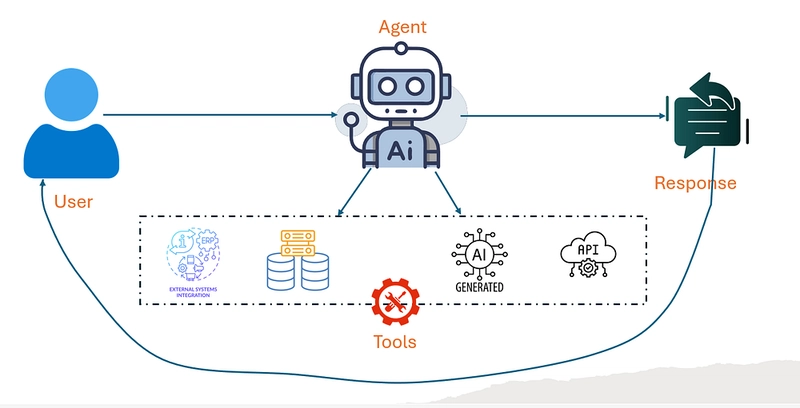
The workflow for an agentic app begins when the user interacts with it, presenting a prompt via a chat interface or a form. The agent receives this prompt and analyzes it to determine the user's intent and requirements. It can use an LLM to acquire tasks, clarify details, and break the whole into subtasks.
As soon as the agent has a clear understanding of the target, it selects the most appropriate specialized tools or services to achieve the goal. These bring APIs, databases, generative AI (for writing, image generation, etc.), or other partnered systems, and the agent might arrange or put together multiple tool actions, dependent on the difficulty of the job.
The agent continually assesses and adjusts, repeating the tool calls and requesting further clarification if the output is insufficient or unclear. After achieving a tangible or high-quality outcome, the agent merges the outputs, formats the response, and returns it to the user for review. This adaptation process gives the user a relevant, sometimes even superior answer by fully utilizing the integrated tools and intelligent planning.
Why the Need for Standard Protocol?
The present architecture lacks the flexibility to implement all but tools, which means that the tool is solely part of the particular agent application. There is no universal method to publish this tool for use by other systems or applications.
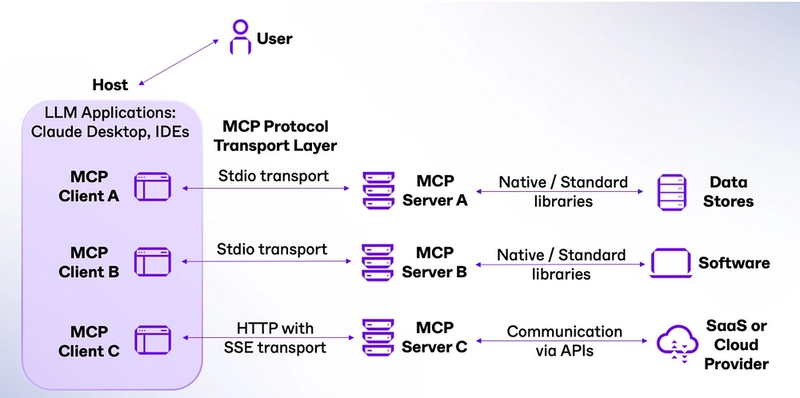
The Model Context Protocol (MCP) is where the matter comes to application. MCP is a system created by Anthropic that not only makes it easy to plug tools into a single application but also lets many different applications connect to those tools through a shared, standard way of describing and exposing capabilities. MCP is modeled on a client-server architecture.
It is structured as follows: The server is the application that communicates its specific capabilities via the standard MCP interface. The clients are equivalent to other applications that utilize these facilities to create intelligent, deeply integrated experiences. An overview of the classical MCP architecture is given below.
Microsoft Azure Functions Helps
The agent's lack of flexibility is addressed by the Microsoft offering, which includes the recently released Remote MCP feature in Azure Functions. It is a step ahead in developing intelligent AI workflows and tools to quickly and accurately connect and collaborate with cloud services. Through direct use of the MCPs in Azure Functions, developers can, for the first time, create robust, scalable AI tools that can harness the full power of the respected Azure platforms, while also running easily and cheaply due to serverless computing.
What is Remote MCP?
Remote MCP is a feature that allows Azure Functions to be configured as MCP servers, which expose custom tools that AI assistants like GitHub Copilot, Claude, or other MCP-compatible clients can find and use.
The MCP allows connecting the AI logic to the cloud-native operations, thus making it possible for the AI agents to:
- Read and write data from Azure Storage
- Query databases
- Process files and documents
- Integrate with third-party APIs
- Perform complex business logic in the cloud
Real-World Use Case: Smart Snippet Management
Let's explore a practical scenario where developers need an AI-powered code snippet management system that can:
- **Save and retrieve** reusable snippets
- **Organize snippets** by name and content
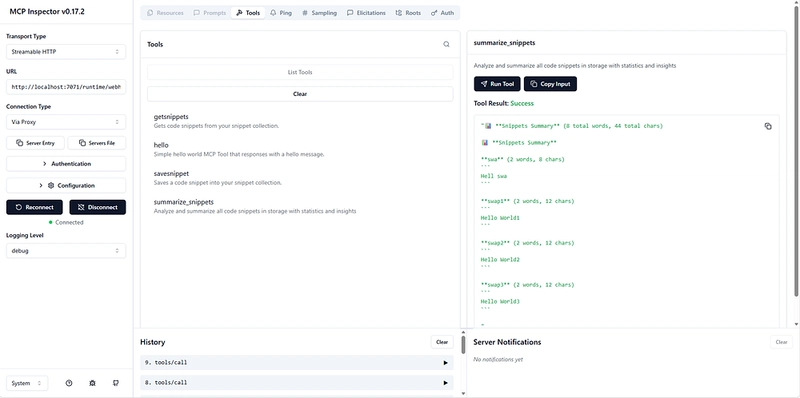
- **Analyze and summarize** multiple snippets
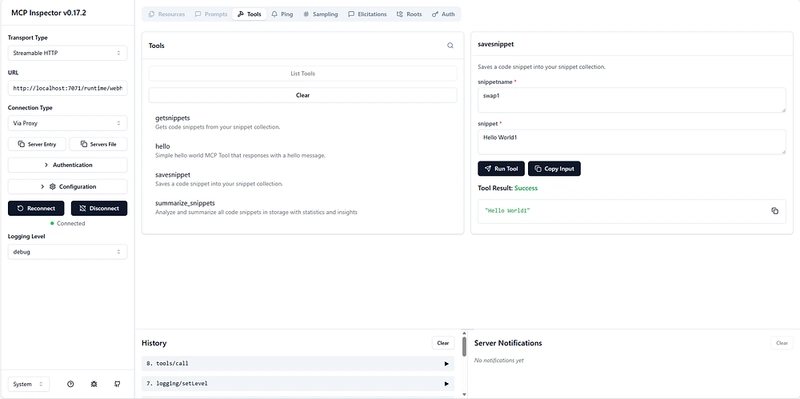
This system demonstrates Remote MCP using MCP Tool Triggers with Azure Functions input and output bindings in their simplest form.
Implementation
1. Snippet Storage and Retrieval
import { app, InvocationContext, input, output, arg } from "@azure/functions";

// Constants matching the C# ToolsInformation class
const GET_SNIPPET_TOOL_NAME = "getsnippets";
const GET_SNIPPET_TOOL_DESCRIPTION =
  "Gets code snippets from your snippet collection.";
const SAVE_SNIPPET_TOOL_NAME = "savesnippet";
const SAVE_SNIPPET_TOOL_DESCRIPTION =
  "Saves a code snippet into your snippet collection.";
const SNIPPET_NAME_PROPERTY_NAME = "snippetname";
const SNIPPET_PROPERTY_NAME = "snippet";
const SNIPPET_NAME_PROPERTY_DESCRIPTION = "The name of the snippet.";
const SNIPPET_PROPERTY_DESCRIPTION = "The code snippet.";

// Define blob input and output bindings
const blobInputBinding = input.storageBlob({
  connection: "AzureWebJobsStorage",
  path: `snippets/{mcptoolargs.${SNIPPET_NAME_PROPERTY_NAME}}.json`,
});

const blobOutputBinding = output.storageBlob({
  connection: "AzureWebJobsStorage",
  path: `snippets/{mcptoolargs.${SNIPPET_NAME_PROPERTY_NAME}}.json`,
});

// GetSnippet function - retrieves a snippet by name
export async function getSnippet(
  _toolArguments: unknown,
  context: InvocationContext
): Promise<string> {
  console.info("Getting snippet");

  // Get snippet name from the tool arguments
  const mcptoolargs = context.triggerMetadata.mcptoolargs as {
    snippetname?: string;
  };
  const snippetName = mcptoolargs?.snippetname;

  console.info(`Snippet name: ${snippetName}`);

  if (!snippetName) {
    return "No snippet name provided";
  }

  // Get the content from blob binding - properly retrieving from extraInputs
  const snippetContent = context.extraInputs.get(blobInputBinding);

  if (!snippetContent) {
    return `Snippet '${snippetName}' not found`;
  }

  console.info(`Retrieved snippet: ${snippetName}`);
  return snippetContent as string;
}

// SaveSnippet function - saves a snippet with a name
export async function saveSnippet(
  _toolArguments: unknown,
  context: InvocationContext
): Promise<string> {
  console.info("Saving snippet");

  // Get snippet name and content from the tool arguments
  const mcptoolargs = context.triggerMetadata.mcptoolargs as {
    snippetname?: string;
    snippet?: string;
  };

  const snippetName = mcptoolargs?.snippetname;
  const snippet = mcptoolargs?.snippet;

  if (!snippetName) {
    return "No snippet name provided";
  }

  if (!snippet) {
    return "No snippet content provided";
  }

  // Save the snippet to blob storage using the output binding
  context.extraOutputs.set(blobOutputBinding, snippet);

  console.info(`Saved snippet: ${snippetName}`);
  return snippet;
}

// Register the GetSnippet tool
app.mcpTool("getSnippet", {
  toolName: GET_SNIPPET_TOOL_NAME,
  description: GET_SNIPPET_TOOL_DESCRIPTION,
  toolProperties: {
    [SNIPPET_NAME_PROPERTY_NAME]: arg.string().describe(SNIPPET_NAME_PROPERTY_DESCRIPTION)
  },
  extraInputs: [blobInputBinding],
  handler: getSnippet,
});

// Register the SaveSnippet tool
app.mcpTool("saveSnippet", {
  toolName: SAVE_SNIPPET_TOOL_NAME,
  description: SAVE_SNIPPET_TOOL_DESCRIPTION,
  toolProperties: {
    [SNIPPET_NAME_PROPERTY_NAME]: arg.string().describe(SNIPPET_NAME_PROPERTY_DESCRIPTION),
    [SNIPPET_PROPERTY_NAME]: arg.string().describe(SNIPPET_PROPERTY_DESCRIPTION)
  },
  extraOutputs: [blobOutputBinding],
  handler: saveSnippet,
});
2. Smart Snippet Analysis
// Summarize multiple snippets at once
export async function summarizeSnippets(
  _toolArguments: unknown,
  context: InvocationContext
): Promise<string> {
  console.info("Summarizing snippets");

  try {
    // Get the storage connection string
    const connectionString = process.env.AzureWebJobsStorage;
    if (!connectionString) {
      return "Azure Storage connection string not configured";
    }

    // Create blob service client
    const blobServiceClient = BlobServiceClient.fromConnectionString(connectionString);
    const containerClient = blobServiceClient.getContainerClient("snippets");

    if (!(await containerClient.exists())) {
      return "No snippets container found";
    }

    let summary = `**Snippets Summary**\n\n`;
    let totalWords = 0;
    let totalChars = 0;

    // Read and display all snippets
    for await (const blob of containerClient.listBlobsFlat()) {
      const blobClient = containerClient.getBlobClient(blob.name);
      const response = await blobClient.download();

      if (response.readableStreamBody) {
        const chunks = [];
        for await (const chunk of response.readableStreamBody) {
          chunks.push(chunk);
        }
        const content = Buffer.concat(chunks).toString();
        const words = content.trim().split(/\s+/).length;
        const chars = content.length;

        totalWords += words;
        totalChars += chars;

        const fileName = blob.name.replace('.json', '');
        summary += `**${fileName}** (${words} words, ${chars} chars)\n`;
        summary += `\`\`\`\n${content}\n\`\`\`\n\n`;
      }
    }

    summary = `**Snippets Summary** (${totalWords} total words, ${totalChars} total chars)\n\n` + summary;
    return summary;

  } catch (error) {
    console.error("Error in summarizeSnippets:", error);
    return `Error generating summary: ${error instanceof Error ? error.message : 'Unknown error'}`;
  }
}

// Register the SummarizeSnippets tool
app.mcpTool("summarizeSnippets", {
  toolName: "summarize_snippets",
  description: "Analyze and summarize all code snippets in storage with statistics and insights",
  toolProperties: {
    // No parameters needed - analyzes all snippets in storage
  },
  handler: summarizeSnippets,
});
3. Integration with AI Assistants
Once deployed, AI assistants can discover and use these tools:
GitHub Copilot Chat Example:
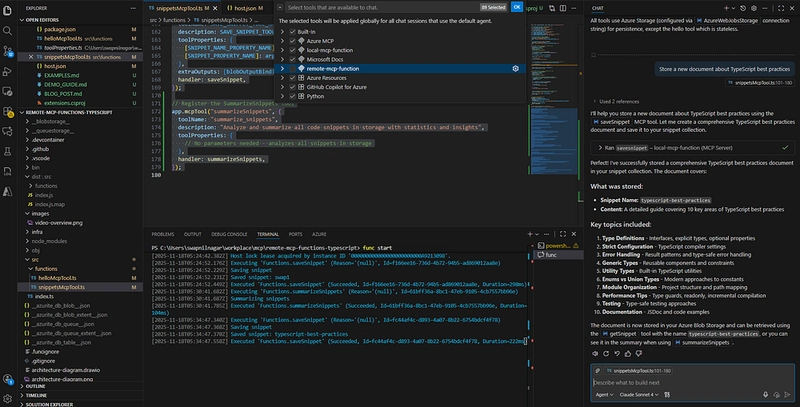
User: "Store a new document about TypeScript best practices"
AI: I'll help you store that document. Let me use the document management system.
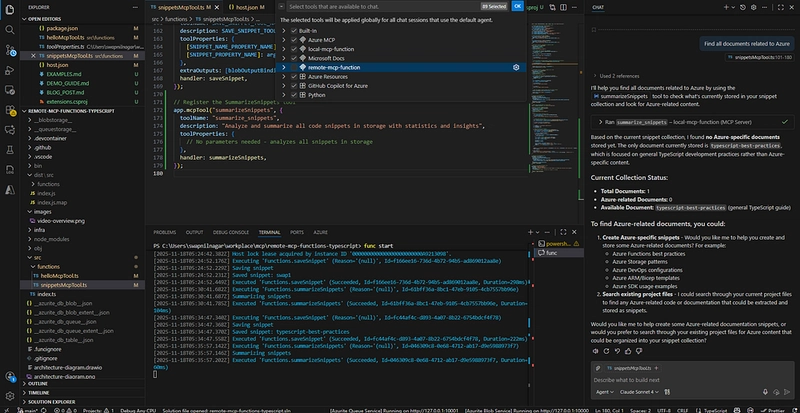
User: "Find all documents related to Azure"
AI: I'll search for documents with Azure-related content.
Why use Azure Serverless Platform?
Serverless Scalability: Azure Functions automatically scales based on demand, handling everything from single-document requests to thousands of concurrent operations.
Rich Integration Ecosystem: With built-in bindings, you can easily integrate with:
- Azure Storage (Blobs, Tables, Queues)
- Azure SQL Database
- Cosmos DB
- Service Bus
- Event Hubs
- And many more…
Cost-Effective: Pay only for execution time with the consumption plan, making it perfect for AI assistant scenarios with sporadic usage patterns.
Enterprise Security: Built-in authentication, network isolation, and managed identity support ensure your AI tools are secure by default.
Getting Started
1. Clone the sample repository:
git clone https://github.com/Azure-Samples/remote-mcp-functions-typescript

git clone https://github.com/Azure-Samples/remote-mcp-functions-python

git clone https://github.com/Azure-Samples/remote-mcp-functions-java

git clone https://github.com/Azure-Samples/remote-mcp-functions-dotnet

cd remote-mcp-functions-typescript
2. Install dependencies:
npm install3. Start local development:
func start4. Deploy to Azure:
azd upConclusion
The Remote MCP, aka MCP Tool Trigger, feature in Azure Functions is an amazing opportunity to build cloud-native AI assistants/Workflows. Serverless, along with Azure's extensive ecosystem, seamlessly integrates to help developers create powerful, scalable, and economical AI tools.
MCP Tool Triggers are also a shortcut to AI decision-making in the workflow of document management systems, data processing pipelines, or custom business logic. The functional integration with the Azure Functions binding system lets you connect to virtually any service or data source, thereby enhancing the capabilities and usefulness of your AI assistants.
Be the first to get your hands on fingerprint file triggers and explore how the truly autonomous cloud can transform your apps!
Resources
Opinions expressed by DZone contributors are their own.
Comments