

Development of System Configuration Management: Building the CLI and API
This article covers advanced development of our custom SCM, focusing on CLI and API design, command execution, and YAML configuration templating.
 ·
·
Join the DZone community and get the full member experience.
Join For FreeSeries Overview
This article is Part 2.2 of a multi-part series: "Development of system configuration management."
The complete series:
- Introduction
- Migration end evolution
- Working with secrets, IaC, and deserializing data in Go
- Building the CLI and API
- Handling exclusive configurations and associated templates
- Performance consideration
- Summary and reflections
CLI
This is a convenient tool for SCM that facilitates operations from CI. We used the module 'github.com/urfave/cli/v2,' which simplifies the fast development of CLI tools.
We developed an action that calls the API, allowing parameters to be passed in and looking for errors in the response to indicate problems. At least one error is enough to change the exit code from zero. The parameters 'tmp' and 'persist' can save the JSON to temporary and persistent Consul keys. Temporary objects are stored with a TTL in Consul and will be deleted after deployment, while persistent objects remain in Consul for an extended period. This opens up opportunities for one-shot operations and the use of certain variables during deployment.
Below is an example of code of CLI that deploys:
func deploy(c *cli.Context) error {
    config := map[string]interface{}{
        "group":   c.String("group"),
        "tmp":     c.String("tmp"),
        "persist": c.String("persist"),
    }

    resp := makeRequest(c, "/api/v3/push/config", config, "")

    var RespJson DeployApiResponse
    err := json.Unmarshal([]byte(resp), &RespJson)
    if err != nil {
        return err
    }

    for Host, Obj := range RespJson {
        Agent := Obj.Agent

        if Obj.Error != "" {
            return errors.New("error not null: " + Host + " host: " + Obj.Error)
        }

        if Agent.Code != 200 {
            return errors.New("Code not 200: " + Host)
        }

        if Agent.Error != "" {
            return errors.New("error in agent not null: " + Host + " error: " + Agent.Error)
        }

        if reflect.ValueOf(Agent.Return).IsZero() {
            return errors.New("error in agent return is null: " + Host)
        }

        for Returner, Data := range Agent.Return {
            if Data.Error != "" {
                return errors.New("error in agent return is null:" + Host + " return: " + Returner + " error: " + Data.Error)
            }
        }
    }
}
After some time, we decided not to limit ourselves to performing simple deployments on machines. We added handlers to the API and CLI tool to ping, store persistent configuration in Consul, and run agent commands. We describe the command functionality in the context
Implementing Command Execution
We'd been refraining for a long time from implementing command running. This was connected to the idea of immature SCM managers. We believed that any command should be wrapped around different managers (parsers and mergers), and in normal situations, this wasn't necessary. However, we occasionally faced tasks that required command execution for:
- Proof of Concept (PoC)
- Fast workarounds before a proper solution
- Simple scenarios, such as running a binary to enable health checks on hosts in one-shot mode after creating a new host.
All these cases highlighted the necessity of creating a command-running manager. Creating a push model would provide more opportunities to run commands widely across servers, especially when, for instance, the security department needs to collect data from a hostgroup.
In most cases, the command should be run only once after creating a host. The manager sets a flag on the local filesystem and doesn't run the command again while the flag exists on the host. The flag should only be set if the command exits with a non-zero code. If it does not, the SCM agent will continue attempting to run it until it is successful.
func AgentCommandParser(ApiResponse map[string]interface{}, status map[string]interface{}) {
    if ApiResponse["command"] == nil {
        return
    }

    var command resources.Command
    err := mapstructure.WeakDecode(ApiResponse["command"], &command)
    for cmd, Opts := range command {
        FlagName := "Command-" + cmd
        // Check the flag on local filesystem before the run command
        if GetFlag(FlagName) {
            continue
        }

        if Opts.Command == "" {
            continue
        }

        CmdRunSpl := strings.Split(Opts.Command, " ")

        // wrapper over exec.Command() + exec.Run()
        stdout, stderr, err, exitcode := ECmdRun(false, Opts.Envs, Opts.StdIn, Opts.WorkDir, CmdRunSpl[0], CmdRunSpl[1:]...)
        Resp[cmd] = map[string]interface{}{
            "stdout": stdout,
            "stderr": stderr,
            "code": exitcode,
        }

        // after success of working command, we don't need to run it again. Set flag on local filesystem and it will mean that the command was run successfully and host doesn't need to run this command again.
        if (exitcode == 0) && (err == nil) {
            SetFlag(FlagName)
        } else {
            RespCmd := Resp[Cmd].(map[string]interface{})
            RespCmd["error"] = err.Error()
        }
    }
}
In the API, the call interface looks like this:
func RunCommandOnGroup(group string, hosts []string, command string, howMany int) (map[string]interface{}, error) {
    if group != "" {
        Resp, err := consul.ConsulGetListByGroup(group)
        if err != nil {
            return map[string]interface{}{}, fmt.Errorf("RunCommandOnGroup group: %s, hosts: %v, error: %v", group, hosts, err)

        }

        if len(Resp.HostList) == 0 {
            return map[string]interface{}{}, fmt.Errorf("RunCommandOnGroup error: host_list not found by group %s\n", group)
        }
        for _, Opt := range Resp.HostList {
            hosts = append(hosts, Opt.Hostname)
        }
    }
    if len(hosts) > 1 {
        hosts = common.RemoveDuplicatesStringSlice(hosts)
    }
    var wg sync.WaitGroup
    var sm sync.Map
    Ret := map[string]interface{}{}
    Ret["error"] = ""
    if howMany > 0 {
        if len(hosts) < howMany {
        } else {
            hosts = hosts[:howMany]
        }
    }
    for _, host := range hosts {
        wg.Add(1)
        go HostsCommandRun(host, "https://"+host+":10443/api/v1/command", command, &sm, &wg)
    }
    wg.Wait()

    sm.Range(func(Key, Val interface{}) bool {
        KeyStr := Key.(string)
        Ret[KeyStr] = Val

        errorFromRet := Val.(map[string]interface{})["error"]
        if errorFromRet != nil && errorFromRet != "" {
            Ret["error"] = "can't run command on host(s)"
        }
        return true
    })

    for Key, _ := range Ret {
        sm.Delete(Key)
    }

    return Ret, nil
}
HTTP API
The HTTP API serves two main tasks:
- Distributing the configuration via pull requests from agents.
- Interacting with the configuration of controlled hosts, which can be used by remote hosts or from CI pipelines.
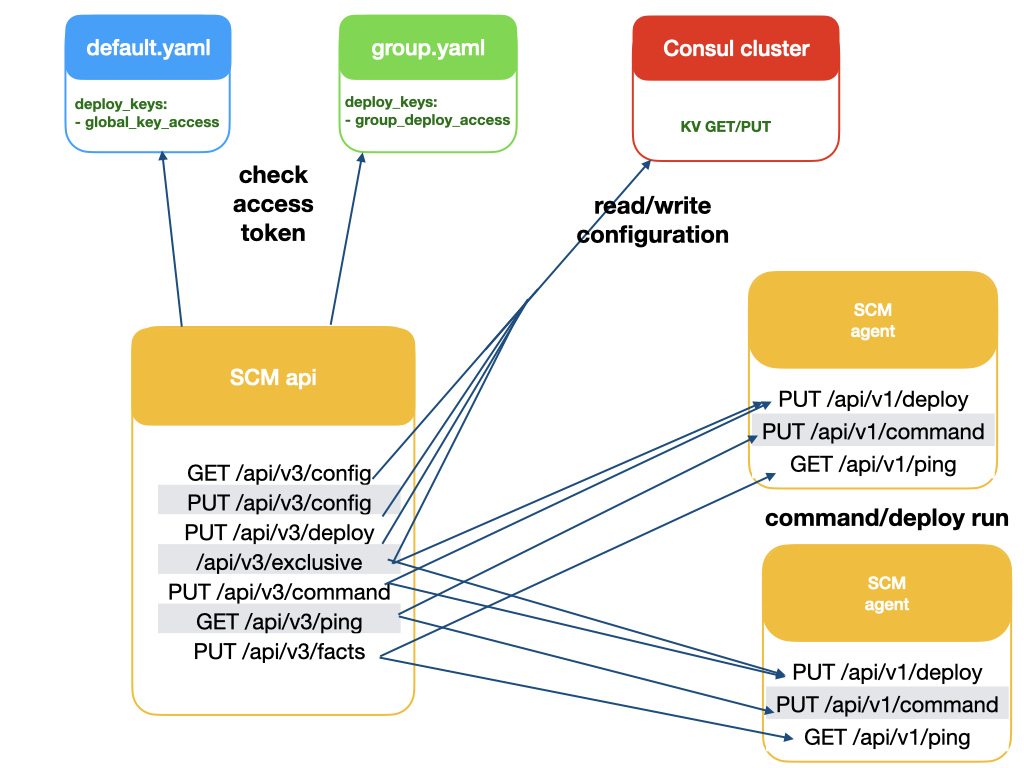
The endpoints that have been introduced are sufficient for our needs. The following handlers are available:
- GET /api/v3/config: This endpoint returns the configuration that is expected for the requesting host. The API processes authentication based on an X509 certificate and the IP address, which must belong to a specific hostgroup. If it is a new host, only the IP address is checked, and the TLS certificate signature is retrieved. The signature of the TLS certificate is then saved to Consul to authenticate this host in the future.
- PUT /api/v3/config: This endpoint saves additional configuration to Consul, which will be merged into the main JSON structure for the hostgroup and considered in future configuration generations. In contrast to
/api/v3/deploy, this handler is faster because it simply stores the data for generating configurations in future builds. It uses token-based authentication specific to a hostgroup. This token must be defined in the hostgroup’s configuration file. The Vault module in the SCM generates the token and stores it in Vault. When a deploy is called, the API authenticates the token from the client and compares it with the token stored in the Vault key before deciding whether to process the update or refuse it. - PUT /api/v3/deploy: This endpoint is similar to
/api/v3/config, but it also initiates external requests from the API to the agents, calling them to deploy new configurations to the end hosts. Each agent has a similar handler that immediately runs the configuration update and sends the results back to the API. All results will be returned to the client. - PUT /api/v3/command: This command uses token-based authentication and is utilized for running bash commands on the agents. The API sends a request to run a command on a specified hostgroup and waits for responses containing the command's stdout and stderr.
- PUT /api/v3/ping: This command employs token-based authentication and is used to perform a simple health check of all hosts from the API.
- PUT /api/v3/facts: This command is used by the agents to send or update relevant facts about themselves.
- PUT/DELETE /api/v3/exclusive: This handler is used by the CLI or other integrations to delete and set the configuration relevant to particular hosts in hostgroups. We will describe this in the section on.
Templating the Main Group YAML File
The main YAML files contain the configurations for hostgroups that have remained without templates for an extended period. Earlier, we decided to keep this implementation intact for as long as possible, and here are the reasons why:
- Integration with other IaC tools within the same repository using uniform YAML files
- Opportunities for YAML linting checks via pre-commit hooks
- The ability to store infrastructure information in various databases for architectural analysis
- Our SCM considers the main YAML file as the primary data source that can generate templates for other files. If we wish to establish a more primary source, we need to define such a data source.
After introducing agents to obtain facts about end nodes, it became clear that we needed to template this file. For instance, different operating systems require the repository files to be placed in different directories, and various distributions may have different package names or versions relevant for installation. Consequently, we embraced this trend and proceeded with templating the main files.
When we examined other SCMs, we can see how these problems were addressed in their products:
SaltStack
SaltStack actively uses Jinja templates in its SLS files. All configurations in SaltStack are templated by default.
{%- if grains['os'] == 'CentOS Stream' and grains['osmajorrelease'] == 9 %}
iptables-legacy:
  pkg.installed
{%- elif grains['os'] == 'CentOS' and grains['osmajorrelease'] == 7 %}
iptables:
  pkg.installed
{%- endif %}
{% for user in users %}
{{ user.name }}:
  user.present:
    - fullname: {{ user.fullname }}
    - shell: /bin/bash
    - home: /home/{{ user.name }}
{% endfor %}
Ansible
Ansible has taken a different approach to maintain proper YAML formatting by actively utilizing directives like 'when', 'with_*'.
Ansible also has the "loop" functionality to traverse array elements. In most cases, this eliminates the need for templates within the YAML file, handling complex constructs for YAML parsing directly. For example:
- name: set up company cert
  when: ansible_distribution == 'CentOS'
  template: src=rootca_company.crt dest=/etc/pki/ca-trust/source/anchors/rootca_company.crt
- name: set up company cert
  when: ansible_distribution == 'Ubuntu'
  template: src=rootca_company.crt dest=/usr/local/share/ca-certificates/rootca_company.crt
- name: "create user {{ item.name }}"
  user:
    name: "{{ item.name }}"
  with_items: "{{ users }}"
How We Rewrote Our SCM
Our SCM has now been rewritten in a way similar to SaltStack, and the Go templater has been integrated into the main manifests:
files:
{{- if eq .facts.os_info.os_version "9" }}
  /etc/yum.repos.d/el.repo:
    from: os/repos/centos/el9.repo
{{- end }}
{{- if eq .facts.os_info.os_version "7" }}
  /etc/yum.repos.d/el.repo:
    from: os/repos/centos/el7.repo
{{- end }}
Overall, this has led to problems with simple YAML parsing, and we decided to change our approach to resolve these issues:
- We have moved away from YAML linting. While this may not be the best decision, keeping these checkers has been helping us only with YAML syntax issues, not with semantic ones. However, these checkers can be developed within SCM in the future.
- We have now moved the task of sending files to the architecture analysis database from the CI pipeline to the SCM scheduler, which templates the files for each host and sends them as clear YAML.
- For YAML integration with other IaC scripts, we have rewritten the support for non-compliant YAML. This was manageable due to our own IaC scripts. This required us to create a function to extract only the relevant portion of a configuration file related to the necessary fields for such an IaC manager:
func FindDataByTokens(data []byte, startToken string, stopToken string) []byte {
    var result string
    recordLines := false
    for _, line := range strings.Split(string(data), "\n") {
        if strings.HasPrefix(line, stopToken) {
            break
        }
        if recordLines {
            result += "\n" + line
            continue
        }
        if strings.HasPrefix(line, startToken) {
            recordLines = true
        }
    }
    return []byte(result)
}
As a result, we can now use non-compliant YAML configurations through multiple IaC managers.
Execution Order of Processing Modules
The new SCM initially did not support custom ordering of processing modules. At the agent level, this means that the code runs in the order specified:
common.PackageParser(ApiResponse, ClientResponse)
common.DebParser(ApiResponse, ClientResponse)
common.PipParser(ApiResponse, ClientResponse)
common.SaltstackSettingUP(ApiResponse)
common.PartitionParser(agentFullInfo, ApiResponse)
common.GroupParser(ApiResponse, ClientResponse)
common.FilesParser(ApiResponse)
tls.CertificateParser(ApiResponse)
common.DirectoryParser(ApiResponse, ClientResponse)
common.ServiceParser(ApiResponse, ClientResponse)
common.CommandParser(ApiResponse, ClientResponse)
... different parsers for services like RabbitMQ or Aerospike
In most cases, this order works well, which is logical:
- First, you want to install the packages.
- Then, you set up the disk partitions.
- Next, you create the necessary users and groups on the server.
- Finally, you handle files, certificates, directories, and run services.
However, there are times when a different order is necessary. We have encountered a specific case where you need to carry the repository files before package installation. To address this, we implemented a 'top' flag for the file handler. This allows us to classify files into two categories in JSON: "tops" and "others." Top files are processed before everything else, while the others follow.
// Separates the files into two types
preparsed := common.FilesPreparse(ApiResponse)

// Process top-ordered files
common.FilesParser(ApiResponse, preparsed, "tops")
common.PackageParser(ApiResponse, ClientResponse)
common.DebParser(ApiResponse, ClientResponse)
common.PipParser(ApiResponse, ClientResponse)
common.SaltstackSettingUP(ApiResponse)
common.PartitionParser(agentFullInfo, ApiResponse)
common.GroupParser(ApiResponse, ClientResponse)

// Process other files
common.FilesParser(ApiResponse ,preparsed, "alls")
tls.CertificateParser(ApiResponse)
common.DirectoryParser(ApiResponse, ClientResponse)
common.ServiceParser(ApiResponse, ClientResponse)
common.CommandParser(ApiResponse, ClientResponse)
... different parsers for services like RabbitMQ or Aerospike
After implementing this feature, the initial deployment of hosts was accelerated because packages could be installed during the first phase of deployment, eliminating the need to wait for the next attempt.
Opinions expressed by DZone contributors are their own.
Comments