

Development of System Configuration Management: Working With Secrets, IaC, and Deserializing Data in Go
This article covers migrating to a new Go-based SCM. It evolved from basic to supporting IaC, secret management, and more, becoming a flexible infrastructure tool.
 ·
·
Join the DZone community and get the full member experience.
Join For FreeSeries Overview
This article is Part 2.1 of a multi-part series: "Development of system configuration management."
The complete series:
- Introduction
- Migration end evolution
- Working with secrets, IaC, and deserializing data in Go
- Building the CLI and API
- Handling exclusive configurations and associated templates
- Performance consideration
- Summary and reflections
Migration
The initial phase of migration involved using our developed SCM alongside the traditional SCM. This transition might last for many years, or perhaps indefinitely. We were not certain that all functionality would be replaced by the new SCM. The primary idea was to reach an agreement: we would introduce the developed SCM only for elements that had already been tested and demonstrated improvements. If deemed applicable, we would remove these implementations from the old SCM and begin using the new SCM in their place. It worked like this: we introduced a new manager (for example, "nginx"). If it covers all functionality and is convenient for us, we can move all Nginx servers under the control of the new SCM.
This approach clarifies the areas of responsibility for the various tools managing our infrastructure. Each new functionality of the updated SCM enhances our productivity because, unlike SaltStack or Ansible, it makes periodic checks and, as a result, maintains state consistency.
As a result, we began using the new SCM as a system package controller, service runner, and file manager. The update process for packages on the hosts became easier due to the pull model of the new SCM.
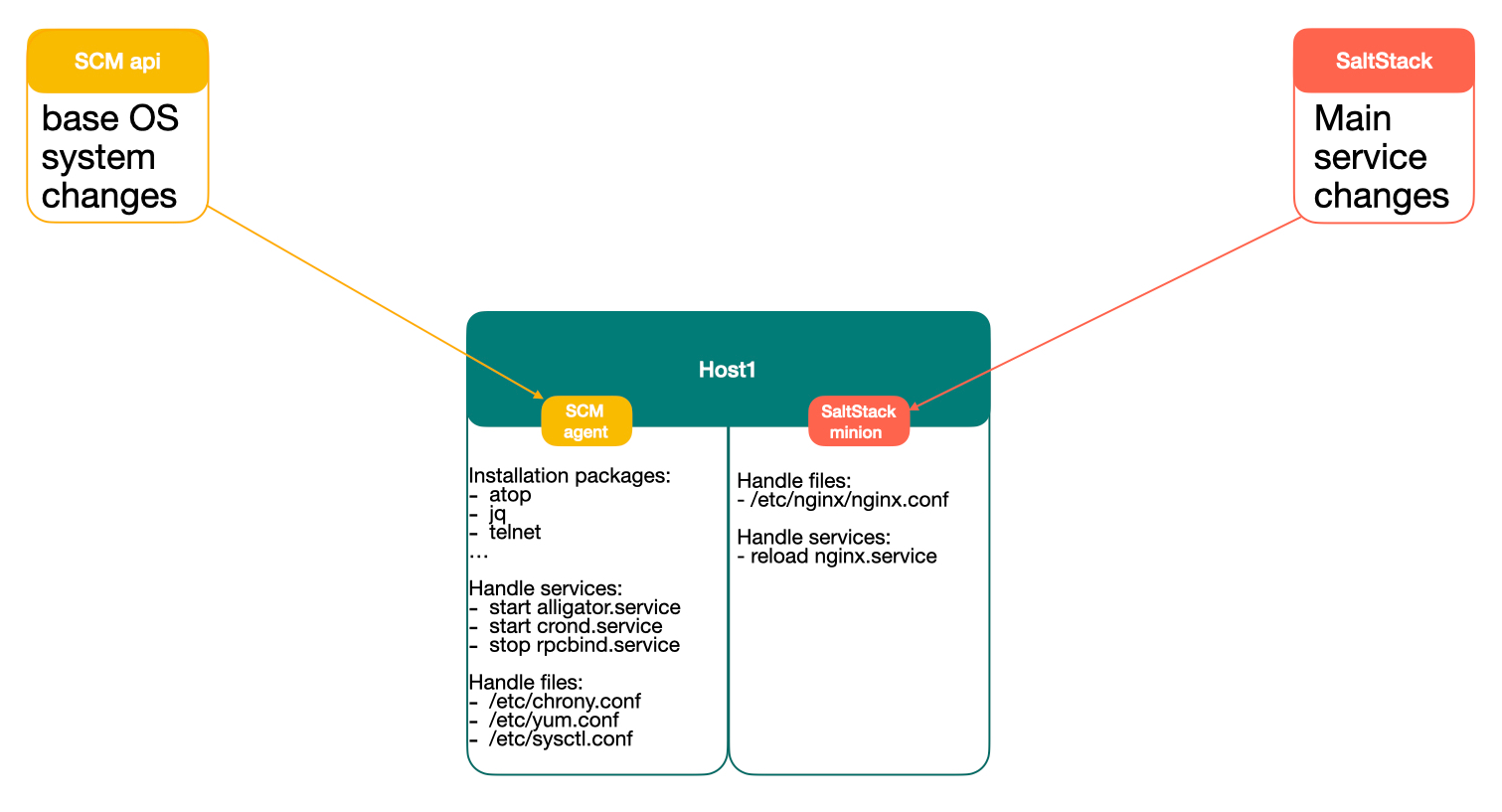
In this transition, we excluded many controls from the old SCM and transferred them to the new SCM. By combining the use of both SCMs, we made the transition period clearer and more predictable. Gradually developing new modules in the new SCM facilitates the migration of configurations on the hosts from the old SCM to the new one.
First Results and Achievements
The first achievement was the automatic synchronization of RPM packages and their versions on the hosts. The new SCM makes it possible to control versions in real time and update software as quickly as possible. This is especially helpful whenever the CyberSec department requests package updates on the hosts due to a CVE.
The next step was the implementation of a file deployer and templater. The challenging part was migrating from Python Jinja templates to Go templates.
With the subsequent implementation of systemd and Vault, we opened up opportunities to update x509 certificates on the fly from Vault and reload the web server without requiring an engineer.
However, the migration process was challenging. First of all, we had many projects and servers, and the configuration of all these servers had to be rewritten in a new way, which took considerable time. As a result, the entire migration took four years to complete. After this, the last SaltStack master was shut down.
Evolution
The code for the new SCM has proven to be quite easy to change. It has only undergone a few structural changes, but overall, it has remained fairly static. In this paragraph, we will discuss the major changes in the SCM.
Rewritten Parsers and Mergers to Work With Structs Instead of Interfaces
While interfaces are beneficial for working with Go templates, they can be impractical when you need to work with the fields of an object in Go code. We decided to use these ways together. We retained interface-encoded JSON, but every merger and parser now uses mapstructure.Decode to decode only the relevant parts of the interface.
Previously, we had used the following constructs for each parameter:
something := ""
something_p := reflect.ValueOf(ApiResponse["something"])
if !something_p.IsZero() {
    something = ApiResponse["something"].(string)
}
This approach sometimes resulted in segmentation faults when the type did not match. As an alternative, we utilized more reflection:
something := ""
something_p := reflect.ValueOf(ApiResponse["something"])
if !something_p.IsZero() {
   if something_p.Kind() == reflect.String {
      something = something_p.String()
   }
}
However, it increases the code size, complicating maintainability and introducing potential errors. The go module mapstructure with its Decode method allows a smoother transition to structures, step by step, grouped by managers that handle a specific type of resources. This allows us to deserialize only the relevant objects for the handlers, thereby reducing the complexity of parsing interfaces and maintaining flexibility when using Go templates in the file manager.
Below is an example of using a parser with 'mapstructure' to cast an interface to a static type and work with it:
func ParserGetData(ApiResponse, ClientResponse map[string]interface{}, Name string) (map[string]interface{}, map[string]interface{}, bool) {
    if ApiResponse == nil {
        return nil, nil, false
    }

    if ClientResponse == nil {
        return nil, nil, false
    }

    if ApiResponse[Name] == nil {
        return nil, nil, false
    }

    RetService := ApiResponse[Name].(map[string]interface{})

    // We decided to use an immutable flag to indicate that all changes in this context should be stopped.
    if RetService["immutable"] != nil {
        return nil, nil, false
    }

    // resp is an object that contains the response from the agent to the API with the results of the working managers for the push model.
    resp := map[string]interface{}{}
    ClientResponse[Name] = resp

    return RetService, resp, true
}

func PartitionManagerParser(ApiResponse map[string]interface{}, ClientResponse map[string]interface{}) {
    Partitions, Resp, ActiveParser := ParserGetData(ApiResponse, ClientResponse, "disk")
    if !ActiveParser {
        return
    }

    for DeviceName, partData := range Partitions {
        if partData == nil {
            continue
        }
        Devices := partData.([]interface{})

        for _, object := range Devices {

            // converts from interface to struct
            var Device PartitionObj;
            mapstructure.Decode(object, &Device)
            DeviceDecodeNum(object, &Device)

            if Device.State == "absent" {
                DeviceDeletePartitions(Device, DeviceName)
                continue
            }

            if Device.Type == "tmpfs" {
                TmpfsMount(Device.Mount, Device.Size)
            }

            if Device.Type == "gpt" || Device.Type == "partition" {
                DeviceCreateGPT(Device, DeviceName, Resp)
                continue
            }

            if Device.Type == "md" {
                err := DeviceCreateRaid(Device, DeviceName, Resp)
                if err != nil {
                    continue
                }
            }

            if Device.Type == "lv" {
                err := DeviceLv(Device, DeviceName, Resp)
                if err != nil {
                    continue
                }
            }
        }
    }
}
It seems that we struggle more with variable casting in Go than with handling disk parameters.
Increasing the Functionality of Managers and Creating New Managers
Throughout the development process, new servers and hostgroups have been transitioning from SaltStack to the new SCM. We used both systems because not all cases were developed in the new SCM, and we continued to use SaltStack as well. However, more and more functionality from the introduced servers has been migrated to the new SCM from SaltStack.
Over the next two years, we developed managers for all the software we used, including databases, web servers, message brokers, and Docker. Common managers were also expanded to include a disk partition manager, htpasswd file manager, process runner, firewall controller, and much more.
IaC Functionality
One of the first things that emerged in the new SCM was a module that could create virtual machines in our private cloud. This was a significant leap for us and opened up opportunities to store all configurations of a hostgroup in a single file.
The second development was a module that registers our exporter endpoints with our custom API, which generates the Prometheus configuration. This module was created to address the issue of users forgetting to manually add hostgroups to the monitoring system. With SCM's knowledge of all active exporters for each host, we can simply describe the main software; the exporters will also be installed and automatically enabled in the monitoring system.
Implementing PKI in the New SCM
This functionality is closely connected with the Vault store. The main idea is to create mTLS endpoints to authorize clients. In other SCM systems, we encountered some problems with this:
- Lack of full support for all certificate and key formats (such as p12, p11, jks)
- Inability to automatically generate certificates, save them in Vault, and transfer them from Vault to destination servers
With custom code, these issues can be resolved more easily.
For this scheme to work, we agreed to use a specific prefix for keys in Vault to store the CA and linked certificates. It follows the structure of the key tree shown below:
- secrets/pki/
  - <CN of CA>/:
    - CA [crt, key]
    - <cn1> [crt, key, jks_password, keystore, truststore]
    - <cn2> [crt, key, jks_password, keystore, truststore]
For example:
- secrets/pki/
  - ca.example.com/:
    - CA [crt, key]
    - *.example.com [crt, key, jks_password, keystore, truststore]
    - anotherdomain.com [crt, key, jks_password, keystore, truststore]
    ...
This structure is adapted for a one-level CA for our purposes. It consists of a single directory level with CN names. Inside each directory, there is at least one key named CA that contains the main certificate and key in different formats - PEM and JKS, which are widely supported by various software.
Generation of certificates is performed via the SCM API. If the key pki is specified in the hostgroup YAML file, it enables the PKI manager at the API level.
func GetTLSCert(PKIname string, CommonName string, OrgName string, CountryCode string, Province string, City string, Address string, PostalCode string, Domains []string, IPAddresses []net.IP) (string, string, string, string, string, string, error) {
    PKIpath := conf.VaultPath + "/pki/" + PKIname

    // Set default vaules for optional fields
    setDefaults(&OrgName, &CountryCode, &Province, &City, &Address, &PostalCode)

    // Get Certificate Authority (CA)
    CAPath := PKIpath + "/CA"
    CAData, exists, err := vault.VaultGet(CAPath)
    if err != nil {
        return "", "", "", "", "", "", err
    }
    if exists == 0 {
        // Create the certificates PEM and transfer it into Vault
        err = Gen_Vault_CA_Cert(CAPath, PKIname, OrgName, CountryCode, Province, City, Address, PostalCode, Domains, IPAddresses)
        if err != nil {
            return "", "", "", "", "", "", err
        }

        // Retrieve the CA again from the Vault
        CAData, exists, err = vault.VaultGet(CAPath)
        if err != nil {
            return "", "", "", "", "", "", err
        }
    }

    // get certificate
    CertPath := PKIpath + "/" + CommonName
    Data, exists, err := vault.VaultGet(CertPath)
    if err != nil {
        return "", "", "", "", "", "", err
    }

    if exists == 0 {
        // Creates the cerificates PEM, add the JKS format using `-importkeystore` for keytool, and transfer it into Vault
        // Certificates on the local filesystem will be deleted after operation
        err = Sign_Vault_Cert(PKIpath, CAPath, CertPath, CommonName, OrgName, CountryCode, Province, City, Address, PostalCode, Domains, IPAddresses)
        if err != nil {
            return "", "", "", "", "", "", err
        }

        // Retrieve it again from Vault
        Data, exists, err = vault.VaultGet(CertPath)
        if err != nil {
            return "", "", "", "", "", "", err
        }
        if exists == 0 {
            return "", "", "", "", "", "", err
        }
    }

    return Data["crt"].(string), Data["key"].(string), CAData["crt"].(string), Data["keystore"].(string), Data["truststore"].(string), Data["jks_password"].(string), nil
}

func PKI_Manager(ApiResponse map[string]interface{}) {
    if ApiResponse == nil {
        return
    }

    if ApiResponse["PKI"] == nil {
        return
    }

    // Deserialize interface to struct
    var PKI resources.File
    err := mapstructure.Decode(ApiResponse["PKI"], &PKI)
    if err != nil {
        return
    }

    // Loop over the map of certificates, where Name represents the Certificate Authority's CN
    for Name, Data := range PKI {

        // Retrieve TLS certificates from the Vault
        Cert, Key, Ca, KeyStore, TrustStore, JksPassword, err := GetTLSCert(Name, Data.CommonName, Data.OrgName, Data.CountryCode, Data.Province, Data.City, Data.Address, Data.PostalCode, Data.Domains, Data.IPAddresses)
        if err != nil {
            return
        }

        if Data.Path == "" {
            continue
        }

        VaultPath := conf.VaultPrefixlPath + "/pki/" + Name
        VaultData, exists, err := vault.VaultGet(VaultPath)
        if err != nil {
            continue
        }

        // Append the TLS certificates from the Vault to the response object called 'files' for use by the file manager at the SCM agent level
        if Data.Path != nil {
            if ApiResponse["files"] != nil {
                Files := ApiResponse["files"].(map[string]interface{})
                // JKS is already stored in base64 format in the Vault due to binary format
                if Data.Format == "jks" {
                    Files[Data.Path + KeyStoreName] = map[string]interface{}{
                        "data":       KeyStore,
                        "file_user":  FileUser,
                        "file_group": FileGroup,
                        "file_mode":  FileMode,
                        "state":      "present",
                        "password":   JksPassword,
                    }
                    Files[Data.Path + TrustStoreName] = map[string]interface{}{
                        "data":       TrustStore,
                        "file_user":  FileUser,
                        "file_group": FileGroup,
                        "file_mode":  FileMode,
                        "state":      "present",
                        "password":   JksPassword,
                    }
                } else {
                    B64Cert := base64.StdEncoding.EncodeToString([]byte(Cert))
                    Files[Data.Path + CrtName] = map[string]interface{}{
                        "data":       B64Cert,
                        "file_user":  FileUser,
                        "file_group": FileGroup,
                        "file_mode":  FileMode,
                        "state":      "present",
                    }
                    B64Key := base64.StdEncoding.EncodeToString([]byte(Key))
                    Files[Data.Path + KeyName] = map[string]interface{}{
                        "data":       B64Key,
                        "file_user":  FileUser,
                        "file_group": FileGroup,
                        "file_mode":  FileMode,
                        "state":      "present",
                    }
                    if CaName != "" {
                        B64Ca := base64.StdEncoding.EncodeToString([]byte(Ca))
                        Files[Data.Path + CaName] = map[string]interface{}{
                            "data":       B64Ca,
                            "file_user":  FileUser,
                            "file_group": FileGroup,
                            "file_mode":  FileMode,
                            "state":      "present",
                        }
                    }
                }
            }
        }
    }
}
This code obtains the certificates from the Vault and transfers them to the response JSON. If a certificate does not exist in the Vault, it generates the certificate locally in P12 as a portable format, converts it to PEM and JKS, transfers it to the Vault, and retrieves it for the response JSON.
Below is a configuration example that injects the certificates into the API response and generates them if they do not exist:
x509:
  ca.kafka.example.com:
    *.srv.example.com:
      path: /etc/kafka
      file_user: kafka
      file_group: kafka
      file_mode: "0600"
      keystore_name: server.keystore.jks
      truststore_name: server.truststore.jks
      format: jks
    client-kafka.srv.example.com:
      path: /app/
      file_user: nobody
      file_group: nobody
      file_mode: "0600"
      crt_name: app.crt
      key_name: app.key
      ca_name: ca.crt
Handling Secrets, Tokens, and Passwords
The main logic is similar to that of certificates, but easier to implement. Users can specify the character set for generating a secret word and the number of characters. For this purpose, we introduced the function 'RandomString(symbols string, length int)' and a path in the Vault, such as '/password', which contains secrets generated by SCM, grouped by their name.
The API checks the path in Vault, such as '/secrets/password/mysecret', and retrieves it in the response JSON. If it does not exist, it calls the 'RandomString' function to generate the secret, transfers it to the Vault, and retrieves it for the response JSON again. As a result, these secrets can be used in Go templates.
This is an example of a configuration in the hostgroup YAML that generates a 25-character secret or retrieves it from the Vault key '/secrets/password/lukskey' to the response object 'crypt_key'.
password:
  lukskey:
    object: crypt_key
    size: 25
Any hostgroup can access the password if this option is declared in their configuration file. Then we can share this secret between clients and servers, allowing us to synchronize them simultaneously.
Another case involves generating the htpasswd file. This is necessary because standard Go templating does not work with encrypted files. We describe the logic at the agent level using the module 'github.com/foomo/htpasswd'. This module cannot check passwords within the htpasswd file, but it can verify the existence of users, add users, and set passwords for them.
Below is a part of the code that implements the logic for generating fields in the htpasswd file:
...
        localFileUsers, _ := htpasswd.ParseHtpasswdFile(Ht)

        for User, UserOpts := range Users {
            // Check the necessity of removing the user
            if UserOpts.State == "absent" {
                htpasswd.RemoveUser(Ht, User)
                continue
            }

            // Check for the existence of the user
            if localFileUsers[User] == "" {
                htpasswd.SetPassword(Ht, User, UserOpts.Password, htpasswd.HashAPR1)
            }
        }
...
The next problem in operating with secrets relates to the Consul ACL cluster bootstrap.
The main issue with working with Consul is generating some secrets inside the result node. For security purposes, we decided not to connect the SCM agent and Vault directly, which has led to some complications. In previous cases, we were able to generate secrets or certificates via the API, which had a direct connection to the Vault. However, the new Consul cluster uses a completely different approach.
Below is a GIF that describes the process of obtaining and saving the Consul bootstrap tokens to the Vault and a file.
Below is a small example of code for the Consul manager that operates at the agent level and can perform ACL bootstrapping on new clusters:
func ConsulBootstrap(Url string) {
    BootstrapUrl := Url + "/v1/acl/bootstrap"
    AclData, HttpCode, err := HTTPRequest("PUT", BootstrapUrl, "")
    if err != nil {
        return
    }
    if HttpCode == 403 {
        return
    }

    var RespAcl consul_acl_response_type
    err = json.Unmarshal([]byte(AclData), &RespAcl)
    if (RespAcl.AccessorID == "") || (RespAcl.SecretID == "") {
        return
    }

    VaultData := consul_acl_transfer_type
        AccessorID: RespAcl.AccessorID,
        SecretID:   RespAcl.SecretID,
    }

    BootstrapAclPath := Consul + "/bootstrap"
    _, err = consul.ConsulSaveToMigrate(BootstrapAclPath, VaultData)
    if err != nil {
        return
    }
}
After the SCM performs ACL bootstrapping for Consul, it can use the token to manage various ACLs and create new tokens on its own.
Push Model
We had been working exclusively with a pull model for a long time. However, when we encountered CI integration, it revealed the necessity for runtime calls to the agents. This led to the need for the following scenarios to be described in code:
- Adding a route to the API SCM: This API takes input variables that will be included in the JSON response for the agents. Secondly, the API makes requests in goroutines to all agents in the target hostgroup. Essentially, it is sending a standard response in the body of the request.
- Introducing API on the agent: The body of the request should contain the result JSON with the full declarative configuration.
- Introducing a struct that contains the response from the agent to the API, with status: With the pull model, this was not necessary, as the working log file was sufficient for debugging. However, the response to the API is important because the CI pipeline needs to know the status of the running task.
- Adding CLI for simplified usage in CI pipelines: To improve performance, we used goroutines within the API.
func PushAndRunConfig(Group string) map[string]interface{} {
    // Renew the config on the API from the repository
    err := common.GitUpdate(conf.FilesDir, "origin", "master")
    if err != nil {
        return map[string]interface{}{}
    }

    Resp, err := consul.ConsulGetListByHG(Hostgroup)
    if err != nil {
        return map[string]interface{}{}
    }

    if len(Resp.HostList) == 0 {
        return map[string]interface{}{}
    }

    var wg sync.WaitGroup
    var sm sync.Map
    Ret := map[string]interface{}{}

    for _, Opt := range Resp.HostList {
        OptMap := Opt.(map[string]interface{})
        Hostname := OptMap["hostname"].(string)
        IP := OptMap["ip"].(string)

        wg.Add(1)
        // Use goroutines to improve speed
        go UrlPushConfigRun(IP, Hostname, "https://"+Hostname+":10443/api/v1/config", &sm, &wg)
    }
    // Wait for all goroutines to complete
    wg.Wait()

    // Loop over elements and store them into the response object
    sm.Range(func(Key, Val interface{}) bool {
        KeyStr := Key.(string)
        Ret[KeyStr] = Val
        return true
    })

    // Free the memory after work is done
    for Key, _ := range Ret {
        sm.Delete(Key)
    }

    return Ret
}
You can notice that we use goroutines to operate commands on all hosts in parallel to improve speed. The sync.Map and WaitGroup are used for waiting and obtaining results from multiple goroutines. The use of the push model does not require the pull model to be stopped; both functionalities can work together.
To eliminate the chance of concurrent running of two processes, we add locks at the agent level for calling parsers. This can sometimes be confusing, as the pull manager can overtake the push request, leading to the CI pipeline being unaware of what has been deployed on the host since the push manager may not detect any changes. However, this is not a critical issue.
Opinions expressed by DZone contributors are their own.
Comments