

Test Automation Success With Measurable Metrics
In this article, we delve into the key metrics that enable us to gauge the effectiveness of automation and understand its transformative impact on quality assurance.
Join the DZone community and get the full member experience.
Join For FreeNowadays, organizations want to deliver high-quality software products at an accelerated pace. For that, most software delivery companies want to automate their testing activities. However, the true effectiveness of test automation lies not just in its adoption but in how it is implemented and executed.
When we start to automate the test cases, our management should raise the following questions:
- What effect will automation add to this process?
- What is the percentage going to be covered via test automation?
- What is the ROI of automation?
- How many man-days can be reduced when automation is implemented in the testing cycle?
- etc...
Test Automation was introduced to reduce repetitive manual work with the help of scripts or computer programs and to perform the required testing activities without human interaction. This can include the following activities:
- Test data generation.
- Performing pre-activities for test execution.
- Executing the defined test steps.
- Comparing the actual and expected results.
- Managing the test execution changes.
- Generating the test report.
Effectiveness of Test Automation
Test automation has revolutionized quality assurance processes, streamlining workflows and enhancing overall efficiency. In this article, we delve into the key metrics that enable us to gauge the effectiveness of automation and understand its transformative impact on quality assurance. The below metrics discussed valuable insights into the efficiency, reliability, and scope of automation efforts.
Measuring Effectiveness
Source Code Coverage
This metric identifies the extent to which the automated tests access different conditions and flows within the source code. By ensuring comprehensive coverage, we can increase confidence in the software's reliability.
Examples and illustrations of how this metric is applied will be provided later in the article.
Test Coverage
Test coverage measures the percentage of test cases automated from the total identified test scenarios. A higher test coverage implies a more thorough evaluation of the software and faster feedback on code changes.
Maintainability
Evaluating the ease of maintaining and updating the automated tests is essential for ensuring the sustainability of the automation effort.
Execution Time
Tracking the time taken to run the automated test cases provides valuable insights into efficiency gains achieved through automation.
Reportability
These reports indicate the pass/fail status of test cases and provide detailed information about failures, aiding in prompt bug resolution.
Reliability
Measuring the reliability of automated test cases ensures that they provide accurate feedback on the software's behavior across multiple test runs.
Context
Considering the context of test automation is crucial. Deciding whether to cover only the basic functionality of the product or include minor validations requires careful consideration.
Automating Application Testing With Instrumentation: A Step-By-Step Guide
Here, we can try to create the sample react web application and instrument our source code, then run the automation against the instrumented web application. In this process, we will follow these steps:
Install the NPM dependency
Install the @cypress/instrument-cra package as a development dependency in the project directory of your react-typescript application:
Istanbul is used for report generation.
npm install --save-dev @cypress/instrument-cra npm install -g istanbul
Configure This to Your React App package.json File
Open the package.json file in your project and modify the scripts section as follows:
"scripts": {

  "start": "react-scripts -r @cypress/instrument-cra start",}
Start the React Application
Start your React application in instrumented mode by running:
npm start
Create the Selenium Automation Script
1.1 In the provided code snippet, replace the WebDriver configuration with the following:
private void initializeJavascriptExecutor() {

  System.setProperty("webdriver.chrome.driver", "path/to/chromedriver");

  driver = new ChromeDriver();

  js = (JavascriptExecutor) driver;}
Replace "path/to/chromedriver" with the actual path to the ChromeDriver executable on your system.
1.2 Create feature files using Cucumber syntax to define your test scenarios. For example, create a file named test.feature with the following content:
Feature: Form Application

@All

Scenario: Submitting a form

Given I open the form application

When I enter the name "John Doe"

And I enter the email "[email protected]"

And I submit the form

@All

Scenario: About description should be visible

Given I open the form application

And I click on about button

And the about description should be visible

@All

Scenario: User select Yes option in about page

Given I open the form application

And I click on about button

And the user should click on yes button

@All

Scenario: User select No option in about page

Given I open the form application

And I click on about button

And the user should click on no button

@All

Scenario: User select maybe option in about page

Given I open the form application

And I click on about button

And the user should click on maybe button
Write the Coverage Collection Function With Your Automation Script
In the provided code snippet, replace the WebDriver configuration in cucumberRunner.java file with the following:
  @After

    public void saveCoverageInformation() {

        Object coverage = js.executeScript("return window.__coverage__;");

        coverageData.putAll((Map<String, Object>) coverage);


        // Exclude files from coverage data

        String excludedFile = "/path/reportWebVitals.ts";

        coverageData.remove(Paths.get(excludedFile).normalize().toString());


        Gson gson = new GsonBuilder().setPrettyPrinting().create();

        String json = gson.toJson(coverageData);


        try (FileWriter writer = new FileWriter(coverageFilePath)) {

            writer.write(json);

            System.out.println("Coverage information saved to " + coverageFilePath);

        } catch (IOException e) {

            e.printStackTrace();

        }

    }
Replace "/path/coverage.json" with the actual path to the project directory on your system.
Run the Test Automation Against the Instrumented Web Application
Once this is run, then a defined path coverage file will be created with collected data.
After the Automation Run and Obtaining the Report
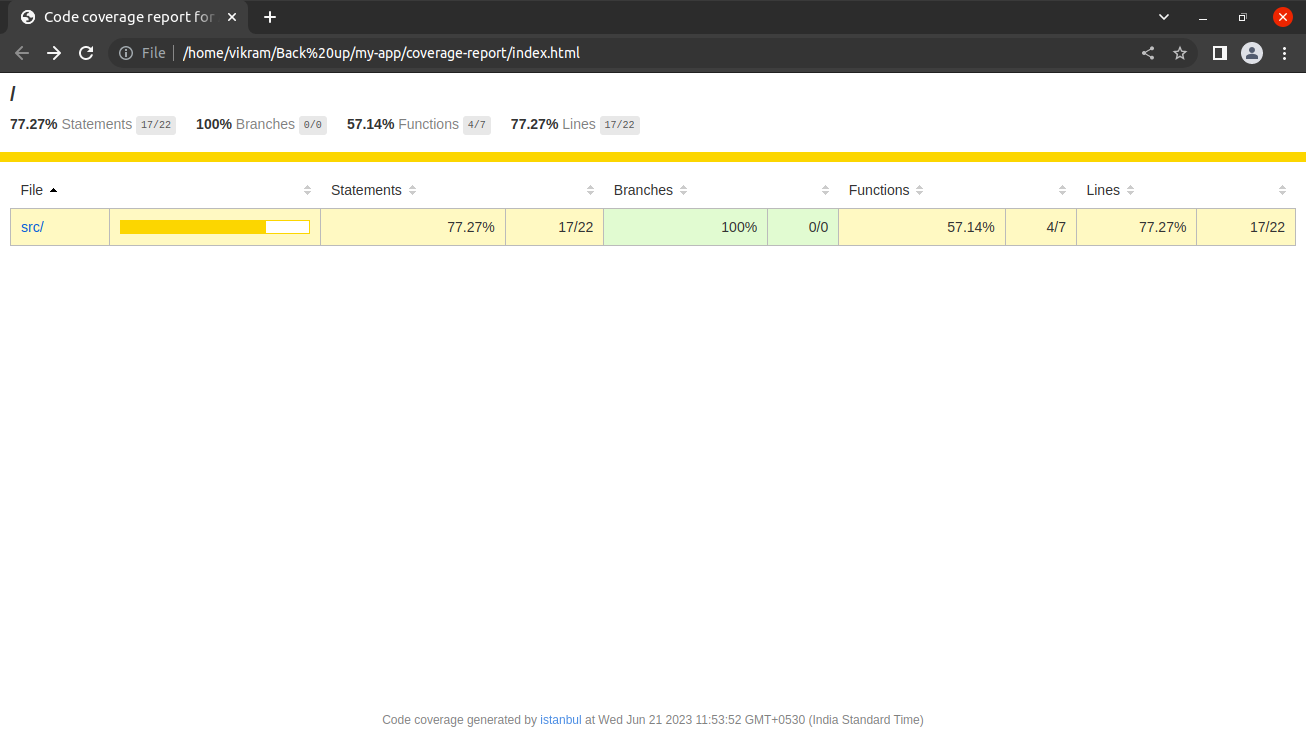
Once the test is complete, we can get the coverage.json file in the mentioned path, as I explained in step 2. Then, we should open a terminal at the location of the generated coverage.json file and type the following command to create the reports in a directory called “coverage-report”:
istanbul report --include coverage.json --dir coverage-report html
Sample reports are below:
Conclusion
When implemented with a strategic approach to identify the effectiveness of test automation, it empowers organizations to make informed decisions about delivering higher-quality software. Among the factors discussed earlier, source code coverage stands out as a measurable metric for calculating test automation effectiveness.
In conclusion, automation not only reduces time-to-market but also enhances business agility. Embracing the principles, best practices and emerging technologies of test automation allows organizations to transform their quality assurance processes. With this change, AI-driven test automation becomes a more powerful tool for software testing activities.
Opinions expressed by DZone contributors are their own.
Comments