

The Secrets of JQL Everyone Wished They Knew
JIRA's querying language, JQL, can be extremely useful. Look at some secrets when it comes to JQL that can help you make more effective use of your own JIRA instance.

Join the DZone community and get the full member experience.
Join For FreeJIRA Software is a cool tool, but what makes it even cooler is its powerful search features. By now, you have probably already discovered JIRA Query Language (JQL) and learned the basics, but here are some of my favorite tips and commands that I use all the time in JQL — what I call the secret powers of JQL.
Filter on Users
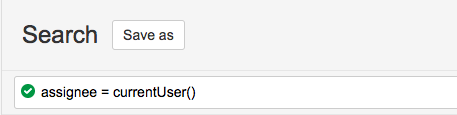
currentUser()
What if you would like to find all issues to which you’ve been assigned? This is basically all the work that you are expected to do. Good to know, right?
You can use the JQL function currentUser() for this:
assignee = currentUser()This filter works not only for you but it’ll work for others, too, if you change the value currentUser() to the user’s name. If you save this filter and make it available to others, they’ll be able to see all issues that have been assigned to them.
membersOf()
You could do the same for all members of a certain squad, team, or group. The most important thing to note here is the use of IN instead of =.
assignee IN membersOf(“Collaboration Squad”)This will show you all the tickets assigned to members of a team, so you can see how much work they have on their plates.
Date Filtering
In the article about history searches, we covered many ways of filtering by using dates. Most of the examples were using static dates. But Atlassian has a set of functions to support dynamic date filtering as well.
Static dates represent a specific moment in time, like, “give me all the issues created on the 1st of January 2017.” Dynamic dates represent the time period you determine; for example, “give me all the issues created 5 days ago.”
startOf…()
These functions are particularly helpful if you are querying for a certain period. For example, all issues created within this week. Where you could use a combination startOfWeek() and endOfWeek():
created > startOfWeek() and created < endOfWeek()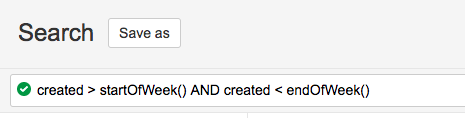
Or even more advanced, if you’d like only issues created in the current workweek:
created > startOfWeek(1d) and created < endOfWeek(-1d)There’s a couple of helpful functions for ‘startOf…’.
startOfDay()startOfWeek()startOfMonth()startOfYear()
The following example gives you all issues that were created this year:
created >= startOfYear()You can also use dynamic dates in the startOfWeek and endOfWeek functions. You can only enter one item (so just -1w or -2w, not -2w -1d). So, for example:
startOfWeek(“-8d”) OR startOfWeek(“-15d”) OR startOfWeek(“-22d”)...should be accepted.
But if you want all issues created on the past three mondays:
(created <= startOfWeek(“-5d”) AND created >= startOfWeek(“-6d”)) OR (created <= startOfWeek(“-12d”) AND created >= startOfWeek(“-13d”)) OR (created <= startOfWeek(“-19d”) AND created >= startOfWeek(“-20d”))...this query takes into account the fact that created contains time as well (start of day and end of day).
endOf…()
The same functions exist for the end of a day, week, month, or year:
endOfDay()endOfWeek()endOfMonth()endOfYear()
now()
This command will show you a list of all issues that were due up until now and not just today. Catch up on any work that may have slipped through the cracks!
The now() function refers to the current date and time and is often used for filtering on the due date:
due <= now() lastLogin()
If you want to keep track of all the issues that have been created or updated since you last logged in, you could use this function:
created >= lastLogin() OR updated >= lastLogin()Filter on Tasks
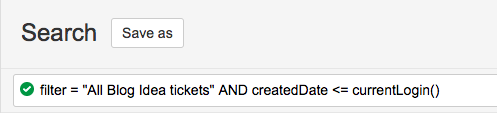
Perhaps you want to search for tasks on Kanban boards or a Scrum backlog. A Kanban/Scrum board itself is backed by an existing JQL filter.
If you know the filter’s name or id you can do the following and add extra clauses to get a more specific result:
filter = 123456 AND …Or...
filter = ‘Filter Name’ AND …Many More
These are just a handful of available functions that I use all the time. To find a complete list, check out the JIRA documentation site.
Questions/Problems?
If you haven’t yet, check out our blog series on JQL:
- JQL: The most flexible way to search JIRA
- JQL: Using filters and subscriptions
- JQL: Functions, history, and sorting
- Getting the most out of JQL with Atlassian Marketplace add-ons
Or, ask me a question in the Atlassian Community.
Published at DZone with permission of Maarten Cautreels. See the original article here.
Opinions expressed by DZone contributors are their own.
Comments