

Training a Neural Network Model With Java and TensorFlow
Learn how to train a neural network model using the TensorFlow platform with Java and using a pre-trained model in a proper Spring Boot application.
Training, exporting, and using a TensorFlow model is a great way to gain a low-level understanding of the building blocks of the LLMs fueling the AI revolution.
Since I am comfortable with using Java, I will use it to define a neural network (NN) model, train it, export it in a language-agnostic format, and then import it into a Spring Boot project. Now, doing all this from scratch would not be advisable, since there are many advances in the field of NN that would take a long time to properly understand and implementing them would be difficult and error-prone. So, to both learn about NNs and make implementation easy, we will use a proven software platform: TensorFlow.
TensorFlow is a mature and robust platform used by many to build and train models, but it is almost exclusively used with the Python programming language. Fortunately for us, the project has been made available for use with Java by wrapping the native library as a Maven dependency: https://github.com/tensorflow/java.
We will use the CPU for learning and running, since it is simple, and nothing extra needs to be done except adding the specific Maven dependency. The TensorFlow platform also supports using the GPU, which requires extra steps to configure properly. The downside of using the CPU is decreased learning speed (the model will perform the same if it is trained for the same number of epochs).
This tutorial will cover the complete process, from gathering the data to train our own simple classification model to importing and using a pre-trained object detection model from the TensorFlow team.
Tutorial
Before we begin, there are a few basic concepts related to NN that we need to get familiar with if we want to actually have something usable:
- Layer: This is a structure in an artificial NN formed of multiple artificial neurons arranged in a one-dimensional array.
- Weight initialization: Every layer in a NN has a weight (the actual values that are updated during training); these are what defines the NN after it has been trained; the initial values are initially set to random values but how these random values are chosen is important and choosing a particular iInitializer implementation will affect the number of iterations used for learning (to these weights there are biases added to shift the entire values up or down allowing for faster training).
- Activation function: Function applied to the weights of a layer, often used to add the non-linearity needed for the NN to learn complex patterns.
- Loss function: Used only during training by the optimizer to update the weights and biases.
- Optimizer: Using the value returned by the loss function, the optimizer travels through the NN layers and updates the values of the weights and biases.
The Java TensorFlow platform provides convenient implementations of most of these concepts (Initializer, Loss, and Optimizer), so it is easy to switch among them and observe how the training and final models behave on your input data.
You shouldn't be afraid to experiment, as you will discover that many of the NN topologies are the result of empirical studies and presented as such even in published papers.
The data set used to train our model is a classic one used in plenty of tutorials: the Iris plant data set. It contains length and width information about petals and sepals for different species of Iris and the species to which it belongs.
The information is organized in the input file as the example below:
sepal_length | sepal_width | petal_length | petal_width | species_name

5.1          | 3.5         | 1.4          | 0.2         | Iris-setosa
This order will be kept during training; it is important to be consistent.
There are three species, each with 50 values. The three species will be our features. Because we have three features, this type of problem is called classification — the output of running the model will be 3 values with percentages for each, which when summed up will give 100% (e.g., 0.80, 0.01, 0.19). For example, if we were instead training an exchange rate prediction model(with only 1 value as output - the exchange rate), that would have been a regression-type problem.
During the training of our Iris classification, we will take the output of the model (e.g., 0.80, 0.01, 0.19) and check if, for the given input, the highest probability belongs to the position of the expected species. What that means is that the index of the output will always belong to the same species — the index and the species are chosen by us, and it can be any, but it has to be consistent. For our training, we will choose these indexes:
          0 |                1 |             2

Iris Setosa | Iris Versicolour |Iris Virginica
With these chosen indexes the value 0.80 from the example above will be interpreted by us, the ones doing the design of the NN (aka the topology), as an 80% chance that the species is Iris Setosa.
Now that we have a basic understanding of NN and have decided what the input and output is let's start writing the code for the trainer.
We'll use a simple NN topology known as a multilayer perceptron with two hidden layers. This type of topology can be used to solve a range of problems and will work well for our Iris classification problem.
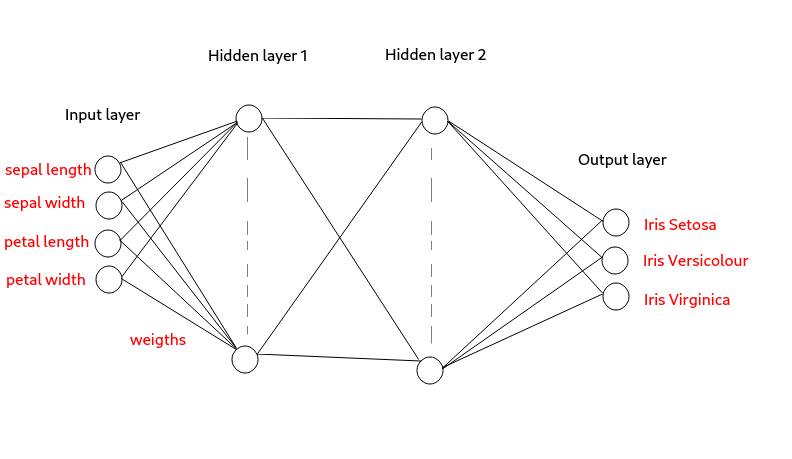
For start, we'll choose five nodes (neurons) for the 1st hidden layer and four nodes for the 2nd hidden layer. We can experiment with these values if needed to improve the training time and performance.
How do we decide when to stop training? To do that, we compare the output of the prediction with the known answer, and when there is an acceptable percentage of correct answers, we stop.
All the code snippets below are extracted from this repository: https://github.com/ghalldev/tensorflow_trainer.
First thing is to build our network:
var initializer = new Glorot<TFloat32>(Distribution.NORMAL, RANDOM_SEED);

// input layer
var inputLayerPlaceholder = tensorFlowApi.withName(OP_NAME_INPUT_LAYER_PLACEHOLDER).placeholder(TFloat32.class,
                                                                                                Placeholder.shape(Shape.of(-1, INPUT_LAYER_WIDTH)));

// hidden layer 1
var hiddenLayer1Weights = tensorFlowApi.withName(OP_NAME_HIDDEN_LAYER1_WEIGHTS).variable(initializer
                .call(tensorFlowApi, tensorFlowApi.array(INPUT_LAYER_WIDTH, HIDDEN_LAYER_1_WIDTH), TFloat32.class));
var hiddenLayer1Biases = tensorFlowApi.withName(OP_NAME_HIDDEN_LAYER1_BIASES)
  .variable(tensorFlowApi.fill(tensorFlowApi.array(HIDDEN_LAYER_1_WIDTH), tensorFlowApi.constant(0.1f)));
var hiddenLayer1Activation = tensorFlowApi.nn.relu(tensorFlowApi.math
                .add(tensorFlowApi.linalg.matMul(inputLayerPlaceholder, hiddenLayer1Weights), hiddenLayer1Biases));

// hidden layer 2
var hiddenLayer2Weights = tensorFlowApi.withName(OP_NAME_HIDDEN_LAYER2_WEIGHTS).variable(initializer
                .call(tensorFlowApi, tensorFlowApi.array(HIDDEN_LAYER_1_WIDTH, HIDDEN_LAYER_2_WIDTH), TFloat32.class));
var hiddenLayer2Biases = tensorFlowApi.withName(OP_NAME_HIDDEN_LAYER2_BIASES)
  .variable(tensorFlowApi.fill(tensorFlowApi.array(HIDDEN_LAYER_2_WIDTH), tensorFlowApi.constant(0.1f)));
var hiddenLayer2Activation = tensorFlowApi.nn.relu(tensorFlowApi.math
                .add(tensorFlowApi.linalg.matMul(hiddenLayer1Activation, hiddenLayer2Weights), hiddenLayer2Biases));

// output layer
var outputLayerWeights = tensorFlowApi.withName(OP_NAME_OUTPUT_LAYER_WEIGHTS).variable(initializer
                .call(tensorFlowApi, tensorFlowApi.array(HIDDEN_LAYER_2_WIDTH, OUTPUT_LAYER_WIDTH), TFloat32.class));
var outputLayerBiases = tensorFlowApi.withName(OP_NAME_OUTPUT_LAYER_BIASES)
  .variable(tensorFlowApi.fill(tensorFlowApi.array(OUTPUT_LAYER_WIDTH), tensorFlowApi.constant(0.1f)));
tensorFlowApi.withName(OP_NAME_OUTPUT_ACTIVATION).nn.softmax(tensorFlowApi.math
                .add(tensorFlowApi.linalg.matMul(hiddenLayer2Activation, outputLayerWeights), outputLayerBiases));
Notice that we named most of our operations (tensorFlowApi.withName(...)) so we can easily retrieve them later when using and saving.
Next is to read the data we will use for the training:
var trainData = new ArrayList<IrisDataLine>(INPUT_DATA_LINES);
BufferedReader dataReader = new BufferedReader(
  new InputStreamReader(inputData.getInputStream(), StandardCharsets.UTF_8));
while (dataReader.ready()) {
  var rawDataLine = dataReader.readLine();
  if (rawDataLine.isBlank()) {
    continue;
  }
  var splitDataLine = rawDataLine.split(CSV_SEPARATOR_REGEX);
  trainData.add(new IrisDataLine(Float.valueOf(splitDataLine[CSV_SEPAL_LENGTH_IDX]).floatValue(),
                                 Float.valueOf(splitDataLine[CSV_SEPAL_WIDTH_IDX]).floatValue(),
                                 Float.valueOf(splitDataLine[CSV_PETAL_LENGTH_IDX]).floatValue(),
                                 Float.valueOf(splitDataLine[CSV_PETAL_WIDTH_IDX]).floatValue(),
                                 IrisSpecies.getIrisSpecies(splitDataLine[CSV_SPECIES_NAME_IDX])));
}
Now that we have the network and the data, we can start training it:
// loss and optimizer only needed during training
var meanSquaredErrorLoss = new MeanSquaredError(Reduction.AUTO);
var optimizer = new Adam(tfGraph, LEARNING_RATE);
var trainingOutputPlaceholder = tensorFlowApi.placeholder(TFloat32.class,
                                                          Placeholder.shape(Shape.of(-1, OUTPUT_LAYER_WIDTH)));
var minimize = optimizer.minimize(meanSquaredErrorLoss.call(tensorFlowApi, trainingOutputPlaceholder,
                                                            tfGraph.operation(OP_NAME_OUTPUT_ACTIVATION).output(0)));
for (int currentTrainingEpoch = 0; currentTrainingEpoch < TRAINING_EPOCHS; currentTrainingEpoch++) {
  var numberOfPredictedOk = 0;
  for (int inputDataIdx = 0; inputDataIdx < trainData.size(); inputDataIdx++) {
    var currentInputData = trainData.get(inputDataIdx);
    try (var inputDataTensor = Tensor.of(TFloat32.class, Shape.of(1, INPUT_LAYER_WIDTH), data -> {
      data.setFloat(currentInputData.sepalLength, 0, CSV_SEPAL_LENGTH_IDX);
      data.setFloat(currentInputData.sepalWidth, 0, CSV_SEPAL_WIDTH_IDX);
      data.setFloat(currentInputData.petalLength, 0, CSV_PETAL_LENGTH_IDX);
      data.setFloat(currentInputData.petalWidth, 0, CSV_PETAL_WIDTH_IDX);
    }); var expectedOuputTensor = Tensor.of(TFloat32.class, Shape.of(1, OUTPUT_LAYER_WIDTH), data -> {
      // 0 = 0%, 1 = 100% chance to be the expected species
      // only 1 of the 3 must be set to 1, the rest 0
      data.setFloat(currentInputData.irisSpecies == IrisSpecies.IRIS_SETOSA ? 1 : 0, 0,
                    OUTPUT_IRIS_SETOSA_IDX);
      data.setFloat(currentInputData.irisSpecies == IrisSpecies.IRIS_VERSICOLOUR ? 1 : 0, 0,
                    OUTPUT_IRIS_VERSICOLOUR_IDX);
      data.setFloat(currentInputData.irisSpecies == IrisSpecies.IRIS_VIRGINICA ? 1 : 0, 0,
                    OUTPUT_IRIS_VIRGINICA_IDX);
    })) {

      Result result = tfSession.runner().addTarget(minimize)
        .feed(OP_NAME_INPUT_LAYER_PLACEHOLDER, inputDataTensor)
        .feed(trainingOutputPlaceholder, expectedOuputTensor).fetch(OP_NAME_OUTPUT_ACTIVATION)
        .run();

      var outputTensor = (TFloat32) result.get(0);
      var chanceIrisSetosa = outputTensor.getFloat(0, OUTPUT_IRIS_SETOSA_IDX);
      var chanceIrisVersicolour = outputTensor.getFloat(0, OUTPUT_IRIS_VERSICOLOUR_IDX);
      var chanceIrisVirginica = outputTensor.getFloat(0, OUTPUT_IRIS_VIRGINICA_IDX);
      var speciesToChanceMap = Map.of(IrisSpecies.IRIS_SETOSA, chanceIrisSetosa,
                                      IrisSpecies.IRIS_VERSICOLOUR, chanceIrisVersicolour, IrisSpecies.IRIS_VIRGINICA,
                                      chanceIrisVirginica);
      var predictedSpecies = speciesToChanceMap.entrySet().stream().sorted((entry1, entry2) -> {
        return entry1.getValue() > entry2.getValue() ? -1 : 1;
      }).toList().get(0).getKey();
      var predictedOk = predictedSpecies == currentInputData.irisSpecies;
      if (predictedOk) {
        numberOfPredictedOk++;
      }
    }
    logger.info("For training epoch [{}] predicted as expected for [{}]/[{}]", currentTrainingEpoch,
                    numberOfPredictedOk, trainData.size());
  }
}
Notice that we check if the predicted value is the same as the expected one, and at the end of a training epoch, print how many we predicted correctly — this is a simple check to know when to stop the training. With this topology and four training epochs, we get 124 guessed right out of 150, which is acceptable for a tutorial. Better performance can be achieved easily by tweaking topology, random seed, and so on.
Now that the training has reached acceptable performance, we can save the model so it can be shared:
Signature signature = Signature.builder().key(Signature.DEFAULT_KEY)
  .input(OP_NAME_INPUT_LAYER_PLACEHOLDER,
         tfSession.graph().operation(OP_NAME_INPUT_LAYER_PLACEHOLDER).output(0))
  .output(OP_NAME_OUTPUT_ACTIVATION, tfSession.graph().operation(OP_NAME_OUTPUT_ACTIVATION).output(0))
  .build();
SessionFunction sessionFunction = SessionFunction.create(signature, tfSession);
SavedModelBundle.exporter(exportPath).withFunction(sessionFunction).withTags(SavedModelBundle.DEFAULT_TAG)
  .export();
The export format is TensorFlow-specific, but language-agnostic, meaning that models saved using the Java API can be used with the TensorFlow Python API and vice versa.
Loading the model is as simple as it was saving it:
model = SavedModelBundle.load(modelPath, SavedModelBundle.DEFAULT_TAG);
logger.info("TensorFlow model functions: [{}]", model.signatures());
It is a good idea to list the signatures to know what is available and the names of the functions — they can be used to run data through the model or use only parts of the model by using intermediary inputs as outputs (if they were exported by adding the operations to the signature when saving).
Once we have the model loaded, we can use it to get a session:
Session tfSession = model.session();From now on, the same code that was used for training (except the loss and optimizer) can be used to run the data through the model and extract the prediction:
String species = null;
Session tfSession = model.session();
try (var inputDataTensor = Tensor.of(TFloat32.class, Shape.of(1, INPUT_LAYER_WIDTH), data -> {
  data.setFloat(sepalLength, 0, SEPAL_LENGTH_IDX);
  data.setFloat(sepalWidth, 0, SEPAL_WIDTH_IDX);
  data.setFloat(petalLength, 0, PETAL_LENGTH_IDX);
  data.setFloat(petalWidth, 0, PETAL_WIDTH_IDX);

})) {
  Result result = tfSession.runner().feed(OP_NAME_INPUT_LAYER_PLACEHOLDER, inputDataTensor)
    .fetch(OP_NAME_OUTPUT_ACTIVATION).run();

  var outputTensor = (TFloat32) result.get(0);
  var chanceIrisSetosa = outputTensor.getFloat(0, OUTPUT_IRIS_SETOSA_IDX);
  var chanceIrisVersicolour = outputTensor.getFloat(0, OUTPUT_IRIS_VERSICOLOUR_IDX);
  var chanceIrisVirginica = outputTensor.getFloat(0, OUTPUT_IRIS_VIRGINICA_IDX);
  var speciesToChanceMap = Map.of(IRIS_SETOSA, chanceIrisSetosa, IRIS_VERSICOLOUR, chanceIrisVersicolour,
                                  IRIS_VIRGINICA, chanceIrisVirginica);
  species = speciesToChanceMap.entrySet().stream().sorted((entry1, entry2) -> {
    return entry1.getValue() > entry2.getValue() ? -1 : 1;
  }).toList().get(0).getKey();
}
Closing
This concludes the training, exporting, loading, and using our own model. But most of the time, we will want to use models created by others and published online, for example, on https://www.kaggle.com/models?framework=tensorFlow2.
After downloading the model, the same steps as above can be used to load and use the model. Most of them have complete documentation online but even when it is missing the information can be extracted from the model using model.signatures() after it has been loaded. The example below is for https://www.kaggle.com/models/tensorflow/efficientdet/tensorFlow2/d0 (this model is loaded and used in the linked GitHub project above):
Signature for "serving_default":
	Method: "tensorflow/serving/predict"
	Inputs:
		"input_tensor": dtype=DT_UINT8, shape=(1, -1, -1, 3)
	Outputs:
		"raw_detection_boxes": dtype=DT_FLOAT, shape=(1, 49104, 4)
		"detection_multiclass_scores": dtype=DT_FLOAT, shape=(1, 100, 90)
		"num_detections": dtype=DT_FLOAT, shape=(1)
		"detection_scores": dtype=DT_FLOAT, shape=(1, 100)
		"detection_anchor_indices": dtype=DT_FLOAT, shape=(1, 100)
		"detection_boxes": dtype=DT_FLOAT, shape=(1, 100, 4)
		"raw_detection_scores": dtype=DT_FLOAT, shape=(1, 49104, 90)
		"detection_classes": dtype=DT_FLOAT, shape=(1, 100)
]Opinions expressed by DZone contributors are their own.