

Understand and Optimize AWS Aurora Global Database
The default settings in AWS Aurora Global may not work for everyone. This article explains various settings and their implications in availability and consistency.
Join the DZone community and get the full member experience.
Join For FreeAWS Aurora Database supports a global multi-region setup, including a primary and a secondary region. When engineering with Aurora Global, the default settings are great, but understanding all the available configuration options and how those come together saves time and effort. This article explains Global Write Forwarding and its effects in detail, which is a very handy setting that lets applications read and write from applications running on both primary and secondary regions.
Note that this article is not about Aurora DSQL, which is a different service that supports active-active setup out of the box.
Aurora Defaults
Aurora Global Database sets up a writer and a reader in the primary region, plus a reader and a standby writer instance in the secondary region. The standby writer will be promoted to a writer during a region failover, where the secondary region becomes primary.
Endpoints are created to connect to 3 of the 4 instances (shown in Figure 1): a read-write endpoint to interact with the primary writer, a read-only endpoint to interact with the primary reader, and a read-replica endpoint to interact with the secondary reader.
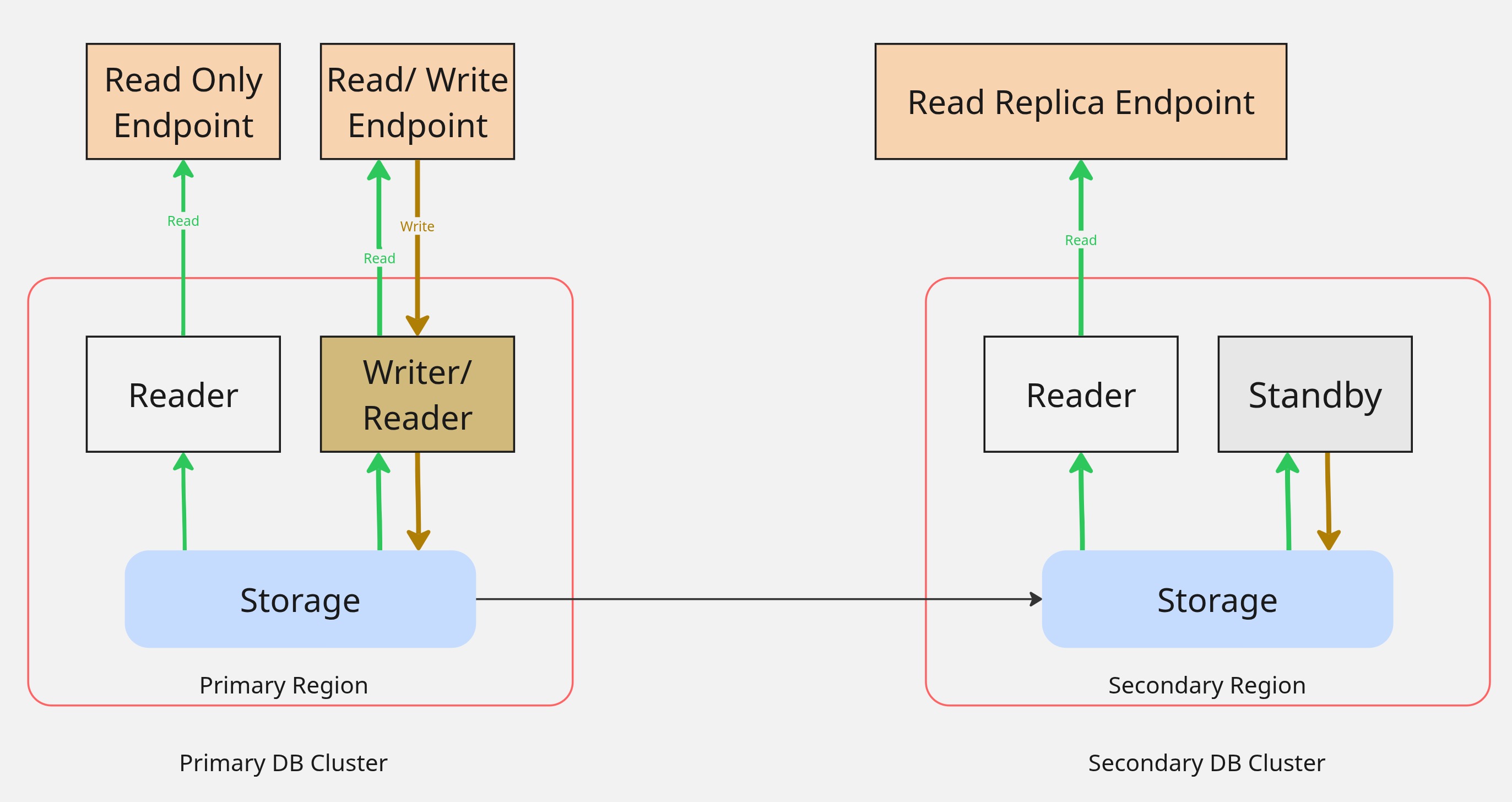
Based on how the security groups are configured, these endpoints can be accessed from both regions, but interact only with their respective DB instance.
This default setup works best as an active-standby setup where the application on the secondary region can be available but not actively serving any traffic involving the database connection. Configuring cross-region access is possible, but inconvenient to maintain.
Global Endpoint
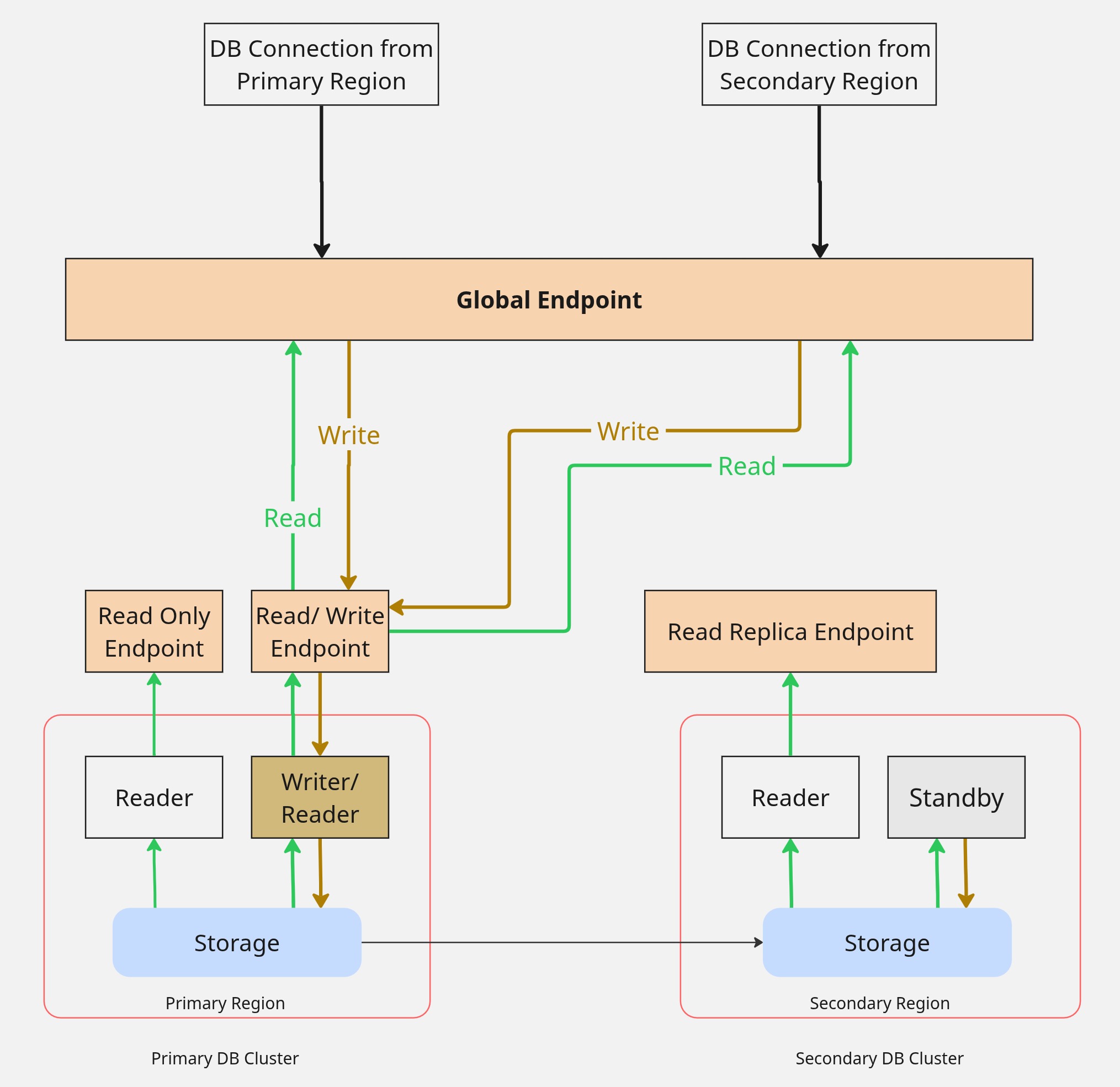
A global endpoint can be enabled, which proxies the primary region writer endpoint by default. The purpose of a global endpoint is that the application using the endpoint does not need to change when a region failover event occurs, in which case the global endpoint switches to point at the newly promoted writer.
This setup can work with active-active compute, when using the same global endpoint in both regions, and the application can tolerate the latency everywhere a database access is involved in the secondary region.
Global endpoint connects only the primary writer. The reader instances in either region are not used unless those endpoints are explicitly coded as application data sources. See Figure 2
Global Write Forwarding
We had established that the default settings, combined with the usage of the global endpoint, are great for region failover scenarios.
If you coded the application to use a global endpoint for writes and local reader endpoints for reads, you care about sharing the load in read-heavy/ write-heavy workloads. One of the settings available is to enable write forwarding.
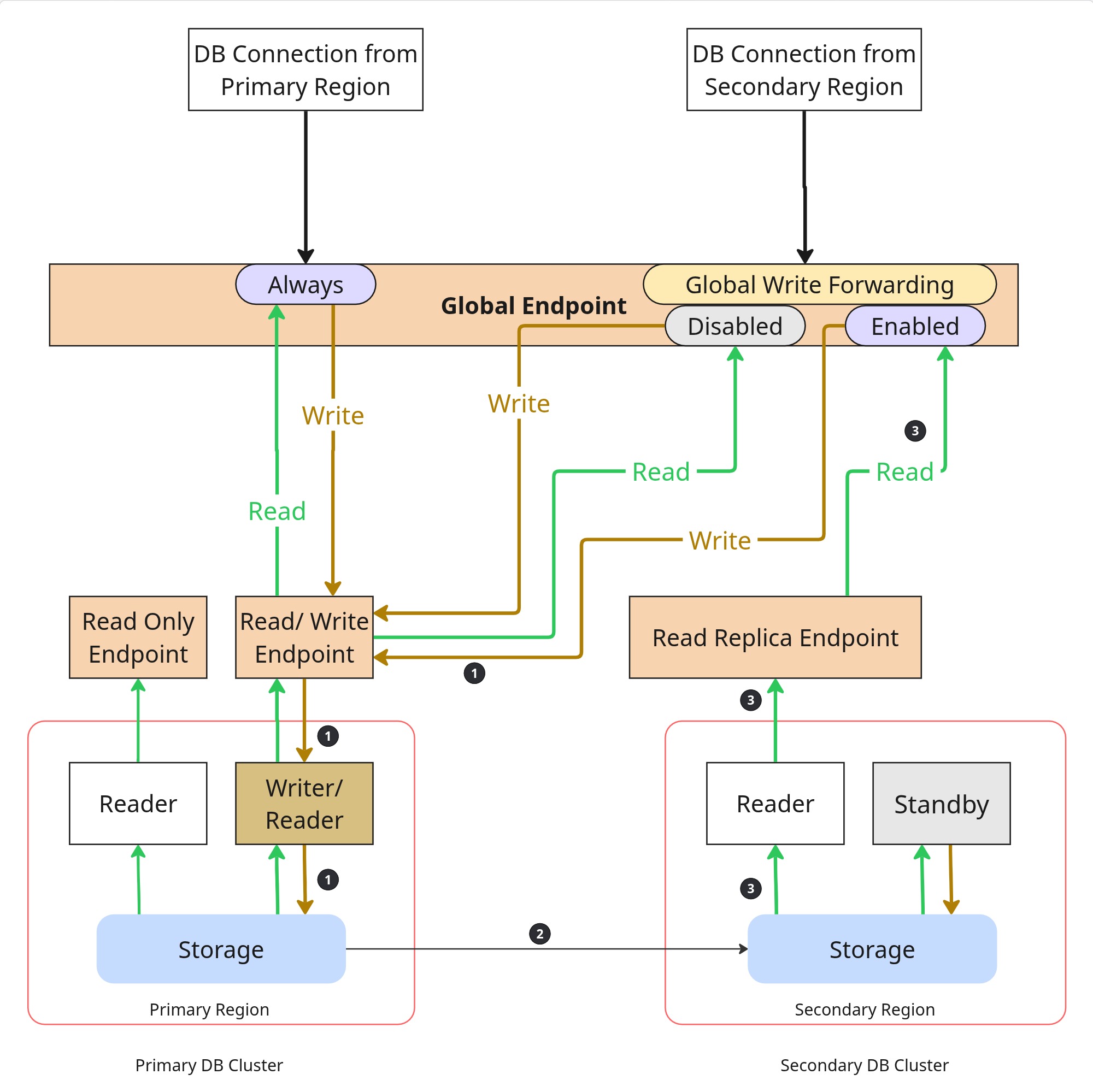
When this setting is enabled, using the global endpoint from the secondary region, reads locally and writes to the primary region, without needing any additional application code to switch between reads and writes.
This setting has an effect only on the secondary cluster. The primary region will need additional code to separate reads and writes.
This is great for read-heavy applications, letting them remain active-active, providing low-latency local database reads. However, this brings a challenge of distributed data consistency.
See Figure 3 for updated connectivity patterns with and without global write forwarding.
Consistency
If you observe the path 1->2->3 in Figure 3, which is the data flow from the secondary region when write forwarding is enabled, you see that we are writing and reading from different clusters, relying on Aurora to keep the data consistent. Thankfully, Aurora handles this by default, but the question remains: are the default settings good enough for your use case?
There are three ways Aurora provides read consistency: session, eventual, and global. For write forwarding to work, the consistency setting must be configured correctly. The defaults are also different in MySQL and PostgreSQL.
Session consistency is the default setting in Postgres; it limits blocking and works in most cases.
MySQL does not have a default consistency set. Until a value is set, write forwarding setting is ignored by Aurora.
Click through the links above to see how global and eventual consistency settings work before choosing one.
Replication Lag
If there is a delay in replication between the regions, write forwarding based on its consistency configuration may not be working as expected. The recovery point objective setting controls the lag and is set to 1 minute by default, meaning Aurora tries to keep the lag under 1 minute; it can be adjusted, but cannot go any lower than 20 seconds. This setting blocks transactions until the lag clears to maintain data integrity. Before changing the default setting, make sure that your application tolerates the delay and data integrity trade-offs.
Conclusion
Understanding the configuration options available with the Aurora database and their trade-offs helps in choosing the optimal setting for your workload. Default settings are a good starting point, but sometimes we learn the trade-offs the hard way, like during a production incident when the settings fail under specific conditions. Fully understand the application throughput, data access patterns, and related configurations before using them.
Published at DZone with permission of Subhash Kovela. See the original article here.
Opinions expressed by DZone contributors are their own.
Comments