

Understanding DataWeave's Pluck Function
The pluck function is used to retrieve the key, value, and index from an object and output the result to an array.
Join the DZone community and get the full member experience.
Join For FreeMain Points
- the pluck function iterates over each key/value pair of the input object.
- it retrieves the keys, values, and indexes from the input object.
- input to the pluck function is an object, and output is an array.
What Is the Pluck Function Used For?
The pluck function is used to retrieve the key, value, and index from an object and output the result to an array. The code snippets in figures 1, 2, and 3 show the retrieval of the object’s key, value, and index using the full reference and the built-in default.
{pet: "cat", name: "Ponsonby"} pluck (value, key, index) -> key
or
{pet: "cat", name: "Ponsonby"} pluck $$
OUTPUT: ["pet", "name"]
Figure 1: Use the pluck function to retrieve all keys from the input object.
{pet: "cat", name: "Ponsonby"} pluck (value, key, index) -> value
or
{pet: "cat", name: "Ponsonby"} pluck $
OUTPUT: ["cat", "Ponsonby"]
Figure 2: Use the pluck function to retrieve the values of all the values in the input object.
{pet: "cat", name : "Ponsonby"} pluck (value, key, index) -> index
or
{pet: "cat", name: "Ponsonby"} pluck $$$
OUTPUT: [0, 1]
Figure 3: Use the pluck function to retrieve the index of all elements in the input object.
How Does the Pluck Function Work?
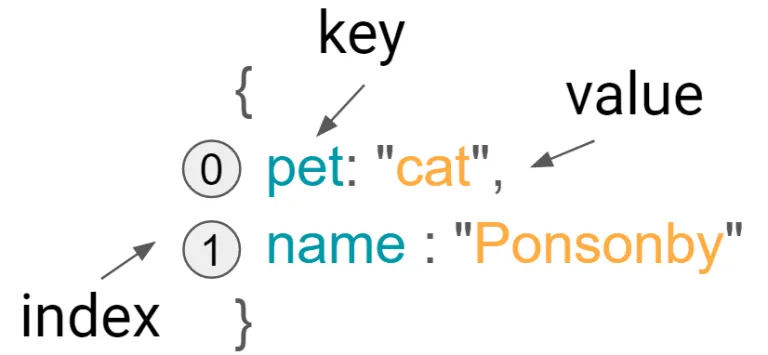
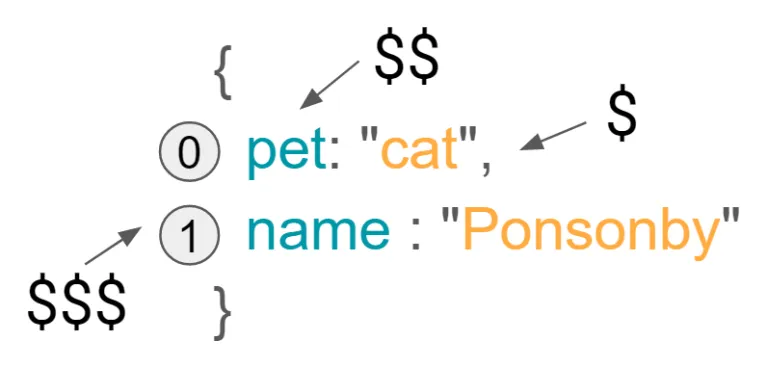
The pluck function iterates over each key and value pair of the input object and extracts its keys, values, and indexes, and compiles the result to an array. You have a choice and can use the full reference to key, value, and index or the built-in defaults $$, $ and $$$ (respectively).
An Example of a Combined Use of Pluck
Here are two further examples of the use of the pluck function. In figure 6, each key and value pair is extracted into an object, which compiles into an array.
payload pluck {
  key: $$,
  value: $,
  index: $$$
}
OUTPUT:
[
  {
    "key": "pet",
    "value": "cat",
    "index": 0
  },
  {
    "key": "name",
    "value": "Ponsonby",
    "index": 1
 }
]
Figure 6: Extract all parts of an object
In figure 7, all the keys, values, and indices are extracted into separate arrays:
{
  keys: payload pluck $$,
  values: payload pluck $,
  indices: payload pluck $$$
}
OUTPUT:
{
  "keys": [ "pet", "name" ],
  "values": [ "cat", "Ponsonby" ],
  "indices": [ 0, 1 ]
}
Figure 7: Extract all keys, values, and indices
Conclusion
Typically the pluck function would be used in collaboration with other functions such as the DataWeave map function or the mapObject function.
Published at DZone with permission of Alex Theedom. See the original article here.
Opinions expressed by DZone contributors are their own.
Comments