

Arrays in Java

Join the DZone community and get the full member experience.
Join For FreeArrays in Java are fundamental data structures used to store elements of the same type sequentially in memory. They provide a convenient way to manage collections of data where each element is accessed by its index.
Basics of Arrays
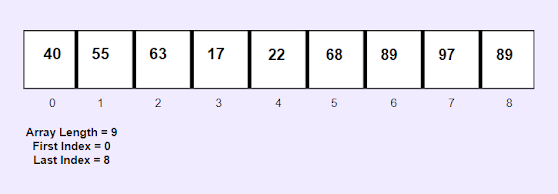
An array in Java is a fixed-size container that holds a specific number of elements of the same data type. This means all elements in an array must be of the same type such as integers (int), floating-point numbers (double), characters (char) or objects (Object).
 |
Declaring and Initializing Arrays
To declare an array in Java we specify the type of elements followed by square brackets [] and the array name:
dataType[] arrayName;
For example, to declare an integer array named numbers:
int[] numbers;
Arrays in Java are objects and like all objects they must be instantiated with the new keyword before they can be used:
arrayName = new dataType[arraySize];
For instance, to create an integer array numbers with a size of 5:
int[] numbers = new int[5];
This initializes an array numbers that can hold 5 integers with indices ranging from 0 to 4.
Accessing Elements in Arrays
Array elements are accessed using their index, which starts at 0 for the first element and goes up to arraySize - 1 for the last element. For example, to access and modify elements of the numbers array:
int[] numbers = {10, 20, 30, 40, 50};
int firstElement = numbers[0]; // Retrieves the first element (10)

int thirdElement = numbers[2]; // Retrieves the third element (30)

numbers[1] = 25; // Modifies the second element to 25
Array Length
The length of an array in Java, which is the number of elements it can hold can be obtained using the length property:
int arrayLength = numbers.length; // Returns 5 for the 'numbers' array
The length property is a final variable defined in the array object itself and it cannot be changed after the array is created.
Iterating Through Arrays
Arrays can be traversed using loops such as for or foreach to access and manipulate each element sequentially:
int[] numbers = {10, 20, 30, 40, 50};
for (int i = 0; i < numbers.length; i++) {

System.out.println("Element at index " + i + ": " + numbers[i]);

}
Alternatively, Java provides an enhanced for-each loop also known as the enhanced for loop to iterate through elements of an array without explicitly using an index:
for (int number : numbers) {
System.out.println(number); }
Multidimensional Arrays
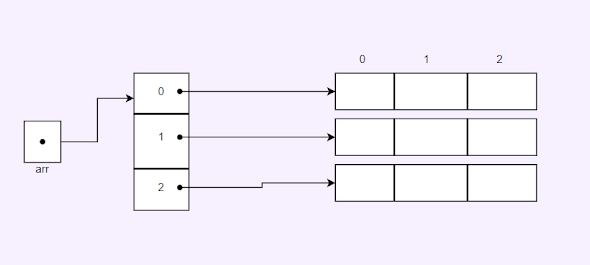
Java supports multidimensional arrays which are arrays of arrays. we can declare and initialize them as follows:
dataType[][] arrayName = new dataType[rows][columns];For example, to create a 2D integer array matrix with 3 rows and 3 columns:
int[][] matrix = new int[3][3];
Accessing elements in a 2D array requires specifying both row and column indices:
int element = matrix[1][2]; // Retrieves element at row 1, column 2
Arrays Class Methods
The Arrays class in Java provides utility methods for working with arrays such as sorting, searching and comparing arrays:
import java.util.Arrays;
int[] numbers = {5, 3, 8, 2, 7};

Arrays.sort(numbers); // Sorts the 'numbers' array in ascending order

int index = Arrays.binarySearch(numbers, 8); // Searches for '8' in the sorted array
Other useful methods include copyOf(), fill() and equals().
Common Operations on Arrays
- Sorting: Arrays can be sorted using
Arrays.sort(). - Searching: Use
Arrays.binarySearch()to search for an element in a sorted array. - Copying: Arrays can be copied using
Arrays.copyOf()orSystem.arraycopy(). - Filling: Arrays can be filled with a specific value using
Arrays.fill().
Applications of Arrays
Arrays are used extensively in various applications, such as:
- Storing and manipulating collections of data in algorithms and applications.
- Implementing data structures like lists, queues, and matrices.
- Handling input/output operations in Java programs.
- Passing arrays as parameters to methods for processing and manipulation.
Conclusion
Arrays are fundamental data structures in Java that provide efficient storage and access mechanisms for homogeneous collections of data. They play a crucial role in Java programming offering versatility and performance in managing and manipulating data elements.
FAQs
1. What is an array in Java?
An array in Java is a fixed-size collection of elements of the same type stored sequentially in memory.
2. How do you declare an array in Java?
You declare an array in Java by specifying the type of elements followed by square brackets [] and the array name, like int[] numbers;.
3. Can arrays in Java store elements of different data types?
No, arrays in Java can only store elements of the same data type. Once declared the data type of an array is fixed.
4. What is the difference between length and length() in arrays?
length is a final variable in arrays that denotes the number of elements it can hold. length() is a method used with the strings and other objects to get the number of characters or elements.
5. How do you initialize an array in Java?
You can initialize an array in Java using the new keyword followed by the array type and size like int[] numbers = new int[5];.
6. What are multidimensional arrays in Java?
Multidimensional arrays in Java are arrays of arrays. They allow you to store data in multiple dimensions such as rows and columns in a matrix.
7. How can you iterate through an array in Java?
we can iterate through an array in Java using a for loop or an enhanced for-each loop to access each element sequentially.
8. Can you resize an array in Java once it's created?
No, once an array is created with a specific size its size cannot be changed. we would need to create a new array with the desired size and copy elements if resizing is needed.
9. What are the common operations you can perform on arrays in Java?
Common operations include sorting arrays (Arrays.sort()) searching for elements (Arrays.binarySearch()), copying arrays (System.arraycopy()) and filling arrays (Arrays.fill()).
10. What are the applications of arrays in Java?
Arrays are used for implementing data structures like lists and queues storing data in algorithms handling input/output operations and passing data to methods efficiently.
Opinions expressed by DZone contributors are their own.
Comments