

Unveiling the Secret: Achieving 50K Concurrent User Load Using JMeter With 2.5G RAM Only
The utilization of virtual threads has enabled JMeter to operate smoothly and efficiently without any glitches, even when handling heavy loads.
Join the DZone community and get the full member experience.
Join For FreeApache JMeter is an open-source, Java-based tool used for load and performance testing of various services, particularly web applications. It supports multiple protocols like HTTP, HTTPS, FTP, and more. JMeter can simulate heavy loads on a server to analyze performance under different conditions. It offers both GUI and non-GUI modes for test configuration and can display test results in various formats. JMeter also supports distributed testing, enabling it to handle multiple test threads simultaneously. Its functionality can be extended through plugins, making it a versatile and widely used tool in performance testing.
JMeter stands out from other testing tools due to its exceptional concurrency model, which governs how it executes requests in parallel. The concurrency model of JMeter relies on Thread Pools, widely recognized as the standard method for parallel processing in Java and several other programming languages. However, as with any advantage, there comes a significant trade-off: the resource-intensive nature of JMeter’s concurrency model.
In JMeter, each thread corresponds to a Java thread, further utilizing an Operating System (OS) thread for its execution. OS threads, although effective in accomplishing concurrent tasks, carry a certain level of weightiness, manifested in terms of memory consumption and CPU usage during context switching. This attribute poses a noteworthy challenge to JMeter’s performance. Moreover, certain operating systems enforce strict limitations on the total number of threads that can be generated, imposing implicit restrictions on JMeter’s capabilities.
Unleashing the True Power, Java 21 to the Rescue
Project Loom, which has gained significant attention within the Java community over the past several years, has finally been incorporated into Java 21 after several early preview releases with JEP-444.
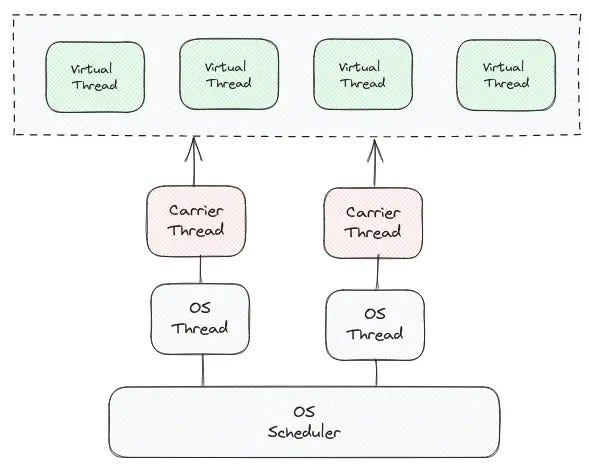
Java’s virtual threads, also known as lightweight or user-mode threads, are introduced as an experimental feature under Project Loom, which is now officially included in Java 21.
While the details of this feature are interesting, they’re not the main focus of our discussion today, so that we won’t delve deeper into them at this moment.
JMeter
The code review reveals a straightforward process for creating a new thread group by coying ThreadGroup class. In this instance, we have simply duplicated the logic from the ThreadGroup JMeter class that we wish to modify.
A key method to note is startNewThread, which is responsible for creating the threads. We have altered one line in this method:
The original line of code:
Thread newThread = new Thread(jmThread, jmThread.getThreadName());
Has been replaced with the following:
Thread newThread = Thread.ofVirtual()
.name(jmThread.getThreadName())
 .unstarted(jmThread);
In this modification, instead of creating a traditional thread, we’re creating a virtual thread, as introduced in Java’s Project Loom. This change allows for more lightweight, efficient thread handling.
Also, other modifications, such as removing the synchronized block from addNewThreadmethod and updating similar thread creation logic at a few other places.
Setup
- I have quickly set up nginx, which always returns a 200 ok response:
# nginx.conf
location /test {
    return 200 'OK';
 }
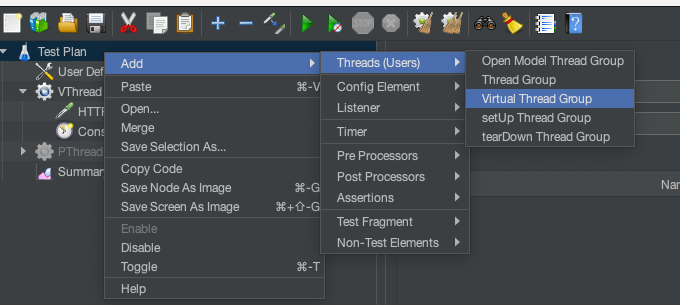
2. Add Virtual Thread Group element:
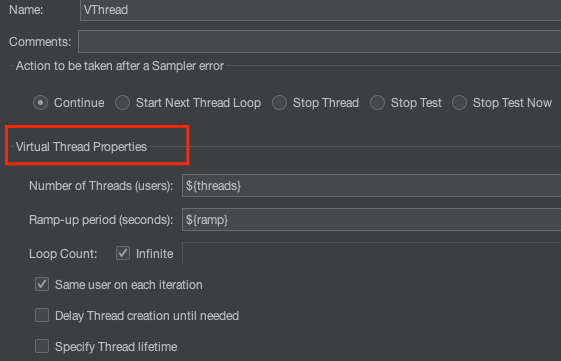
3. Configure Threads: you will see the title Virtual Thread Properties header for the right thread group.
4. Get set, go....!! and final result:

My primary focus was not on the server’s responsiveness or its ability to scale up to 50k users (which, with some tuning, could be easily achieved). Instead, I was more interested in observing how JMeter generates and handles the load, irrespective of whether the server responses were successful or failed.
Summary
JMeter has traditionally been resource-intensive, primarily due to its I/O-bound nature involving network requests. However, with the introduction of virtual threads, it has significantly improved in performance. The utilization of virtual threads has enabled JMeter to operate smoothly and efficiently without any glitches, even when handling heavy loads.
Source Code
Anyone interested in trying on their own, see the following GitHub Project for more details.
Published at DZone with permission of Nirmal Suthar. See the original article here.
Opinions expressed by DZone contributors are their own.
Comments