

Using ChartMuseum as a Helm Repository
ChartMuseum is a lightweight, open-source Helm Chart repository for Kubernetes. Learn how to deploy it, enable authentication, and integrate with CI/CD.
Join the DZone community and get the full member experience.
Join For FreeChartMuseum is an open-source, self-hosted Helm Chart repository server that enables users to store and manage Helm charts efficiently. Helm is the standard package manager for Kubernetes, allowing developers to deploy applications seamlessly. While Helm provides public repositories like Artifact Hub, organizations often require private and secure repositories for managing their Helm charts internally. ChartMuseum fills this gap by offering a lightweight and flexible solution.
ChartMuseum provides a robust API that allows users to interact with it programmatically, making it an essential tool for automated CI/CD pipelines. It is written in Go and can be deployed as a standalone binary, within a container, or as a Kubernetes deployment.
How ChartMuseum Works
ChartMuseum acts as an HTTP server that exposes endpoints to upload, retrieve, and manage Helm charts. It supports multiple storage backends, allowing organizations to choose the best option based on their infrastructure. The Helm CLI can interact with ChartMuseum just like any other Helm repository.
The core functionalities of ChartMuseum include:
- Chart Uploading: Users can push Helm charts to the repository using HTTP POST requests.
- Chart Indexing: ChartMuseum automatically updates the repository index when new charts are uploaded.
- Chart Retrieval: Users can fetch charts using Helm commands.
- Authentication & Authorization: Supports authentication methods like Basic Auth, JWT, and OAuth.
- Multi-Tenant Support: Allows hosting multiple chart repositories within a single instance.
Advantages of ChartMuseum Over Other Chart Storage Platforms
- Self-hosted and Secure: Unlike public Helm repositories such as Artifact Hub, ChartMuseum allows organizations to keep their charts within their infrastructure, providing better security and compliance control.
- Lightweight and Easy to Deploy: ChartMuseum is designed as a lightweight server that can be deployed as a Kubernetes pod, Docker container, or standalone binary, making it extremely flexible.
- Multiple Storage Backend Support: ChartMuseum supports a variety of storage backends, including local file systems, AWS S3, Google Cloud Storage, Azure Blob Storage, and more, providing flexibility to users.
- API-driven Architecture: ChartMuseum provides a RESTful API for managing Helm charts, making it easy to integrate into CI/CD pipelines and automated workflows.
- Integration with Kubernetes Workflows: Since ChartMuseum is built with Kubernetes in mind, it integrates well with Kubernetes-native tools and workflows.
- Multi-tenancy and Authentication: ChartMuseum supports authentication mechanisms such as Basic Auth and can be combined with an NGINX ingress for added security and multi-tenant capabilities.
- Cost-effective: Unlike some commercial Helm chart repositories that require licensing fees, ChartMuseum is open-source and free to use.
- Community Support and Open Source Contributions: Being open-source, ChartMuseum is actively maintained by the community, ensuring that it is regularly updated with new features and bug fixes.
ChartMuseum vs JFrog Artifactory
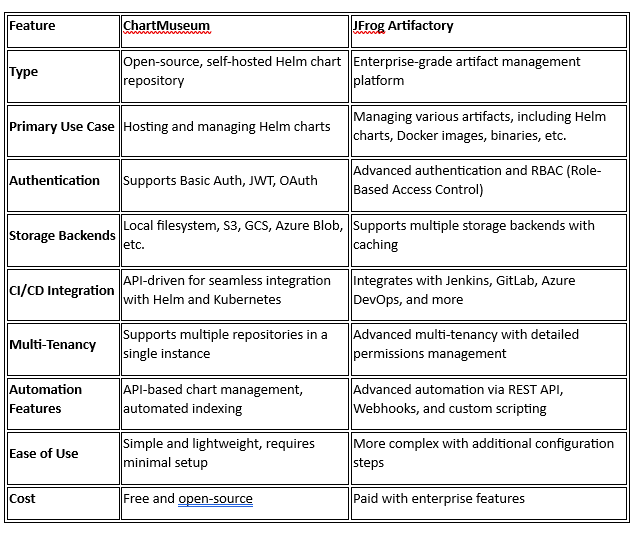
- Simple Setup & Deployment: ChartMuseum is a lightweight server that can be deployed quickly in Kubernetes using a Helm chart, whereas JFrog Artifactory requires more complex configurations and additional dependencies.
- Minimal Resource Consumption: ChartMuseum runs efficiently with minimal memory and CPU usage, while Artifactory is a heavier solution that requires more system resources.
- Easier Authentication: ChartMuseum supports straightforward authentication methods like Basic Auth and JWT, while JFrog Artifactory requires detailed role-based access control (RBAC) configurations.
- Direct API Access: ChartMuseum provides a simple RESTful API for pushing, pulling, and managing charts, making automation easier, while JFrog Artifactory’s API is more complex and geared towards enterprise use cases.
- No Licensing Costs: Unlike JFrog Artifactory, which requires a paid subscription for advanced features, ChartMuseum is completely free and open-source, making it cost-effective for organizations.
- Kubernetes-Native Integration: ChartMuseum is designed with Kubernetes in mind, making it a seamless fit for Helm-based deployments without requiring additional plugins or connectors.
Deploying ChartMuseum on Kubernetes
Let’s deploy ChartMuseum in a Kubernetes cluster using the official Helm chart.
Prerequisites
Ensure you have the following installed:
- kubectl
- Helm
- Kubernetes cluster
Installing ChartMuseum Using Helm
To enable authentication, we configure ChartMuseum to use Basic Auth and JWT. Run the following command to install ChartMuseum with authentication:
helm repo add chartmuseum https://chartmuseum.github.io/charts
helm repo update
helm install my-chartmuseum chartmuseum/chartmuseum \
  --set env.open.DISABLE_API=false \
  --set env.open.BASIC_AUTH_USER=admin \
  --set env.open.BASIC_AUTH_PASS=password \
  --set env.open.AUTH_ANONYMOUS_GET=false
This command:
- Enables authentication with a username (
admin) and password (password). - Disables anonymous access to prevent unauthorized pulls.
Check Running ChartMuseum Pods
kubectl get pods -l app.kubernetes.io/name=chartmuseum
Internal Access to ChartMuseum
To ensure that ChartMuseum is only accessible within the Kubernetes cluster and not exposed externally, create a ClusterIP service:
kubectl expose deployment my-chartmuseum --type=ClusterIP --name=chartmuseum-service
Adding ChartMuseum as a Helm Repo
helm repo add my-chartmuseum http://chartmuseum-service.default.svc.cluster.local --username admin --password password
helm repo update
Pushing Charts to ChartMuseum
To push a chart, first package it:
helm package my-chart
Now, push it using Basic Auth:
curl -u admin:password --data-binary "@my-chart-0.1.0.tgz" http://chartmuseum-service.default.svc.cluster.local/api/charts
Enabling JWT Authentication
To enhance security, JWT authentication can be enabled by setting an environment variable. Modify your deployment to include:
env:
  - name: AUTH_REALM
    value: "chartmuseum"
  - name: AUTH_SECRET
    value: "mysecretkey"
  - name: AUTH_ISSUER
    value: "myissuer"
To authenticate with JWT, generate a token and use it while pushing or pulling charts:
export TOKEN="$(echo '{"iss":"myissuer"}' | openssl dgst -sha256 -hmac "mysecretkey" -binary | base64)"
Push a chart using JWT authentication:
curl -H "Authorization: Bearer $TOKEN" --data-binary "@my-chart-0.1.0.tgz" http://chartmuseum-service.default.svc.cluster.local/api/charts
Installing a Chart from ChartMuseum
To install a chart:
helm install my-release my-chartmuseum/my-chart --username admin --password password
For JWT authentication:
helm install my-release my-chartmuseum/my-chart --set global.imagePullSecrets[0].name=jwt-secret
Deploying an Application Using a Helm Chart from ChartMuseum
Example: Deploying a Nginx Application
Assuming that we have pushed an Nginx Helm chart to ChartMuseum, we can deploy it as follows:
helm install my-nginx my-chartmuseum/nginx --set service.type=ClusterIP --set replicas=2 --username admin --password password
For JWT authentication:
helm install my-nginx my-chartmuseum/nginx --set global.imagePullSecrets[0].name=jwt-secret
Verifying the Deployment
kubectl get deployments
kubectl get pods -l app=my-nginx
Automations Supported by ChartMuseum
ChartMuseum supports several automation features:
- Automated Chart Indexing
- Webhook Integration
- CI/CD Integration
- Storage Backend Automation
- Authentication & Authorization (Basic Auth, JWT)
- API-driven Management
References
Now you’re ready to manage and secure your own Helm charts with ChartMuseum in Kubernetes!
Opinions expressed by DZone contributors are their own.
Comments