

UX Research in Agile Product Development: Making AI Workflows Work for People
UX research in agile product development helps teams build AI workflows grounded in real user needs, reducing guesswork and improving ROI.
Join the DZone community and get the full member experience.
Join For FreeDuring my eight years working in agile product development, I have watched sprints move quickly while real understanding of user problems lagged. Backlogs fill with paraphrased feedback. Interview notes sit in shared folders collecting dust. Teams make decisions based on partial memories of what users actually said. Even when the code is clean, those habits slow delivery and make it harder to build software that genuinely helps people.
AI is becoming part of the everyday toolkit for developers and UX researchers alike. As stated in an analysis by McKinsey, UX research with AI can improve both speed (by 57%) and quality (by 79%) when teams redesign their product development lifecycles around it, unlocking more user value.
In this article, I describe how to can turn user studies into clearer user stories, better agile AI product development cycles, and more trustworthy agentic AI workflows.
Why UX Research Matters for AI Products and Experiences
For AI products, especially LLM-powered agents, a single-sentence user story is rarely enough. Software Developers and product managers need insight into intent, context, edge cases, and what "good" looks like in real conversations. When UX research is integrated into agile rhythms rather than treated as a separate track, it gives engineering teams richer input without freezing the sprint.
In most projects, I find three useful touchpoints:
- Discovery is where I observe how people work today
- Translation is where those observations become scenario-based stories with clear acceptance criteria
- Refinement is where telemetry from live agents flows back into research and shapes the next set of experiments
A Practical UX Research Framework for Agile AI Teams
To keep this integration lightweight, I rely on a framework that fits within normal sprint cadences.
I begin by framing one concrete workflow rather than a broad feature; for example "appointment reminder calls nurses make at the start of each shift."
I then run focused research that can be completed in one or two sprints, combining contextual interviews, sample call listening, and a review of existing scripts. The goal is to understand decisions, pain points, and workarounds.
Next, I synthesize findings into design constraints that developers can implement directly. Examples include "Never leave sensitive information in voicemail" or "Escalate to a human when callers sound confused." Working with software developers, product managers, and UX designers, I map each constraint to tests and telemetry so the team can see when the AI agent behaves as intended and when it drifts.
- Also Read: The Benefits of AI Micromanagement
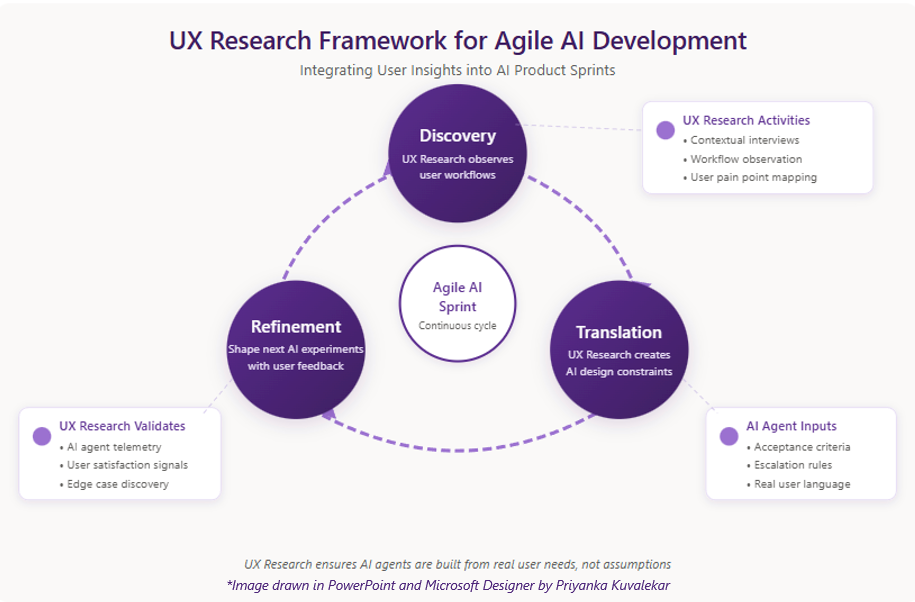
UX Research Framework for Agile AI Product Development
UX Research Framework for Agile AI Product Development
Technical Implementation: From Research to Rapid Prototyping
One advantage of modern AI development is how quickly engineering can move from research findings to working prototypes. The gap between understanding the problem and having something testable has shrunk dramatically. Gartner projects that by 2028, 33% of enterprise software will embed agentic AI capabilities driving automation and more productivity.
When building AI agents, I have worked with teams using LLMs or LLM SDKs to stand up functional prototypes within a single sprint. The pattern typically looks like this: UX research identifies a workflow and its constraints, then developers configure the agent using the SDK's conversation flow tools, prompt templates, and webhook integrations. Within days, I have a working prototype that real users can evaluate.
This is where UX research adds the most value to rapid prototyping. SDKs handle the technical heavy lifting, such as speech recognition, text-to-speech, and turn-taking logic. But without solid research, developers and PMs end up guessing business rules and conversation flows.
When I bring real user language, observed pain points, and documented edge cases into sprint planning, the engineering team can focus on what matters: building an agent that fits how people work. The same holds true for text-based agents. LLM SDKs let developers wire up conversational agents quickly, but prompt engineering goes faster when you have actual user phrases to work from. Guardrails become obvious when you have already seen where conversations go sideways.
How UX Research Changes Agile AI Development
Incorporating UX research into agile AI work changes how teams plan and ship software. Deloitte's 2025 State of Generative AI in the Enterprise series notes that organizations moving from proofs of concept into integrated agentic systems are already seeing promising ROI. In my experience, the shift happens in two key areas.
The first change is in how I discuss the backlog with engineering and product teams. Instead of starting from a list of features, I start from observed workflows and pain points. Software developers and PMs begin to ask better questions: How often does this workflow occur? What happens when it fails? Where would automation genuinely help rather than just look impressive in a demo?
The second change is in how I judge success. Rather than looking only at LLM performance metrics or deployment counts, I pay attention to human-centric signals. Did the AI agent reduce manual calls for nurses that week? Did fewer financial operations staff report errors in their end-of-day checks? Those questions anchor agile AI decisions in users' lived experience.
Use Case: Voice AI Agent for Routine Calls
I built a voice AI agent to support routine inbound and outbound calls in healthcare and financial services. In my user research, I found that clinical staff and operations analysts spent large parts of their shifts making scripted reminder and confirmation calls. Staff jumped between systems, copied standard phrases, and often skipped documentation when queues spiked.
I ran contextual interviews with nurses and operations staff over two sprints. I sat with them during actual call sessions, noted where they hesitated, and asked why certain calls took longer than others. One nurse told me she dreaded callbacks for no-shows because patients often got defensive. That single comment shaped how we designed the escalation logic.
Based on these observations, I scoped an AI agent with clear boundaries. It would dial numbers, read approved scripts, capture simple responses like "confirm" or "reschedule," log outcomes in the primary system, and escalate to a human when callers sounded confused or emotional. Each constraint came directly from something I observed or heard in research. The "escalate when confused" rule, for example, came from watching a staff member spend four minutes trying to calm a patient who misunderstood an automated message.
We treated the research findings as acceptance criteria in the backlog. Developers could point to a specific user quote or observed behavior behind every rule. When questions came up during sprint reviews, I could pull up the interview notes rather than guess.
The AI agent cut manual call time, reduced documentation errors by more than 50%, and made collaboration between teams and end users more consistent. Because I started from real workflow observations and built in human escalation paths, adoption was smoother than previous automation attempts and increased by 35% in one quarter.
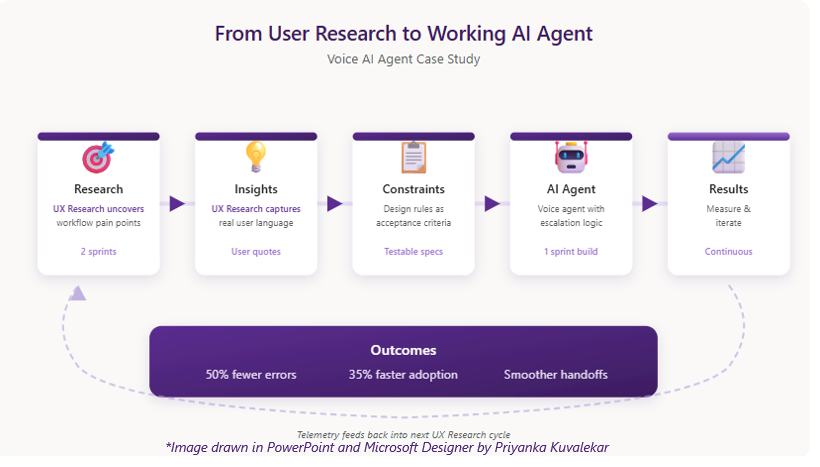
Why This Approach Works
UX research gives agile AI development a focused user perspective that directly supports developer cycles. When teams work from real workflows and constraints, they write less speculative code, reduce rework, and catch potential failures earlier.
McKinsey's work on AI-enabled product development points out that teams redesigning their Agile AI product development and with UX research expertise tend to see more user-centric decision-making leading to better product experiences. Knowing this, and in my opinion, you do not have to trade one for the other. Agile AI teams that work this way stay closer to their users without slowing down.
Key Takeaways
If you are beginning to build or refine LLM-powered agents, here is a realistic next step. Pick one narrow workflow. Study how work happens today. Run a small research-driven experiment. Use telemetry and follow-up conversations to refine each iteration.
AI delivers lasting value only when it is integrated thoughtfully into how people and teams already operate. By treating UX research as a first-class part of agile AI development, you bring the user's perspective into every sprint and make your development lifecycle more responsive to real needs.
- UX research helps agile AI teams start from real workflows instead of abstract features, leading to more focused and effective agentic workflows
- Integrating Research into each agile AI product development sprint gives teams clearer constraints, reduces rework, and supports higher quality releases
- Modern LLMs accelerate prototyping, but the quality of your agentic AI workflows depends on how well you understand the AI workflows before you define requirements and write code
Opinions expressed by DZone contributors are their own.
Comments