

A Complete Guide to Creating Vector Embeddings for Your Entire Codebase
Learn how to transform your codebase into semantic vector embeddings for better code search, AI integration, and enhanced developer productivity.
 ·
·
Join the DZone community and get the full member experience.
Join For FreeAs AI-powered development tools like GitHub Copilot, Cursor, and Windsurf revolutionize how we write code, I've been diving deep into the technology that makes these intelligent assistants possible. After exploring how Model Context Protocol is reshaping AI integration beyond traditional APIs, I want to continue sharing what I've learned about another foundational piece of the AI development puzzle: vector embeddings. The magic behind these tools' ability to understand and navigate vast codebases lies in their capacity to transform millions of lines of code into searchable mathematical representations that capture semantic meaning, not just syntax.
In this article, I'll walk through step-by-step how to transform your entire codebase into searchable vector embeddings, explore the best embedding models for code in 2025, and dig into the practical benefits and challenges of this approach.
What Are Code Vector Embeddings?
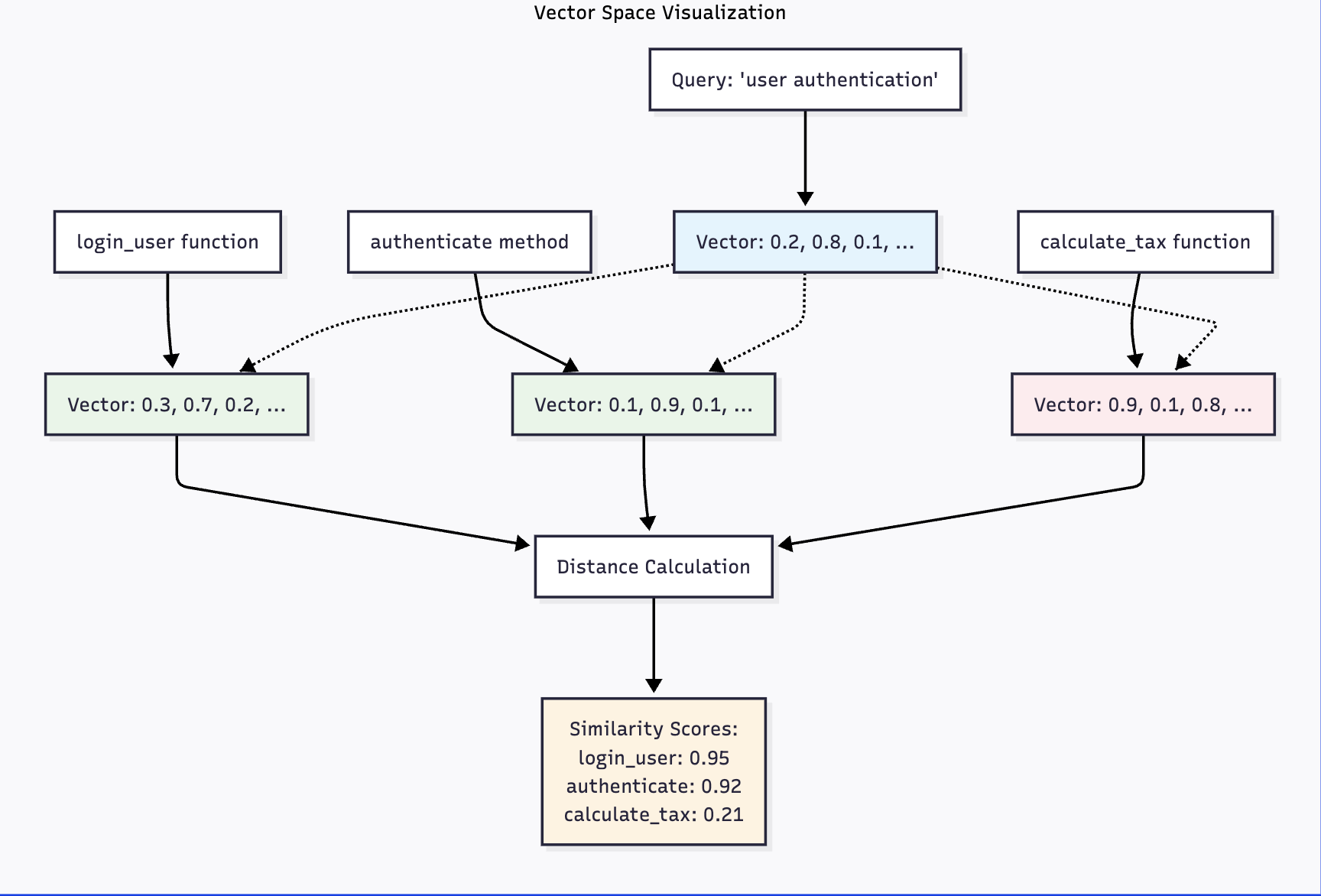
Vector embeddings are dense numerical representations that capture the semantic essence of code snippets. Unlike traditional keyword-based search, which looks for exact text matches, embeddings understand the meaning behind code, allowing you to find similar functions, patterns, and logic even when the syntax differs.
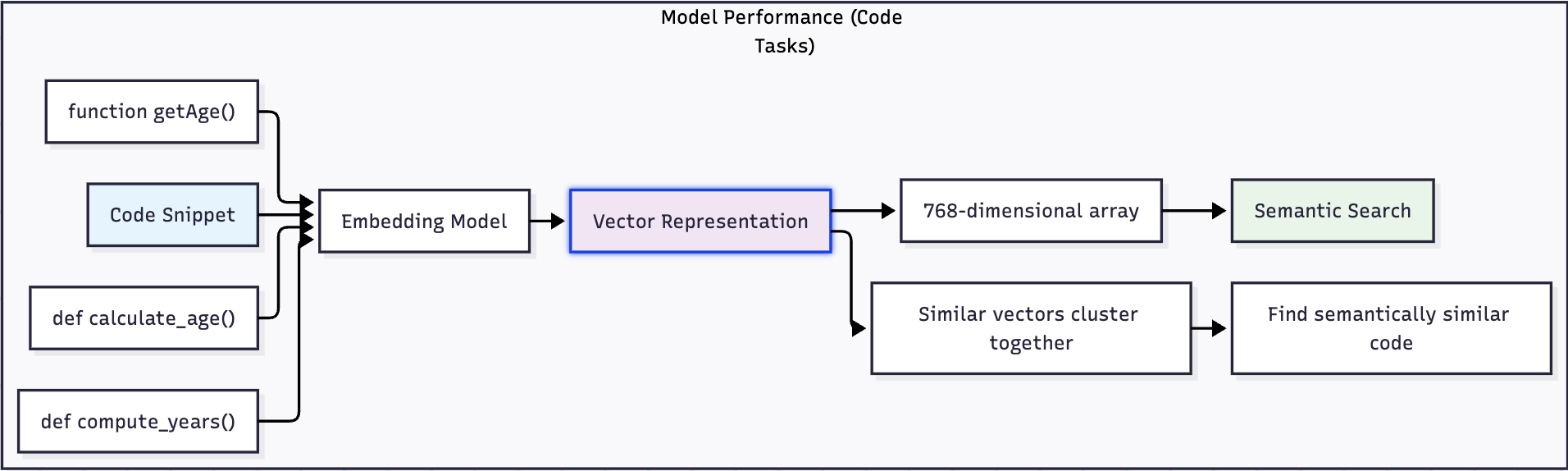
For example, these two code snippets would have similar embeddings despite different naming conventions:
def calculate_user_age(birth_date):
return datetime.now().year - birth_date.yeardef compute_person_years(birth_year):
return datetime.now().year - birth_yearWhen transformed into vectors, both functions would cluster together in the embedding space because they perform semantically similar operations.
Traditional vs. Vector-Based Code Search
How Traditional Keyword Search Works:

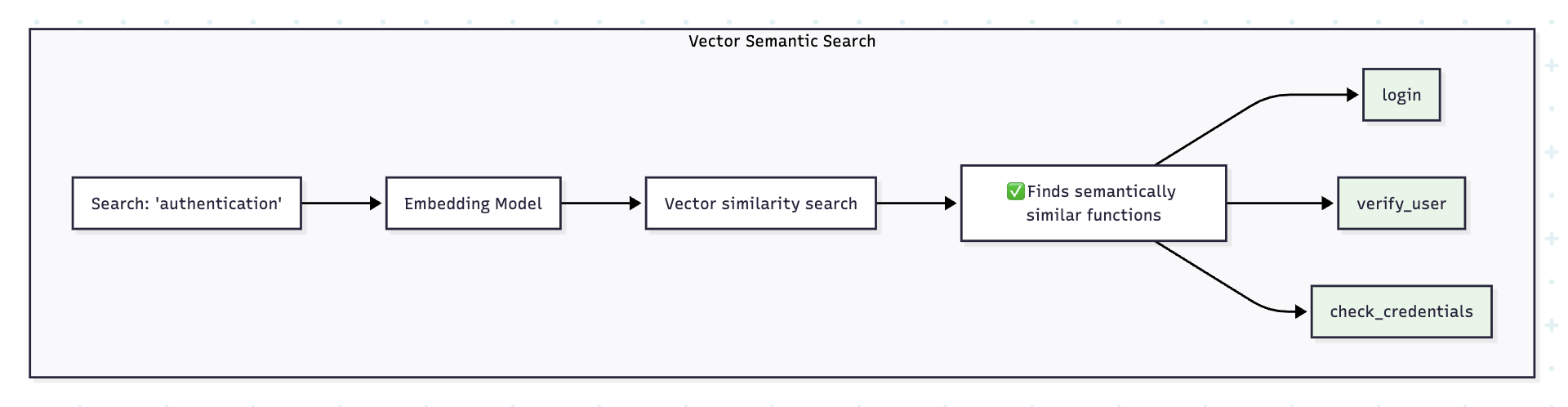
How Vector Embedding Search Works:
Why Vectorize Your Entire Codebase?
Enhanced Code Discovery
Vector embeddings enable semantic code search, which outperforms basic text matching. You can ask questions like "Show me all functions that handle user authentication" or "Find code similar to this database connection pattern" and get relevant results even if they don't share exact keywords.
Intelligent Code Completion
Modern AI coding assistants like Cursor, Github Copilot rely on codebase embeddings to generate context-specific suggestions to the user. By understanding your specific codebase patterns, these tools can generate more accurate and relevant code completions.
Automated Code Review and Analysis
Vector embeddings can identify code duplicates, suggest refactoring opportunities, and detect potential security vulnerabilities by comparing them against known patterns.
Documentation and Knowledge Transfer
New team members can quickly understand unfamiliar codebases by asking natural language questions that map to relevant code sections through vector similarity.
Embedding Model Performance Comparison
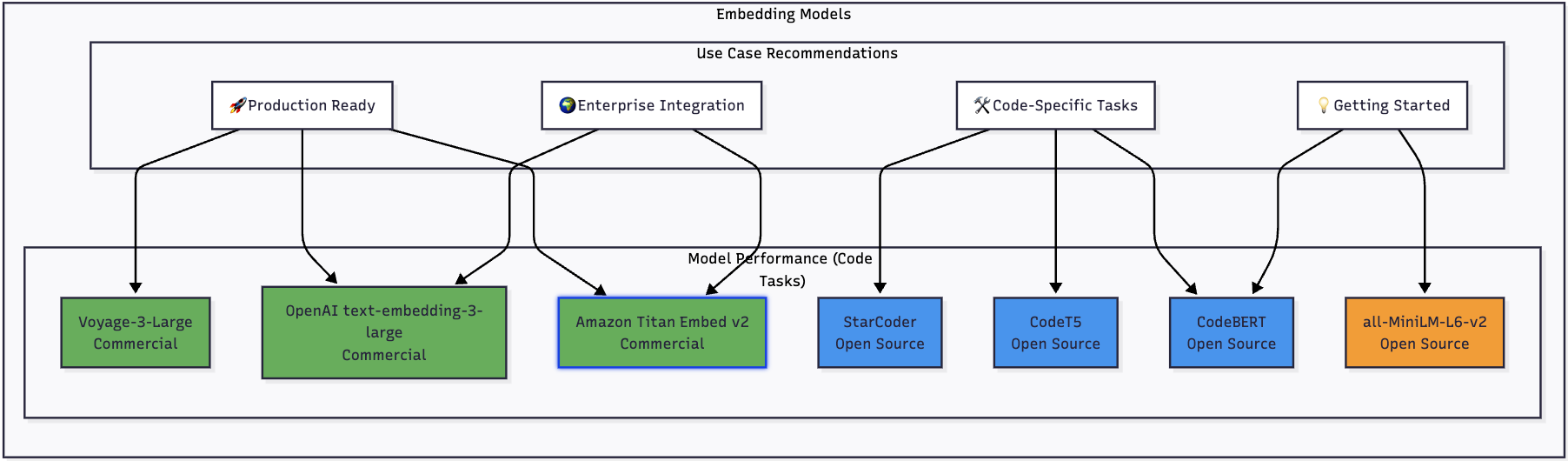
Here's how the leading embedding models stack up for code-related tasks:
Cost vs Performance Analysis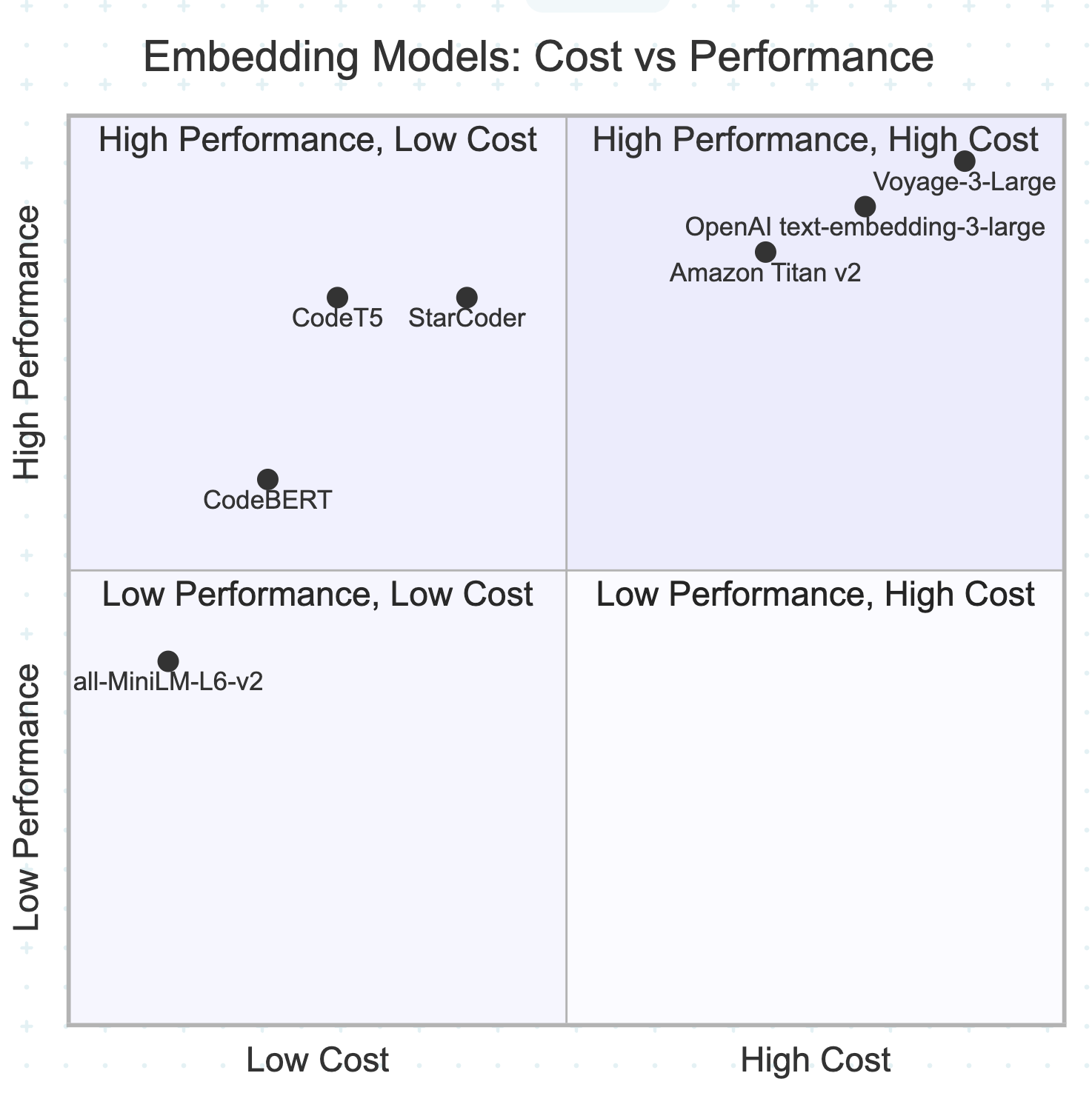
Implementation: Building Your Code Vector Database
The landscape of code embedding models has undergone significant evolution. Here are the top performers for 2025:
1. Voyage-3-Large
The Voyage-3-large model stands alone in its performance class because it surpasses all other models in recent benchmark tests. The VoyageAI proprietary model demonstrates exceptional code semantic understanding while preserving high accuracy across various programming languages.
Key Features:
- Superior performance across retrieval tasks
- Multi-language support
- Optimized for code understanding tasks
- Commercial licensing available
2. StarCoder/StarCoderBase
StarCoder models are large language models for Code trained on permissively licensed data from GitHub, including data from over 80 programming languages. With over 15 billion parameters and an 8,000+ token context window, StarCoder models can process more input than most open alternatives.
Key Features:
- Trained on 1 trillion tokens from The Stack dataset
- Support for 80+ programming languages
- Large context window for processing entire files
- Open-source under OpenRAIL license
- Strong performance on code completion benchmarks
3. CodeT5/CodeT5+
CodeT5 is an identifier-aware unified pre-trained encoder-decoder model that achieves state-of-the-art performance on multiple code-related downstream tasks. It's specifically designed to understand code structure and semantics.
Key Features:
- Identifier-aware pre-training
- Unified encoder-decoder architecture
- Strong performance on code understanding tasks
- Free and open-source
- Optimized for code-to-natural language tasks
Open Source Embedding Models for Getting Started
For developers looking to experiment without licensing costs, here are the best open-source embedding models to get started with code vectorization:
1. all-MiniLM-L6-v2
The all-MiniLM-L6-v2 model is one of the most popular general-purpose embedding models that works surprisingly well for code tasks.
Key Features:
- Small model size (22MB) - fast inference
- Good balance of performance and speed
- Widely supported across frameworks
- Perfect for prototyping and small projects
from sentence_transformers import SentenceTransformer
model = SentenceTransformer('all-MiniLM-L6-v2')
embeddings = model.encode(code_snippets)
2. CodeBERT (microsoft/codebert-base)
Microsoft's open-source model is specifically pre-trained on code and natural language pairs.
Key Features:
- Trained on 6 programming languages
- Understands code-natural language relationships
- Suitable for code search and documentation tasks
- Available on Hugging Face
from transformers import AutoModel, AutoTokenizer
tokenizer = AutoTokenizer.from_pretrained("microsoft/codebert-base")
model = AutoModel.from_pretrained("microsoft/codebert-base")
3. Stella-en-400M and Stella-en-1.5B
Top-performing models on the MTEB retrieval leaderboard that allows commercial use.
Key Features:
- Stella-en-400M: Smaller, faster option
- Stella-en-1.5B: Higher accuracy, more parameters
- Trained with Matryoshka techniques for efficient truncation
- Excellent performance on retrieval tasks
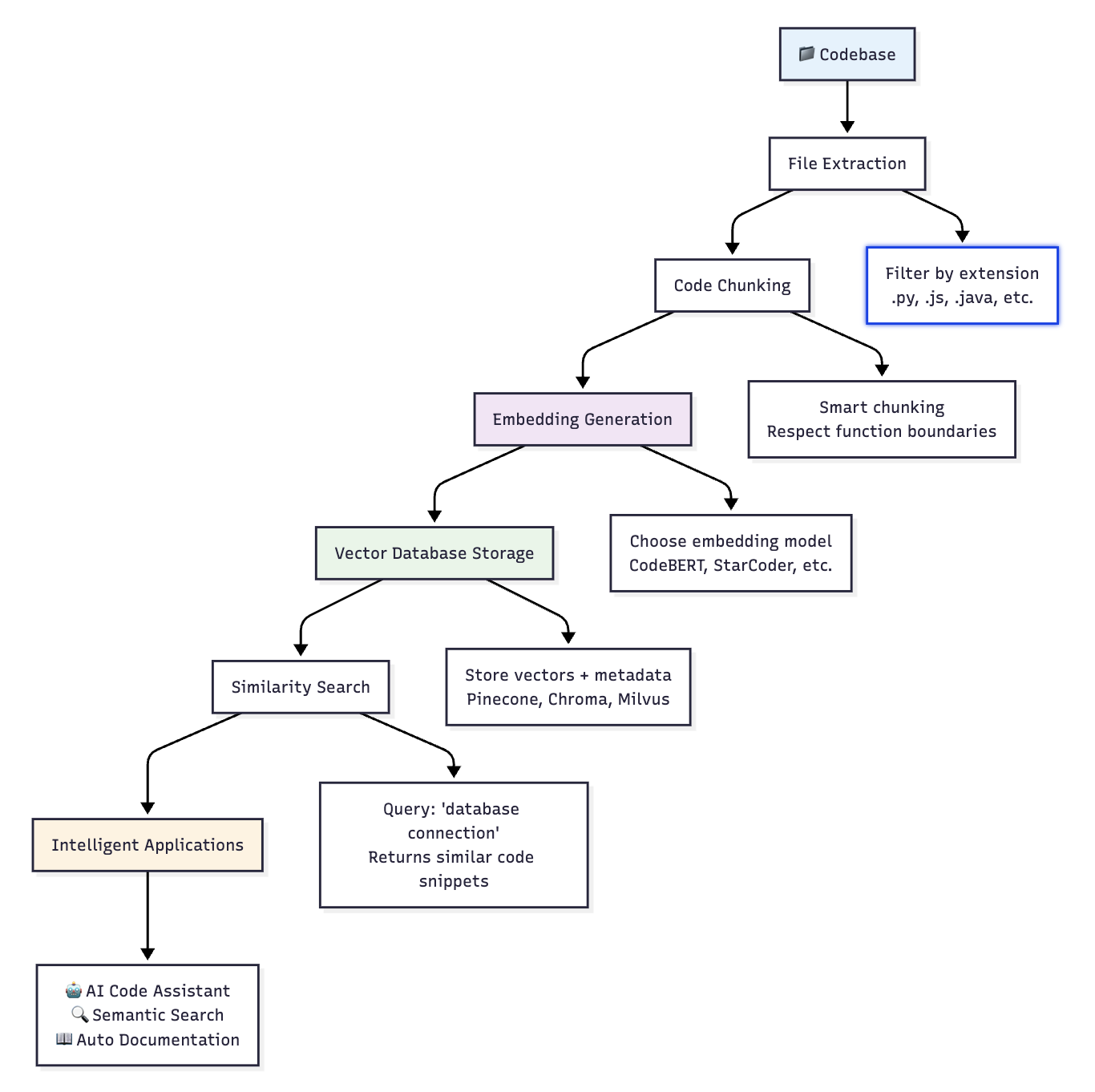
The Complete Codebase Vectorization Pipeline
Understanding the end-to-end process is crucial for successful implementation:
How Vector Similarity Works
Building a Codebase Vectorizer: A Step-by-Step Implementation
Let's walk through the process of building a complete codebase vectorization system, explaining each component and decision along the way.
Step 1: Setting Up Dependencies and Imports
First, let's understand what libraries we need and why:
import os from pathlib
import Path from langchain.text_splitter
import RecursiveCharacterTextSplitter from langchain_community.vectorstores
import Chroma from langchain_aws
import BedrockEmbeddings
import tiktoken
What each import does:
pathlib: Modern file path handling (better than string concatenation)RecursiveCharacterTextSplitter: Intelligently splits large files into chunksChroma: Open-source vector database for storing embeddingsBedrockEmbeddings: AWS integration for enterprise userstiktoken: Token counting for OpenAI models (ensures we don't exceed limits)
Step 2: Class Initialization - Choosing Your Embedding Strategy
class CodebaseVectorizer:
    def __init__(self, codebase_path, vector_store_path="./code_vectors",
                 embedding_model="all-MiniLM-L6-v2"):

        # Convert string path to Path object for better file handling
        self.codebase_path = Path(codebase_path)
        self.vector_store_path = vector_store_path
They provide cross-platform compatibility and cleaner file operations compared to string manipulation.
Now comes the crucial decision, which embedding model to use?
Option 1: Free and Fast (Recommended for Getting Started)
if embedding_model == "all-MiniLM-L6-v2":
  # Open source option - good for getting started
  from sentence_transformers import SentenceTransformer
  self.model = SentenceTransformer('all-MiniLM-L6-v2')
  self.embeddings = lambda texts: self.model.encode(texts).tolist()
What's happening here:
- We load a pre-trained model that is optimized for semantic similarity
- The lambda function creates a standardized interface for generating embeddings
- This model is free, runs locally, and works well for most code tasks
Option 2: High Performance (Commercial)
if embedding_model == "openai":
  # OpenAI's text-embedding-3-large for high performance
  import openai
  self.openai_client = openai.OpenAI()
  self.embeddings = lambda texts: [
    self.openai_client.embeddings.create(
      input=text, model="text-embedding-3-large"
    ).data[0].embedding for text in texts
  ]
Trade-offs to consider:
- Higher accuracy than open-source models
- Costs money per API call
- Requires internet connection
- Sends your code to external servers
Option 3: Enterprise Integration
elif embedding_model == "amazon-titan":
  # Amazon Titan (requires AWS credentials)
  self.embeddings = BedrockEmbeddings(
    model_id="amazon.titan-embed-text-v2:0",
    region_name="us-west-2"
  )
Best for:
- Teams already using AWS
- Enterprise environments with compliance requirements
- Large-scale deployments
Step 3: Configuring the Text Splitter
# Initialize text splitter for code chunks
self.text_splitter = RecursiveCharacterTextSplitter(
  chunk_size=1000,
  chunk_overlap=200,
  separators=["\n\n", "\n", " ", ""]
)
The text splitter serves an essential purpose because most embedding models restrict their input to 512-8192 tokens so large code files need to be divided into smaller sections that meet these limits. The intelligent chunking approach maintains semantic meaning by splitting code at function boundaries instead of mid-line positions which helps related code stay together for better similarity search accuracy.
Step 4: Finding Code Files in Your Project
def extract_code_files(self):
  """Extract all code files from the codebase"""
  code_extensions = {'.py', '.js', '.jsx', '.ts', '.tsx', '.java',
                     '.cpp', '.c', '.h', '.go', '.rs', '.rb', '.php'}

  code_files = []
  for file_path in self.codebase_path.rglob('*'):
    if (file_path.suffix in code_extensions and
        file_path.is_file() and
        'node_modules' not in str(file_path)):
      code_files.append(file_path)

      return code_files
Systematically discovers all code files in your project by recursively scanning directories and filtering for relevant file extensions like .py, .js, .java, etc. It utilizes smart filtering to exclude dependency folders, such as node_modules and non-code files, ensuring that we only process actual source code rather than wasting time on thousands of irrelevant files. This targeted approach dramatically improves processing speed and focuses the vectorization on the code that matters for semantic search.
Step 5: Processing Individual Files
def process_file(self, file_path):
  """Process a single code file into chunks"""
  try:
    with open(file_path, 'r', encoding='utf-8') as f:
      content = f.read()

      # Create chunks
      chunks = self.text_splitter.split_text(content)

      documents = []
      for i, chunk in enumerate(chunks):
        # Create metadata for each chunk
        metadata = {
          'file_path': str(file_path),
          'relative_path': str(file_path.relative_to(self.codebase_path)),
          'file_extension': file_path.suffix,
          'language': self.detect_language(file_path.suffix),
          'chunk_id': i,
          'chunk_size': len(chunk)
        }

        documents.append({
          'content': chunk,
          'metadata': metadata
        })

        return documents

      except Exception as e:
        print(f"Error processing {file_path}: {e}")
        return []
The function processes each file through safe content reading (with encoding error handling) before dividing the file into smaller chunks based on our defined text splitter. The system adds file path information along with programming language identification and chunk position data to each chunk before creating structured documents that unite code content with necessary contextual metadata for future search and filtering operations.
Step 6: Language Detection
def detect_language(self, extension):
    """Detect programming language from file extension"""
    language_map = {
        '.py': 'python',
        '.js': 'javascript',
        '.jsx': 'javascript',
        '.ts': 'typescript',
        '.tsx': 'typescript',
        '.java': 'java',
        '.cpp': 'cpp',
        '.c': 'c',
        '.h': 'c',
        '.go': 'go',
        '.rs': 'rust',
        '.rb': 'ruby',
        '.php': 'php'
    }
    return language_map.get(extension, 'unknown')
Simple but effective: File extensions are 99% accurate for language detection. For edge cases, you could enhance this with content analysis, but it's usually overkill!
Step 7: The Main Vectorization Process
def vectorize_codebase(self):
    """Main method to vectorize the entire codebase"""
    print(f"Starting vectorization of {self.codebase_path}")

    # Extract all code files
    code_files = self.extract_code_files()
    print(f"Found {len(code_files)} code files")
Feedback is crucial - vectorization can take minutes for large codebases, so users need to know it's working. It took nearly 30 minutes to vectorize my codebase with almost 16,500+ chunks
Processing All Files
# Process all files
all_documents = []
for file_path in code_files:
    documents = self.process_file(file_path)
    all_documents.extend(documents)

print(f"Created {len(all_documents)} code chunks")
This loop is where the magic happens:
- Each file gets read and chunked
- All chunks get collected into one big list
- Each chunk has its metadata attached
Creating the Vector Database
# Create vector store
texts = [doc['content'] for doc in all_documents]
metadatas = [doc['metadata'] for doc in all_documents]

vector_store = Chroma.from_texts(
    texts=texts,
    metadatas=metadatas,
    embedding=self.embeddings,
    persist_directory=self.vector_store_path
)

vector_store.persist()
print(f"Vector database created at {self.vector_store_path}")

return vector_store
What's happening under the hood:
texts- All the actual code contentmetadatas- All the file/chunk informationChroma.from_texts()- Automatically generates embeddings and creates the databasepersist()- Saves everything to disk so you don't lose your work
Step 8: Putting It All Together
Starting Simple
# Getting started with free open-source model
vectorizer = CodebaseVectorizer("/Users/cyeddula/sample-project",
                               embedding_model="all-MiniLM-L6-v2")
vector_store = vectorizer.vectorize_codebase()
What Happens When You Run This?
Here's what you'll see in your terminal:
Starting vectorization of /Users/cyeddula/sample-project
Found 827 code files
Created 16,900 code chunks
Vector database created at ./code_vectors
And on your filesystem, you'll have:
./code_vectors/
├── chroma.sqlite3          # Vector database
├── index/                  # Vector indexes
└── collections/            # Metadata storage
Getting Started Recommendations
For Beginners: Start with all-MiniLM-L6-v2 - it's free, fast, and surprisingly effective for many code tasks. You can have a working prototype in minutes.
For Production Deployments: Consider OpenAI text-embedding-3-large for superior accuracy, Amazon Titan Embed v2 for AWS integration, or Voyage-3-Large for best-in-class performance.
For Enterprise Integration: Amazon Titan offers seamless AWS integration with enterprise security, while OpenAI provides battle-tested APIs with extensive ecosystem support.
Benefits of Codebase Vectorization
1. Semantic Code Understanding
Vector embeddings capture the intent behind code, not just syntax. This enables finding functionally similar code even when implementation details differ.
2. Faster Development Cycles
Developers can quickly locate relevant code examples, reducing time spent navigating large codebases. Systems like Cursor use embeddings to provide context-aware suggestions, dramatically improving development speed.
3. Improved Code Quality
By identifying similar code patterns, teams can:
- Reduce code duplication
- Standardize implementation approaches
- Share best practices across the organization
4. Enhanced Onboarding
New team members can ask natural language questions about the codebase and receive relevant code examples, accelerating their understanding of complex systems.
5. Intelligent Automation
Vector embeddings enable automated tasks like:
- Smart code review suggestions
- Automatic documentation generation
- Intelligent test case creation
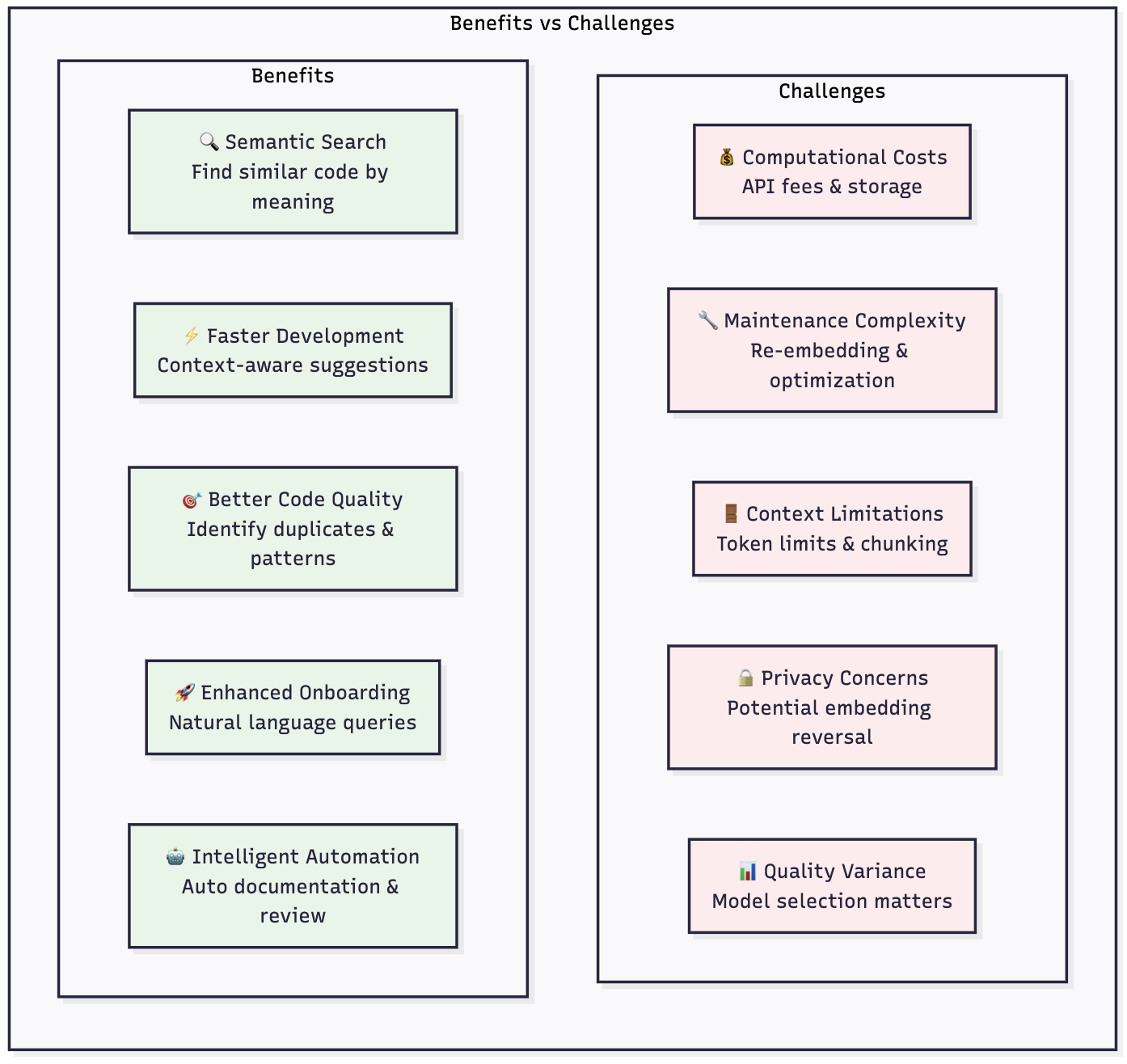
Benefits vs Challenges: The Complete Picture
Challenges and Drawbacks
1. Computational Overhead
Creating and maintaining embeddings for large codebases requires substantial computational resources. The process of generating embeddings can be time-consuming, while storage expenses grow with the size of vector dimensions.
2. Embedding Quality Varies
The effectiveness of your vector database depends heavily on the quality of your embedding model. Some models may produce inflated performance scores as they might include benchmark datasets in their training data.
3. Context Window Limitations
Embedding models have token limits - OpenAI's text-embedding-3-small model has a token limit of 8192, which may require chunking large files and potentially losing context.
4. Maintenance Complexity
Vector databases require ongoing maintenance:
- Regular re-embedding as code changes
- Index optimization for performance
- Monitoring for drift in embedding quality
5. Privacy and Security Considerations
Academic research has shown that reversing embeddings is possible in some cases, potentially exposing information about your codebase.
6. Cost Implications
For large codebases, the costs can be substantial:
- Embedding generation API costs
- Vector database storage fees
- Computational resources for similarity search
Best Practices for Implementation
1. Choose the Right Chunking Strategy
- Use language-aware splitters that respect code structure
- Maintain function/class boundaries when possible
- Include relevant context (imports, class definitions)
2. Optimize for Your Use Case
- Code search: Use smaller chunks (500-1000 tokens)
- Documentation: Use larger chunks (1000-2000 tokens)
- Code generation: Include full function context
3. Implement Incremental Updates
Rather than re-embedding the entire codebase, implement delta updates for changed files to reduce computational costs.
4. Monitor and Evaluate
Evaluate the embedding model on your own dataset with 50 to 100 data objects to see what performance you can achieve rather than relying solely on public benchmarks.
Future Outlook
The field of code embeddings is rapidly evolving. We can expect to see:
- Improved code-specific models trained on larger, more diverse code datasets
- Better context awareness through longer context windows and hierarchical embeddings
- Integration with development workflows making vector search a native part of IDEs
- Enhanced security with privacy-preserving embedding techniques
Conclusion
Vectorizing your codebase represents a paradigm shift in how we interact with and understand large software systems. While the implementation requires careful consideration of costs, complexity, and privacy concerns, the benefits in terms of developer productivity, code quality, and organizational knowledge management are substantial.
As AI continues to reshape software development, teams that invest in building robust code vector databases will find themselves better positioned to leverage the next generation of AI-powered development tools. The key is to start with a clear use case, choose the right embedding model for your needs, and build incrementally toward a comprehensive solution.
Whether you're building the next AI coding assistant or want to make your existing codebase more discoverable, vector embeddings provide the foundation for brilliant code understanding systems.
Opinions expressed by DZone contributors are their own.
Comments