

Vibe Coding: Conversational Software Development — Part 4: Guiding AI Through Iteration
In part 4 of my 'Vibe Coding' series, learn more about conversational coding, code generation from prompts, and the future of developer productivity.
 CORE
·
CORE
·
Join the DZone community and get the full member experience.
Join For FreeWelcome to the fourth and final post in my Vibe Code series. In the previous article, I explained how system prompts can steer AI behaviour by setting initial expectations and boundaries. But if you have worked on even a mildly complex application, you will know that the first draft is never the final version. You always have some sort of UX tweaks, performance enhancements, or new feature requirements.
That is where task-level prompting comes into play. Once your foundation is in place, the next step is to provide instructions to AI to build, improve, and polish step by step. In this blog post, I will share several approaches that have worked well for me.
Begin Small: Simplicity First, Structure Later
Shipping into production is never a one-and-done task. There are always iterations, refactoring, testing, and including non-functional requirements like accessibility to account for. It is unrealistic to expect an AI assistant to accomplish all of this in a single prompt.
Instead, start small and iterate. In the early phases, simplicity wins. Here is an example of an intentionally open-ended prompt I might use:
Create a dashboard with spaces for visual elements.
Assume type of charts or some reason you think works best for this data.
Here I am just focused on the dashboard screen. Using such a prompt will direct AI without boxing it. You are setting a vibe and offering intent rather than detailed instructions. The prompt is open and allows AI to make suggestions. But you have a long way to go from here.

One Task at a Time: Iterating With Focus
Let us go deeper, take the example from my previous blog around London Air Quality Data. Once the initial dashboard was created, I narrowed the focus:
Consider this London Air Quality Data and analyse the dataset.
Suggest data visualization or graph that captures key trends on the dashboard.
Now the AI is not just coding, it is thinking. Below are a few suggestions it came up with.
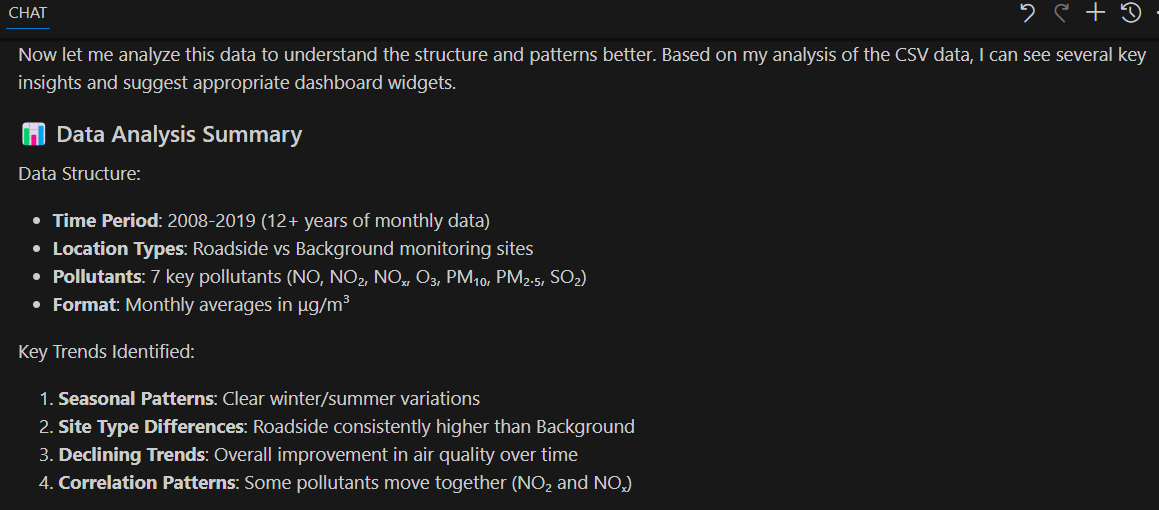
It might surface insights you hadn’t noticed or suggest charts that suit the story your data is telling. This is where AI becomes a true collaborator, not just a code generator.
Note: If London Air Quality Data is not available at the above link, I have committed a copy of it, as CSV, at the time I am writing this post.
Refining With Follow-Up Prompts
When I first asked Copilot to generate a dashboard for the London Air Quality dataset, the output was functional but visually felt basic. Below is the screenshot of the dashboard that Copilot generated for me after some initial prompts. It looked like a prototype with a basic white background, simple line charts, and limited interactions. If I were to demo to a stakeholder, it would not feel like a product.
It needs further iterations to aggregate the data and add the depth I was after. It was difficult to identify any likely trends, spikes, or patterns. I wanted my dashboard to be presentable with smoother lines on a modern theme.
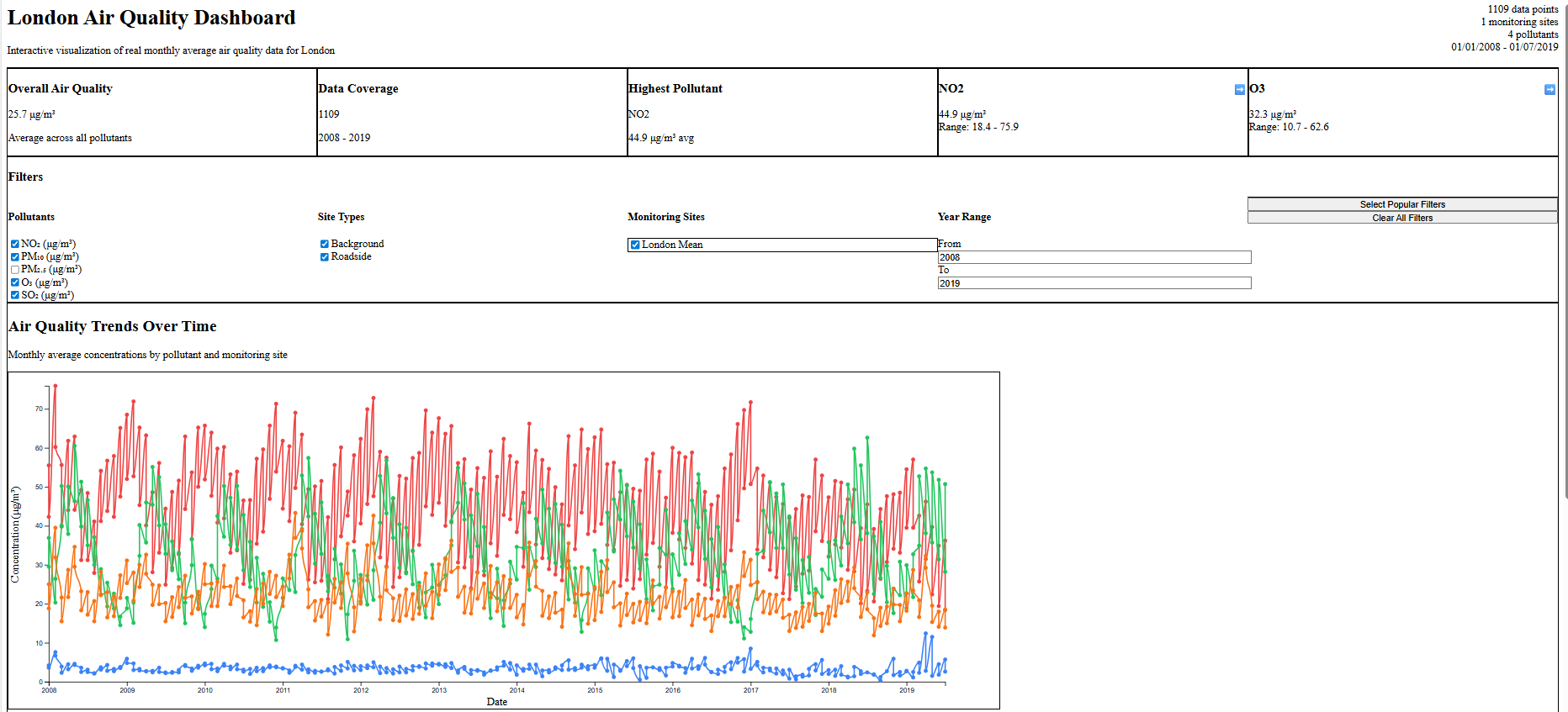
So, I refined with these two targeted prompts:
Prompt 1:
Visualize air quality trends over time.
Aggregate data by half-year, use smoother lines, add subtle gridlines, and stretch the graph to full page width.
Prompt 2:
The dashboard has a white background and basic styling.
Can you apply a modern dark theme and make it more visually appealing?
Here is the result. A cleaner and more elegant dashboard that is much closer to production quality.
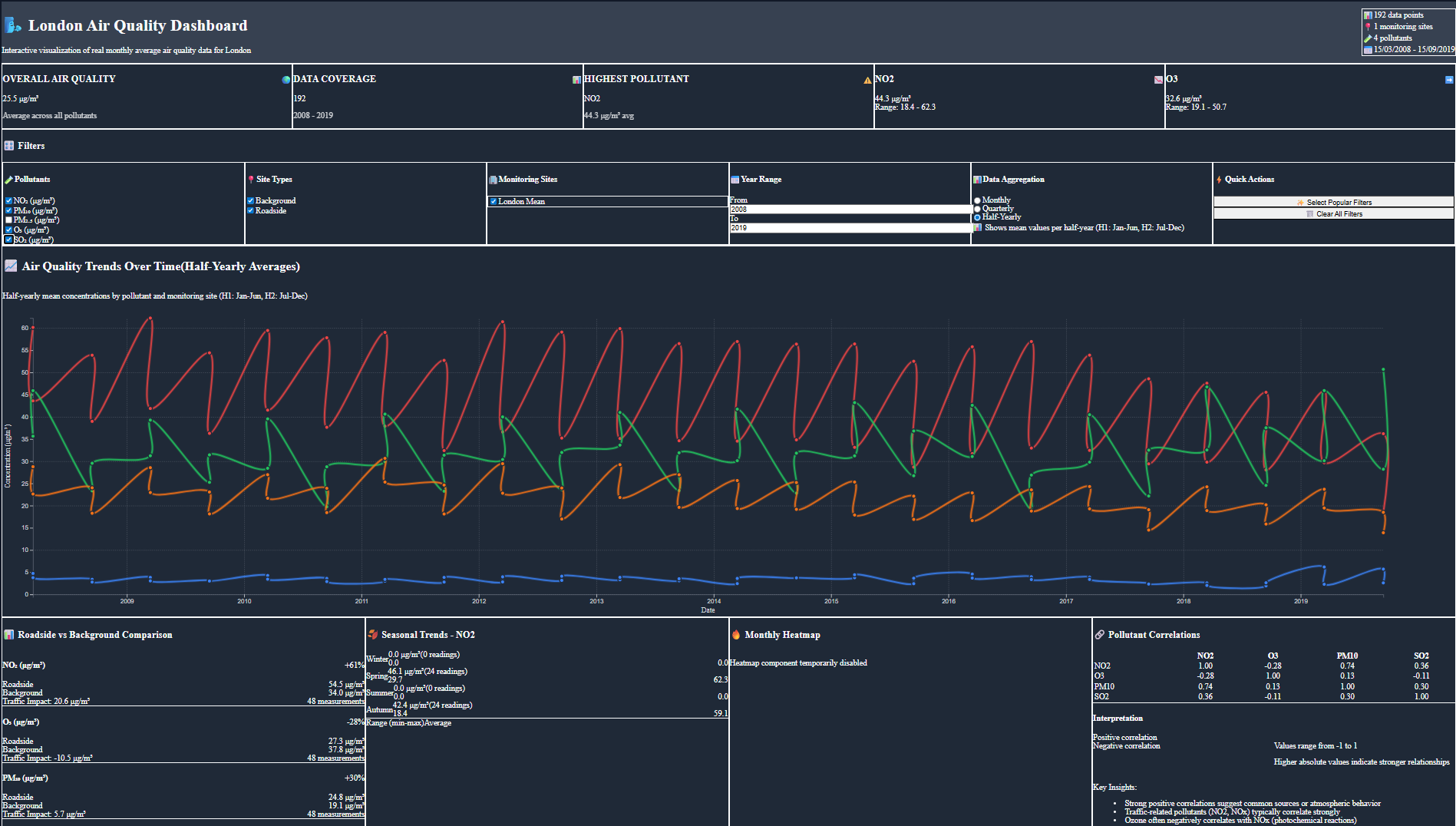
We started with a messy draft and steadily refined it. The process is like a software delivery lifecycle. AI is not doing the job for you; rather, it is accelerating the loop.
You can push it further based on your requirements:
Make the chart mobile friendlyAdd a tooltip to show percentage change from the previous half-yearApply WCAG accessibility standards to the chart labels and colours-
Do you notice any unusual patterns we should highlight?
This is where you can make AI act as your pair programmer, iterating with you. I treat every refinement as a small backlog item. I decomposed the improvements into a single step. I try to provide the same clarity as I expect from a Jira ticket. In my opinion, the approach leads to cleaner outputs and fewer surprises.
Structure the Conversation for Better Outcomes
If you are not sure where to begin? Try out different prompts, but the key is to keep them focused and open-ended. Try something like:
Give me a few different dashboard layouts that summarise the data.
First results are rarely the final ones. Don’t stress about getting everything perfect upfront. It usually takes three or four iterations, sometimes more, before it is ready for production. The goal is to progress.
Prompting Pitfalls
Task-level prompting is not an art; rather, it needs a logical, structured approach to guide AI assistants. One of the fastest ways to make it go wrong is to overload a single prompt. Just as a junior developer struggles with a vague, multi-purpose task, AI also struggles when you mix too many objectives. Below are a few dos and don'ts.
Dos
- Focus on one goal at a time.
- Clearly specify your expected outcome.
- Encourage creativity from AI, like "what could be the most insightful chart for this data set?"
Don’ts
- Mix multiple objectives (bug fixes, feature requests, and styling) in one prompt.
- Leave AI to guess your requirements.
- Assuming AI will automatically meet your compliance, security, and coding standards.
Final Thoughts
I believe we are still in the early stages of AI-assisted development. Most of the tools expect you to break problems down and provide clear prompts, iterating step by step. But the market is evolving quickly. New models like GPT-5 have longer memory and contextual awareness, and are already making it possible to carry conversations across multiple sessions. I think that, soon, it should be possible to orchestrate entire workflows or assign JIRA tickets to AI assistants.
Published at DZone with permission of Gaurav Gaur. See the original article here.
Opinions expressed by DZone contributors are their own.
Comments