

Visualizing Thread-Safe Singletons in Java
In this article, I will dive deep into the singleton pattern in Java with a multi-threaded environment view.
Join the DZone community and get the full member experience.
Join For FreeWorking in Java, we seldom have to create our handwritten singletons, for the existing frameworks like Spring creates these objects for us and maintains them. In enterprise applications, we get into framework disposal and let them create the singletons.
But it is interesting to know the singleton pattern and visualize the famous pattern in a multi-threaded environment. In this article, I will dive deep into this pattern with a multi-threaded environment view.
I am expecting the reader to be a bit familiar with multithreading.
Breaking Down Singleton Pattern
Singleton pattern is a creational design pattern where we restrict the creation of an object to a single instance, in the complete running process. This is possibly because the object is such that multiple instances aren't necessary by functionality or design.
Examples and Advantages
A class doing some generic mathematical computation can have a single instance across the process. Whenever a method of the class is required, we can reuse the single object created.
This has multiple advantages:
- Let's say we need mathematical operation sin(radian)/cos(radian) and we use this operation 1k times in a single iteration of a business call. We certainly run through multiple such business calls, which means around 1k unnecessary objects would be created and garbage collection has to run more frequently. It's always good to make the GC run as little as possible.
- Sometimes singleton is desired as part of business functionality itself which we might fail to observe. For example, let's say we design a university web application with students, their professors, and other real entities. Each different student should be created in memory (Heap) because there exist multiple students; but what about the university itself? How do you put a constraint over a university, not to have multiple instances in the heap? That would be chaos in the case by mistake 2 instances university exists in memory and both the instance carry bit different updated information of the students. To be precise, the university should not have multiple instances in a single deployment.
Understanding Singleton Pattern in Java
That said, let's now discuss a bit how we understand the singleton pattern in Java.
In nutshell, we should not allow the class to be created publicly. We should handle the creation privately. This would allow stringent law of single creation enforced! We should keep things in control.
public class University {
    private static University university = null;

    private University(String name) {
        System.out.println("University created - "+ name);
    }

    public static University getInstance(String name) {

        if (university == null) {
            university = new University(name);
        }
        return university;
    }
}
Now, let's test it using multiple threads.
import java.util.concurrent.ExecutorService;
import java.util.concurrent.Executors;
import java.util.function.Function;

public class UniversityTest {

    @org.junit.Test
    public void getInstance() {

        /**
         * Lets say we have spawned 5 threads of the University app deployment.
         */

        Function<String, University> function = (name) -> University.getInstance(name);

        Runnable runnable1 = () -> function.apply("Birla Institute of technology");
        Runnable runnable2 = () -> function.apply("Birla Institute of technology");
        Runnable runnable3 = () -> function.apply("Birla Institute of technology");
        Runnable runnable4 = () -> function.apply("Birla Institute of technology");
        Runnable runnable5 = () -> function.apply("Birla Institute of technology");

        ExecutorService executorService = Executors.newFixedThreadPool(5);
        long startTime = System.nanoTime();
        executorService.execute(runnable1);
        executorService.execute(runnable2);
        executorService.execute(runnable3);
        executorService.execute(runnable4);
        executorService.execute(runnable5);


        long endTime = System.nanoTime();
        long completionTime = endTime - startTime;
        System.out.println("Completion time : "+completionTime + " nanoseconds("+(float)completionTime/1000000+"ms)");
    }
}
Output : <Most of the time>
University created - Birla Institute of Technology

University created - Birla Institute of Technology

University created - Birla Institute of Technology

University created - Birla Institute of Technology

University created - Birla Institute of Technology

Completion time : 1103152 nanoseconds(1.103152ms)
We see that the code misbehaved in a multi-threaded env. University got created more than once in most of the runs. I am expecting that the reason is known that the creation is handled in an unsynchronised manner. Multiple threads hold the creation in its own stack.
This can be resolved if we synchronized the getInstance() method itself. Let's do it.
public synchronized static University getInstance1(String name) {
    if (university == null) {
        university = new University(name);
    }
    return university;
}
Output:
University created - Birla Institute of technology

Completion time : 1541073 nanoseconds(1.541073ms)
Here, we got University created just once, which was triggered using the same test method used above. We would be using the same test method once and again to test it. Synchronizing solves our issue. However, synchronizing the whole method is often not a good idea. This is because other threads have to wait for the completion of the entire method completion to get hold of it. We should rather synchronize only the part of the code required to be exclusive.
That can be done using the lock variable. Let's see how.
We can use a lock object to lock the access to the block of code only with lock object monitor.
public class University {
    private static  University university = null;
    private static Object lock = new Object();

    private University(String name) {
        System.out.println("University created - "+ name);
    }

    public static University getInstance(String name) {
        if(university == null) {
            synchronized (University.class) {
                    university = new University(name);
            }
        }
        return university;
    }
}
Another option is that we can lock the entire class access, using synchronized (University.class). This isn't a good way to lock class because it locks the entire class from access, meaning no other methods can be accessed by any thread. In our case, it doesn't makes difference, as we don't have another method to access.
public static University getInstance(String name) {
    if(university == null) {
        synchronized (University.class) {
                university = new University(name);
        }
    }
    return university;
}
Result:
University created - Birla Institute of technology

University created - Birla Institute of technology

University created - Birla Institute of technology

University created - Birla Institute of technology

University created - Birla Institute of technology

Completion time : 1213831 nanoseconds(1.213831ms)
But this is not what we wanted!
We synchronized the block using either lock monitor object or University.class and got no effect. The university object got created multiple times (more than once, mostly).
What went wrong here?
Let's understand this with the help of a diagram below. The explanation is also given within the diagram.
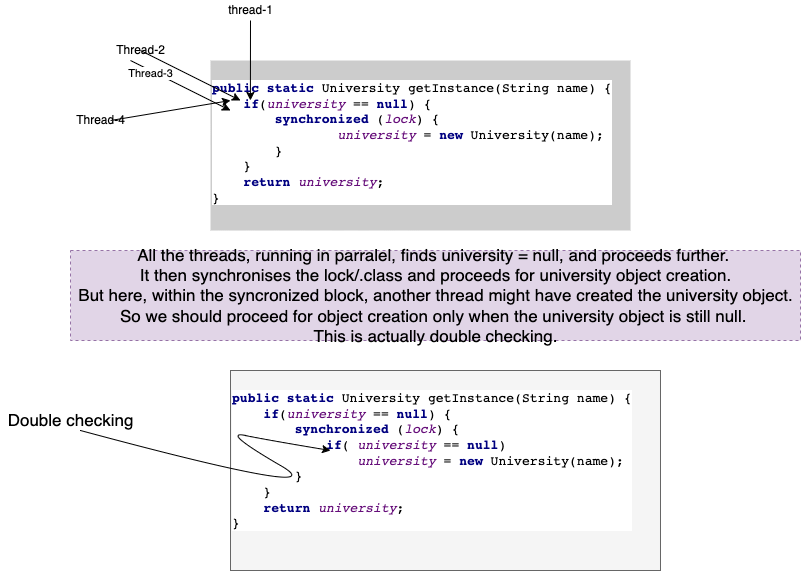
Double-checking is required in synchronized block object creation in Singleton pattern.
public static University getInstance(String name) {
    if(university == null) {
        synchronized (lock) {
            if( university == null)
                university = new University(name);
        }
    }
    return university;
}
Output:
University created - Birla Institute of technology

Completion time : 855721 nanoseconds(0.855721ms)
Yes! We achieved the university object creation just once in a multithreaded environment with performance in mind!
Opinions expressed by DZone contributors are their own.
Comments