

What Is PKCE?
PKCE, or Proof Key for Code Exchange, is a mechanism that came into being to make the use of OAuth 2.0 Authorization Code grant more secure.
 ·
·
Join the DZone community and get the full member experience.
Join For FreePKCE is short for Proof Key for Code Exchange. It is a mechanism that came into being to make the use of OAuth 2.0 Authorization Code grant more secure in certain cases.
Why PKCE?
When building applications and integrating a user signing and getting access to some resource, one of the main go-to standards is OAuth 2 with the usage of the Authorization Code grant type. Those who know the flow of Authz Code grant type know that the first call (authorization request) is made through a browser (User-Agent) to obtain the authorization code. This makes the auth code susceptible to an “Authorization Code Interception Attack”. In simple terms, there is a chance someone could steal that auth code. (This has happened!)
A couple of ways the auth code can be stolen include having a malicious app also register a custom URI scheme that matches the response of the Authz Code request. Or by gaining access to the HTTP request/response logs.
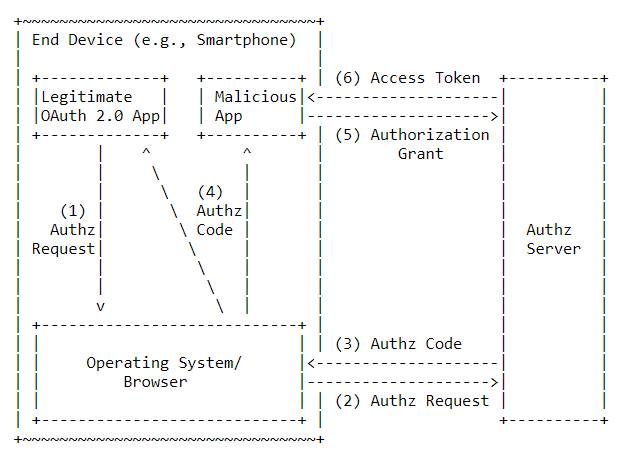
Well, they can’t do anything with the code as long as they don’t have the client credentials right? What if they have that, too? This is why I said “…in certain cases” at the beginning. If your app is a mobile app or a Single Page Web App (SPA), chances are that you will be using the same client credentials for every instance of the app, and the credentials are hardcoded into the apps. These are the kinds of apps that are known as public clients because you can’t really make sure those credentials have been kept secret, and no one else already has them. For public clients, it is recommended not to perform any actions based on the availability of the client secret (by trusting the secret).
So there’s your problem if you’re having a public client, and you're using the Authz Code grant. Then, some imposter could be generating and using access tokens without you even knowing!
How Does PKCE Prevent This?
The basic idea behind PKCE is proof of possession. The client app should give proof to the authorization server that the authz code belongs to the client app in order for the authorization server to issue an access token for the client app.
PKCE introduces a few new things to the Authz Code flow: a code verifier, a code challenge, and a code challenge method. The “code verifier” is a random code that meets a certain requirement. The “code challenge” is a transformation of the code verifier or in some cases can be the code verifier itself (DO NOT use the code verifier itself!!! Please don’t!). Use of the “code challenge method” is actually optional and it’s used to state the method used to transform the code verifier into the code challenge and if you don’t use it an Authorization Server will assume that the code challenge and the code verifier are the same. Both the code verifier and the code challenge is created by the client app. And each pair is used only once.
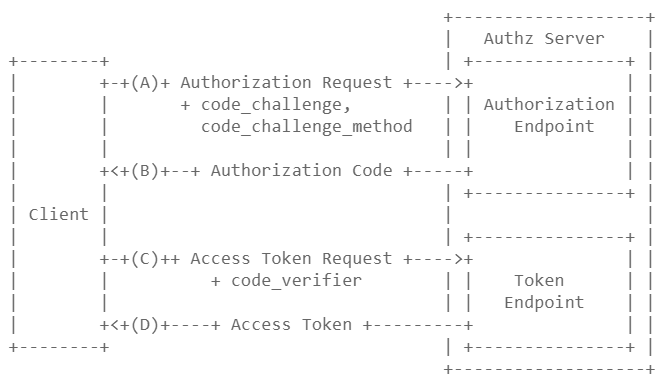
So the basic flow is like this.
- The client sends the authorization request along with the code_challenge and the code_challenge_method.
- The Authorisation Server makes note of the
code_challenge, and thecode_challenge_methodand issues an authz code. - The client sends an access token request along with the
code_verifier. - The Authorization Server validates the
code_verifierwith the already receivedcode_challengeand thecode_challenge_methodand issues an access token if the validation is successful.
This works because the code challenge or the code verifier cannot be intercepted. The code_verifier and the code_challenge should only be used once per token requesting cycle. Every time an authorization request is made, a new code challenge should be sent. Since the code challenge is sent through the browser, it is VERY important that the code challenge not be the same as the code verifier. Or, if by some means an attacker has access to the HTTP request, it could be through HTTP logs then the use of PKCE will be useless. Of course, this goes without saying the communication between the client and authorization server should be through a secured channel (TLS) so the codes cannot be intercepted.
Some Basic Stuff About the code_verifier, code_challenge, and the code_challenge_method
- code_verifier: The code verifier should be a high-entropy cryptographic random string with a minimum of 43 characters and a maximum of 128 characters. Should only use A-Z, a-z, 0–9, “-”(hyphen), “.” (period), “_”(underscore), “~”(tilde) characters.
- code_challenge: The code challenge is created by SHA256 hashing the code_verifier and base64 URL encoding the resulting hash
Base64UrlEncode(SHA256Hash(code_verifier). In the case that there is no such possibility ever to do the above transformation it is okay to use the code_verifier itself as the code_challenge. - code_challenge_method: This is an optional parameter. The available values are “S256” when using a transformed
code_challengeas mentioned above. Or “plain” when thecode_challengeis the same as thecode_verifier. Since this is an optional parameter, if not sent in the request, the Authorisation Server will assign “plain” as the default value.
Well, that’s it.
Published at DZone with permission of Janak Amarasena. See the original article here.
Opinions expressed by DZone contributors are their own.
Comments