

When MySQL, PostgreSQL, and Oracle Argue: Doris JDBC Catalog Acts as the Peacemaker
What is this magical Doris JDBC Catalog? It's like a universal key in the data world, opening the doors to multiple databases with one key.
Join the DZone community and get the full member experience.
Join For FreeAt noon, Xiao Wang was staring at his computer screen, looking worried.
He is in charge of the company's data platform and recently received a task: to perform real-time analysis on data from three different databases—MySQL, PostgreSQL, and Oracle.
"I have to write three sets of ETL programs to synchronize the data into Doris. What a workload...", Xiao Wang rubbed his sore eyes.
"Why make it so complicated? Use JDBC Catalog!" his colleague Xiao Li's voice came from behind.
Xiao Wang looked puzzled: "What is this magical JDBC Catalog?"
Xiao Li smiled: "It's like a universal key in the data world, opening the doors to multiple databases with one key."
The Magic Tool to Break Data Silos
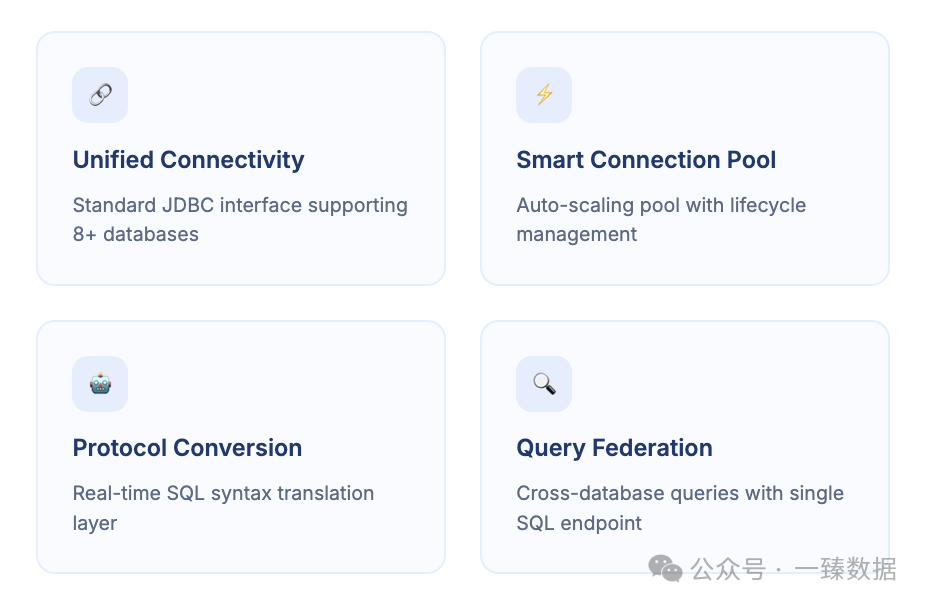
The core charm of Doris JDBC Catalog lies in its ability to connect to a variety of databases through the standard JDBC interface, including MySQL, PostgreSQL, Oracle, SQL Server, IBM Db2, ClickHouse, SAP HANA, and OceanBase.
Let's look at a practical example:
CREATE CATALOG mysql_source PROPERTIES (

    "type"="jdbc",

    "user"="root",

    "password"="secret",

    "jdbc_url" = "jdbc:mysql://example.net:3306",

    "driver_url" = "mysql-connector-j-8.3.0.jar",

    "driver_class" = "com.mysql.cj.jdbc.Driver"

)
That's it!
Once created, you can query tables in MySQL just like querying local Doris tables:
-- Show all databases
SHOW DATABASES FROM mysql_source;

-- Show tables in the test database
SHOW TABLES FROM mysql_source.test;

-- Directly query a table in MySQL
SELECT * FROM mysql_source.test.users;
For data analysts, this means no more writing complex ETL processes, no more worrying about data consistency, and no additional storage costs.
The data remains stored in the original databases, but you can query them as if they were local tables.
The Magic Formula of JDBC Catalog
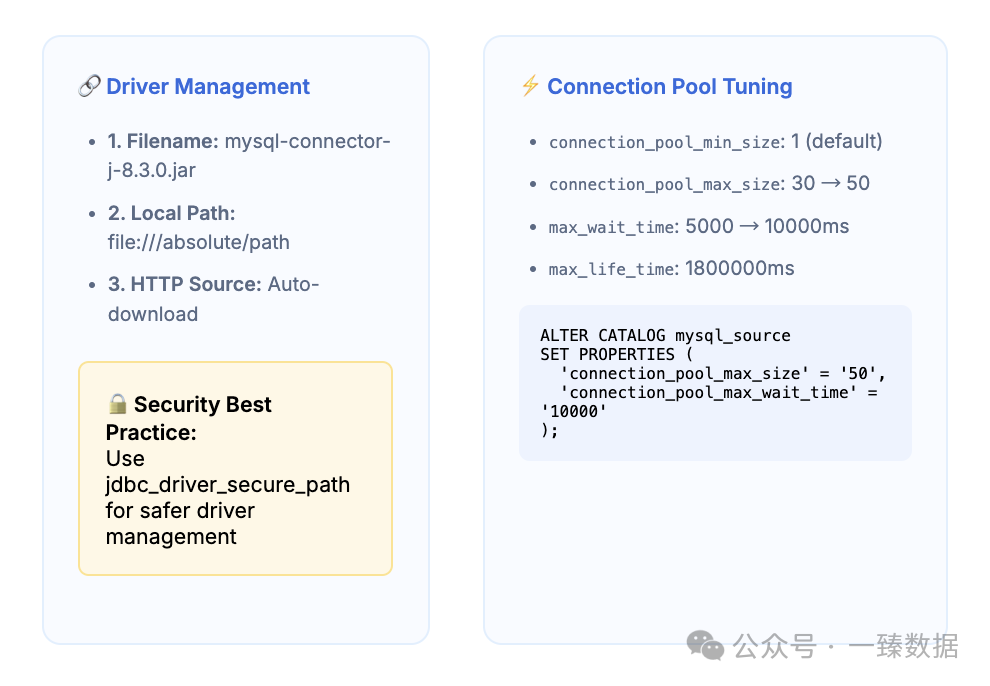
To unleash the full power of JDBC Catalog, you need to understand its key configuration options.
Driver Configuration
First, the driver package path can be specified in three ways:
- Filename only, such as
mysql-connector-j-8.3.0.jar. The system will look for it in thejdbc_drivers/directory. - Local absolute path, such as
file:///path/to/mysql-connector-j-8.3.0.jar. - HTTP address. The system will automatically download the driver file.
Tip:
To better manage driver packages, you can use the jdbc_driver_secure_path FE configuration item to allow driver package paths, enhancing security.
Connection Pool Tuning
The connection pool has a significant impact on performance. For example, establishing a new connection for each query is like having to apply for a new access card every time you enter the office—it's cumbersome!
Key parameters include:
connection_pool_min_size: Minimum number of connections (default is 1).connection_pool_max_size: Maximum number of connections (default is 30).connection_pool_max_wait_time: Maximum milliseconds to wait for a connection (default is 5000).connection_pool_max_life_time: Maximum lifecycle of a connection (default is 1800000 milliseconds).
-- Adjust connection pool size based on load
ALTER CATALOG mysql_source SET PROPERTIES (
    'connection_pool_max_size' = '50',
    'connection_pool_max_wait_time' = '10000'
);
Advanced Usage: Statement Pass-Through
Xiao Wang curiously asked, "What if I want to perform some DDL or DML operations in MySQL?"
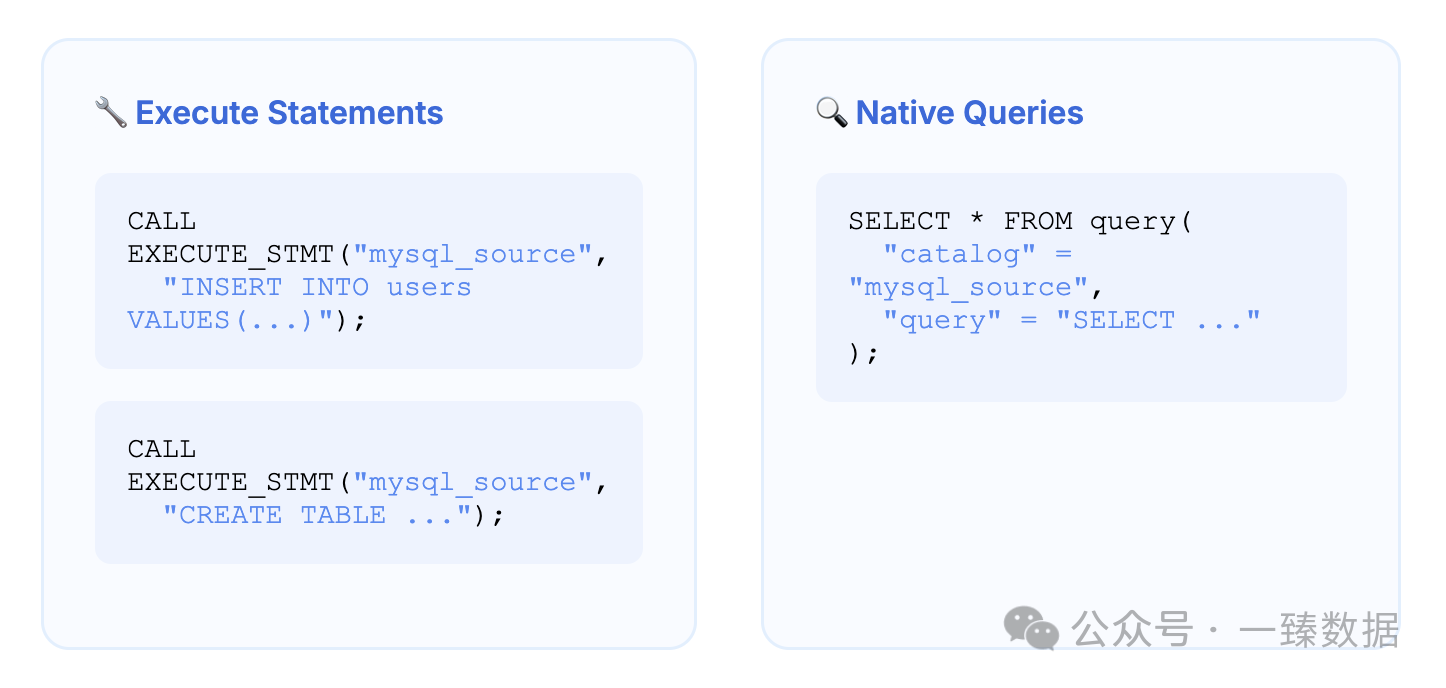
Xiao Li smiled mysteriously: "Doris provides a statement pass-through feature that allows you to execute native SQL statements directly in the data source."
DDL and DML Pass-Through
Currently, only DDL and DML statements are supported, and you must use the syntax corresponding to the data source.
-- Insert data
CALL EXECUTE_STMT("mysql_source", "INSERT INTO users VALUES(1, 'Zhang San'), (2, 'Li Si')");

-- Delete data
CALL EXECUTE_STMT("mysql_source", "DELETE FROM users WHERE id = 2");

-- Create a table
CALL EXECUTE_STMT("mysql_source", "CREATE TABLE new_users (id INT, name VARCHAR(50))");
Query Pass-Through
-- Use the query table function to execute a native query
SELECT * FROM query(
  "catalog" = "mysql_source",
  "query" = "SELECT id, name FROM users WHERE id > 10"
);
The pass-through feature allows you to fully leverage the capabilities and syntax of the source database while maintaining unified management in Doris.
Pitfall Guide: Common Issues and Solutions
The world of database connections is not always sunny; sometimes you will encounter some pitfalls.
Connection Timeout Issues
One of the most common errors is: Connection is not available, request timed out after 5000ms
Possible causes include:
- Cause 1: Network issues (e.g., the server is unreachable).
- Cause 2: Authentication issues, such as invalid usernames or passwords.
- Cause 3: High network latency, causing connection creation to exceed the 5-second timeout.
- Cause 4: Too many concurrent queries, exceeding the maximum number of connections configured in the connection pool.
Solutions:
1. If you only see the error Connection is not available, request timed out after 5000ms, check Causes 3 and 4:
First, check for high network latency or resource exhaustion.
Increase the maximum number of connections and connection timeout time:
-- Increase the maximum number of connections
ALTER CATALOG mysql_source SET PROPERTIES ('connection_pool_max_size' = '100');

-- Increase the wait time
ALTER CATALOG mysql_source SET PROPERTIES ('connection_pool_max_wait_time' = '10000');
2. If you see additional errors besides Connection is not available, request timed out after 5000ms, investigate these additional errors:
- Network issues (e.g., the server is unreachable) can cause connection failures. Check if the network connection is normal.
- Authentication issues (e.g., invalid usernames or passwords) can also cause connection failures. Verify the database credentials used in the configuration to ensure they are correct.
- Investigate issues related to the network, database, or authentication based on the specific error messages to identify the root cause.
Conclusion
Doris JDBC Catalog brings a revolutionary change to data analysis. It allows us to connect to multiple data sources in an elegant and efficient way, achieving query-as-you-go. No more complex ETL processes, no more data synchronization headaches, just a smooth analysis experience.
As Xiao Wang later said to Xiao Li: "JDBC Catalog has shown me a new possibility in the world of data. I used to spend 80% of my time handling data synchronization, but now I can use that time for real analysis."
Next time you face the challenge of analyzing multiple data sources, consider trying this universal key to the data world. It might change your data analysis approach just as it changed Xiao Wang's.
Stay tuned for more interesting, useful, and valuable content in the next post!
Published at DZone with permission of Zen Hua. See the original article here.
Opinions expressed by DZone contributors are their own.
Comments