

WireMock With Dynamic Proxies
This quick lesson in WireMock considers using dynamic proxies with your tests. We'll use the OpenWeather API in this example.
Join the DZone community and get the full member experience.
Join For FreeIn this series, let's learn about the WireMock dynamic proxy. We will also see how to switch mocks real service requests. For more information on learning WireMock, visit this link.
In this example, I used the OpenWeather API to get weather information. Click here for more details.
WireMock has a feature where you can extend it by using its extensions such as Transformer and PostServeAction.
Transformers(ResponseDefinitionTransformer): This extension mechanism makes it possible to dynamically modify responses, allowing header re-writing and templated responses, amongst other things.
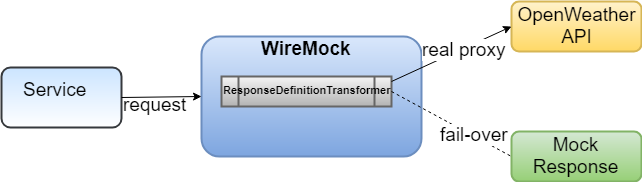
In the above diagram, Service sends the request to WireMock, then WireMock executes one of its extensions, i.e the ResponseDefinitionTransformer#transform method. We have a simple validation inside the transform(override by the subclass) method — i.e if the OpenWeather API service is available or not. If the API service is available, then we attach it to the proxy URL and return a new ResponseDefinition. WireMock sends the request to the OpenWeather API service and receives the response. Otherwise, I set my own mock response to the body and return ResponseDefinition. Let us see the FailOverTransformer code:
package com.mim.poc;

import java.net.MalformedURLException;
import java.net.URL;
import com.github.tomakehurst.wiremock.client.ResponseDefinitionBuilder;
import com.github.tomakehurst.wiremock.common.FileSource;
import com.github.tomakehurst.wiremock.extension.Parameters;
import com.github.tomakehurst.wiremock.extension.ResponseDefinitionTransformer;
import com.github.tomakehurst.wiremock.http.Request;
import com.github.tomakehurst.wiremock.http.ResponseDefinition;

public class FailOverTransformer extends ResponseDefinitionTransformer {

    public static final String FAIL_OVER_TRANSFORMER = "fail-over-transformer";
    public static final String WEATHER_PROXY_URL = "weather-proxy-url";
    public static final String WEATHER_MOCK_RES_BODY = "weather-mock-res-body";
    @Override
    public String getName() {
        return FAIL_OVER_TRANSFORMER;
    }
    @Override
    public ResponseDefinition transform(Request request, ResponseDefinition responseDefinition, FileSource files,
        Parameters parameters) {
        String proxyURl = parameters.getString(WEATHER_PROXY_URL);
        boolean found = false;
        try {
            found = HttpPingTestUtil.doesURLExist(new URL(proxyURl + request.getUrl()));
        } catch (MalformedURLException e) {
            e.printStackTrace();
        }
        return found ? ResponseDefinitionBuilder
            .like(responseDefinition)
            .proxiedFrom(proxyURl)
            .build() :
            new ResponseDefinitionBuilder()
            .withStatus(200)
            .withHeader("Content-Type", "text/plain")
            .withBody(parameters.getString(WEATHER_MOCK_RES_BODY))
            .build();
    }

}- Line 24: proxy URL is a setting in the WeatherIT class Looking at line 23, the proxy URL is coming from a properties file,
- Line 27: The HttPingTestUtil class has the doesURLExist method to validate whether the service is available or not. See the complete code in the GitHub repo. If the service is available, then it returns true; otherwise false.
- Line 31: If found=true, then ResponseDefinition attaches to the proxy URL and returns the new ResponseDefinition. Otherwise, it returns with a mock response body. The mock response body is set on WeatherIT.java Line 24: .withTransformerParameter(FailOverTransformer.WEATHER_MOCK_RES_BODY, readContentBy("/mock/mockresponse.xml"))));
Our integration test in Spring:
@RunWith(SpringJUnit4ClassRunner.class)
@ContextConfiguration("classpath:application-test.xml")
public class WeatherInfoIT {

    @Autowired
    private WeatherGateway gateway;

    @Value("${weather.proxy.url}")
    private String weatherProxyUrl;

    @SuppressWarnings("static-access")
    @Rule
    public WireMockRule openWeatherMockRule = new WireMockRule(wireMockConfig().options().port(8999)
        .extensions(new FailOverTransformer()));

    @Before
    public void init() throws Exception {
        openWeatherMockRule.stubFor(WireMock.get(WireMock.urlPathMatching(".*"))
            .withQueryParam("appid", WireMock.equalTo("b6907d289e10d714a6e88b30761fae22"))
            .withQueryParam("mode", WireMock.equalTo("xml"))
            .withQueryParam("q", WireMock.equalTo("London"))
            .willReturn(WireMock.aResponse().withTransformers(FailOverTransformer.FAIL_OVER_TRANSFORMER)
                .withTransformerParameter(FailOverTransformer.WEATHER_PROXY_URL, weatherProxyUrl)
                .withTransformerParameter(FailOverTransformer.WEATHER_MOCK_RES_BODY,
                    readContentBy("/mock/mockresponse.xml"))));
    }
    private String readContentBy(String filePath) {
        String contents = "";
        Resource resource = new ClassPathResource(filePath);
        try {
            contents = new String(Files.readAllBytes(resource.getFile().toPath()));
        } catch (IOException e) {}
        return contents;
    }
    @Test
    public void getInfo() {
        QueryParameters parameters = new QueryParameters();
        parameters.setAppId("b6907d289e10d714a6e88b30761fae22");
        parameters.setMode("xml");
        parameters.setCity("London");
        String response = gateway.send(parameters);
        System.out.println(response);
        //fake test
        Assert.assertTrue(true);
    }
}- Above WeatherIT.java On-Line 14: adding FailoverTransformer to WireMock extension
- On-Line 22: registering FailoverTransformer with the name. see FailOverTransformer#FAIL_OVER_TRANSFORMER
- On-Line 23: setting proxy URL as Transformer parameter
- On-Line 24: setting Mock Response body as Transformer parameter
Finally, we run it as a JUnit getInfo() method. You will see the actual OpenWeather API response because the service is available — so WireMock hit the proxy.
Sample output:

Let's change proxy URL in the properties file and re-run JUnit getInfo():
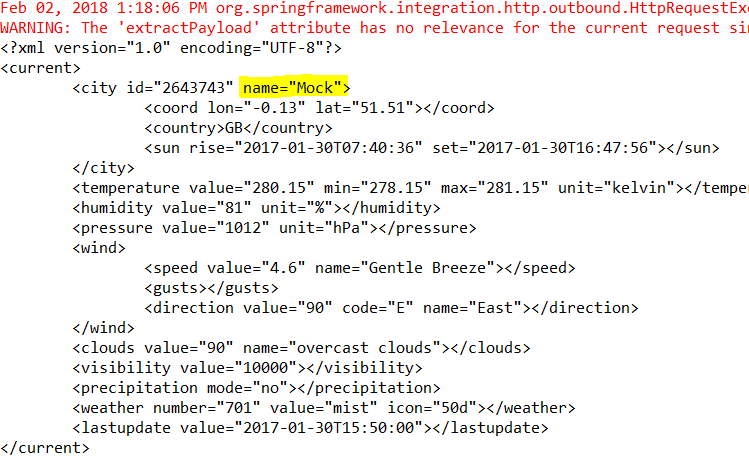
weather.proxy.url=http://samples.openweathermap.orMake sure we need to give the wrong URL, then the Mock response will return:
#wiremock endpoint
weather.endpoint.url=http://localhost:8999/data/2.5/weather?{city}&{mode}&{appid}
#real endpoint
#if you want switch to mock just change to incorrect address so that it failover to mock
weather.proxy.url=http://samples.openweathermap.org
<?xml version="1.0" encoding="UTF-8"?>
<beans xmlns="http://www.springframework.org/schema/beans"
xmlns:xsi="http://www.w3.org/2001/XMLSchema-instance" xmlns:context="http://www.springframework.org/schema/context"
xmlns:int="http://www.springframework.org/schema/integration"
xmlns:int-jdbc="http://www.springframework.org/schema/integration/jdbc"
xmlns:int-http="http://www.springframework.org/schema/integration/http"
xmlns:task="http://www.springframework.org/schema/task" xmlns:p="http://www.springframework.org/schema/p"
xsi:schemaLocation="http://www.springframework.org/schema/beans http://www.springframework.org/schema/beans/spring-beans.xsd
http://www.springframework.org/schema/context http://www.springframework.org/schema/context/spring-context.xsd
http://www.springframework.org/schema/integration http://www.springframework.org/schema/integration/spring-integration.xsd
http://www.springframework.org/schema/integration/jdbc
http://www.springframework.org/schema/integration/jdbc/spring-integration-jdbc.xsd
http://www.springframework.org/schema/integration/http http://www.springframework.org/schema/integration/http/spring-integration-http.xsd
http://www.springframework.org/schema/task http://www.springframework.org/schema/task/spring-task.xsd">
<context:property-placeholder location="classpath:application-test.properties" />
<int:channel id="weatherInboundChannel" >
<int:queue capacity="100"/>
</int:channel>
<int:channel id="weatherOutboundChannel">
<int:queue capacity="100"/>
</int:channel>
<int:poller max-messages-per-poll="10" fixed-rate="500" default="true"/>
<int:gateway service-interface="com.mim.poc.WeatherGateway"id="weatherGateway" default-request-channel="weatherInboundChannel" default-reply-channel="weatherOutboundChannel"/>
<int-http:outbound-gateway url="${weather.endpoint.url}" request-channel="weatherInboundChannel" reply-channel="weatherOutboundChannel"
http-method="GET" extract-request-payload="true" expected-response-type="java.lang.String">
<int-http:uri-variable name="city" expression="'q='+payload['city']"/>
<int-http:uri-variable name="mode" expression="'mode='+payload['mode']" />
<int-http:uri-variable name="appid" expression="'appid='+payload['appId']" />
</int-http:outbound-gateway>
</beans>See the complete code in GitHub.
Opinions expressed by DZone contributors are their own.
Comments