

Zero Trust in CI/CD Pipelines: A Practical DevSecOps Implementation Guide
A quick guide to applying Zero Trust in CI/CD by removing static credentials, automating security checks, and enforcing safe deployments into Kubernetes/EKS.
 ·
·
Join the DZone community and get the full member experience.
Join For FreeSecuring modern CI/CD pipelines has become significantly more challenging as teams adopt cloud-native architectures and accelerate their release cycles. Attackers now target build systems, deployment workflows, and the open-source components organizations rely on every day. This tutorial provides a practical look at how Zero Trust principles can strengthen the entire software delivery process. It walks through real steps you can apply immediately using identity-based authentication, automated scanning, policy checks, and hardened Kubernetes deployments. The goal is simple: make sure that only trusted code, moving through a trusted pipeline, reaches production.
As organizations continue transitioning to cloud-native applications and distributed systems, the CI/CD pipeline has become a critical part of the software supply chain. Unfortunately, this also makes it an increasingly attractive target for attackers. Compromising a build system or deployment workflow can lead to unauthorized code changes, credential theft, or even the silent insertion of malicious workloads into production.
Traditional CI/CD setups often rely on implicit trust: long-lived credentials stored in pipeline settings, overly permissive roles, and build agents with broad access across environments. These patterns no longer meet today’s security expectations.
Zero Trust Offers a Modern Alternative
Instead of assuming that components inside the pipeline are trustworthy, Zero Trust requires continuous identity verification, least-privilege permissions, strong validation at every stage, and secure deployment workflows from source to runtime.
This tutorial walks through a practical, real-world approach to implementing Zero Trust principles in DevSecOps pipelines using:
- Identity-based, credential-less deployments with OIDC
- OpenID Connect (OIDC)
- Mandatory SAST, SCA, SBOM, and container security scans
- Policy-as-Code (PaC) enforcement for infrastructure and Kubernetes
- Hardening techniques for runners, agents, and build infrastructure
- Secure workloads, signature verification, and admission control in Kubernetes/EKS
By applying these principles, you can build a CI/CD pipeline that is resilient, verifiable, and aligned with modern Zero Trust standards.
Why Zero Trust Matters in CI/CD
Modern pipelines commonly contain shared credentials, powerful deployment permissions, and access to sensitive artifacts. If a runner, plugin, or repository is compromised, an attacker may:
- Deploy unauthorized workloads
- Alter production artifacts
- Steal secrets or tokens
- Inject supply-chain backdoors
Zero Trust reduces this risk by replacing assumptions with verification. Key Zero Trust Concepts for CI/CD include:
- Identity over location: Access is granted based on workload identity, not network or IP
- Least privilege: Each stage receives only the permissions it needs
- Continuous validation: Code, images, manifests, and dependencies are verified at every step
- Independent trust boundaries: Build, scan, deploy, and runtime each validate the previous phase
Zero Trust CI/CD Architecture Overview
A secure Zero Trust pipeline introduces validation and identity enforcement from commit to deployment:
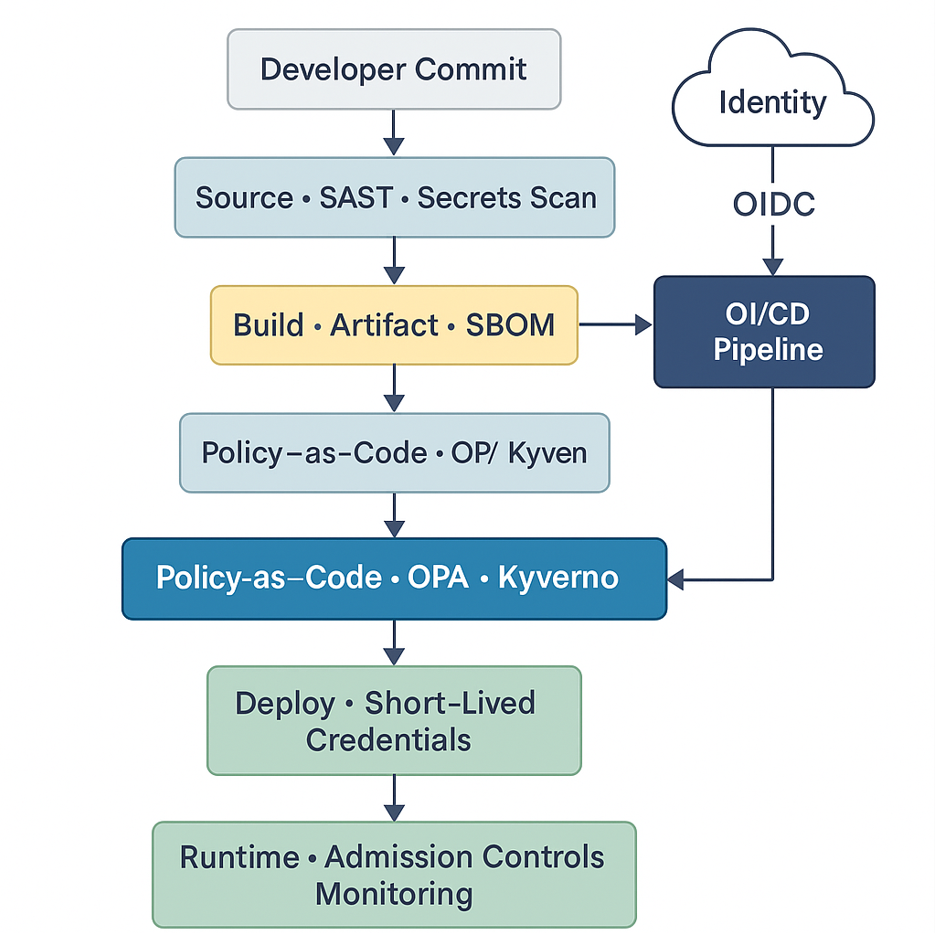
This flow ensures that only verified artifacts, signed images, and approved configurations reach production.
Eliminating Secrets With OIDC (Zero-Trust Identity)
One of the most impactful Zero Trust improvements is removing long-lived credentials from your CI/CD environment. Instead of storing AWS keys, Azure secrets, or kubeconfigs, the pipeline uses short-lived identity tokens issued at runtime via OpenID Connect (OIDC).
GitHub Actions → AWS Example (Secretless Deployment)
GitHub provides a signed OIDC token that identifies the repository, workflow, and branch. AWS validates this token and issues temporary credentials.
IAM Trust Policy Example:
{

  "Version": "2012-10-17",

  "Statement": [

    {

      "Effect": "Allow",

      "Principal": {

        "Federated": "arn:aws:iam::AWS_ACCOUNT_ID:oidc-provider/token.actions.githubusercontent.com"

      },

      "Action": "sts:AssumeRoleWithWebIdentity",

      "Condition": {

        "StringLike": {

          "token.actions.githubusercontent.com:sub": "repo:your-org/your-repo:*"

        }

      }

    }

  ]

}
GitHub Workflow Using OIDC (No AWS Keys Stored)
jobs:

  deploy:

    runs-on: ubuntu-latest

    steps:

      - uses: actions/checkout@v4

      - name: Configure AWS via OIDC

        uses: aws-actions/configure-aws-credentials@v4

        with:

          role-to-assume: arn:aws:iam::ACCOUNT_ID:role/OIDCDeployRole

          aws-region: us-east-1


      - name: Deploy to EKS

        run: |

          aws eks update-kubeconfig --name prod

          kubectl apply -f k8s/
This eliminates persistent secrets while enforcing identity-based authorization.
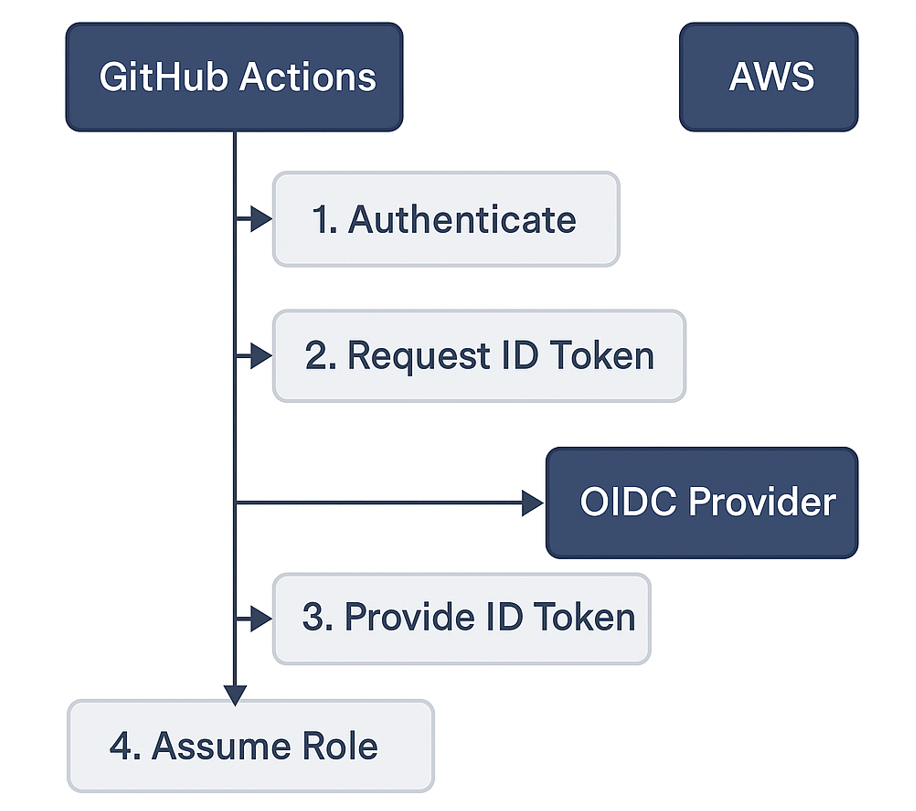
Mandatory Security Scanning in the Pipeline
Zero Trust requires that all code and artifacts be validated before deployment.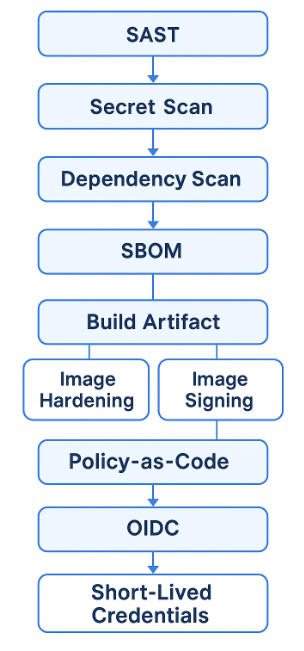
Static Code Analysis (SAST)
Detects injection risks, unsafe APIs, insecure input handling, and similar issues.
- name: Run SAST
run: semgrep ci
Fail the pipeline on high/critical issues.
Secret Scanning
Tools like GitLeaks or TruffleHog detect exposed credentials:
- name: Secrets Scan
uses: gitleaks/gitleaks-action@v2
Any discovered secret should trigger fail-fast and immediate rotation.
SBOM Generation & Dependency Scanning
Software bills of materials (SBOMs) provide a full inventory of components, versions, and licenses.
Using Syft:
syft . -o cyclonedx-json > sbom.jsonThen scan it for vulnerabilities using Trivy or Anchore.
Container Image Scanning
Scan OS-level packages and configurations:
trivy image myapp:latest \
--severity HIGH,CRITICAL \
--exit-code 1
Zero Trust pipelines do not deploy unscanned or vulnerable images.
Enforcing Policy-as-Code
Policy-as-Code applies organizational rules automatically, ensuring consistent security standards across all deployments.
Example: Block Root Containers (OPA/Rego)
deny[msg] {

  input.spec.template.spec.containers[_].securityContext.runAsNonRoot == false

  msg = "Root containers are not allowed"

}
CI pipeline validation (Conftest):
- name: Validate Kubernetes Policies

  uses: instrumenta/conftest-action@v1

  with:

    files: k8s/
If a manifest violates policy → deployment is blocked.
Hardening CI/CD Runners and Build Agents
Because build infrastructure handles sensitive code and artifacts, Zero Trust requires strong isolation.
Recommended Practices:
- Use ephemeral runners that reset after each job
- Restrict runner outbound access (no unrestricted internet egress)
- Avoid root containers for builds
- Limit plugin installation (especially in Jenkins)
- Separate untrusted PR builds from privileged deployment pipelines
This approach reduces the blast radius in the event of compromise.
Zero Trust Deployment to Kubernetes/EKS
Zero Trust extends beyond pipeline steps into the cluster itself.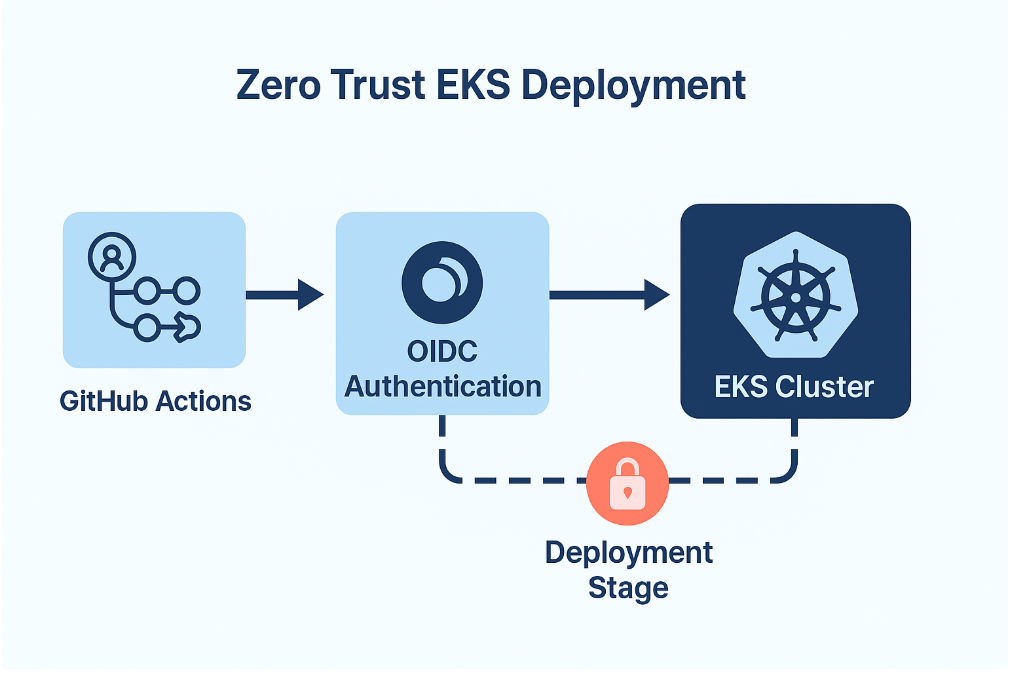
Identity-Based Access with IRSA
Kubernetes service accounts map to AWS IAM roles without storing AWS secrets inside pods.
Admission Controllers
Kyverno or OPA Gatekeeper enforce cluster-level policies:
- Only signed images allowed
- No privileged workloads
- Required resource limits
- Approved registries only
Image Signing and Verification
Sign the image during CI:
cosign sign myregistry/myapp:v1Verify signatures before deployment:
verifyImages:

  - image: "registry/*"

    key: "cosign.pub"
Unsigned images are rejected automatically.
Conclusion
Zero Trust transforms CI/CD from a trust-based pipeline into a verifiable, identity-driven, and resilient software delivery system. By eliminating long-lived secrets, enforcing strong scanning workflows, validating configurations automatically, and verifying deployments at runtime, organizations significantly reduce their exposure to supply-chain attacks.
Starting with OIDC and essential scanning is simple, and each additional step — SBOMs, Policy-as-Code, admission control, workload identity, and image signing — brings the pipeline closer to a fully Zero Trust model.
This structured and practical approach ensures that only trusted code, built through a trusted process, is deployed into trusted environments.
Opinions expressed by DZone contributors are their own.
Comments