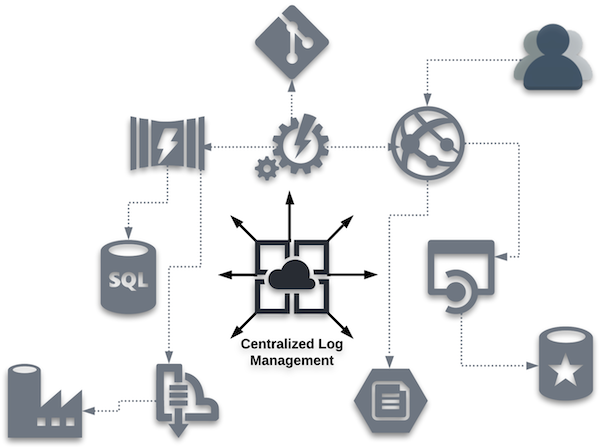
The time required to process and analyze logged information is important, especially when there is an urgent need to resolve an unexpected situation. As a result, a period of exploration should be taken to determine what information will be logged and what information will not be logged. In the example noted in the introduction, the DevOps engineer needed to review the consolidated events for an application that encountered an incident. In most cases, the situation needs to be resolved as soon as possible.
This effort could easily include logs from the microservices, databases, client application frameworks, and the security layer. If the logs included aspects that were not pertinent for analysis, additional time will be required to review and discard this type of information.
Consider the following example of logs that are ingested from the authentication/authorization service participating in the centralized log management strategy:
1550149377 INFO Userid (someUserId) successfully logged in from IP 127.0.0.1
1550149382 INFO SSID for someUserId updated to reflect last login
1550149385 WARN Password for someUserId will expire in 26 hours
1550149415 INFO UserId (someUserId) granted access to SomeApplication via token #tokenGoesHere
While the information being logged is important information, it might be best to filter out all the events, except for the following message:
1550149377 INFO Userid (someUserId) successfully logged in from IP 127.0.0.1
In doing so, the number of log messages that would need to be reviewed during a crisis is minimized — especially in cases where hundreds (or thousands) of users are accessing the application.
Sensitive Information
Another aspect to consider is making sure that secretive information (access tokens, database connection strings, encryption keys, account information, user information, etc.) is not stored in the CLM solution. In the log example above, the #tokenGoesHere log message should be suppressed from ingestion into the CLM solution since that token could be considered sensitive information. If the event is required, the message should be enriched to only ingest the following information:
1550149415 INFO UserId (someUserId) granted access to SomeApplication
Establish Guidelines
The key is to establish guidelines that meet the needs of the entire user community that will utilize the solution. Think of this no differently than how any other application is architected — understanding the limits that are introduced by both not enough log events and too many log events. Once established, this information should be shared with teams who can create the events that are being captured by the CLM solution.
Centralized Log Management Checklist
When the decision is made to evaluate CLM solutions, the number of available offerings will certainly appear daunting. As a result, it is crucial to understand which features and functionality are important for your implementation. Below are some high-level aspects and questions to consider.
Zero to 60
- What is involved in getting started?
- How quickly can a new implementation span from setup and configuration to log analysis and debugging success?
While the time required to get up to full speed is not an exclusive metric, there is some merit in knowing if the product under review gives the ability to get started quickly without a great deal of setup and configuration.
Ease of Data Exploration
- Can all types of users easily operate the system and locate data?
Remember, the user is often more of a data explorer and not a data scientist. Any built-in reports or filters will lead to a better user experience when extracting results from the system.
Analyst Efficiency
- How quickly does the system respond, including the ability to create complex searches or filters?
- Once data is returned, how easy are the results to comprehend and utilize?
As noted above, time is often the driving component when trying to retrieve information from a CLM solution. Again, filters and reporting can help improve end-user efficiency.
Scalability
- How well does the solution work within your organization?
- Can all systems function within one CLM solution or would multiple instances be required? How about five years from now?
It is important to understand how the CLM solution scales as more systems are introduced to the technology. Historically, some performance degradation was considered an acceptable tradeoff at high data volumes. But modern architectures no longer make you choose. Solutions that separate storage from compute can maintain consistent query performance regardless of data volume.
When evaluating scalability, ask vendors to demonstrate query response times not just at your current volume, but also at 10x and 100x that volume. The answer will tell you a great deal about the underlying architecture.
Storage
- What are the storage expectations?
- Where does the storage live?
- What are the associated costs of a target implementation?
Storage architecture has evolved significantly. Traditional log management systems required tiered storage strategies, keeping recent data in fast, expensive storage and older data into slower, cheaper tiers. This created a practical tradeoff: Cost savings came at the expense of accessibility/speed. Modern solutions built on cloud-native object storage eliminate the need for tiered storage, delivering subsecond query performance directly against inexpensive storage regardless of data age.
When evaluating storage, ask whether all of your data, recent and historical, is queryable at the same speed and cost. If the answer requires a tiering strategy, factor that into total cost of ownership and explore your alternatives.
Log Completeness
- Does the information retained include everything necessary?
- Is extra effort required to retrieve data from an additional source?
If you find yourself having to retrieve data from outside the CLM solution, there might be a gap in functionality with respect to your requirements.
Data Enrichment Functionality
- Does enrichment functionality exist?
- How easy is it to utilize and maintain?
It’s a good idea to review current log sources and understand more of the edge cases that could require data enrichment exceeding typical enrichment usage patterns.
Open/Closed Source
- Does the solution utilize an open source approach?
- How does this approach line up with other solutions your entity employs?
Log Collectors
- How are the log collectors defined?
- Are they proprietary or have they been created by third parties/vendors?
- Can these log collectors be centrally managed by the solution?
- Do they have to be independently managed at the log source level?
Typically, proprietary developed connectors lag those created by the third party/vendor themself. If the connectors can be managed and configured by the CLM solution, there is less need for configuration to be maintained on the log source.
Configuration as Code
- Does the solution employ a “* as Code” approach, allowing the configuration of the CLM solution to be stored in a code repository?
If your organization is embracing the concept of “* as Code,” CLM solutions that adopt this philosophy will be able to build and configure instances programmatically.
Class-Specific Functionality
- Does the solution contain features that help a particular class of user (e.g., DevOps, security, compliance, ITOps) obtain common results?
- Do reports exist to locate regulatory exceptions (e.g., HIPAA)?
Having functionality built in to assist specific use cases will lessen the time required for such groups to get up to speed and recognize value in the CLM solution.
API Functionality
- Is there a public API available for the solution?
Gaining familiarity of any underlying API for the CLM solution could further justify or leverage the value returned from implementation.
Anticipated Costs
- How is the product licensed?
Understanding the cost model will allow for product comparisons as time progresses and more components embrace centralized log management within your organization.
CLM vs. SEIM
- Is the target solution a CLM solution, or is it a security information and event management (SEIM) product?
- Do your current needs require one solution over the other… or perhaps both solutions?
The requirements approved for the product will be a guide to understand what type of solution should be considered. It is important, however, to understand the differences between CLM and SEIM.
ELK Stack
- Does the underlying solution leverage the ELK Stack?
- If not, what integrations exist to leverage these tools to improve the effectiveness and observability of the centralized logging solution?
Solutions like the ELK Stack have been a widely adopted foundation for centralized log management, and for many organizations, it remains a practical starting point. However, as log volumes grow, ELK-based architectures increasingly surface real constraints: Indexing overhead drives up storage costs, query performance degrades at high cardinality, and operational complexity grows with the data. Understanding where your current architecture hits those limits, and what alternatives exist, is an important part of any honest product evaluation.
During product evaluations, document the specific volume thresholds at which the solution was tested. Costs and performance characteristics at your current scale may differ significantly from what you will encounter as your log data grows.
Advanced Features for Log Management
While the centralized log management checklist section provided features and functionality that should be expected in an acceptable solution, below is a collection of advanced features for products that offer leading-edge functionality. These features are intended to leverage technology in order to enrich the log management experience.
Recurring Pattern Identification
Having an option to quickly see recurring patterns across all log data allows analysts to isolate issues and unexpected behavior. Implementing the ability to present a patterns perspective will alter the analyst’s view of a series of endless log entries to a categorized table, showing something like what is displayed below:
Count    Ratio   Pattern
-----    ------  ---------------------------
52,701   22.17%  License key has expired
19,457    7.99%  Invalid User ID
18,295    7.25%  New customer account created
In the example above, a large percentage of the messages match the pattern where a license key expired, which may not be easy to locate in a large volume of individual log entries.
Machine Learning and Crowdsourcing
Analysts often find themselves looking for the root cause of an unexpected issue, which can resemble a needle in a haystack. Rather than spending hours trying to narrow down the endless sea of log entries, the concept of machine learning and crowdsourcing support can minimize the time required to identify the root cause. Solutions that employ machine learning can help present key terms found in the centralized log events, along with the number of occurrences for each term. This enables the analyst to quickly reduce the number of log entries to process, thus making the haystack much smaller.
With a smaller collection of logs to process, these same market leaders provide additional information from sources outside the CLM service. For example, opening a given log entry provides the expected information related to the captured log data, but it goes a step further by linking crowdsourced data like:
- Discussion threads related to the logged message or condition
- Blog entries focused on how to correct the situation
- Documentation for the method, function, or class being utilized
- Additional information related to the error itself
Anomaly Detection
Issues that do not appear in the logs often, but are extremely valuable in nature, are often referred to as anomalies. Advanced solutions should provide the ability to detect anomalies so they can be surfaced and addressed. Anomaly detection leverages machine learning patterns to automatically isolate and investigate emergent problems based upon unusual behavior.
Once a baseline collection of fields has been specified and a query is established, the CLM service builds a model and begins to analyze and capture unusual behavior and events. Those detected events can be surfaced as new alerts in real time to provide instant access to emerging issues.
Data Visualization
Visualizations enable analysts to view data in graphical format, which can allow them to better understand comparisons over time. By defining common elements for the X- and Y-axis, data in the advanced CLM solution can be leveraged to communicate the state of the events being captured. These visualizations can be combined into a dashboard to show the overall status of the environment being monitored by the CLM service.
When Volume Changes Everything
Log management guidance often treats “high volume” as a relative term. But in practice, the architecture decisions that serve a team ingesting millions of events per day break down at billions, and break down further at hundreds of billions.
At lower volumes, index-based search, tiered storage, and periodic batch processing are workable approaches. As volumes scale toward enterprise-level traffic, those approaches introduce compounding costs and latency.
At that threshold, the architectural requirements shift: Streaming ingest replaces batch collection, storage and compute decouple, and query performance must hold regardless of how much data is stored. Understanding which threshold your organization is approaching, or has already crossed, is one of the most useful inputs to any log management platform decision.
Streaming vs. Batch Ingest
The collect step in most log management implementations has traditionally operated as a batch process: Logs are gathered from source systems on a schedule and pushed to the centralized solution periodically. For many use cases, this is sufficient. For teams operating in CDN, media delivery, security operations, or any environment where conditions change in seconds, batch ingest introduces a lag that can make the difference between catching an incident in progress and investigating it after the fact.
Streaming ingest architectures, often built on systems like Apache Kafka or similar message queues, allow log events to be ingested and made queryable in seconds. This enables live operational visibility rather than historical review. When evaluating log management solutions, consider whether your use case requires data to be actionable in seconds or minutes, and whether the solution’s ingest architecture can support that requirement without added infrastructure complexity.