

DZone
Thanks for visiting DZone today,
Edit Profile
  • Manage Email Subscriptions
  • How to Post to DZone
  • Article Submission Guidelines
Sign Out View Profile
  • Post an Article
  • Manage My Drafts
Newsletter
Log In / Join
Refcards Trend Reports
Events Video Library
Refcards
Trend Reports

Events

View Events Video Library

Related

  • How to Effortlessly Host Your Angular Website on GitHub Pages
  • Angular vs. Flutter for Web App Development: Know Which One Is Best?
  • Difference Between Bootstrap and AngularJS in 2022
  • A Brief Guide to Using Sass/SCSS in an Angular App

Trending

  • Fix the Target, Precompute Once: A Backend-Free Word-Ladder Solver With a BFS Distance Field
  • PostgreSQL vs Oracle: When Higher Cost Means Better Performance
  • Android Application Security: Android Application Architecture
  • Building a Software Factory With AI Agents and Workflows

Draft This article hasn't been published, so readers can't see it.

In moderation This article is waiting for review, so readers can't see it yet.

Deleted This article has been deleted, so readers can't see it.

  1. DZone
  2. Coding
  3. Frameworks
  4. 5 Easy Steps to Run Your C Code From an Angular App

5 Easy Steps to Run Your C Code From an Angular App

You might not need to do this all the time, but when you do, this post will come in handy. Let's quickly explore how to use WebAssembly to accomplish this task.

By 
Magdalena Brych
·
Nov. 15, 18 · Tutorial
Post on X (opens in a new tab) Share on LinkedIn (opens in a new tab)
11.0K Views

Join the DZone community Save articles, join the discussion, and download Refcards and Trend Reports with a free account.

Join for free Already a member? Log in

As a front-end developer, you've probably been hearing about WebAssembly for a long time. Below I will show you how, in 5 simple steps, you can start using the code written in C by calling it directly from the Angular component. I won't write down what WebAssemblyis but I will show you how to use it right away:

1. Download the Emscripten library from GitHub and install it.

2. In the app.tsconfig.json change the module from es2015 to esnext.

3. Write your code in C.

4. Compile it to .js and .wasm.

5. And voila, you can already call the C code from Angular.

The results are amazing. It's two times faster than the vanilla JS Fibonacci method!
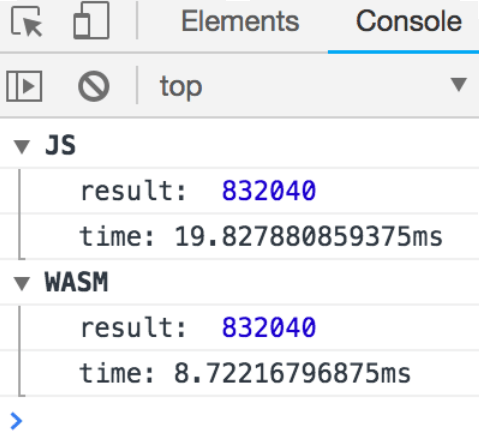
You probably don't need WASM when you develop a simple login form or another table on the page. But, once you have developed your own map implementation, or when you fall in love with CityBound, you will see that WASM is the right solution for you.

AngularJS app

Published at DZone with permission of Magdalena Brych. See the original article here.

Opinions expressed by DZone contributors are their own.

Related

  • How to Effortlessly Host Your Angular Website on GitHub Pages
  • Angular vs. Flutter for Web App Development: Know Which One Is Best?
  • Difference Between Bootstrap and AngularJS in 2022
  • A Brief Guide to Using Sass/SCSS in an Angular App

Partner Resources

×

Comments

Loading comments

The comments didn't load

Please try again in a moment.

Likes

Loading

The next likes didn't load. Please try again.

The likes didn't load

Please try again in a moment.

See who liked this

Log in or join DZone for free to see who liked this article.

Log in Join for free
  • RSS
  • X
  • Facebook

ABOUT US

  • About DZone
  • Support and feedback
  • Community research

ADVERTISE

  • Advertise with DZone

CONTRIBUTE ON DZONE

  • Article Submission Guidelines
  • Become a Contributor
  • Core Program
  • Visit the Writers' Zone

LEGAL

  • Terms of Service
  • Privacy Policy

CONTACT US

  • 3343 Perimeter Hill Drive
  • Suite 215
  • Nashville, TN 37211
  • [email protected]

Let's be friends:

  • RSS
  • X
  • Facebook