

A Beginners Guide to SQL Window Functions
Let's explore some fundamental SQL window functions together! We will cover exciting SQL concepts for data analysis. Get ready to learn!
 CORE
·
CORE
·
Join the DZone community and get the full member experience.
Join For FreeHello there! Are you interested in learning about SQL window functions? Well, let's not waste any time and set sail on a journey to explore some of the most fundamental window functions in SQL! We'll be navigating through some exciting SQL concepts that will help you analyze data like a pro. So, buckle up and get ready to learn!
Prerequisites
To follow along with this tutorial, you will need:
- Working knowledge of SQL.
- A database management tool such as DbVisualizer.
What Are Window Functions?
Firstly, let's understand what window functions are. A window function is a type of function in SQL that performs a calculation across a set of rows. These functions operate on a subset of rows, called a window, that is defined by an OVER() clause.
Let's take a closer look at the syntax for using these window functions:
SELECT column1, column2, function()
OVER (PARTITION BY partition_expression ORDER BY sort_expression) as result_column_name
FROM table_name
Here's a breakdown of the syntax:
- The
SELECTclause specifies the columns you want to retrieve from the table. - The
function()is the window function you want to use. - The
OVERclause specifies the partitioning and ordering of the rows in the window. - The
PARTITION BYclause divides the rows into partitions based on the specified expression. If you don't specify a partition expression, the entire result set is treated as a single partition. - The
ORDER BYclause specifies the order in which the rows are processed within each partition. If you don't specify an order expression, the rows are processed in an undefined order. - The
result_column_nameis the name you want to give to the result column.
It's important to note that the window functions are applied after the WHERE, GROUP BY, and HAVING clauses are processed. This means that you can use the results of the window functions in subsequent clauses of the query.
The Dataset
For this tutorial, we will be using a table exam_scoreswhich we will be running all our queries on.
CREATE TABLE exam_scores (

  id INT PRIMARY KEY,

  name VARCHAR(50),

  score INT

);

INSERT INTO exam_scores (id, name, score)

VALUES

  (1, 'Alice', 85),

  (2, 'Bob', 92),

  (3, 'Charlie', 78),

  (4, 'Dave', 91),

  (5, 'Eve', 89),

  (6, 'John', 92),

  (7, 'Andrew', 85);
The exam_scores table has three columns: id (integer), name (string up to 50 characters), and score (integer). The id column is the primary key, and the table contains seven rows of data representing students' exam scores.
Fundamental Window Functions
Now, let's take a look at some fundamental window functions:
ROW_NUMBER()
The ROW_NUMBER() function assigns a unique integer to each row within a window, starting with 1 for the first row.
Here's an example of how to use the ROW_NUMBER() function:
SELECT name, score, ROW_NUMBER() OVER (ORDER BY score DESC) as rank

FROM exam_scores
In this example, we're selecting the name and score columns from the exam_scores table and using the ROW_NUMBER() function to assign a rank to each row based on the score. The rank for each row is returned in the "rank" column.
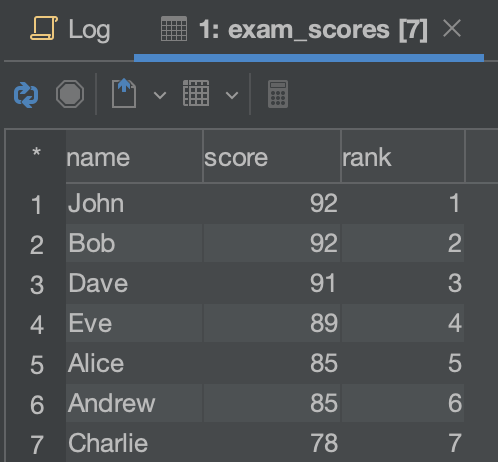
row_number() result
RANK()
The RANK() function assigns a rank to each row within a window, with ties receiving the same rank and the next rank being skipped. For example, if two rows have the same value and are assigned a rank of 2, the next row will be assigned a rank of 4.
Here's an example of how to use the RANK() function:
SELECT name, score, RANK() OVER (ORDER BY score DESC) as rank

FROM exam_scores
In this example, we're selecting the name and score columns from the exam_scores table and using the RANK() function to assign a rank to each row based on the score. The rank for each row is returned in the "rank" column.
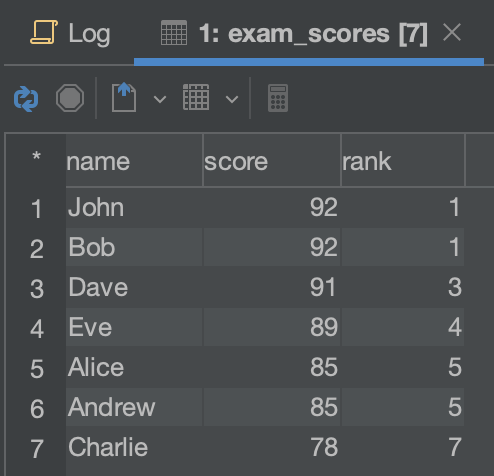
rank() result
DENSE_RANK()
The DENSE_RANK() function assigns a rank to each row within a window, with ties receiving the same rank and the next rank being consecutive. For example, if two rows have the same value and are assigned a rank of 2, the next row will be assigned a rank of 3.
Here's an example of how to use the DENSE_RANK() function:
SELECT name, score, DENSE_RANK() OVER (ORDER BY score DESC) as rank

FROM exam_scores
In this example, we're selecting the name and score columns from the exam_scores table and using the DENSE_RANK() function to assign a rank to each row based on the score. The rank for each row is returned in the "rank" column.
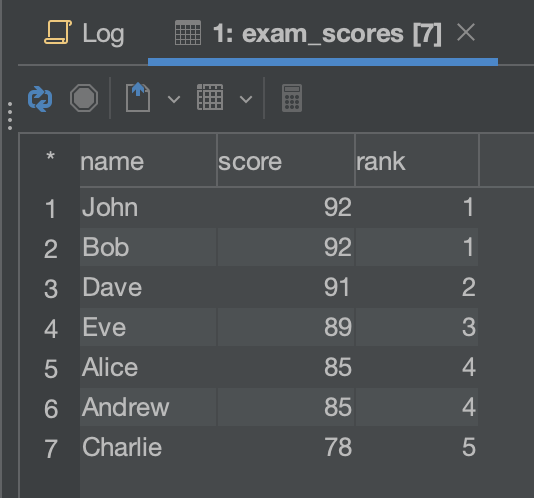
dense_rank() result
PERCENT_RANK()
The PERCENT_RANK() function is a beginner-level window function in SQL. It calculates the rank of each row within a result set as a value between 0 and 1, where 0 represents the minimum value, and 1 represents the maximum value. The function takes into account ties in the ranking, which means that rows with the same value will receive the same rank and the same percentile rank.
Here's an example of how to use the PERCENT_RANK() function:
SELECT name, score, PERCENT_RANK() OVER (ORDER BY score DESC) as percentile_rank

FROM exam_scores
In this example, we're selecting the name and score columns from the exam_scores table and using the PERCENT_RANK() function to calculate the percentile rank of each row within the result set based on the score. The percentile rank is returned in the "percentile_rank" column.
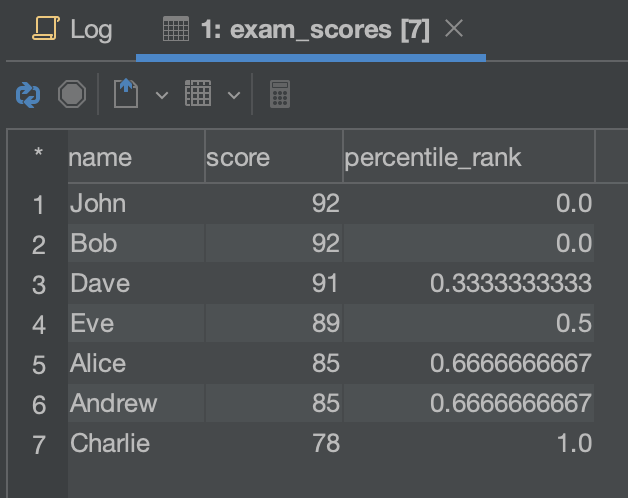
PERCENT_RANK() result
NTILE()
The NTILE() function divides a window into a specified number of groups and assigns each row to a group. For example, if you specify NTILE(4), the window will be divided into four groups, and each row will be assigned to one of the groups.
Here's an example of how to use the NTILE() function:
SELECT name, score, NTILE(4) OVER (ORDER BY score DESC) as quartile

FROM exam_scores
In this example, we're selecting the name and score columns from the exam_scores table and using the NTILE() function to divide the window into four groups based on the score. Each row is assigned to a group, and the group number is returned in the "quartile" column.
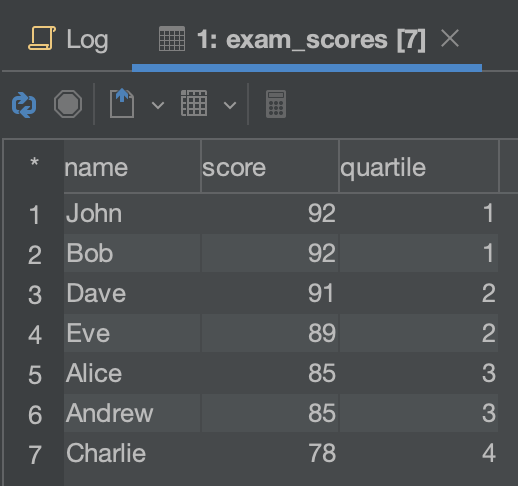
NTILE() result
Conclusion
In conclusion, SQL window functions are an essential tool for anyone looking to analyze data efficiently. Utilizing functions such as ROW_NUMBER(), RANK(), DENSE_RANK(), and NTILE() can help you gain valuable insights into your data, enabling you to make informed decisions. These are just a few of the many window functions available in SQL, and mastering them will set you on the path to becoming an SQL expert. With a little practice, you'll be able to incorporate these functions into your queries with ease, making your data analysis journey an enjoyable one. So why wait? Set sail on your SQL adventure today and start exploring the vast world of window functions!
FAQs(Frequently Asked Questions)
1. What are SQL window functions?
SQL window functions are functions that perform calculations across a set of rows, known as a window. They allow you to perform calculations such as ranking, row numbering, percent ranking, and more based on specific criteria within the window.
2. How do I use the ROW_NUMBER() function in SQL?
The ROW_NUMBER() function assigns a unique integer to each row within a window. Use it in the SELECT clause with the OVER clause, which defines the window. Example:
SELECT name, score, ROW_NUMBER() OVER (ORDER BY score DESC) as rank

FROM exam_scores
3. What is the difference between the RANK() and DENSE_RANK() functions in SQL?
RANK() assigns ranks to rows, with ties getting the same rank and the next rank skipped. DENSE_RANK() also assigns ranks, but ties get the same rank, and the next rank is consecutive.
4. How does the PERCENT_RANK() function work in SQL?
PERCENT_RANK() calculates the rank of each row as a value between 0 and 1, representing the percentile rank. Ties receive the same rank and percentile rank.
5. How can I use the NTILE() function in SQL?
NTILE() divides a window into a specified number of groups and assigns rows to groups. Use it in the SELECT clause with the OVER clause. Example:
SELECT name, score, NTILE(4) OVER (ORDER BY score DESC) as quartile

FROM exam_scores
Note: Replace "exam_scores" with your actual table name in the examples.
Published at DZone with permission of Ochuko Onojakpor. See the original article here.
Opinions expressed by DZone contributors are their own.
Comments