

Beyond Partitioning and Z-Order: A Deep Dive into Liquid Clustering for Unity Catalog Managed Tables
Liquid Clustering replaces rigid partitioning and Z-Order with adaptive clustering in Unity Catalog, improving performance with less maintenance.
Partitioning and Z-Ordering have long been fundamental techniques in Delta Lake for optimizing data layout and query performance. However, these methods require significant upfront design and ongoing maintenance and they often struggle to adapt to changing data and query patterns. Databricks Liquid Clustering introduced with Delta Lake 3.0 goes beyond traditional partitioning and Z-Order, offering a self-tuning, flexible approach to organizing data that is especially powerful for Unity Catalog managed tables. In this article, we’ll explore how Liquid Clustering works, how it compares to traditional methods, and how to implement it in Databricks Unity Catalog for improved performance and simpler data management.
Recap: Partitioning and Z-Order Limitations
Before diving into Liquid Clustering, it’s important to understand the challenges of conventional partitioning and Z-Ordering in large Delta Lake tables:
- Design Complexity & Rigidity: Choosing an optimal partitioning scheme is difficult and usually fixed. A static Hive-style partition strategy often demands careful upfront planning to avoid data skew and concurrency conflicts and it cannot easily adapt if query patterns change. Changing partition columns later means expensive data rewrites.
- Partition Explosion & Metadata Overhead: If you partition on high-cardinality columns or many levels, you may end up with too many small partitions. This proliferation of tiny files and directories increases metadata overhead and slows down query planning.
- Need for Additional Clustering (Z-Order): Z-Ordering is often applied on top of partitions to co-locate related data. While Z-Order can improve data skipping, it is expensive to maintain it requires heavy shuffle and rewrite jobs and does not handle concurrent writes well. In other words, Z-Ordering jobs can be lengthy and costly and must be re-run as new data arrives to maintain clustering.
- Manual Tuning & Maintenance: Both partitioning and Z-Order require continuous tuning. Data engineers must monitor query patterns and manually decide how to partition or when to re-Zorder. This ongoing maintenance is time-consuming and error-prone.
In summary, traditional partitioning/Z-ordering yields performance benefits but at the cost of rigidity and operational overhead. This sets the stage for a more adaptive solution.
What Is Liquid Clustering?
Liquid Clustering is a new data layout strategy in Databricks Delta Lake designed to replace traditional partitioning and Z-Ordering for Delta tables. The name liquid signifies flexibility data is clustered by one or more columns in a way that can evolve over time without strict, static partitions. Key characteristics of Liquid Clustering include:
- Dynamic, Self-Tuning Layout: Instead of static partitions, data is dynamically clustered based on specified clustering keys. The table’s storage layout automatically adjusts to changing data and query patterns, incrementally clustering new data as it is written. This means the data layout flows with your workload.
- Simplicity in Key Selection: You choose a set of clustering columns based on query access patterns, typically the columns most commonly used in
WHEREfilters or joins. You don’t need to worry about column cardinality, order of keys or file size tuning the platform handles optimal file sizing and clustering internally. Even high-cardinality columns can be used effectively, which would be impractical as partition keys. - Flexibility to Change Keys (No Rewrites): Perhaps the most revolutionary aspect is that clustering keys can be redefined without rewriting existing data files. If your query patterns shift, you can alter the clustering columns and the system will gradually reorganize data for the new keys. There’s no massive upfront cost of re-partitioning the entire dataset past data doesn’t need an immediate rewrite.
- Skew-Resistant & Efficient Storage: Liquid Clustering is designed to maintain balanced file sizes and avoid the pitfalls of skewed partitions. Under the hood, the data engine can combine or split clustering ranges to keep files at an optimal size.
- Reduced Maintenance Overhead: Because the data layout adapts automatically, the need for manual maintenance is drastically reduced. You no longer have to schedule regular Z-Ordering jobs or hand-tune partition schemes. Liquid Clustering, especially in its automatic mode, offloads these decisions to Databricks.
Databricks recommends using Liquid Clustering for most new Delta tables going forward, especially for tables that are large, have high-cardinality filter columns, experience data skew, or have evolving access patterns. It simplifies data engineering by set it and forget it clustering. In fact, thousands of customers have already adopted it as of 2025, over 3,000 monthly customers were writing 200+ PB of data into Liquid Clustered tables.
Liquid Clustering vs Traditional Methods
Liquid Clustering addresses the limitations of partitions and Z-ordering in several ways:
- No Rigid Partition Boundaries: Unlike Hive partitions, liquid clustering can store a range of values in each data file. This fluid layout avoids issues like tiny partitions or unbalanced file sizes.
- Incremental and Low-Shuffle Clustering: New data is clustered as it’s ingested, without requiring a full table rewrite. When you enable clustering on a table, Databricks flags the table to cluster future writes according to the specified keys. Each new
INSERTorMERGEautomatically writes out files clustered on those keys, and small files are merged as needed. This incremental approach means no huge one-time sort jobs every time you add data. Maintenance operations likeOPTIMIZEstill play a role but they can operate more efficiently since the incoming data is already sorted/clustered on write. Notably, theOPTIMIZEcommand for a liquid-clustered table can be more adaptive than traditional OPTIMIZE+ZORDER it only rearranges data that isn’t well clustered yet rather than always rewriting everything. - Adapting to Change Without Rewriting Everything: In a partitioned table, if you realize a month later that queries would run faster partitioned by a different column, you’d have to repartition the entire dataset. With Liquid Clustering, you can simply issue an ALTER TABLE to change the clustering column set. The system will use the new keys for all future writes, while existing files remain as they are until an optimization is triggered. You can later run a full optimize to reorganize historical data under the new scheme if needed. This means you can respond to evolving query patterns without incurring an immediate cost for reprocessing the whole table.
- Better Concurrency and Fewer Conflicts: Because Liquid Clustering avoids overly granular partitions and heavy-duty clustering jobs, it also mitigates concurrency problems. Traditional partitions can suffer write conflicts if too many jobs target the same partition, and Z-order optimize jobs can conflict with concurrent writes. Liquid Clustering’s design results in fewer such bottlenecks.
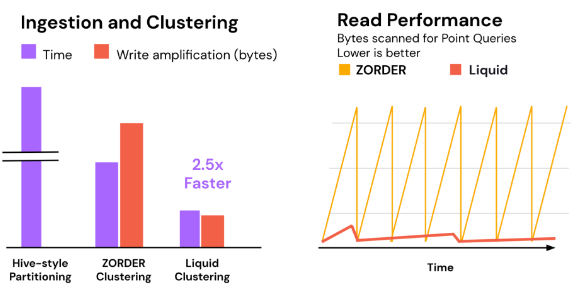
- Performance Gains: Ultimately, the goal is faster queries and lower cost. By clustering data on the actual query predicates, Liquid Clustering improves data skipping. This leads to less IO and faster execution. In one benchmark, Databricks observed that a 1 TB warehouse dataset clustered with Liquid Clustering ran 2.5× faster to optimize (cluster) than using Z-Ordering, and yielded significantly better query performance than both partitioning or Z-Order. In real workloads, users have reported dramatic improvements; for example, Healthrise (a Databricks customer) saw some queries run up to 10× faster after enabling Automatic Liquid Clustering on their tables. We’ll discuss Automatic mode shortly.
How Liquid Clustering Works (Under the Hood)
At a high level, manual Liquid Clustering works by clustering data files on chosen key columns, while automatic Liquid Clustering adds an intelligent layer to choose and adjust those keys for you. Let’s break down the mechanisms:
- Clustering on Write: When you define clustering keys for a Delta table, the Delta engine ensures that newly written data is organized according to those keys.
- Maintenance and OPTIMIZE: Over time, as data is appended, you may still accumulate some fragmentation. The
OPTIMIZEcommand can be used on a clustered Delta table to compact small files and sort data more finely according to the clustering columns. Unlike Z-Ordering, an optimize on a liquid-clustered table doesn’t always have to rewrite all files it focuses on incremental clustering, merging files that are sub-optimally placed. You can think of it as tightening the clustering. If you change the clustering columns viaALTER TABLE, you can runOPTIMIZE FULLto recluster all existing records under the new key order. In normal operation, Databricks recommends running periodicOPTIMIZEto keep performance optimal, but these operations are more lightweight than traditional heavy Z-order jobs. - Data Skipping with Statistics: Delta Lake maintains statistics that the query engine uses for data skipping. Liquid Clustering maximizes the effectiveness of data skipping by ensuring those min/max ranges align with query filters.
Enabling Automatic Clustering
To use Automatic Liquid Clustering, you need to have Predictive Optimization enabled for your workspace (this is the feature in Unity Catalog that handles these background optimizations). Many new Databricks accounts have this on by default since late 2024, but it can also be enabled via the account console (under Feature Enablement). Assuming it’s enabled, turning on Automatic clustering for a table is straightforward:
-
SQL: Use the
CLUSTER BY AUTOclause when creating or altering a Delta table. For example, to create a new table in Unity Catalog with auto clustering:SQL-- Creating a Unity Catalog managed table with Automatic Liquid Clustering CREATE TABLE main.analytics.user_events ( user_id STRING, event_type STRING, event_date DATE, details STRING ) CLUSTER BY AUTO; -- enables automatic liquid clustering on this tableThis instructs Databricks to begin monitoring the table’s workload and to auto-select clustering keys for optimal performance. The table does not need to have any manual keys set; the system will determine them. (Under the hood, the first time it chooses keys, it will update the table’s metadata with those columns as clustering keys.)SQLALTER TABLE main.analytics.user_events CLUSTER BY AUTO; - PySpark API: In code, you can also enable auto clustering when writing data. For instance, using the DataFrame Writer API in PySpark:
-
The above will create thePython
# df is a DataFrame we want to save as a Delta table with auto clustering df.write.format("delta") \ .option("clusterByAuto", "true") \ .mode("overwrite") \ .saveAsTable("main.analytics.user_events_auto")user_events_autotable as a Unity Catalog managed table with automatic clustering enabled. (If you want to provide an initial hint for clustering columns, you can combine.clusterBy("col1", "col2")with theclusterByAuto=trueoption, but it’s not required – the system will figure it out if you leave it open.)
Once Automatic mode is on, no further action is needed from the user. Databricks will handle running background optimize jobs as needed. It’s worth noting that these maintenance operations run on a serverless compute in the background. The benefit is you no longer need to schedule OPTIMIZE or VACUUM on your own; predictive optimization will run them at optimal times.
Using Manual Liquid Clustering (Custom Clustering Keys)
In some cases, you may want to manually specify the clustering columns. Unity Catalog supports manual Liquid Clustering on managed tables as well. Here’s how to use it:
-
Table Creation with Cluster Keys: You can define clustering keys in the
CREATE TABLEstatement via aCLUSTER BYclause. For example:SQL-- Create a Delta table clustered by specific columns (manual clustering) CREATE OR REPLACE TABLE main.analytics.sales_data ( sale_id BIGINT, region STRING, product STRING, sale_date DATE, amount DECIMAL(10,2) ) CLUSTER BY (region, sale_date);
In this example, the table’s data will be clustered by region and sale_date. This means each file written will tend to contain a narrow range of region values and sale_date values. This is analogous to creating a partitioned table on multiple keys, but without creating separate directories for each region or date.
- Altering an Existing Table: If you have an unpartitioned Delta table and want to enable clustering on it, use an ALTER statement. For instance:
-
SQL
ALTER TABLE main.analytics.sales_data CLUSTER BY (region, sale_date); -
This will register
regionandsale_dateas the clustering keys forsales_data. As mentioned, this does not rewrite existing files immediately. It flags the table so that future writes will be clustered by these keys. Any new data you append or merge intosales_datawill now be written in clustered order. Data that was already in the table remains in its original layout until you optimize.
Reclustering Existing Data: To apply the new clustering to old files, you can run an OPTIMIZE operation. For a large table, you might do this during a maintenance window. For example:
OPTIMIZE main.analytics.sales_data;-
The above will compact small files and cluster data incrementally. If you recently changed the clustering keys and want to force a full re-cluster of all data under the new key order, use
OPTIMIZE main.analytics.sales_data **FULL**. AnOPTIMIZE FULLwill read and rewrite all files in the table, arranging them according to the current clustering columns. In most cases, a regular OPTIMIZE will suffice, as it will naturally pick up new keys over time. -
PySpark Write with Clustering Keys: You can also write data from Spark with clustering, similar to how you’d write partitioned data. For example:
# Given a Spark DataFrame df, write it to a Delta table with clustering on specified keys
df.write.format("delta") \
  .mode("append") \
  .clusterBy("region", "sale_date") \
.saveAsTable("main.analytics.sales_data");-
Here,
.clusterBy("region", "sale_date")ensures the data indfgets written out clustered by those columns. If the tablesales_datawas not already created, this will create it with those cluster keys.
Finally, remember that Liquid Clustering is supported only on Delta tables with the latest protocols. Enabling it will bump your table’s Delta protocol version which older clients cannot read. In a Databricks environment this is usually not an issue, but be cautious if you have external readers/writers that might be using older Delta Lake libraries.
Conclusion
Liquid Clustering represents a major evolution in data layout management for the Lakehouse. By moving beyond the rigidness of partitioning and the heavy operational cost of Z-Ordering, it delivers a simpler and more adaptive way to optimize tables. For Data Engineers, this means less time agonizing over partition strategies and maintenance jobs, and more time focusing on data and insights. With Unity Catalog’s Automatic Liquid Clustering, the process is taken a step further clustering becomes a self-driving process, leveraging query insights to continuously improve performance.
In summary, Databricks Liquid Clustering dynamically organizes data based on actual usage, can adjust without expensive rewrites, and has been shown to boost query performance significantly. As you design your next Delta Lake tables in Unity Catalog, consider leveraging Liquid Clustering from the start it can simplify your architecture and ensure your tables automatically stay optimized as your data (and its use cases) grow.
Opinions expressed by DZone contributors are their own.