

After the AI Commit: What Eight Retrospectives Taught Me About Working With Coding Agents
A one-week self-study of real mobile-development sessions showed that some problems I blamed on AI were actually flaws in how I organized the collaboration.
AI coding tools are usually evaluated at the most visible point: the generated code. Did it compile? Did the pull request ship? Did the developer finish faster?
Those questions matter, but they miss a large part of the work. Before code reaches a test suite or a reviewer, the developer has already decided how to describe the problem, which context to provide, which assumptions to leave implicit, when to challenge the agent, and what evidence is enough to call the task complete.
I build mobile applications with a small team of long-time friends, moving between product management and hands-on development. In any given week, I may work on onboarding, subscription screens, analytics, SDK integrations, marketing experiments, or release tooling. Coding agents have become part of that workflow. They are useful, but I noticed that I had no systematic way to answer a basic question after a task: did I work with the AI well, or did the session merely end with working code?
To explore that question, I built the AI Developer Effectiveness Framework and spent one week analyzing eight completed sessions from my own projects. The sample included mobile UI work, analytics and advertising SDK integrations, an investigation involving signing and identity flows, and maintenance of the framework itself.
This was a personal experiment, not a controlled benchmark. I was not trying to prove that one model was better than another or calculate a universal productivity gain. I wanted to see whether a lightweight retrospective could expose patterns that disappeared when I treated every chat as an isolated event.
It did. The most useful finding was not a score. It was that several problems I blamed on the agent were actually defects in the way I had organized the collaboration.
The Missing Feedback Loop
Software development already has feedback mechanisms: tests, code review, linting, staging environments, monitoring, and production metrics. These mechanisms evaluate the product of the work.
AI changes the process before those checks begin. A coding agent can make a poorly framed task feel precise. It can turn missing context into a confident implementation. It can produce a plausible solution quickly enough that both developer and agent move on before questioning whether they solved the right problem.
The chat interface makes this worse. Once a task is finished, the conversation is normally abandoned. A useful correction, a repeated misunderstanding, or a good verification habit remains buried in that session. The next chat starts almost from zero.
I wanted a small closing ritual that would preserve the lesson without preserving the entire private conversation. At the end of a meaningful task, I ask the agent to close the session. The framework evaluates the workflow visible in that session and saves a structured retrospective locally in the project.
The question is deliberately narrow: did the developer use AI effectively for this particular task?
What I Build
Before scoring anything, the framework classifies the task: its complexity and risk, the kind of change, the developer's familiarity with the codebase, the role played by the AI, and the systems touched.
This matters because good engineering behavior depends on the work. A documentation correction does not need the same planning and verification as an authentication change, a payment migration, or a native analytics integration. A fixed checklist would reward ceremony rather than judgment.
The session is then assessed across seven dimensions:
- Problem framing
- Context quality
- Planning discipline
- Tool, model, and mode usage
- Verification discipline
- Ownership and understanding
- The learning loop
Each dimension receives a score from zero to five, but it also receives an applicability weight. Verification may be central for a risky SDK integration and lighter for a small documentation change. The overall score is therefore a task-specific summary, not a ranking of developers or tools.
A session record also includes the evidence behind every score: what worked, what reduced effectiveness, unresolved risks, checks completed or not observed, and one recommendation for the next similar task. Evidence can come from the conversation, repository files, diffs, commands, test results, or explicit user feedback. When the session does not show something, the record says “not observed” rather than inventing confidence.
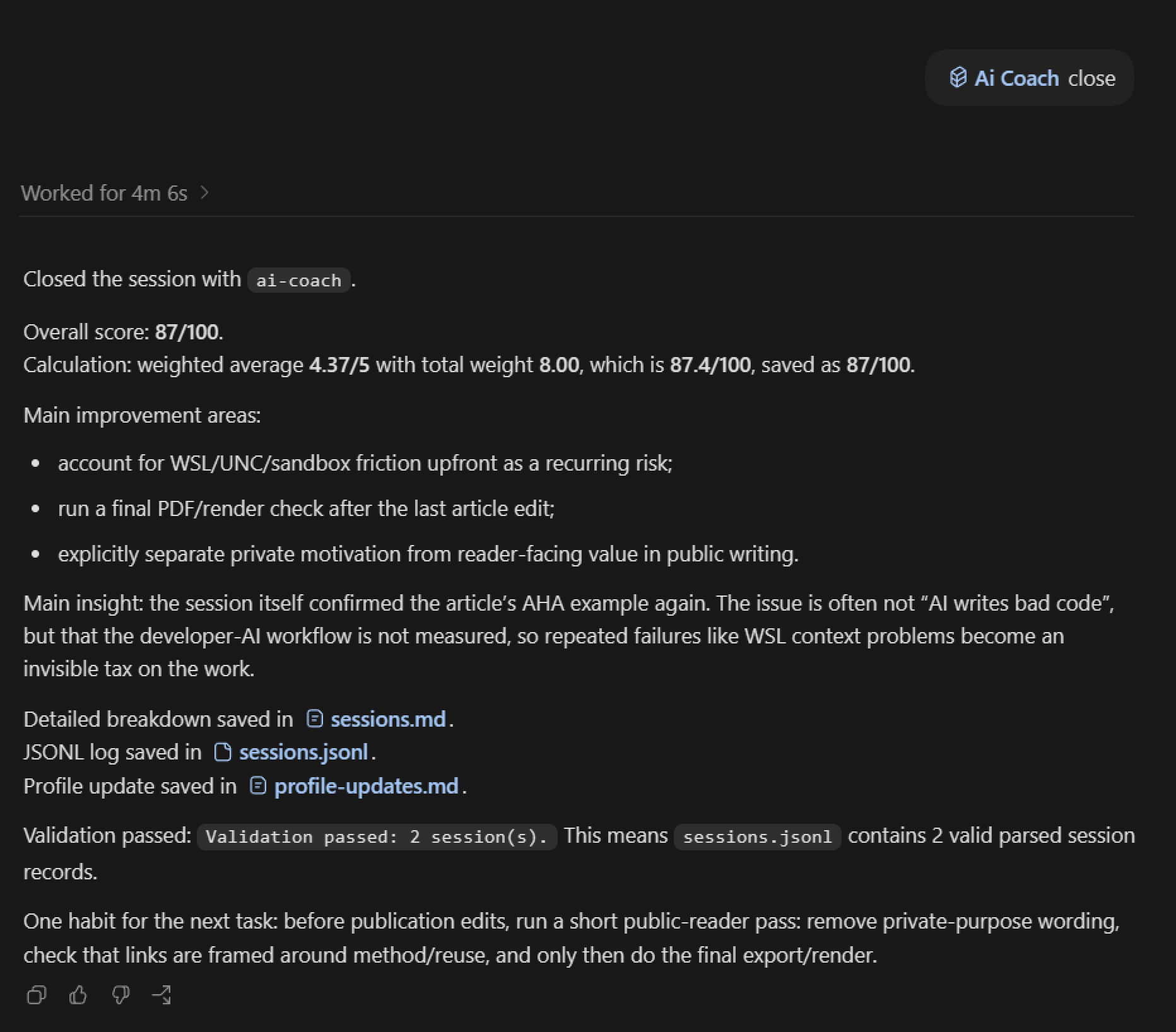
The framework writes three outputs. sessions.md is a readable history. sessions.jsonl stores the same information as structured data for later analysis or a dashboard. profile-updates.md keeps recurring strengths, weaknesses, and working rules that may be useful in future chats.
That separation is why I describe the project as a framework rather than a single skill. A skill is the adapter that teaches one agent how to close a session. The framework defines the method, schema, scoring model, validation, storage, and boundaries around that action. The current Codex adapter provides the shortest workflow, while the same session format can be produced by Claude Code, Cursor, or another coding agent and saved through the local script. The provider can change without discarding the accumulated history.
Installation is deliberately small and project-scoped. An agent copies a .ai-effectiveness directory into the repository and installs the relevant adapter. The framework does not require a hosted account, background monitoring, or the storage of raw transcripts. The implementation, methodology, examples, schemas, adapters, and tests are available in my public GitHub repository.
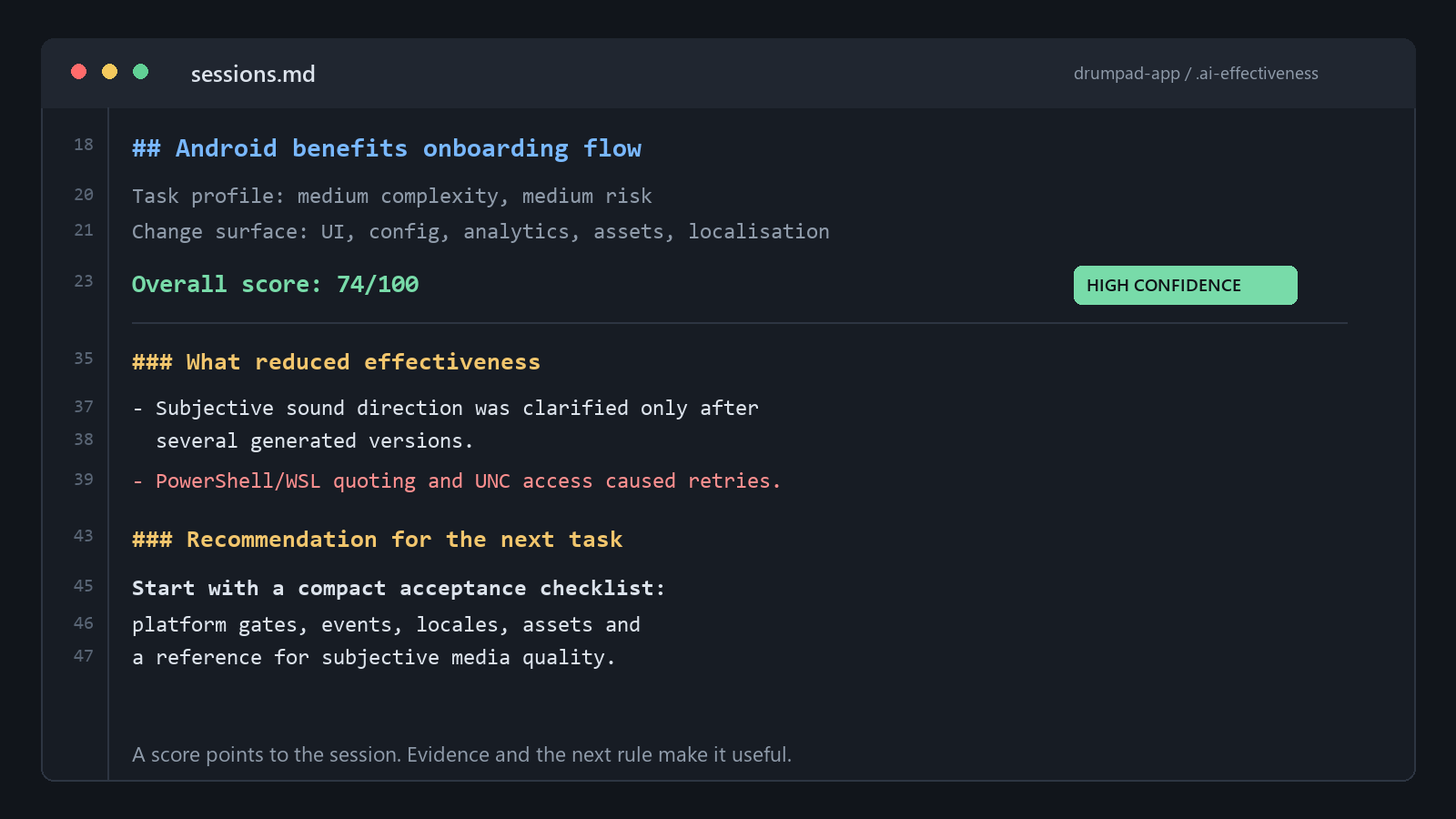
Figure 1. A compact view of a real session record. The score is visible, but the useful output is the evidence and the rule carried into the next task.
The Aha Moment: My “AI Problem” Was an Environment Contract Problem
My main development environment has an awkward but common boundary. I use Windows as the desktop operating system, while many repositories live inside Windows Subsystem for Linux, or WSL. WSL runs a Linux environment inside Windows. It is convenient for JavaScript and React Native tooling, but an agent must understand which shell owns the command, which path format to use, and how edits should cross the Windows/Linux boundary.
When that context is missing, the failures look random. A command written for Bash is interpreted by PowerShell. A Windows path is passed to a Linux tool. Quoting survives one shell and breaks in the next. An editing tool can read a file through a network-style WSL path but fail when it tries to write to the same location.
One of the eight sessions involved an Android onboarding feature touching configuration, UI, analytics events, localization, images, and generated sound. The agent did a reasonable job of exploring the repository and implementing the feature. TypeScript, formatting, and locale checks passed. Yet the session also contained repeated PowerShell and WSL quoting failures, an access error from the normal patch route, and a temporary malformed line caused by shell handling. The errors were recovered, but the collaboration spent time solving the environment instead of the product problem.
In isolation, I treated this as ordinary tool friction. Then I read the other retrospectives. The same pattern appeared during paywall work, signing-key investigation, push-notification integration, advertising and analytics integrations, and maintenance of the framework itself. Different tasks, same friction.
The pattern became impossible to dismiss while I was gathering material for this article. I ran a command intended to list files in the framework repository. Because the Windows shell did not remain in the WSL working directory, the command listed the PowerShell installation instead: hundreds of runtime libraries rather than my project. The next explicit WSL attempt failed with an access error. I had reproduced the central finding while trying to describe it.
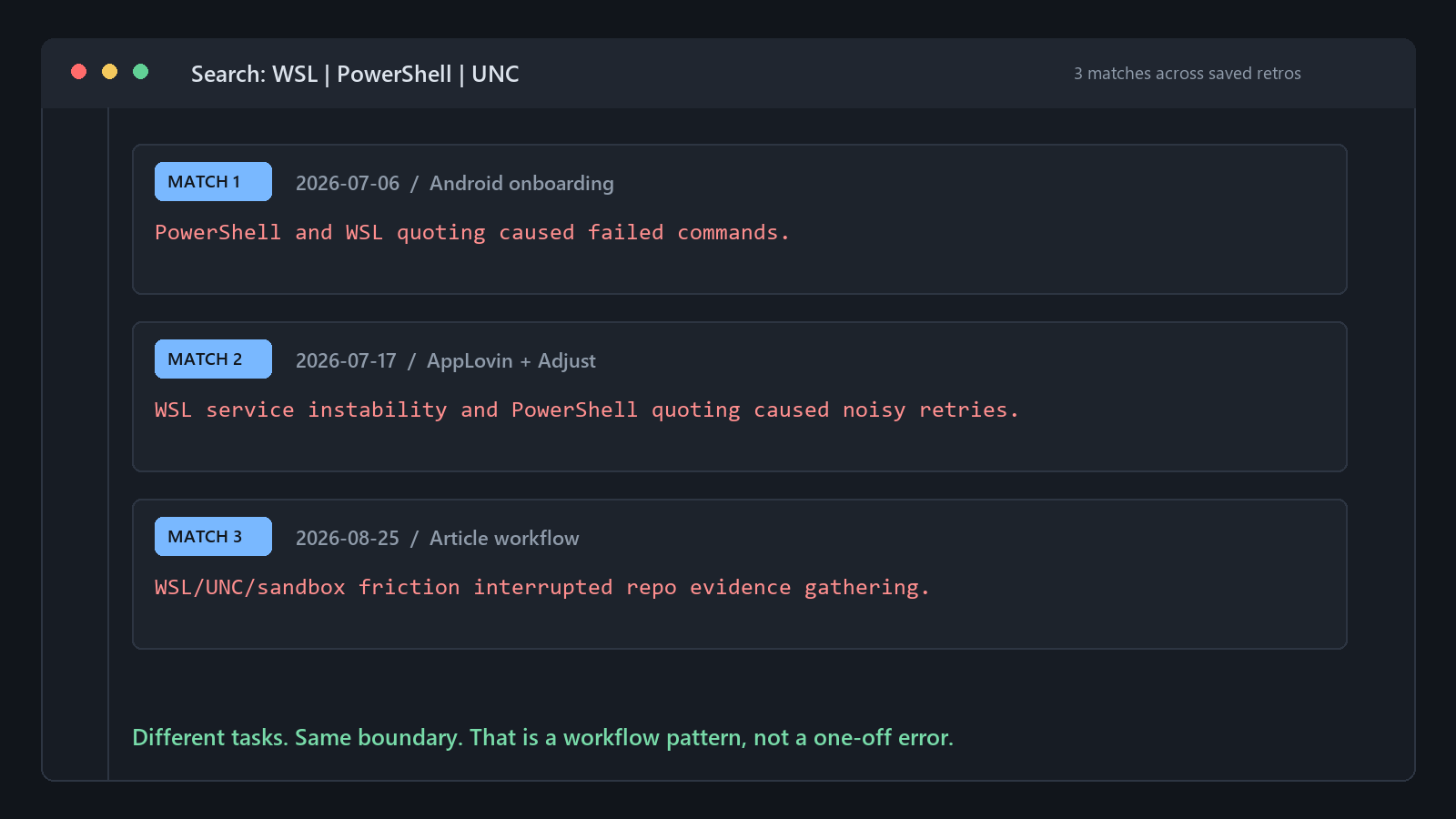
Figure 2. The same Windows/Linux boundary appears in retrospectives from unrelated tasks.
That was the aha moment. I had been calling these failures agent mistakes, but every new chat was being asked to rediscover my environment by failing inside it. The agent had to infer the shell, filesystem boundary, path rules, editing route, and escalation behavior from error messages. The problem was not primarily model intelligence. It was missing onboarding information for the model.
The recommendation became an environment contract at the start of a chat. Mine can be expressed in four short statements:
- The repository lives inside WSL.
- Run project commands in Ubuntu.
- Use Linux paths inside those commands.
- If the first edit or shell route fails because of the boundary, switch to the known working route instead of retrying variations.
This is a small intervention, but it changes the session. The agent starts with information that previously took several failed commands to discover. More importantly, the rule came from repeated evidence across real tasks, not from generic prompt-engineering advice.
A Second Pattern: Vague Taste Makes the Agent Guess
The other strong lesson came from a very different kind of task. During the Android onboarding work, part of the feature needed a short sound effect and a coherent product feel. The technical requirements were fairly concrete. The subjective requirements were not.
The first sound choices were plausible but felt too much like coins or a casual game. I wanted something more mature and closer to a polished product signal. We reached a better result, but only after several rounds of feedback.
It would be easy to conclude that the model was bad at sound direction. The retrospective pointed somewhere more useful: I had supplied taste as a correction after implementation instead of context before implementation. Phrases such as “make it more premium” or “make it feel adult” leave a large space for guessing. A coding agent can fill that space quickly, but speed does not make the guess accurate.
The saved recommendation was specific: when quality is subjective, ask one targeted question or offer two or three directions before implementing. For visual design, sound, animation, or copy, the starting context should include references, tone, constraints, supported screen sizes, and examples of what would feel wrong.
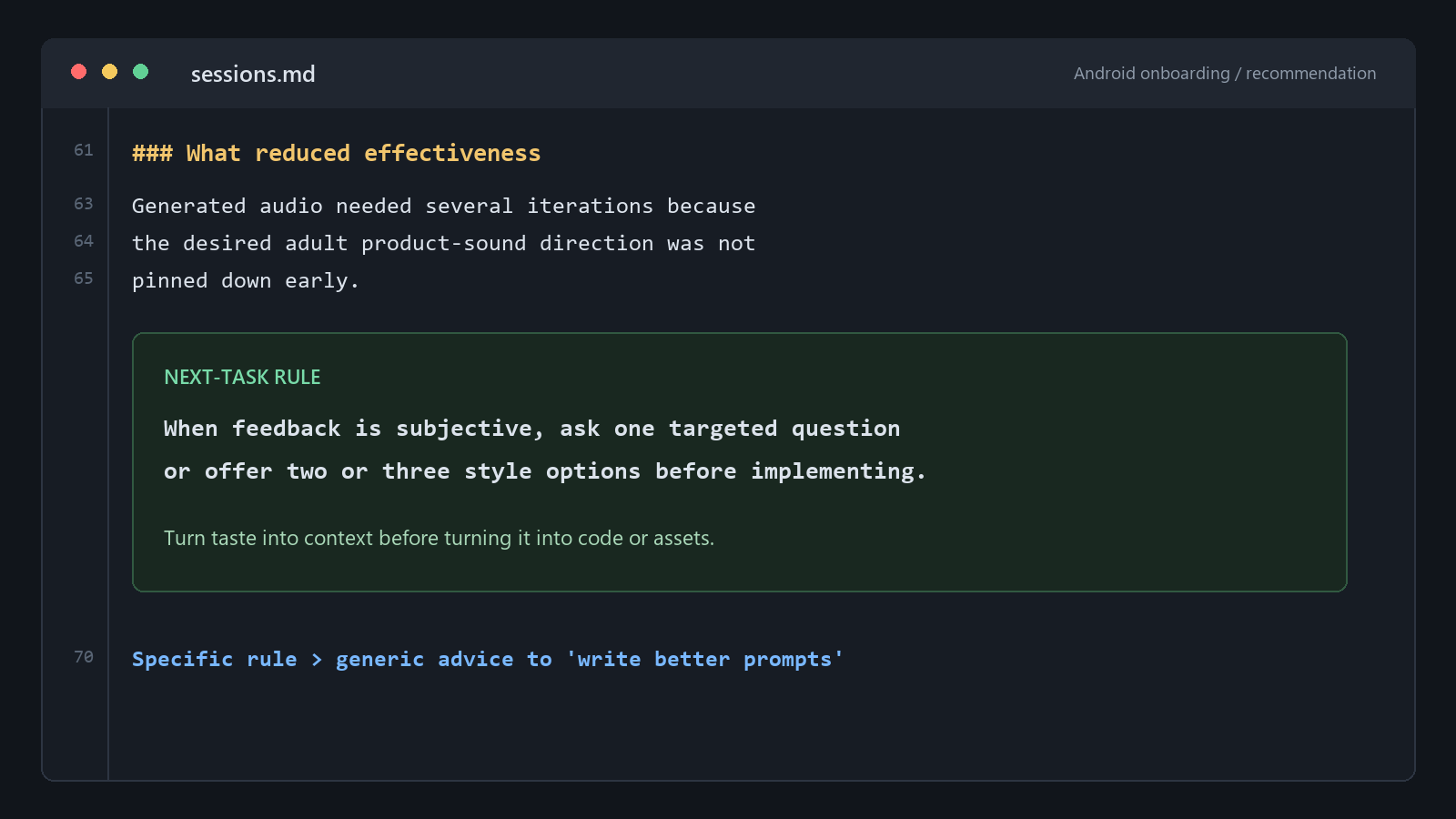
Figure 3. A vague request was converted into an operational rule for future design-heavy tasks.
This is more useful than telling developers to “write better prompts”. Better prompting is too broad to be actionable. The real rule is conditional: when the task depends on taste, do not make the agent choose a direction silently. Turn the uncertainty into options before code or assets are produced.
What Eight Sessions Actually Showed
The eight session scores ranged from 74 to 89 out of 100. I do not consider that range a productivity result. The scoring model is new, the sample is small, and I evaluated my own work. The numbers were useful mainly as indexes into the evidence.
Three patterns mattered more than the scores.
First, the strongest sessions were grounded in the repository. The agent inspected existing configuration, followed patterns from sibling applications, reviewed diffs, checked ignored files, and ran focused validation. AI was most effective when it worked inside the constraints of the real codebase rather than generating an isolated “best practice” implementation.
Second, repeated friction was more informative than any single failure. One broken command is noise. The same shell-boundary failure across unrelated projects is a missing workflow rule. One subjective correction is normal feedback. Several rounds caused by the same absent design direction point to a better way to begin the task.
Third, the final recommendation was usually more valuable than the score. Real examples from the experiment included:
- Extract conventions from sibling applications before starting a new SDK integration.
- Define subjective visual or sound criteria before implementation.
- Keep configuration surfaces minimal unless the new application genuinely needs different behavior.
- Use a small viewport and accessibility matrix for subscription-screen polish.
- Separate source changes, validation, publishing, and local installation when maintaining the framework.
- State the WSL shell and path contract at the start of the session.
These are modest rules. That is exactly why they can survive contact with daily work.
Why Store Sessions as Files?
It may seem excessive to save retrospectives as Markdown and JSONL when the agent could simply provide a short summary in chat. The file history changes what can be learned.
A chat summary is useful once. A readable local log allows a developer to compare similar tasks. Structured records make trends possible: which dimensions repeatedly score lower, which task types generate the most rework, which verification steps are often missing, and which recommendations recur across repositories.
Files also keep the system inspectable. The schema can be versioned. The score can be recalculated. A recommendation can be traced back to its evidence. The developer can remove sensitive material, keep the directory out of version control, or delete the history entirely. There is no need to upload raw conversations to a central service.
This creates a boundary that matters to me: the framework is intended for self-coaching, not employee surveillance. I would not use these scores for compensation, promotion, stack ranking, or forcing developers to use AI. A score based on one visible chat doesn't measure a person's engineering ability. It is a prompt to inspect one workflow.
Where the Framework Could Go Next
The first version closes the loop only after a completed task. The obvious next step is to bring useful lessons forward.
At the beginning of a new chat, the framework could read previous profile updates and generate a small pre-flight note appropriate to the task. A WSL project would surface the environment contract. An SDK integration would suggest checking sibling applications first. A design-heavy task would ask for references or options. The developer would remain in control of which advice is used.
A weekly or monthly interface could aggregate the JSONL records. It could show trends by dimension, repeated anti-patterns, task categories, verification gaps, and recommendations that appear often enough to become stable working rules. The goal would not be a management dashboard. It would be a private retrospective view for the person doing the work.
The same method could extend beyond developers. Product managers could review AI-assisted requirements, analysts could record source and reproducibility checks, designers could capture where references or stakeholder validation were missing, and marketers could review claims, audience context, and measurement. The scoring dimensions and verification expectations would need to change by domain, but the basic loop remains: frame, provide context, choose an approach, verify, retain ownership, and carry learning forward.
There is also a connection to AI techniques described as reflection, self-correction, or self-refinement, where feedback from one attempt informs the next. I do not want an agent to grade itself and silently rewrite its own rules. A more useful design is a human-owned reflection loop: the agent extracts evidence, the developer can challenge the assessment, and only explicit recommendations become context for later work.
Limitations
This experiment has obvious limits. It covers eight sessions from my own repositories and my own way of working. The tasks were different, the scoring model evolved, and there was no control group. A session record only knows what was visible in the conversation and repository. It cannot prove work that happened elsewhere.
The framework also does not prove that a shipped feature is correct. Tests, runtime checks, security review, product analytics, and human judgment remain necessary. The retrospective evaluates the collaboration that produced the change; it does not replace engineering verification.
Even with those limits, the experiment changed my behavior. I now see recurring friction as data. I am more likely to state environment assumptions, show repository precedents, separate facts from guesses, define subjective criteria, and ask what should be remembered before closing a chat.
The Question After the Commit
AI coding will keep getting faster. That makes reflection more important, not less. When output arrives almost immediately, it becomes easier to confuse activity with progress and plausibility with correctness.
After the next meaningful AI-assisted task, ask five questions:
- Was the problem framed clearly enough for the risk of the task?
- Did the agent receive the right repository and environment context?
- Did the plan fit the complexity, or did the work begin on assumptions?
- What was actually verified, and what was merely plausible?
- What one rule should change the next similar session?
The point is not to add heavyweight process to every chat. It is to stop throwing away the lessons hidden inside them.
The most important improvement in my experiment did not come from changing models. It came from recognizing that effective AI-assisted development is a system: developer, agent, context, tools, evidence, and feedback. If that system is never reviewed, the same mistakes return with a fresh chat window.
Opinions expressed by DZone contributors are their own.