

A Generic MCP Database Server for Text-to-SQL
A YAML-driven, secure, and scalable framework that enables accurate text-to-SQL queries across PostgreSQL, MySQL, Snowflake, Redshift, and more.
 ·
·
Join the DZone community and get the full member experience.
Join For FreeText-to-SQL is quickly becoming one of the most practical applications of large language models (LLMs). The idea is appealing: write a question in plain English, and the system generates the correct SQL query.
But in practice, the results are mixed. Without structured schema information, models often:
- Hallucinate tables or columns that don’t exist.
- Struggle with ambiguous names.
- Overload on too much schema context at once.
This is where a generic MCP (Model Context Protocol) database server comes in. Using YAML-based schema contracts, the server provides clear, consistent schema definitions that guide the model. Combined with a two-step prompting approach and strong security guardrails, this framework makes Text-to-SQL both accurate and safe.
High-Level Architecture and Query Flow
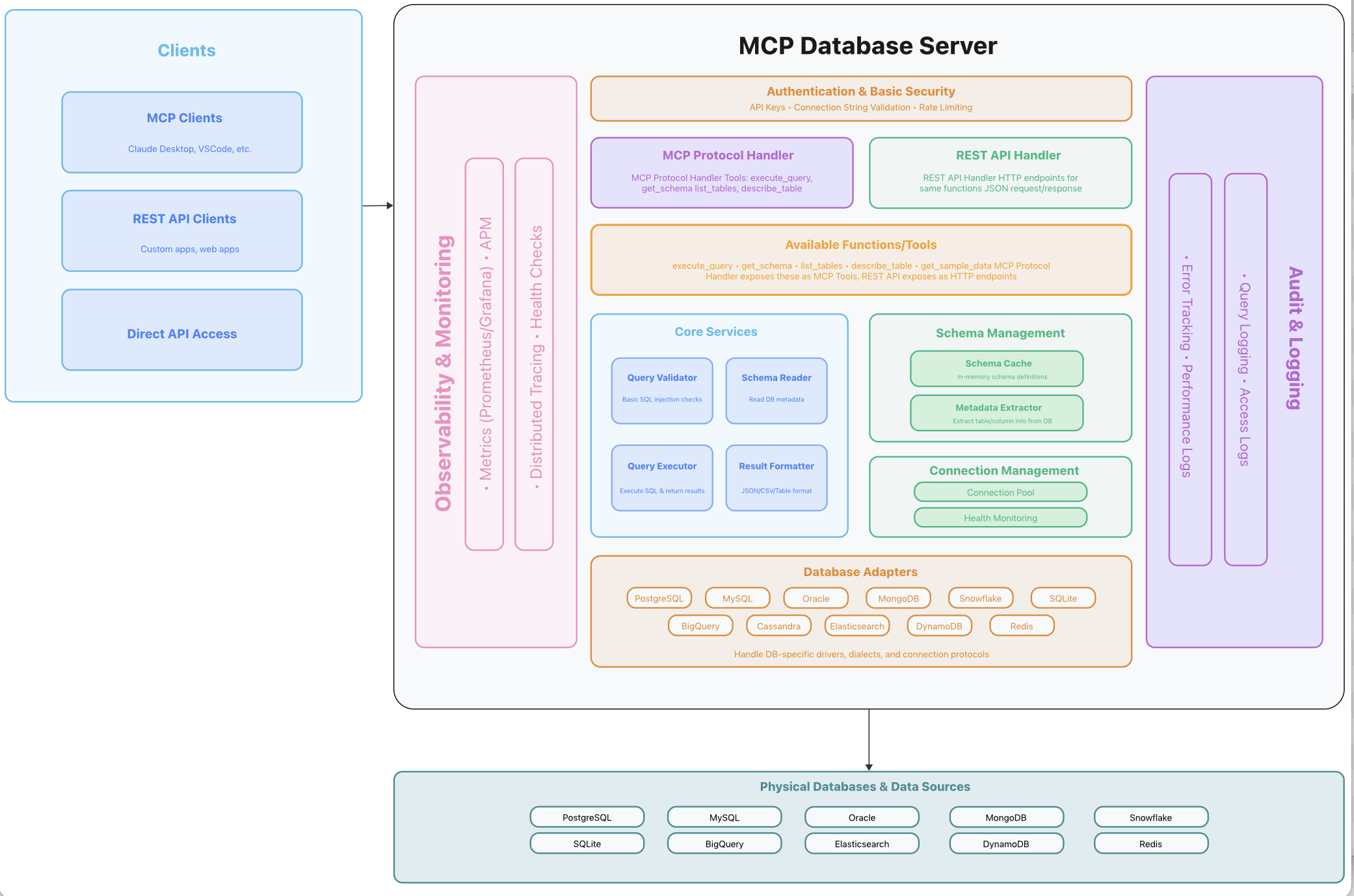
At a high level, the architecture looks like this:
- Client – A UI, portal, or application where a user asks a question in natural language.
- MCP Client – Acts as a broker, sending the NLP query to the LLM and coordinating with the MCP Server.
- LLM – Converts natural language into SQL, guided by schema metadata from YAML.
- MCP Server – Validates queries, manages schema context, and executes SQL safely.
- Database – Runs the actual query (using a read-only connection).
- Results – Flow back through the MCP Client to the user.
Architecture View
Server:
Client: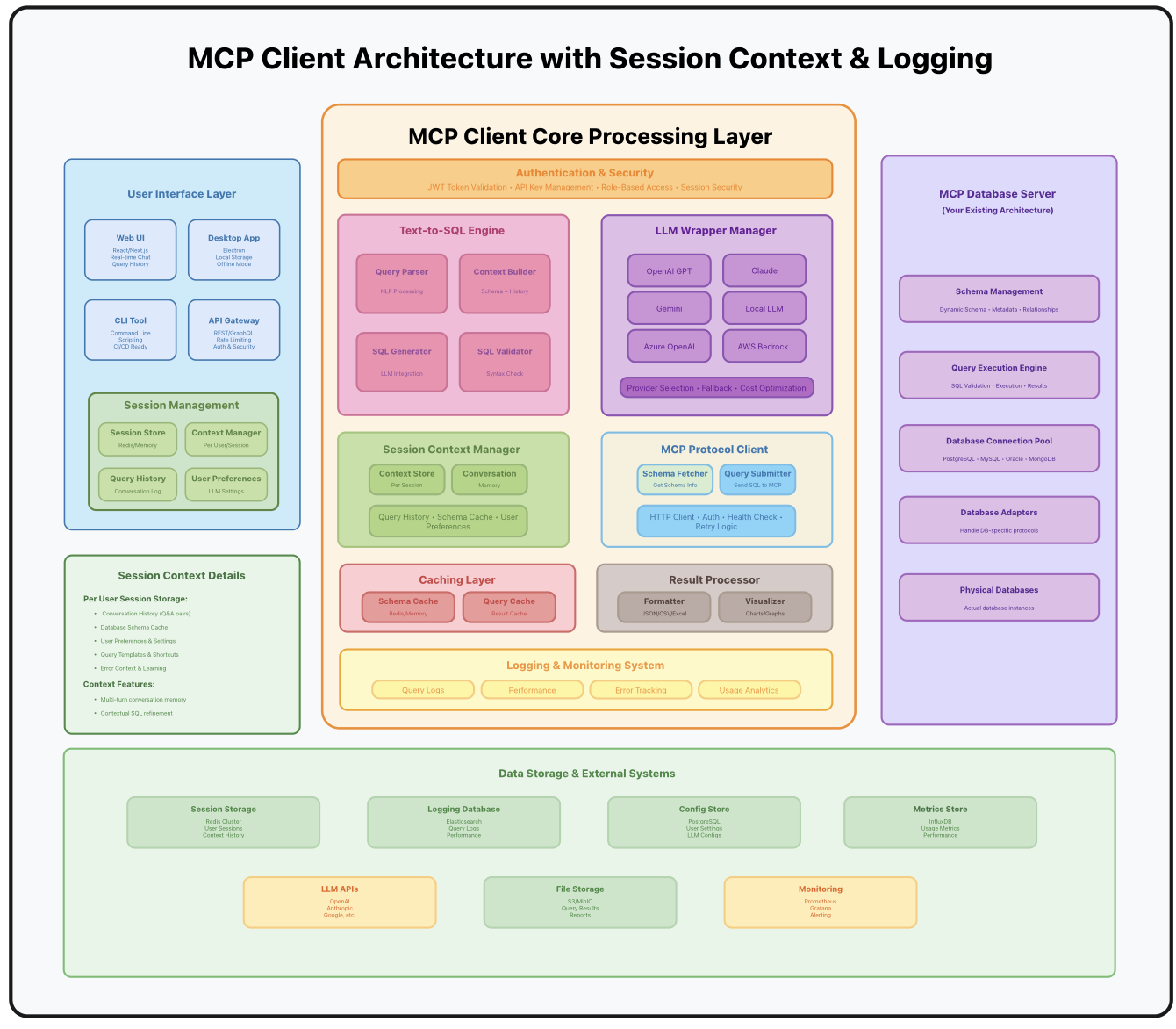
The SQL query is never executed directly by the LLM. Instead, it is validated and run by the MCP Server, ensuring guardrails are in place.
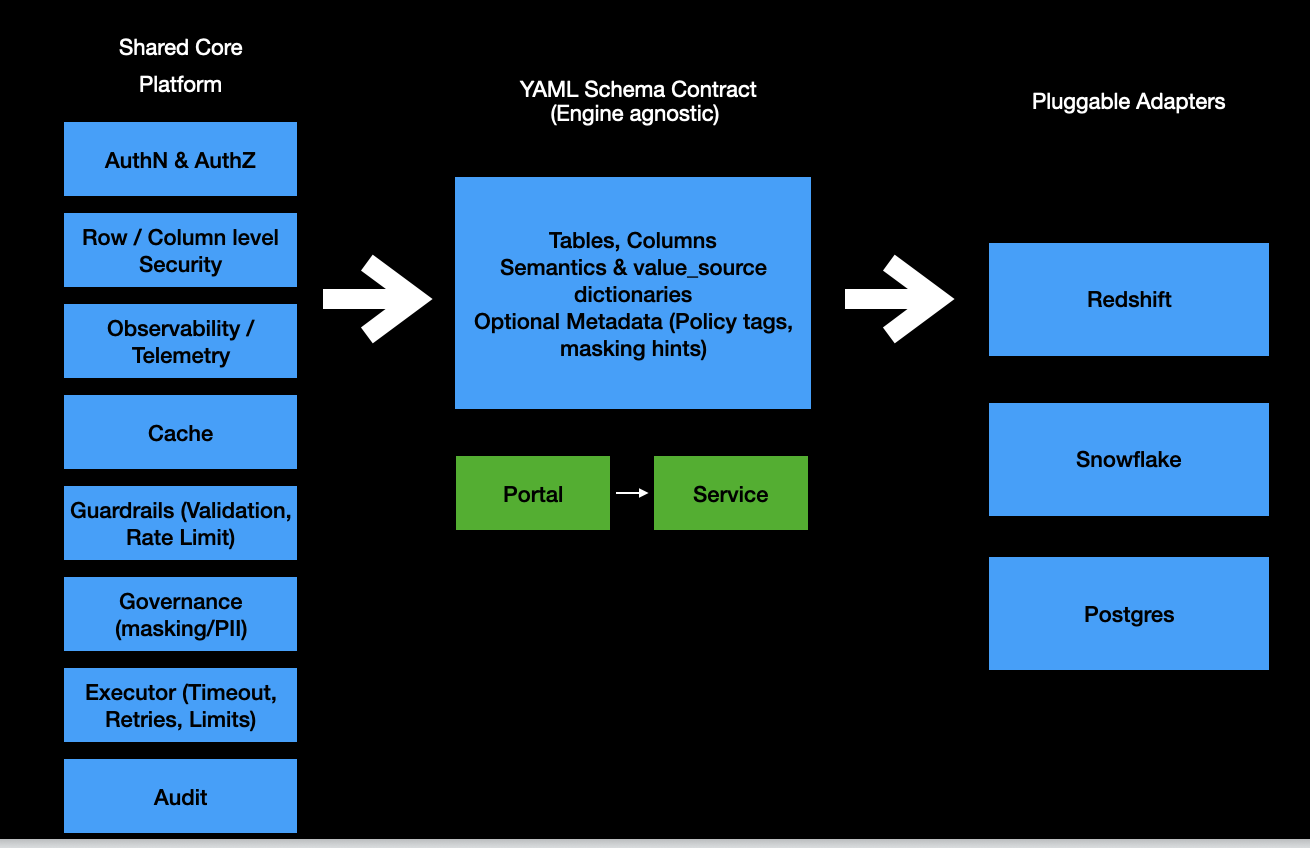
Core Components of the MCP Server
The MCP Server is built from modular, pluggable components:
Shared Core Platform
- AuthN and AuthZ – Authentication and role-based authorization.
- Row and column security – Restrict sensitive data.
- Observability and telemetry – Metrics, logs, and tracing.
- Cache – Faster schema lookups.
- Guardrails – Query validation, throttling, and rate limiting.
- Governance – Policy tags, PII masking, and compliance rules.
- Executor – Timeouts, retries, and resource limits.
- Audit – Full logging for compliance.
YAML Schema Contract
- Tables, columns, and semantic roles (dimension/measure/grain).
- Metadata: descriptions, synonyms, and value examples.
- Dictionaries: value sources with normalization rules.
- Optional policy metadata like masking tags.
Pluggable Adapters
-
Works across Redshift, Snowflake, PostgreSQL, MySQL, BigQuery, DynamoDB, and more.
Component breakdown:
What the YAML Does
The YAML schema file is the beating heart of the system. Each schema gets one YAML file, and that file includes:
- Tables and columns – With types and semantic roles
- Descriptions – Human-readable explanations for columns
- Synonyms – Alternate names for natural language matching
- Value examples – Sample data to improve grounding
- Value sources – Queries to hydrate canonical dictionaries
- Normalization rules – Enforce casing, trimming, and formatting
Sample Column Definition
- name: country_name
  type: varchar
  description: Standardized country name
  nullable: false
  role: dimension
  synonyms:
    - nation
    - region
    - geography
  examples:
    - United States
    - India
    - Germany
  source:
    db: "{{ env.schema }}.dim_country"
    query: >
      select distinct trim(country_name) as country_name
      from {{ env.schema }}.dim_country
      where country_name is not null
      order by country_name
  refresh:
    schedule: "0 2 * * *"
    ttl_minutes: 1440
  enrichment:
    normalize:
      case: upper
This tells the system everything it needs to know about the country_name column: its type, meaning, synonyms, examples, and valid values.
Two-Step Prompting to Reduce Hallucination
Dumping entire schemas into an LLM prompt is a recipe for hallucination. Instead, the server uses a two-step strategy:
Step 1: Narrow Down Tables
Prompt:
“Here is a list of tables with descriptions. Based on the user’s question, which tables are relevant?”
Example:
users: Information about registered application users
sessions: Tracks user login sessions and activity durations
logs: System event logs with timestamps and error details
features: Metadata about application features and modules
User question:
“How many login sessions ended with an error in the past week?”
LLM response:
Relevant tables: sessions, logs
Step 2: Load Relevant Columns Only
Prompt:
“Here are the detailed column definitions for the relevant tables. Write a SQL query to answer the question.”
Example:
sessions:

  session_id: bigint – unique session identifier
  user_id: bigint – foreign key to users.user_id
  start_time: timestamp – when the session began
  end_time: timestamp – when the session ended

logs:

  log_id: bigint – unique log entry identifier
  session_id: bigint – links to sessions.session_id
  event_type: varchar – type of event (login, error, logout)
  event_time: timestamp – time when the event occurred
LLM output:
SELECT COUNT(DISTINCT s.session_id)
FROM sessions s
JOIN logs l
    ON s.session_id = l.session_id
WHERE l.event_type = 'error'
  AND s.end_time >= CURRENT_DATE - INTERVAL '7 days';
This reduces context size, improves accuracy, and avoids hallucinations.
Guardrails for Safety
Letting an LLM generate queries requires strict controls. The MCP Server enforces:
Security Guardrails
- Read-only database user – No write permissions
- SELECT-only validation – Rejects
DELETE,UPDATE,INSERT, andDROP - Timeouts and limits – Prevent runaway queries
- Row and column security – Filters sensitive fields
- Audit logging – Every query is recorded
This ensures Text-to-SQL can be deployed in production without risking data corruption.
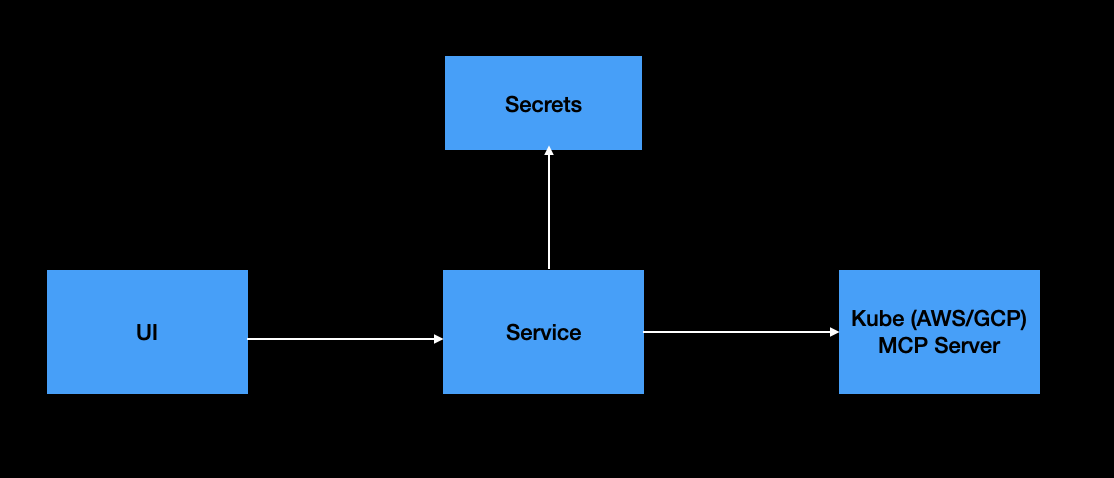
Deployment Model
The deployment is lightweight: you only need two inputs per tenant:
- YAML schema – Tables, columns, semantics, and dictionaries.
- Database connection – Engine, credentials/role, and search path.
The rest is shared and immutable across tenants:
- Same container image
- Same tooling and APIs
- Uniform runtime environment
Key Benefits
- Fast onboarding – Add a new database in minutes.
- Lower ops cost – No per-tenant rebuilds.
- Uniform security – Same hardened runtime across all tenants.
- Zero code rebuilds – Add tenants by config, not engineering effort.
- Observability – Query performance and errors are fully tracked.
- Consistency – LLMs always see the same schema definitions.
End-to-End Example Flow
- A user asks: “How many login sessions ended with an error in the past week?.”
- MCP Client sends the query to the LLM.
- LLM first sees only table names + descriptions.
- LLM selects orders, products.
- MCP Client then loads column metadata for those tables.
- LLM generates a SQL query.
- MCP Server validates (SELECT-only, read-only).
- Database executes the query.
- Results are returned to the MCP Client.
- User sees the final result in the UI.
The process is transparent, auditable, and safe.
Conclusion
Text-to-SQL promises a more natural way to interact with data, but it needs structure and safeguards to work in production. A generic MCP database server, powered by YAML schema contracts and a two-step prompting strategy, delivers exactly that:
- Structured YAML → Tables, columns, semantics, and dictionaries.
- Two-step prompts → Reduce hallucination by filtering tables first.
- MCP server guardrails → Enforce SELECT-only, read-only execution.
- Pluggable adapters → Support for PostgreSQL, MySQL, Redshift, Snowflake, and more.
- Fast deployment → Add new schemas with YAML + connection only.
Instead of brittle integrations and scattered documentation, you get a scalable, extensible framework that brings Text-to-SQL into real-world enterprise use cases.
With YAML-driven contracts, clear prompts, and built-in governance, the generic MCP database server makes natural language access to databases safe, reliable, and future-proof.
Opinions expressed by DZone contributors are their own.
Comments