

Scaling Row-Level Security With ABAC on Databricks Unity Catalog
Learn how to scale row-level security in Databricks Unity Catalog using a tag-driven ABAC pattern that reduces maintenance and simplifies onboarding.
Onboarding a new table into row-level security should be four lines of metadata. Not two new objects, a code review, and a platform-team ticket. This post describes a tag-driven attribute-based access control (ABAC) pattern built on Databricks Unity Catalog primitives that achieves the objective of one UDF per filter shape, one policy per shape, and a single control table that drives all per-group authorization logic.
I work as a solutions architect with large enterprises running hundreds of tables across multiple regions, product lines, and source systems, where row-level security follows a pattern: Group A sees records from System X. Group B sees the regions China and India. Group C sees plant key 333. Group D combines two source systems. Group E sees everything except specific values. The domain (finance, healthcare, etc.) doesn't matter. The pattern remains the same.
A traditional implementation looks like this:
- One row-filter UDF per table
- One row-filter policy per (table and group) combination
- A SQL query layer that joins every table to an identity mapping table
Every new table required writing two new objects (UDF + policy) and updating every existing group definition. Every new group required touching every UDF. Onboarding a new product line meant rebuilding the whole machine. Hundreds of tables × dozens of groups = a maintenance nightmare.
Instead, what they needed was a pattern where:
- A new table joins the RLS scheme with only metadata changes — no new UDFs, no new policies
- A new business group is just a data write — no DDL, no code review
- Misconfigured rules fail closed, not open
This post describes the four-layer pattern we landed on. It's built entirely on Unity Catalog ABAC primitives (governed tags, row-filter policies, attribute-based binding) and a single control table that drives per-group filter logic.
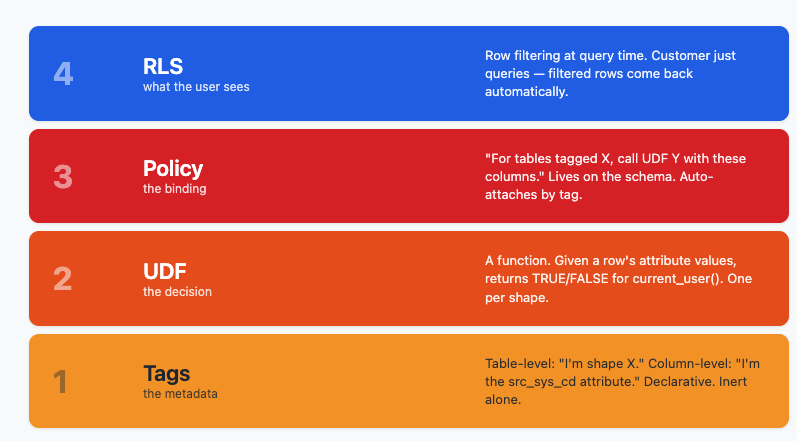
The Four Layers
Each layer does exactly one thing and one thing only:
- Layer 1: Tags are declarative metadata. A table-level tag declares which shape a table is. A column-level tag tells the row filter which physical column corresponds to which logical attribute. All tags do is describe the data. They facilitate the action for the next layers.
- Layer 2: UDF is the decision logic. Given a row's attribute values, it returns a boolean answer of TRUE or FALSE for current_user(). It doesn't know anything about which table it's filtering; it just answers "is this row visible?"
- Layer 3: Policy is the binding. It says, "for tables tagged with shape X, call UDF Y with these columns." It uses tag-matching expressions so it auto-attaches to new tables as they're tagged. This is what enables us to avoid per-table DDL.
- Layer 4: Row-Level Security is what the customer experiences. Their SQL doesn't change; filtered rows just come back.
Layer 1 + 2: Tags Describe, UDFs Decide
Two governed tags do all the work. A rls_tag on the table says "this is a table_1_filter shape." An rls_attr tag on each column says "this column is the src_sys_cd attribute" or "this column is the region attribute." The column tag is the load-bearing piece — it lets you have a column literally named ws_region_cd and still have the policy treat it as the logical region attribute. Physical naming is decoupled from policy semantics.
One UDF per table shape. A "shape" is a set of filterable columns. In this customer's setup, there are two shapes:
- Table 1 shape: (src_sys_cd, plant_key, region) — three attributes. Maybe it's best to call this shape a combination of the keys. For example, all the tables that have src_sys_cd + plant_key+region fall under this shape.
- Table 2 shape: (src_sys_cd, order_key) — two attributes
Each shape has its own UDF (rf_table_1, rf_table_2). The UDF signature takes one parameter per filterable column. The body joins a user_group_control_table (one row per group rule) to a user_group_membership mapping (or, in production, is_account_group_member()) and applies BOOL_OR across the rules — a union grant.
The key property of this UDF design: it doesn't know which table is calling it. It just answers, given attribute values, "does current_user() get this row?" That's what lets the same UDF serve many tables of the same shape.
Layer 3: The Policy that ties it all together
The policy is the only object in the system that knows about both tags and UDFs. Its four clauses each answer a separate question:
| clause | question it answers |
|---|---|
|
`ON SCHEMA …` |
Where does this policy live? (Schema-scoped — broad reach.) |
|
`WHEN has_tag_value('rls_tag', '…')` |
Which tables should it attach to? Anything tagged with the right shape. |
|
`MATCH COLUMNS … has_tag_value('rls_attr', '…')` |
Inside each table, which physical column maps to which logical attribute? |
|
`ROW FILTER … USING COLUMNS (…)` |
Which UDF to call, and in what argument order? |
The auto-attachment behavior is what makes the pattern scale. The policy doesn't enumerate tables — it matches them by tag. Tag a new table tomorrow, and the policy applies to it on the next query. Zero policy edits.
Query Time: What Actually Happens
When a user runs SELECT * FROM table_1, here's what Unity Catalog does behind the scenes:
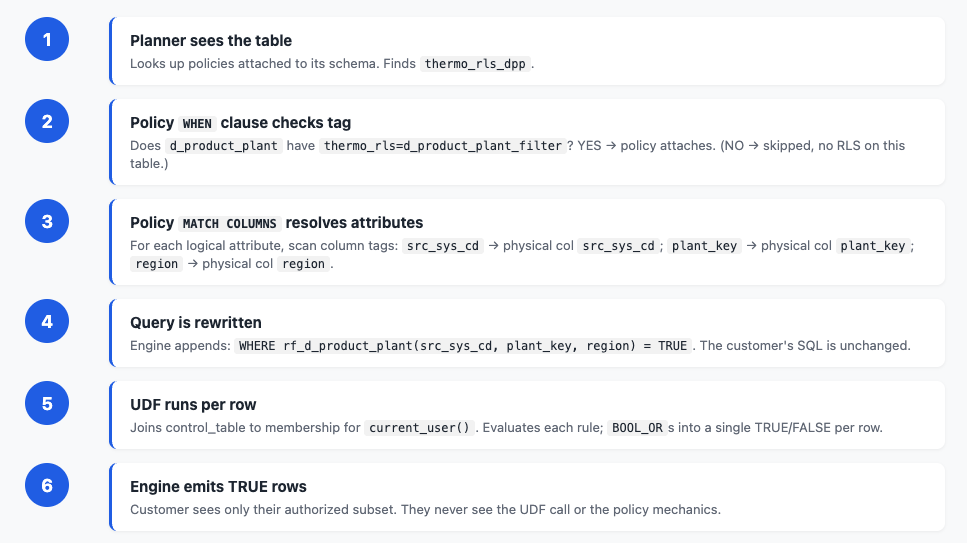
- The planner sees the table and looks up policies attached to its schema. It finds rls_policy_t1.
- The policy's `WHEN` clause checks the table tag. Does table_1 have rls_tag=table_1_filter? Yes → the policy attaches. (If no, the policy is skipped for this table.)
- The policy's `MATCH COLUMNS` resolves attributes. For each logical attribute name, it scans column tags to find the physical column with that role: src_sys_cd → physical column src_sys_cd; plant_key → physical column plant_key; region → physical column region.
- The query is rewritten to append WHERE rf_table_1(src_sys_cd, plant_key, region) = TRUE. The customer's original SQL is unchanged.
- The UDF runs per row. It joins the control table to membership for current_user(), evaluates each rule, and BOOL_ORs the results — TRUE if any rule grants the row, FALSE otherwise.
- The engine emits only the `TRUE` rows. The customer sees only their authorized subset. They never see the UDF call or the policy mechanics.
The whole thing is transparent to the application — same SQL, filtered result.
The Scale Payoff
The reason to build the pattern this way only becomes obvious when you onboard the second, third, and hundredth table.
Adding a New Table to an Existing Shape
A new dimension table arrives that fits the Table 1 shape. The work to bring it under RLS:
| Step | effort shape |
|---|---|
|
Create the table (customer's normal DDL) |
— |
|
Tag the table with the shape |
1 line of DDL |
|
Tag the columns with their logical roles |
3 lines of DDL |
|
Update the UDF? |
None |
|
Update the policy? |
None |
|
Update the control table? |
**None** (existing groups apply automatically through their existing rules) |
Four ALTER lines. That's the whole onboarding cost.
Adding a New Business Group
A new business group needs access to a specific slice of the data:
| step | effort |
|---|---|
|
`INSERT` one row into `user_group_control_table` |
1 INSERT |
|
Add users to the AD group (outside Databricks) |
— |
|
Update the UDF? |
None |
|
Update the policy? |
None |
|
Update any table tags? |
None |
One INSERT. Adding a new group is a data write, not DDL — which means operations teams can self-serve through their normal change-management process, without code review or platform-team involvement.
GitHub repo: https://github.com/vbablue/databricks-abac-rls-demo/tree/main
Opinions expressed by DZone contributors are their own.