

A Specialized High Performance Concurrent Queue
Need to create multiple writing threads and a single reading thread for your queue? Want better performance than java.util.concurrent.BlockingQueue? Try this out.
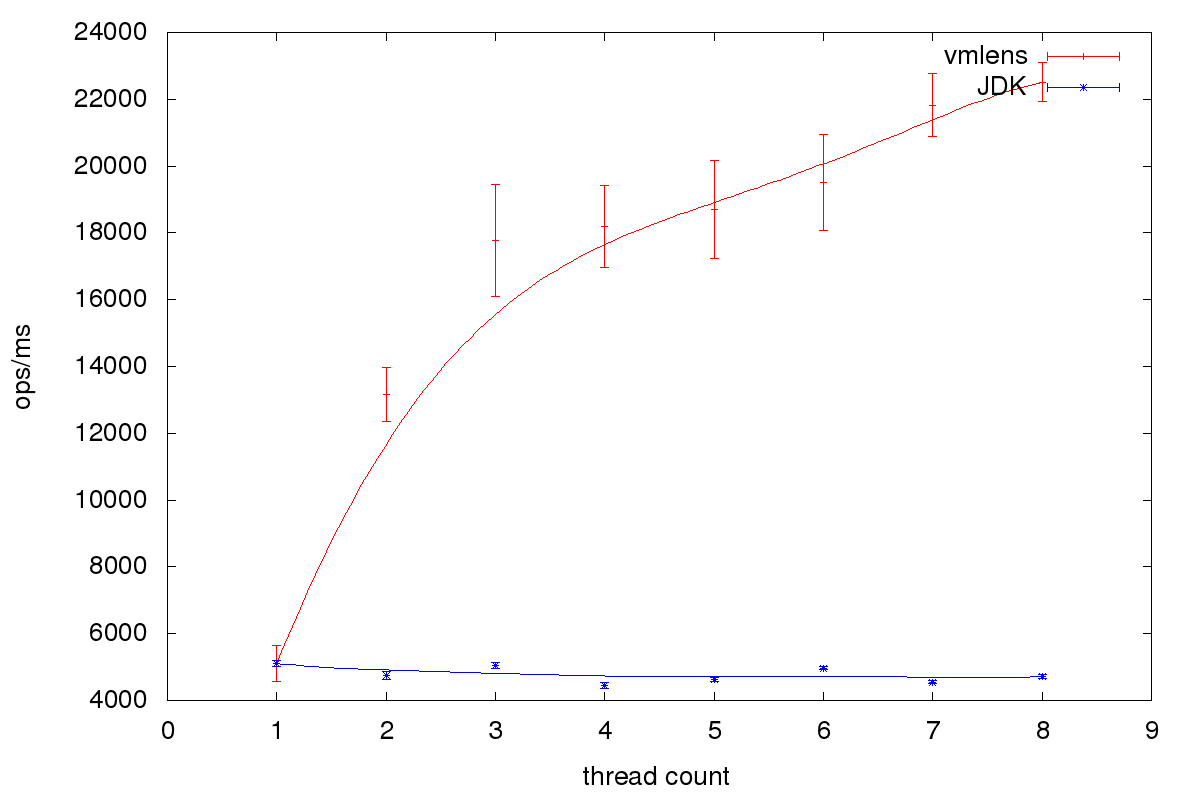
Using a specialized algorithm, it is possible to achieve up to four times better performance than java.util.concurrent.BlockingQueue for multiple writing threads and a single reading thread. Such a blocking queue supporting multiple writers, but only one reader, is useful if you have to access a single resource from multiple threads. Instead of writing directly to the resource, you to put the data into a queue and let a single thread write the data asynchronously to the resource.
In vmlens, a tool to detect race conditions and deadlocks during tests, this queue is used to write trace events to the file system.
The Queue
The main idea is to use not one single queue — but many. We use one queue per writing thread stored in a thread local field. A thread-local queue is then a simple linked list using a volatile field for the next element and final for the value. Reading iterates over all writing threads to collect the written data. The algorithm is explained in more detail here.
You can download the source code for the queue from GitHub here.
The Benchmark
Here is the source code of the benchmark:
@State(Scope.Group)
public class BlockingQueueBenchmark {
    private static final int WRITING_THREAD_COUNT = 5;
    private static final int VMLENS_QUEUE_LENGTH = 1000;
    private static final int JDK_QUEUE_LENGTH    = 4000;

    EventBusImpl eventBus;
    Consumer consumer;
    ProzessAllListsRunnable prozess;
    TLongObjectHashMap<ProzessOneList> threadId2ProzessOneRing;
    LinkedBlockingQueue jdkQueue;
    private long jdkCount = 0;
    private long vmlensCount = 0;

    @Setup()
    public void setup() {
        eventBus = new EventBusImpl(VMLENS_QUEUE_LENGTH);
        consumer = eventBus.newConsumer();
        prozess = new ProzessAllListsRunnable(new EventSink() {
            public void execute(Object event) {
                vmlensCount++;
            }
            public void close() {
            }
            public void onWait() {
            }
        }, eventBus);
        threadId2ProzessOneRing = new TLongObjectHashMap<ProzessOneList>();
        jdkQueue = new LinkedBlockingQueue(JDK_QUEUE_LENGTH);
    }
    @Benchmark
    @Group("vmlens")
    @GroupThreads(WRITING_THREAD_COUNT)
    public void offerVMLens() {
        consumer.accept("event");
    }
    @Benchmark
    @Group("vmlens")
    @GroupThreads(1)
    public void takeVMLens() {
        prozess.oneIteration(threadId2ProzessOneRing);
    }
    @Benchmark
    @Group("jdk")
    @GroupThreads(WRITING_THREAD_COUNT)
    public void offerJDK() {
        try {
            jdkQueue.put("event");
        } catch (Exception e) {
            e.printStackTrace();
        }
    }
    @Benchmark
    @Group("jdk")
    @GroupThreads(1)
    public void takeJDK() {
        try {
            jdkQueue.poll(100, TimeUnit.SECONDS);
            jdkCount++;
        } catch (Exception e) {
            e.printStackTrace();
        }

    }
     @TearDown(Level.Trial)
     public void printCounts() {
        System.out.println("jdkCount " + jdkCount);
        System.out.println("vmlensCount " + vmlensCount);
      }
}
The benchmark uses jmh, an OpenJDK framework for micro-benchmarks. The benchmark consists of publishing events to the queues — line 35 for the vmlens queue and line 48 for the JDK queue using WRITING_THREAD_COUNT threads. The events are read in line 41 for vmlens and line 58 for JDK using one thread. The vmlens queue reads all currently available events in one call and calls the callback function execute, line 20, for each event.
You can download the source code of the benchmark from GitHub here.
Results
The benchmark was run on an Intel i5 4 core CPU. All tests were run with the following jmh parameters: -wi 10 -i 50 -f 5 -tu ms. The following graph shows the throughput in operation per milliseconds for one to 8 writing threads:
Conclusion and Next Steps
As we could see, it is possible to achieve better throughput using a specialized queue than the generic java.util.concurrent.BlockingQueue for a blocking, multiple writer, single reader queue. When we use this queue for writing to the file system, the limiting factor is the reading thread. This thread not only needs to collect all the data, but also write it to the file system. So, to improve performance further, I plan to collect the data and probably ZIP it in the blocked writing threads.
I would be glad to hear from you about the techniques you use to write to the file system.
Published at DZone with permission of Thomas Krieger. See the original article here.
Opinions expressed by DZone contributors are their own.