

The A3 Framework: Assist, Automate, Avoid — A Decision System for AI Delegation
The A3 Framework helps teams decide when to Assist, Automate, or Avoid AI by categorizing work before prompting, reducing risk, and safeguarding trust.
 CORE
·
CORE
·
Join the DZone community and get the full member experience.
Join For FreeTL; DR: The A3 Framework
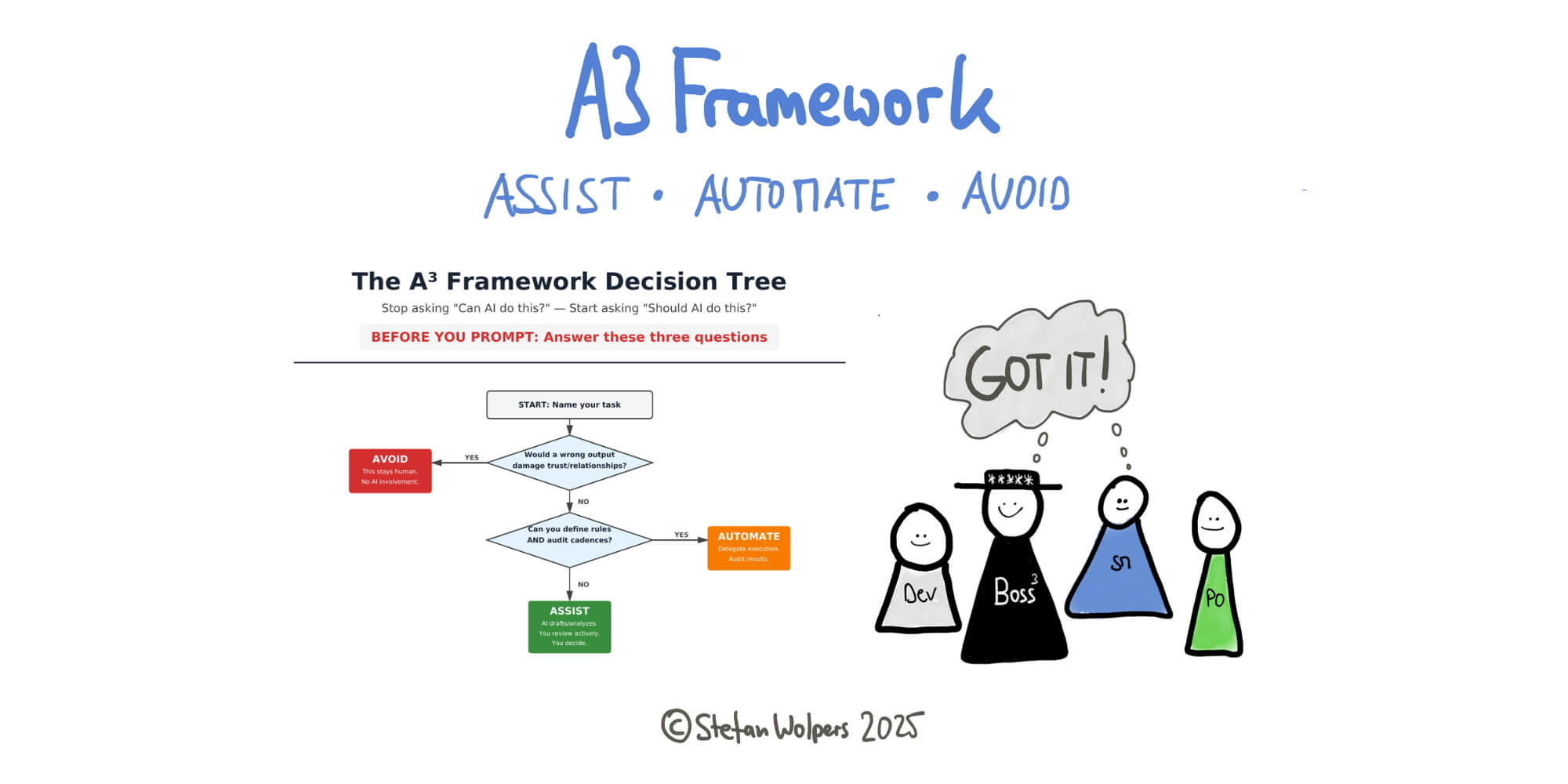
The A3 Framework categorizes AI delegation before you prompt: Assist (AI drafts, you actively review and decide), Automate (AI executes under explicit rules and audit cadences), or Avoid (stays entirely human when failure would damage trust or relationships). Most AI training teaches better prompting.
The A3 Framework teaches the prior question: Should you be prompting at all? Categorize first, then prompt.
The A3 Framework Origins
When agile practitioners try using AI for something important, and it goes sideways, like a wrong tone in a stakeholder email, hallucinated dependency in a status report, or generic acceptance criteria that missed the point entirely, the problem typically is not the AI.
The problem is the ad hoc delegation on the human side.
When you decide in the moment whether to use AI (based on time pressure, curiosity, or convenience), you are gambling. Sometimes it pays off. Sometimes you send a message that damages a relationship you spent months building. (Remember the asymmetry between trust-building and trust-destruction?)
What is missing is a decision system. A way to categorize tasks before you open ChatGPT or Claude, so you know in advance what the AI is allowed to touch, what role you will play, and what stays entirely human.
That system is the A3 Framework: Assist, Automate, Avoid.
Why Categorization Comes Before Prompting
Most AI training starts with prompts. It teaches how to write better instructions, structure context, and iterate. That is useful, but it skips the prior question: should you be prompting at all?
The A3 Framework forces that question first. Before you type anything, you categorize the task into one of three buckets. Each bucket has different rules for AI involvement, different human responsibilities, and different failure modes. Once you know the category, the prompting decisions become obvious.
Applying the A3 Framework is neither bureaucracy nor governance overreach. It is professionalism. Surgeons do not decide mid-operation whether to sterilize instruments. They have protocols that front-load decisions so they can focus on judgment when it matters. The A3 Framework does the same for knowledge work. Let us explore:
ASSIST: AI Drafts, You Decide
Assist creates the most value for agile practitioners. In Assist mode, AI generates options, drafts, or analyses. You retain full decision-making authority. The AI handles the blank page problem. You supply the judgment.
- For Scrum Masters: You might ask AI to generate three alternative Retrospective formats based on the symptoms you describe (e.g., low energy, recurring complaints, surface-level discussion). The AI proposes options you had not considered. You evaluate them against what you know about this specific team’s dynamics, pick one, and adapt it in the room. The AI expanded your options; it did not choose for you.
- For Product Owners and Managers: You might ask AI to draft acceptance criteria for a work item, or to suggest edge cases you might have missed. The AI produces five criteria in seconds. You review them, realize two are redundant, one contradicts a technical constraint the AI does not know about, and one surfaces a gap in your thinking. You edit accordingly. The draft accelerated your work; the judgment remained yours.
- For Agile Coaches: You might ask AI to analyze patterns across six months of Retrospective notes or team health survey data. The AI surfaces themes: recurring blockers, declining engagement in certain ceremonies, and increasing mentions of a specific dependency. You validate those patterns against what you have observed directly, then decide whether they warrant intervention. The analysis was AI; the interpretation was human.
The failure mode in Assist is rubber-stamping. When you accept AI output without genuine review, you have outsourced the thinking you were supposed to retain. Assist requires active engagement, not passive acceptance.
Assist tagline: AI expands options. You own the outcome.
AUTOMATE: Execution Under Constraints
Automate is for tasks where AI handles end-to-end execution. You set rules and audit results. Automate is not abdication. It is a delegation with guardrails.
- For Scrum Masters: Meeting summaries and action item extraction are classic automation targets. You configure a workflow: transcribe the Sprint Review, extract new market developments mentioned, format them as bullet points, and post to the team channel. The AI executes this repeatedly without your involvement. But you have established a ‘human in the loop before publish’ checkpoint, and you audit a sample weekly to catch drift.
- For Product Owners and Managers: Release note drafts can be automated from merged pull requests and “Jira transitions.” The AI assembles what was shipped, formats it for stakeholders, and queues it for your review. You audit for accuracy and tone before sending, but you are not writing from scratch each Sprint.
- For Agile Coaches: Trend detection across survey responses or ticket metadata can surface possible bottlenecks without you reading every data point. The AI flags anomalies; you investigate and decide whether they warrant action.
The failure mode in Automate is set-and-forget. Automation without monitoring becomes invisible drift. The AI might start hallucinating dependencies, misclassifying sentiment, or producing outputs that no longer match your standards. Audit cadences are not optional.
Automate tagline: Delegate execution, not responsibility.
AVOID: Professionalism, Not Fear
Avoid is where mature practitioners earn their keep. Avoid tasks that are too risky, too sensitive, or too context-dependent for AI involvement at any level.
Performance feedback requires reading emotional cues, understanding history, and calibrating the message to the recipient. AI does not know that this Developer had a difficult quarter, that they respond better to direct challenge than gentle suggestion, or that their confidence is fragile right now. You do.
Conflict mediation depends on relationships, subtext, and real-time adaptation. If you let AI summarize a conflict conversation, you risk turning lived nuance into permanent misrepresentation that one or both parties will dispute.
Sensitive stakeholder communication is where tone miscalibration creates actual damage. If you let AI draft a message to a stakeholder you already have a fragile relationship with, you are not saving time. You are gambling with trust. One wrong phrase and months of relationship-building evaporate.
The failure mode in Avoid is rationalization. You tell yourself the AI will ‘just create a starting point’ for that delicate email, but the starting point anchors your thinking, and fragments end up in the final version. Avoid means avoid. Not ‘assist but carefully.’
Avoid tagline: Some work stays human because the cost of failure is trust.
The Cultural Benefit: Making Delegation Discussable
The hidden value of the A3 Framework is not individual productivity. It is team culture.
When your team shares a common vocabulary for AI delegation, the conversation shifts. Instead of suspicious questions (“Who used AI on this? Did you actually think about it?”), you get productive questions: “Which category is this work in? What guardrails do we need?”
Without a shared framework, AI delegation remains implicit. When the A3 Framework is explicit, it becomes discussable. Teams can establish norms: “Acceptance criteria are Assist. Always human-reviewed before refinement.” “Stakeholder escalations are Avoid. No exceptions.”
A3 also creates accountability. When something goes wrong, the framework surfaces why. Did you miscategorize the task? Did you skip the review step in Assist? Did you automate without an audit? The categories make failure analyzable rather than mysterious.
Implementing the A3 Framework This Week
You do not need permission to start using A3. Here is how to begin:
- Day 1: List ten tasks you performed last week. Categorize each as Assist, Automate, or Avoid, and compare these to the actual handling. Notice where you used AI in Avoid territory, or avoided AI in Assist territory.
- Day 2–3: Pick one Assist-category task and run it properly. Draft with AI, then review with actual judgment. Notice the difference between rubber-stamping and genuine evaluation.
- Day 4–5: Identify one Automate candidate. Design the workflow: trigger, action, checkpoint, audit schedule. Do not deploy yet. Just design.
- End of the week: Share A3 with one colleague. Explain the categories. Ask them to categorize a task with you. Notice how the conversation changes.
Conclusion: Start Categorizing Before Prompting
The agile practitioners who will thrive with AI are not those who use it most. They are the ones who know when to use it, when to constrain it, and when to keep it out entirely. The A3 Framework gives you that judgment.
Published at DZone with permission of Stefan Wolpers. See the original article here.
Opinions expressed by DZone contributors are their own.
Comments